Last month a woman came into the shop with her tablet tucked under one arm and her head tilted like she was listening for something in the distance. She asked if we sold ice packs. Her neck had been tight for a week, she said, ever since she started watching a new series on the couch at night, tablet propped on a throw pillow, chin slowly sinking toward her collarbone as the episodes stacked up. I pointed at the tablet stand on the counter and told her that was the real prescription. She looked at me the way you look at someone who suggests a new mattress to fix a headache. She bought the stand anyway. Ten days later she came back for a second one, for the office.
That's how tablet neck works. It never announces itself while it's happening. It doesn't sting like a paper cut or throb like a stubbed toe, where the cause and the pain arrive at the same moment. It's a quiet habit that compounds across days and weeks, one episode at a time, until a Tuesday morning arrives and your neck refuses to cooperate when you try to check your blind spot on the highway.
I've run this shop long enough to have heard a hundred variations of that story, and the tablet is in nearly all of them. The tablet itself is not the villain, to be clear. The tablet is a wonderful machine. The villain is where you hold it, which is almost always too low, too far from your face, for too long. The difference between a good tablet day and a bad one comes down to a few inches of screen height.
So before we get to the fix, which costs $49.99 and looks absurdly simple once you see it, let's go through the eight habits that actually wreck your neck. You will recognize yourself in at least three of them. That's not an insult. It's how almost everyone uses a tablet, including me, before I knew better.
Habit #1: The Screen on Your Lap
The most common tablet pose in America is also the worst one. When the tablet rests on your lap, your eyes aim at a steep downward angle, your chin drops toward your chest, your shoulders roll forward to follow your hands, and the muscles running down the back of your neck have to fire continuously just to keep your head from falling onto the screen.
Here's the part most people don't realize: holding a position is harder on a muscle than moving it. When you lift something, the muscle contracts, relaxes, recovers, and contracts again, a rhythm it can keep up all day. But a static hold has no rest phase. The muscle just keeps firing, minute after minute, with nothing to show for it. Twenty minutes of the lap position and those muscles are exhausted. Forty minutes and they're cramping. An hour and you're the woman at my counter asking about ice packs.
The lap position is also self-reinforcing, which is what makes it so hard to quit. The tablet is heavy enough that holding it up feels like work, so you let it rest on your lap, and then your head has to travel down to meet it. The heavier the tablet feels, the lower it goes, and the lower it goes, the more your neck pays. You traded a tired arm for a tired neck, and the neck is the one that bills you at night.
The fix is not complicated and it's not expensive. Get the screen off your lap and up near your eye line. A stand that raises the tablet to a workable height changes the entire posture in one move: the head stacks back over the shoulders, the neck straightens, the shoulders drop. If a stand feels like an investment, a stack of books is a starting point, but it wobbles, it doesn't hold an angle, and the moment you reach for your coffee the whole tower slides. A stand holds the tablet exactly where you put it, so your neck doesn't have to keep track of where the screen drifted to.
Habit #2: The Couch Slouch
The couch is where tablets go to destroy posture, and it does it with your full cooperation, because the couch feels like the most comfortable place on earth. It's deep, it's soft, it's sloped, which is perfect for a nap and terrible for a screen session. What happens is predictable: you settle in, the tablet lands on your chest or your thigh, and your spine slowly melts into the cushions. Your lower back slides forward. Your head drifts down to meet the screen. By the end of one episode you're shaped like a question mark, with your neck doing all the heavy lifting.
The couch slouch is sneakier than the lap position because it feels restful. You're reclined. You're comfortable. Your body must be happy. But your neck doesn't know you're comfortable. It only knows that your head is hanging out past your chest and that it has been holding that position for forty-five minutes, and it is tired, and it is going to tell you about it tomorrow.
The other thing the couch does is make you crane forward. Because the screen is low and you're sunk into the cushions, you have to push your head forward to see it clearly, and forward head posture is the single most common complaint I hear from tablet users. The head belongs over the shoulders. Every inch it drifts forward, the neck muscles work harder to hold it there, and the couch is an expert at getting it to drift.
The fix starts with the surface the tablet sits on. A side table or a firm armrest changes the game immediately, and a stand with a wide tilt range lets you angle the screen toward your face so you can recline a little and still look at it without folding your neck. That's the key idea for couch use: you shouldn't bend forward to reach the screen. The screen should come to you. Prop it up, angle it toward your eyes, and let the couch do its actual job, which is being a couch.
Habit #3: The One-Handed Grip
This one migrates straight from the phone world, and it takes over the first time you try to reply to a message one-handed. You cradle the tablet in one hand and tap with the other, or you balance it on a knee while you thumb out a text. Either way, the device is being held up by a part of your body that was never meant to do it for long.
The mechanics are a full-body posture crime. Your shoulder hikes up toward your ear to help carry the weight. Your wrist bends back at a harsh angle. Your neck tilts down to see the screen. And because your arm is doing real work, it gets tired, and when an arm gets tired, the body's natural response is to lean the head closer to the task instead of putting the task down. So the fatigue doesn't make you stop. It makes your posture worse.
Holding a tablet this way for twenty minutes is harder on the neck than most people guess, because you never feel the neck strain building. You feel the arm. And you answer the arm by moving your head farther forward, which is exactly the wrong move. The neck quietly picks up the slack the arm is dropping, and it does it without a single complaint until later.
The fix is simple: don't hold it. Let a stand hold the tablet and your hands are free to type, tap, and scroll at a neutral angle, with your shoulders down and your head stacked over your spine. If you're somewhere a stand can't go, switch hands every few minutes and put the tablet down the moment your arm complains. But the reliable fix, the one that works every single time, is putting the tablet on something instead of in your hand.
Habit #4: Reading in Bed
Reading in bed is one of the great small pleasures of owning a tablet, and I'm not going to tell you to stop. I'm going to tell you how to do it without paying for it in the morning.
The problem is the position, and the bed makes every option bad. Prop yourself up on pillows and the tablet goes on your chest, which means your head lifts off the pillow and your chin digs into your neck to see the screen. Hold the tablet above your face and your arms go numb in about four minutes, and the tablet takes a scenic route toward your nose. Wedge it between your knees and you're twisted sideways like a pretzel, with one shoulder carrying the whole load. Every option ends with the neck bent, the shoulders hunched, or both.
There's also a sneaky second problem, and it's the one nobody mentions: what happens after. A neck that's been straining at a bad angle for an hour right before bed is a neck that's already tight when you lie down. Tight neck muscles tend to pick a bad pillow position and stay in it all night, so the damage from your midnight reading session keeps working while you sleep, and you wake up stiff in a place you didn't strain.
The fix is to bring the screen up to face level, even in bed. A stand on the nightstand, angled toward you, lets you read while lying on your side with your head on the pillow, which is the position your neck actually likes. Or sit up against the headboard and put the stand on the bed in front of you, screen tilted back to meet your eyes. The tablet stays put, your neck stays neutral, and nobody gets a tablet to the nose.
Habit #5: The Dead Tablet Problem
Here's a scene from my own house, and I suspect it's a scene from yours too. The tablet's battery is at four percent. The charger is plugged in behind the couch, or in the other room, or under a pile of cables nobody wants to untangle. So you make a deal with yourself: I'll just hold it for a bit, the cable doesn't reach anywhere else anyway.
And that's how a dead battery becomes a posture problem. The tablet ends up wherever the cable will reach, which is usually low, which means your neck ends up bent. It's the same logic that makes people sit on the floor next to an outlet rather than move a chair. Convenience beats posture every single time, until the posture bill arrives.
The dead tablet problem is also a timing problem. The battery usually dies at the worst possible moment, an hour into a show or halfway through a chapter, and that's exactly when you're least willing to change position. So you finish the session in the worst possible posture, craned over a tablet that's sitting wherever the cord allows.
The fix is to put the tablet where your neck wants it and then bring the power to the tablet. That's where a stand with a charger gap earns its keep: a little opening or channel for the cable so the tablet can sit upright at eye level and charge at the same time. Plug it in, set it on the stand, and the cable stops being the boss of your posture. No more deals with yourself about holding a dead tablet on your lap. The tablet charges where you need it, at the height you need it.
Habit #6: The Kitchen Counter Lean
The kitchen is tablet neck's dark horse. Nobody thinks of the kitchen as a screen zone, and that's exactly why it does so much damage. You'd never plan a bad posture session in the kitchen. You just stand over a recipe for forty minutes and wonder why your back hurts at dinner.
Here's the standard scene. You're making dinner and following a recipe on the tablet. There's nowhere to put it, so it lies flat on the counter, and you stand over it like a heron watching a fish, bent at the waist and the neck, staring straight down for the forty minutes it takes to get dinner on the table. This one is a double whammy because you're standing, so your whole spine is loaded, and the counter height guarantees your neck bends at its maximum angle the entire time.
Recipes are the worst offender, but they're not alone. There's the video call you take while you cook, the news playing on the counter while you eat breakfast, the timer app you keep bending over to check. The kitchen turns out to be a major tablet neck zone, and nobody ever talks about it, because standing feels like it should be fine. You're on your feet. You're moving around. It must be healthy. It is not fine. The bend is the problem, not the standing.
The fix is to prop the tablet up so you glance at it instead of bowing to it. A stand with a steep tilt angle on the counter turns that sixty-degree downward stare into a level glance. Angle the screen to match your height, step back a few inches, and suddenly you're cooking with your spine in one piece. Same recipe, same tablet, completely different neck.
Habit #7: The "Just Checking" Spiral
The spiral starts with a perfectly reasonable thought: I'll just check my messages. Two minutes, max. Then you see a notification, then a video, then a headline, then another video, and forty-five minutes later you're still hunched over the tablet like it's the most important object in the room.
The just checking moments are the sneakiest neck killers because they never feel like real sessions. You would never plan to spend forty-five minutes with your chin on your chest. But you will absolutely spend forty-five minutes that way by accident. Nobody schedules a bad posture marathon. Everybody accidentally runs one, and the accidental ones are the ones that add up.
The damage here is compound, and that's the part worth understanding. Short bad posture episodes stack up across the day, and each one starts from the same low, head-down starting position. It's not the one long session that gets you. It's the six quick checks that each run twenty minutes, spread across the day like little taxes on your neck, each one leaving the muscles a little more tired than they were before lunch.
The fix is to make good posture the default instead of the exception. If the tablet lives on a stand at eye level, then even the two-minute checks happen at a neutral angle. You can't plan a proper setup for every scroll of the day, but you can control where the device's home base is. Make the home base a good one, and the spiral does most of its damage in a position that doesn't hurt.
Habit #8: Ignoring the Ache
The eighth habit isn't a position. It's the decision to do nothing about the other seven.
Every habit above sends the same message in the same language: a dull ache at the base of the skull, a tight band across the shoulders, that satisfying crack when you finally turn your head, which is your neck saying thank you and also saying please stop. The body files a complaint, and the standard response is to ignore it. The ache becomes background noise. You push through. You tell yourself it'll go away when the semester ends, or the project wraps, or you finally have time to stretch. The semester ends. The project wraps. The ache stays.
The problem with ignoring the ache is that the neck is a relay station. The muscles at the back of the neck connect to the shoulders, the upper back, and the base of the skull, and strain in one place tends to spread to the others. What starts as a dull ache becomes a constant tightness that follows you into work, into the car, and into bed, and after a while you forget it wasn't always there. You start to believe a tight neck is just what a neck feels like.
The fix is to treat the ache as information, the same way you treat the low fuel light. When your neck complains, ask what you were doing, and change that thing. For most of us, that thing is a screen at the wrong height for too long. I wrote a longer guide to the whole text-neck pattern and how it develops, if you want the detailed version. The summary is this: the ache is a warning, not a lifestyle. Fix the setup, and the warning usually goes quiet.
What $49.99 Actually Buys (and Why It's Enough)

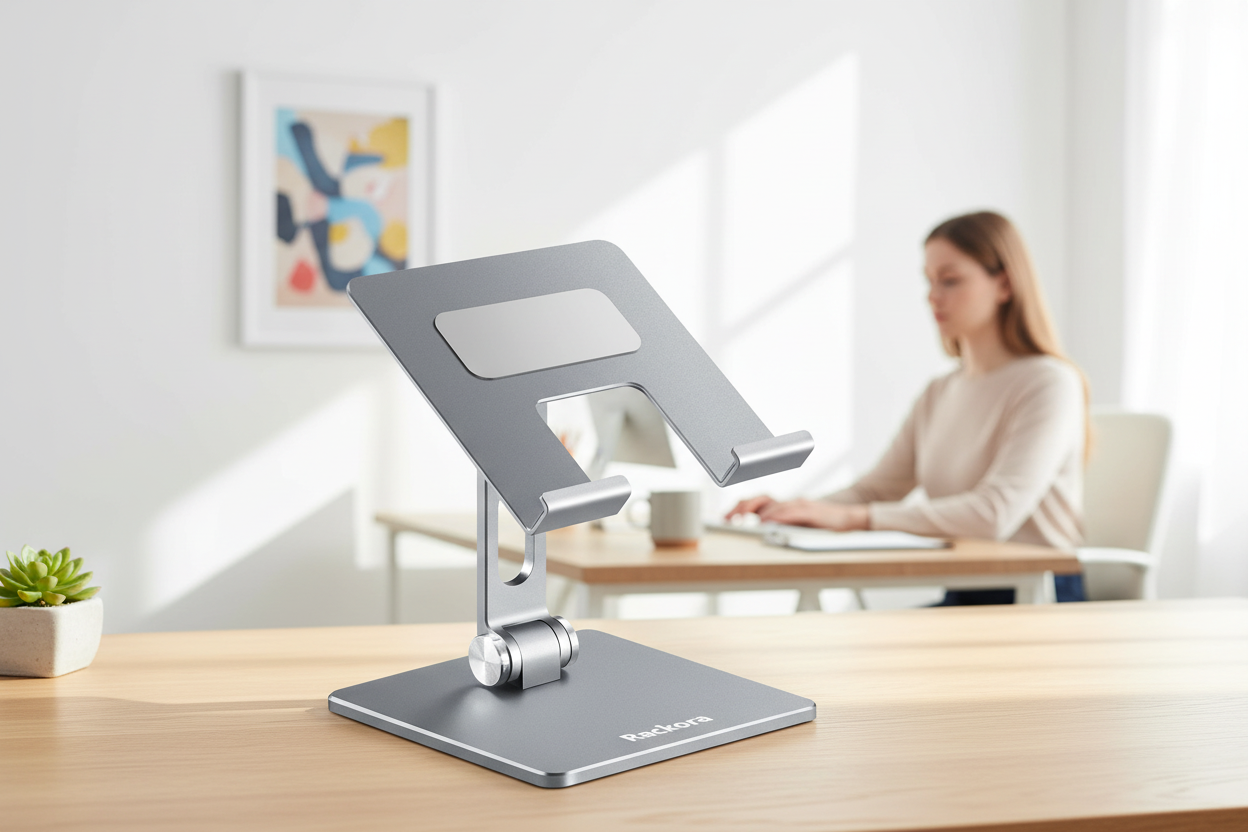
All right. The fix. It's a stand, and it costs $49.99, which is less than most people spend on the case that protects their tablet. The Rackora Adjustable Tablet Stand for Home Office is regularly $69.99, and at $49.99 it's the most effective posture purchase I can name. Here's what that price actually buys, piece by piece.
Tilt. The stand angles the screen to match your eye line, whether you're sitting upright at a desk, leaning back on the couch, or standing at the kitchen counter. Tilt is the feature that turns a flat screen into a face-level screen, and by itself it fixes habits one, two, four, and six, the four biggest offenders on this list.
Grip. The tablet sits in a firm grip that holds it steady, so your hands are free to do the actual work, and the screen doesn't wobble when you tap. That kills habit three, the one-handed grip, and it means your eyes aren't constantly re-focusing on a moving target, which is its own quiet source of fatigue that people blame on the tablet instead of the setup.
Height. The stand lifts the tablet off whatever surface it would otherwise lie on. Lap, counter, bed, floor: those are all wrong heights, each in its own way. The stand's entire job is to get the screen to a height where your head stays balanced over your shoulders, and it does that job every single time you use it, without you having to think about it.
Charger gap. The stand leaves room for the charging cable, so the tablet can sit at eye level and charge at the same time. That kills habit five, the dead tablet lap compromise, and it means the charger can live permanently at the stand instead of wherever the outlet happens to be.
That's the whole list, and it's the whole reason the cheap fix works: the stand doesn't need to be fancy, it needs to be in the right place, and it needs to stay there. If you want a heavier-duty version with a bigger footprint for a desk setup, the Pro Stand 100 is $59.99, regularly $99.99, and it's the one I'd put next to a monitor. If you want the premium build that looks like it belongs in a design magazine, the Premium K80 is $189.99, regularly $219.99. But for the vast majority of people, the $49.99 Home Office stand is the answer, and you can read how all three compare in our roundup of the best tablet stands before you decide. The short version: start with the one that fixes the problem, and the problem is the same in every room of the house.
The Desk and Tablet Second Screen Setup
Once the tablet has a stand, the best thing you can do with it is turn it into a second screen at your desk. Students, freelancers, and anyone who works from home can put the laptop dead ahead and the tablet on a stand beside it, screen raised to match the laptop's height. Now you've got two screens at the same level, and your neck stops shuttling between a high screen and a low one, which is the desk equivalent of the kitchen counter lean, repeated a hundred times an hour.
The setup matters more than people think. The most common desk mistake I see is a laptop on the desk and a tablet lying flat beside it. Every time you glance from one to the other, your neck travels down and up, down and up, over and over. Raise the tablet to match the laptop, and those glances become level turns of the head, which the neck handles easily. It feels like a tiny change. It's not tiny. It's the difference between a neck that moves side to side and a neck that bobs up and down all day.
A few details that make the setup actually stick. Put the tablet on the same side as your less dominant hand, so your main hand stays on the mouse or keyboard. Match the tablet's brightness to the laptop's, so your eyes aren't constantly adapting to two different light levels. And angle the tablet slightly toward you, not flat, so the screen catches your eye line instead of demanding you come down to it.
If you're a student setting up a dorm room or a small apartment study corner, the same logic applies, and our guide to back-to-school dorm setups covers the desk side of the equation, including standing desks that give you a third height option for the days when sitting isn't working.
The Two-Minute Setup Check
Here's a quick way to tell whether your setup is working, and you can do it right now, wherever you're reading this. It takes two minutes, and it will tell you more about your tablet posture than a month of good intentions.
First, the head test. Look straight ahead, then look at your screen. If your chin dropped more than a couple of inches, the screen is too low. The top third of the screen should sit around your eye line, so your glance lands slightly downward, not steeply. If you're looking down at a steep angle, your neck is doing the work your stand should be doing.
Second, the shoulder test. Shrug your shoulders up toward your ears, then let them drop. If they fall more than an inch, you've been holding them up, which is what happens when you're gripping a tablet or leaning toward a screen. Relaxed shoulders, stacked over the hips, are the goal, and they're a good sign that the device is at the right height.
Third, the elbow test. When your hands are on the device, your elbows should sit at about a ninety-degree angle. If your elbows are squeezed into your ribs or flared out like wings, the screen is at the wrong distance. Move it closer or farther until your arms rest naturally.
Fourth, the blink test. If your eyes feel dry or your brow feels tight after screen time, you're probably staring without blinking, which is a cousin of the same problem: the screen is too close, and your whole face is straining. Move the screen back to arm's length and let the stand do the holding.
That's the whole check. Four tests, two minutes, and if any of them fails, the fix is the same: raise the screen, move it back, and stop holding it. Run this check once a week for a month and you'll start catching the bad habits while they're still just habits, before they become the ache you were ignoring in habit number eight.
FAQ
Is tablet use really worse than phone use for my neck?
Tablets tend to be worse in one specific way: you use them longer. A phone gets a quick two-minute glance here and there, while a tablet gets an hour-long session, and it's the sustained position that does the damage. The tablet's size also makes it awkward to hold up at eye level, so it ends up low, which means more forward head tilt for longer stretches.
Will a $50 stand fix months of neck pain?
A stand can't undo an injury, but it can remove the daily cause. If your neck pain comes from hours of looking down at a screen, raising the screen to eye level takes the strain off those muscles, and most people feel a difference within a week or two. If the pain is sharp, radiates down your arm, or doesn't improve with better posture, that's when you should see a doctor.
What height should my tablet be?
The top third of the screen should sit around your eye line, so you look slightly down at it rather than far down or straight ahead. A good rule of thumb: you should be able to use the tablet with your head balanced over your shoulders, not tilted forward. Any stand that gets the screen to roughly eye level is doing the job.
Can I use a tablet stand on the couch?
Yes, and that's where a lot of people use one the most. Put the stand on a side table or a firm armrest and angle the screen toward your face, so you can recline a little without folding your neck. The key is that you shouldn't have to bend forward to reach the screen; the screen should come to you.
Do I need a cooling tablet stand?
Probably not, for most people. Tablets do run warm under heavy use, and a stand that leaves the back of the tablet exposed lets heat escape, which is a nice side benefit. But cooling shouldn't be the reason you buy a stand; fixing your posture should be.
How long before my neck feels better?
Most people notice a difference within a week or two of consistent changes, though it depends on how long the strain has been building. Give the new setup two to three weeks of honest daily use before you judge it. If you're still miserable after that, it's worth a trip to a professional.
Is a tablet stand worth it for an iPad Mini?
If you use the Mini for reading or as a second screen, yes. A smaller screen doesn't change the physics of neck strain; it's still too low when it's in your lap or your hand. A stand holds it steady at the right height, and it works for phones and e-readers too, so it's not a one-device purchase.
Should I see a doctor first?
If your neck pain came on suddenly after an injury, if it's sharp or shooting, if it radiates into your shoulder or arm, or if you have numbness or tingling, see a doctor before you buy anything. For the common dull ache that appears after screen time and fades with movement, fixing your setup is a reasonable first step.
The Bottom Line
Here's the whole article in three sentences. Your tablet is not the problem. The position you hold it in is. And the position is fixable for $49.99.
The Rackora Adjustable Tablet Stand for Home Office is $49.99, regularly $69.99. It ships free anywhere in the US, and it comes with a 30-day money-back guarantee, which means you get to test it against your own couch, bed, and kitchen counter for a full month before you commit. If it doesn't change the way your neck feels, send it back and get every dollar back.
If you want the heavier version for a desk, the Pro Stand 100 is $59.99, regularly $99.99, with the same free shipping and the same guarantee. The Premium K80, at $189.99, regularly $219.99, is the one to grab if you want the premium build that doubles as a desk ornament.
Your neck has been sending you invoices for a while now. Every episode of that show, every recipe, every quick check was a charge on the account. This is the one that finally pays the bill.
