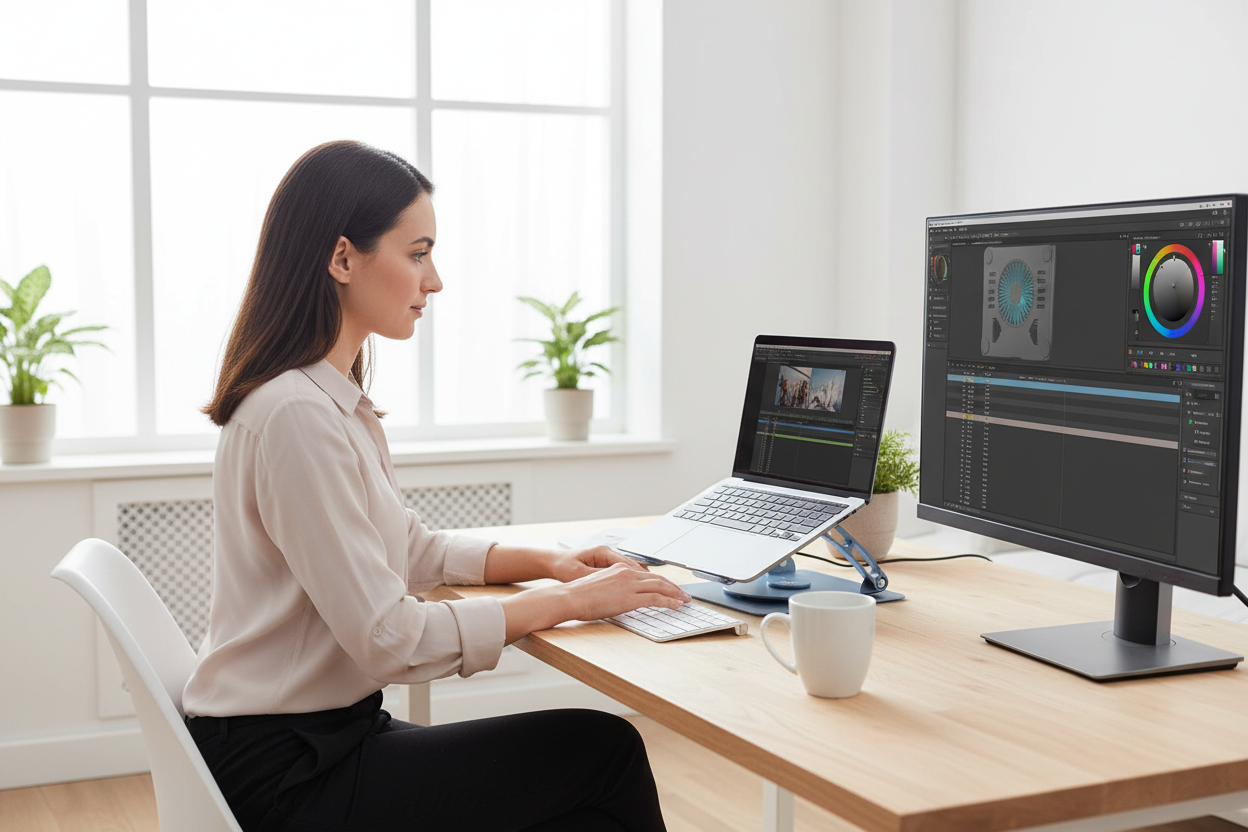
It's July. Your room is sitting at 88°F. You're three hours into a render, a gaming session, or a video call marathon — and your laptop fan sounds like a jet engine preparing for takeoff. Your frame rates are dropping. Your export is taking twice as long as it should. Your battery is draining faster than usual.
This isn't bad luck. This is thermal throttling — and it's one of the most overlooked performance killers for anyone who uses a laptop seriously in summer.
The good news? There's a straightforward fix. And it does more than just cool your machine.
In this guide, we're breaking down the real science behind laptop overheating, why most "solutions" fall short when temperatures climb, and how an active cooling stand — specifically one with a built-in turbo fan and a 360° rotating base — solves multiple problems at once.
The Science of Thermal Throttling: What's Actually Happening Inside Your Laptop
Modern CPUs and GPUs are designed to run fast — but only up to a point. Every processor has a maximum safe operating temperature, typically somewhere between 95°C and 105°C for most consumer chips. When the chip approaches that ceiling, the system doesn't crash. Instead, it does something more insidious: it quietly reduces its own clock speed to generate less heat.
That's thermal throttling. And in summer, it happens far more often than most people realize.
Here's why ambient temperature matters so much: your laptop's cooling system — whether it's a single heat pipe and fan or a more elaborate vapor chamber setup — works by moving heat from the chip to the air. But if the air around your laptop is already 85°F or 90°F, there's less thermal headroom to work with. The delta between chip temperature and room temperature shrinks, and your cooling system has to work harder just to maintain the same performance it delivered in a 68°F room in February.
The result is a cascade of problems:
- CPU/GPU clock speeds drop — sometimes by 20–40% under sustained load
- Frame rates tank in games, especially during GPU-intensive scenes
- Video exports slow down as the encoder loses access to peak CPU performance
- Battery health degrades faster — lithium-ion cells age significantly faster when consistently exposed to heat above 95°F
- System fans run louder and longer, which is both annoying and a sign of stress on the hardware
A study from Battery University found that a lithium-ion battery stored and operated at 77°F loses roughly 20% of its capacity over a year. At 104°F? That number jumps to 35%. Your summer laptop sessions are quietly shortening the life of your battery every single day.
And here's the part that surprises most people: this isn't just a problem for gaming laptops. Thin ultrabooks like the MacBook Air — which use passive cooling with no internal fan — are actually more vulnerable to thermal throttling in summer heat, not less. They have nowhere to put the heat.

The Rackora 360° Rotating Laptop Stand with Cooling Fan — engineered for serious summer use.
Passive vs. Active Cooling: Why Elevation Alone Isn't Enough
When people first notice their laptop running hot, the most common advice they find online is: "just elevate it." Get a stand. Prop it up on a book. Let the air circulate underneath.
And honestly? That advice isn't wrong — in a 68°F room.
Passive cooling (elevation without a fan) works by creating a gap between the laptop's bottom vents and the desk surface. This prevents the vents from being blocked, which is a real problem when a laptop sits flat. It also allows some natural convection — warm air rises, cooler air flows in from below.
But convection is a slow, gentle process. It works fine when the ambient air is cool enough to absorb the heat your laptop is generating. When your room is 88°F in July, that ambient air is already warm. Convection slows down. The heat has nowhere efficient to go.
Think of it this way: passive cooling is like opening a window on a cool spring day. Active cooling is like turning on a fan. One works great in mild conditions. The other is what you actually need when it's hot.
Active cooling stands use one or more built-in fans to force cooler air directly against the laptop's underside. This dramatically increases the rate of heat transfer — moving air away from the chassis much faster than convection alone can manage. The result is a measurable, significant drop in operating temperature.
How significant? In real-world testing across various laptop models, active cooling stands consistently reduce laptop surface temperatures by 10°C to 20°C compared to sitting flat on a desk. That's not a marginal improvement — that's the difference between a CPU running at 98°C (throttled) and 80°C (full performance).
For gamers, that means stable frame rates instead of stuttering drops mid-match. For video editors, that means a 4K export that finishes in 45 minutes instead of 70. For power users running VMs, compiling code, or running AI models locally — it means your machine actually delivers what you paid for.

Meet the Rackora 360° Rotating Laptop Stand with Cooling Fan
Most cooling stands do one thing: they blow air at your laptop. That's useful, but it's also the bare minimum. The Rackora 360° Rotating Laptop Stand with Cooling Fan was designed to solve several problems at once — and the result is something that genuinely changes how you work, game, or create.
Here's what makes it different.
Integrated Turbo Cooling Fan
The built-in cooling fan is the core feature, and it's engineered to move serious airflow without creating serious noise. The fan operates quietly enough that it won't distract you during calls or gaming sessions, while still delivering the active airflow needed to drop temperatures by up to 20°C.
The open-frame design of the stand works in tandem with the fan — rather than just blowing air at a solid surface, the airflow passes through the stand's structure and directly contacts the laptop's underside vents. This dual-path cooling approach (forced airflow + enhanced natural convection through the open frame) is more effective than a fan alone.
Adjustable Ergonomic Height
The stand offers multiple height adjustment settings, letting you raise your laptop screen to eye level. This isn't just a comfort feature — it's a health feature. When your screen sits at desk level, you tilt your head down to look at it. Do that for four hours a day, and you're putting roughly 40–60 lbs of effective force on your cervical spine. That's the condition people call "tech neck," and it's responsible for a significant portion of the neck and upper back pain that desk workers experience.
Raising your screen to eye level eliminates that forward head tilt. Your spine stays neutral. Your shoulders relax. You can work longer without the fatigue and discomfort that accumulates when your posture is off.
The cooling and the ergonomics aren't separate benefits — they're complementary. The same stand that keeps your laptop from throttling also keeps your body from breaking down over a long session.

🔥 Summer Sale — Limited Time
The Rackora 360° Rotating Laptop Stand with Cooling Fan is currently $129.99 (regularly $179.99). Available in Grey and Silvery.
The 360° Rotation Feature: More Useful Than You'd Think
The rotating base is one of those features that sounds like a gimmick until you actually use it — and then you wonder how you lived without it.
Here's the scenario: you're at your desk, working on a design or a spreadsheet, and a colleague walks over to review it with you. Without a rotating stand, you either awkwardly angle your screen toward them (which usually means picking up the whole laptop), or they lean over your shoulder at an uncomfortable angle. Neither is great.
With a 360° rotating base, you spin the stand. Your colleague gets a clear, straight-on view of the screen. You don't move anything else. The whole interaction takes two seconds instead of thirty.
For gamers who stream or record, it's equally useful — you can quickly rotate to show your setup to a camera, adjust your viewing angle mid-session without disrupting your peripherals, or share your screen with someone in the room without breaking your flow.
The base is also designed with desk protection in mind. The bottom surface uses materials that rotate smoothly without scratching wood, glass, or laminate desk surfaces. This is a detail that cheaper stands often skip — and it's the kind of thing you only notice when a stand doesn't have it and leaves marks on your desk.

Who Actually Needs This? (Spoiler: More People Than You'd Expect)
Gamers
If you're gaming on a laptop in summer, thermal throttling is your enemy. The moment your GPU hits its thermal limit, your frame rates drop — often right in the middle of a competitive match. Active cooling keeps your GPU in its performance zone, which means more consistent frame rates, less stuttering, and fewer moments where your hardware lets you down at the worst possible time.
The 360° rotation also makes it easy to show your screen to a friend or quickly adjust your viewing angle when you shift positions during a long session.
Video Editors
Video editing is one of the most thermally demanding tasks a laptop can handle. Color grading, encoding, effects rendering — all of it pushes the CPU and GPU hard for sustained periods. In summer heat, that sustained load is exactly when throttling kicks in hardest.
An active cooling stand keeps your chip temperatures stable throughout a long export, which means consistent performance from start to finish — not fast at the beginning and sluggish by the end.
Remote Workers and Power Users
If you're running multiple browser tabs, video calls, local AI tools, or development environments, your laptop is working harder than it looks. Add summer heat, and you've got a recipe for sluggish performance and a machine that runs hot to the touch.
The ergonomic height adjustment is particularly valuable here — if you're spending 6–8 hours a day at your laptop, the posture benefits compound significantly over time.

Ready to stop losing performance to summer heat?
The Rackora 360° Cooling Stand is compatible with laptops from 10" to 17" — MacBook, Dell XPS, HP Spectre, Lenovo ThinkPad, Asus ZenBook, Surface, and gaming laptops.
Build a Complete Ergonomic Setup Around It
The laptop stand is a great starting point, but the most effective ergonomic setups treat the whole workspace as a system. Here are a few products that pair naturally with the cooling stand:
Add a Monitor Arm for Dual-Screen Productivity
Once your laptop is elevated on the cooling stand, you've freed up desk space and created a natural spot for a secondary monitor. A monitor arm lets you position that second screen at exactly the right height and angle — and keeps your desk clear of clutter.

Full Motion Single Monitor Arm — Adjustable Gas Spring Desk Mount
VESA compatible, supports 13–32" screens. Full motion articulation for the perfect viewing angle.
View Product →Go Dual-Monitor for Maximum Screen Real Estate
If you're a video editor or power user who lives in multiple windows, a dual monitor mount is a game-changer. Keep your laptop on the cooling stand as your primary screen and mount two external monitors side by side.
Rackora Dual Monitor Desk Mount — 17–32 Inch Ergonomic Adjustable Stand
Mount two monitors at the perfect height and angle. Frees up your entire desk surface.
View Product →Add a Mobile Standing Desk for Flexibility
If you move between rooms or prefer to alternate between sitting and standing throughout the day, a mobile rolling desk gives you that flexibility without committing to a fixed standing desk installation.

Rackora Small Mobile Rolling Standing Desk — Laptop Computer Cart
Height adjustable, rolls anywhere. Perfect for home offices and flexible workspaces.
View Product →Quick Specs: Rackora 360° Rotating Laptop Stand with Cooling Fan
| Spec | Detail |
|---|---|
| Price | $129.99 (was $179.99) |
| Colors | Grey, Silvery |
| Compatible Laptop Sizes | 10" to 17" |
| Weight | 1.1 kg |
| Material | Premium aluminum alloy + ABS plastic |
| Cooling | Integrated turbo fan + open-frame airflow |
| Rotation | 360° rotating base |
| Height | Multiple adjustable settings |
| Foldable | Yes — portable and travel-friendly |
| Desk Protection | Anti-slip silicone pads, scratch-free base |

Frequently Asked Questions
Q: How much does a cooling stand actually lower my laptop's temperature?
A: In real-world use, active cooling stands consistently reduce laptop surface and chip temperatures by 10°C to 20°C compared to sitting flat on a desk. The exact drop depends on your laptop model, the ambient room temperature, and how hard your CPU/GPU is working. In summer conditions (85–90°F rooms), the improvement is typically at the higher end of that range because the fan is doing more work that passive convection simply can't.
Q: Will this work with my MacBook Air? It doesn't have a fan.
A: Yes — and the MacBook Air actually benefits more from an active cooling stand than most laptops. Because the Air uses passive cooling internally (no fan), it relies entirely on its chassis to dissipate heat. In summer, that chassis gets hot fast, and the chip throttles aggressively. The Rackora stand's fan blows cool air against the bottom of the chassis, helping pull heat away from the aluminum body and keeping the chip cooler than it would be otherwise.
Q: Is the cooling fan loud?
A: No. The integrated fan is designed for quiet operation — it won't be audible over your game audio, music, or a video call. It's noticeably quieter than most laptop fans running at full speed, which is ironic given that the stand's job is to prevent your laptop fan from having to run at full speed.
Q: What laptop sizes fit on this stand?
A: The Rackora 360° stand accommodates laptops from 10" to 17". It's compatible with MacBook Pro (13", 14", 15", 16"), MacBook Air (13", 15"), Dell XPS and Inspiron series, HP Pavilion, Envy, and Spectre, Lenovo ThinkPad and IdeaPad, Asus ZenBook and VivoBook, Microsoft Surface Laptop, and gaming laptops up to 17".
Q: Does the 360° rotation scratch my desk?
A: No. The base is designed with desk-safe materials that rotate smoothly without scratching wood, glass, or laminate surfaces. The anti-slip silicone pads also keep the stand from sliding around when you don't want it to.
Q: Can I use this stand with an external keyboard and mouse?
A: Absolutely — and that's actually the recommended setup. When your laptop is elevated on the stand, you'll want an external keyboard and mouse to maintain a comfortable typing position. This is the standard ergonomic laptop workstation configuration: laptop elevated to eye level on the stand, external peripherals at desk level for your hands.
Q: Does thermal throttling permanently damage my laptop?
A: Throttling itself is a protective mechanism — it's the laptop protecting itself from damage. But the sustained high temperatures that cause throttling do cause long-term harm, particularly to battery health. Lithium-ion batteries degrade significantly faster when consistently operated at high temperatures. Keeping your laptop cooler with an active cooling stand is one of the most effective things you can do to extend your battery's lifespan.
Q: Is this stand foldable and portable?
A: Yes. The Rackora stand folds flat for easy transport and storage. It's a practical option for remote workers who move between home and office, students who work in different locations, or anyone who wants the benefits of a cooling stand without it being a permanent fixture on their desk.
Q: What's the difference between the Grey and Silvery color options?
A: Both colors are the same stand with identical features and performance — it's purely an aesthetic choice. Grey tends to blend well with darker desk setups and gaming peripherals, while Silvery pairs naturally with aluminum laptops like MacBooks and silver-toned workspaces. Both are priced at $129.99.
Q: How does this compare to just buying a cheap $20 cooling pad?
A: Budget cooling pads typically use low-quality fans that move less air, wear out faster, and often run louder than the Rackora stand. More importantly, they don't offer height adjustment or 360° rotation — so you get some cooling benefit but none of the ergonomic or collaboration features. The Rackora stand is built from premium aluminum alloy and ABS plastic, designed to last, and engineered to solve multiple problems at once rather than just one.

Summer heat is a real performance problem for laptop users — not a minor inconvenience. Thermal throttling quietly robs you of the CPU and GPU performance you paid for, degrades your battery faster than normal use would, and makes your machine run louder and hotter than it should.
Passive elevation helps, but it's not enough when ambient temperatures climb above 85°F. Active cooling — a fan that forces air against your laptop's underside — is what actually moves the needle.
The Rackora 360° Rotating Laptop Stand with Cooling Fan does that, and then some. It keeps your laptop cool, raises your screen to eye level, rotates for collaboration, and folds flat when you're done. At $129.99 (down from $179.99), it's one of the more practical upgrades you can make to your summer setup.
Your laptop is working hard enough already. Give it the airflow it needs.
🛒 Get the Rackora 360° Rotating Laptop Stand with Cooling Fan
✅ $129.99 — Save $50 off regular price
✅ Available in Grey and Silvery
✅ Compatible with 10"–17" laptops
✅ Free shipping on qualifying orders
Add to Cart — $129.99 →