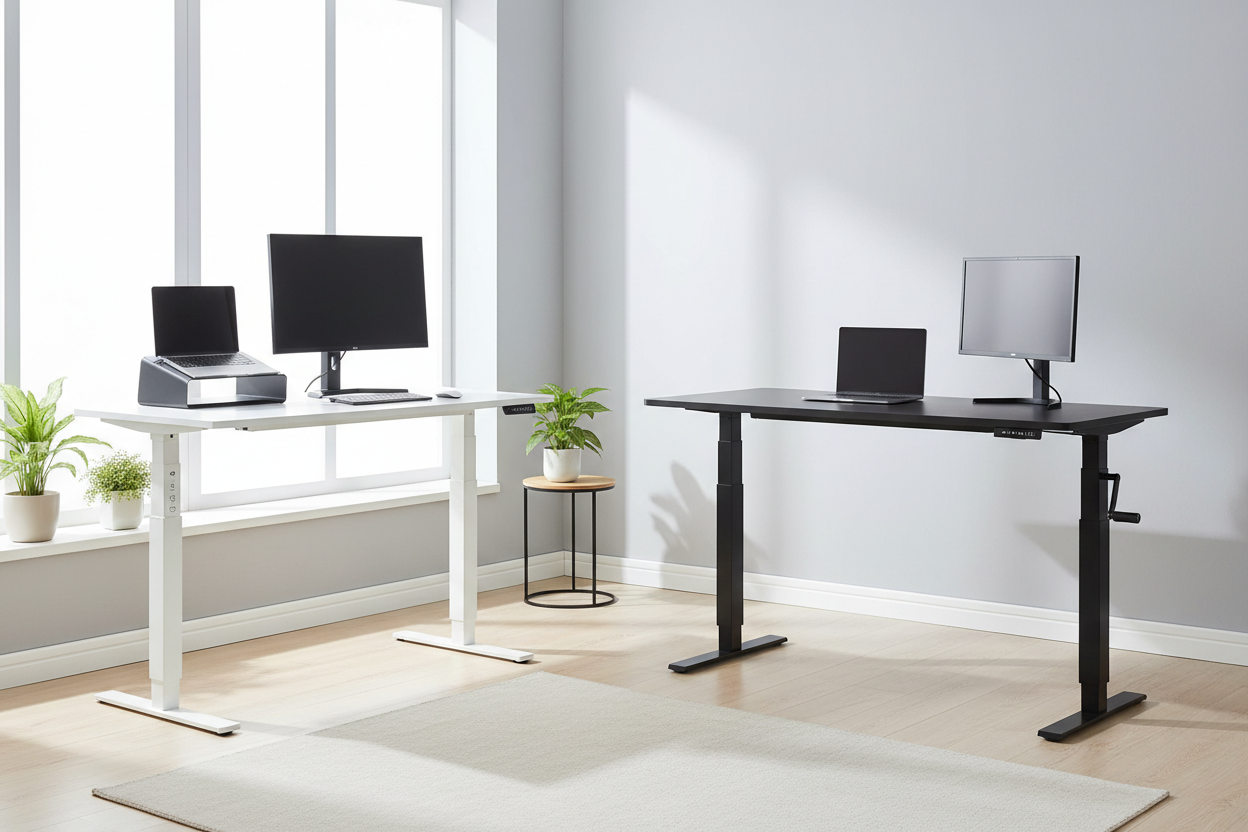
You've been sitting for six hours straight. Your lower back is quietly staging a protest, your neck has developed opinions of its own, and you've read enough about standing desks to know you need one. But then you hit the fork in the road: electric or manual crank?
It sounds like a simple question. It isn't. The wrong choice means either spending money you didn't need to, or buying a desk you'll stop using within three months because adjusting it feels like a chore. We've seen both happen.
This guide cuts through the noise. We'll walk you through the real differences — motor technology, adjustment friction, long-term value, and which type of person genuinely benefits from each. By the end, you'll know exactly which desk belongs in your workspace.
The Core Question Nobody Asks Honestly
Most standing desk comparisons focus on specs: height range, weight capacity, motor count. Those matter, but they miss the most important variable — how often will you actually adjust the desk?
Studies on sit-stand behavior consistently show that people who use height-adjustable desks adjust them far less than they intend to when they buy them. The average drops from an intended 4–6 times per day to fewer than 2 times per day within the first month. The culprit isn't laziness. It's friction.
Friction, in behavioral psychology, refers to any small obstacle that makes a behavior harder to perform. A 30-second manual crank process doesn't sound like much. But when you're mid-thought on a project, that 30 seconds — plus the physical effort, plus the noise — is enough to make you think "I'll do it later." Later never comes.
This is the central argument for electric desks, and it's a real one. But it doesn't mean manual desks are useless. It means they're right for a specific type of user. Let's figure out which one you are.
Understanding the Adjustment Friction Problem
Here's what actually happens when you use a manual crank standing desk day after day.
Day one: You're excited. You crank up, stand for 45 minutes, crank back down. No problem.
Week two: You're busy. You think about standing, glance at the crank handle, and decide to finish this email first. The email leads to a call. The call leads to lunch. You never stood.
Month two: The desk is at sitting height permanently. The crank handle has become a coat hook.
This isn't a hypothetical. It's the documented pattern for manual desk users who don't have a strong, pre-existing habit of standing. The physical act of cranking — typically 30 to 60 rotations to move the desk 6 inches — creates just enough resistance to break the impulse.
Electric desks solve this with a button press. The transition takes 10–15 seconds, requires zero physical effort, and doesn't interrupt your mental flow. That's not a luxury feature. For daily users, it's the difference between a desk that changes your health and one that collects dust.
That said, if you're someone who adjusts your desk on a fixed schedule — say, standing every morning from 9–11 AM regardless — the crank is perfectly workable. Habit-driven users don't need the frictionless trigger. Impulse-driven users do.
Electric Standing Desks: What the Motor Actually Does
The motor in an electric standing desk isn't just a convenience feature. It determines the desk's speed, noise level, stability under load, and long-term reliability. Not all motors are equal, and the difference between a cheap single-motor desk and a quality dual-motor system is significant.
Single Motor vs. Dual Motor
Single-motor desks use one motor to drive both legs through a connecting rod. They're cheaper to manufacture, but they put more stress on the single motor, tend to be slower, and can develop wobble over time as the connecting rod wears. Under heavier loads — a large monitor, multiple screens, a desktop PC — single-motor desks struggle.
Dual-motor desks power each leg independently. This means more lifting force, better stability, smoother movement, and longer motor life. It's the architecture used in professional-grade office furniture, and it's what Rackora uses in their electric lineup.
Noise: The Sub-50dB Standard
Noise matters more than most people expect. If you're on a video call when you decide to adjust your desk, a loud motor is embarrassing and disruptive. The industry benchmark for a quiet desk is below 50 decibels — roughly the volume of a quiet conversation or a refrigerator hum.
Rackora's electric models operate below 50dB. In practice, this means you can raise or lower the desk mid-call without anyone noticing. It's a small thing that makes a real difference in a shared home office or open workspace.
Memory Presets: The Feature That Changes Everything
The best electric desks include programmable height memory. You set your ideal sitting height and your ideal standing height once, then recall them with a single button press. No guessing, no fine-tuning, no measuring. The desk goes exactly where you want it, every time.
This is what makes the adjustment habit stick. When standing requires one button press and 12 seconds, people actually do it.
Meet the Rackora Electric Lineup
40" x 24" Ergonomic Electric Height Adjustable Standing Desk — $599.99

This is Rackora's flagship daily-driver desk. The 40" x 24" surface gives you room for a monitor, keyboard, mouse, and a coffee mug without feeling cramped. The dual-motor system lifts quietly — under 50dB — and the three programmable memory presets mean your sitting and standing heights are always one button away.
The weight capacity is rated at 1,766 lbs (frame rating), which means it handles dual-monitor setups, desktop towers, and heavy peripherals without any instability. Assembly takes about 15 minutes.
This is the desk for people who work at their desk 6+ hours a day and want the adjustment habit to actually stick.
Shop the 40" Electric Desk — $599.99 →
8" x 24" Height Adjustable Ergo Standing Desk — $479.99

A compact electric option for tighter spaces. The 8" x 24" footprint fits on existing desks or in narrow home office setups. Height range of 28"–47" covers most users from seated to standing. Weight capacity of 80 lbs handles a laptop, monitor, and accessories comfortably. If you're working in a smaller room or want an electric desk without committing to a full-size surface, this is a smart middle ground.
Shop the 8" x 24" Electric Desk — $479.99 →
47-Inch Standing Desk with Height Adjustment — White — $489.38

For those who want a larger surface in a clean, minimal aesthetic. The 47-inch white desk fits a 27-inch monitor comfortably and ships from a US warehouse for faster delivery. Weight capacity of 92 lbs. If your home office has a light, Scandinavian, or minimalist design direction, this desk fits without looking like office furniture.
Shop the 47" White Desk — $489.38 →
Manual Crank Standing Desks: The Honest Case For Them
Manual desks get a bad reputation in electric-desk marketing, and some of it is deserved. But there's a real use case for them, and dismissing them entirely does a disservice to buyers with specific needs.
Who Actually Benefits From a Manual Desk
Budget-constrained buyers. If $229 is your ceiling and you genuinely can't stretch to $599, a manual desk is infinitely better than no standing desk. The ergonomic benefit of being able to stand — even if you do it less frequently — is real.
Habit-driven users. If you're the kind of person who sets a phone alarm for "stand up" and actually follows it, the crank won't stop you. You've already solved the friction problem with discipline. The manual mechanism is just a tool.
Light-use setups. If you're using the desk for a laptop and a notebook — not a full workstation — the lower weight capacity and smaller surface of a manual desk may be perfectly adequate.
Spaces without power access. Garages, workshops, outdoor studios — anywhere you don't have a convenient outlet. Manual desks need no power, ever.
The Honest Limitations
Manual desks are slower to adjust. The crank mechanism requires physical effort. There are no memory presets — you adjust by feel or by measuring. Over time, the crank mechanism can develop play or resistance. And the psychological friction issue is real: most people adjust manual desks less than they plan to.
None of these are dealbreakers for the right user. They are dealbreakers for someone who needs the desk to change their sitting habits automatically.
Meet the Rackora Manual Option
Manual Height Adjustable Desk — 27.5" Compact Standing Desk — $229.00

Rackora's manual desk is built for small spaces and tight budgets. The 27.5" x 18.5" surface handles a laptop, a small monitor, or a tablet setup. Height range of 29.5"–43.3" covers most seated-to-standing transitions. The powder-coated steel frame with composite wood top is solid for the price point — this isn't a wobbly, lightweight unit.
Weight capacity is 30 lbs, which is appropriate for a single-monitor or laptop setup. If you're running a dual-monitor workstation, you'll want to look at the electric options above.
At $229, it's the most accessible entry point into height-adjustable work. For students, remote workers on a budget, or anyone who wants to try standing work before committing to a premium desk, it's a sensible starting point.
Shop the Manual Desk — $229.00 →
Side-by-Side Comparison: Electric vs. Manual
| Feature | Electric (Rackora 40" — $599.99) | Manual (Rackora 27.5" — $229.00) |
|---|---|---|
| Adjustment method | Button press (10–15 sec) | Manual crank (30–60 sec) |
| Noise level | Under 50 dB | Mechanical crank sound |
| Memory presets | 3 programmable presets | None |
| Weight capacity | 1,766 lbs (frame) | 30 lbs |
| Surface size | 40" x 24" | 27.5" x 18.5" |
| Power required | Yes (standard outlet) | No |
| Adjustment friction | Very low | Moderate to high |
| Best for | Daily power users, full workstations | Budget buyers, light setups, habit-driven users |
| Price | $599.99 | $229.00 |
Budget vs. Value: The Real Math
Let's talk about the price gap honestly. The Rackora electric desk is $370.99 more than the manual. That's real money. Is it worth it?
It depends entirely on how you'll use the desk.
If you adjust your desk twice a day, five days a week, that's roughly 520 adjustments per year. Over three years, that's 1,560 adjustments. The electric desk costs about $0.38 per adjustment over that period. The manual desk costs about $0.15 per adjustment — but only if you actually make those adjustments. If the friction causes you to adjust half as often, the health benefit drops proportionally.
The electric desk is a better investment for anyone who:
- Works at their desk more than 5 hours a day
- Tends to skip habits when they require extra effort
- Has a full workstation setup (multiple monitors, desktop PC)
- Shares the desk with a partner of different height
- Is buying this desk to address a specific health concern (back pain, posture)
The manual desk is the smarter buy for anyone who:
- Has a firm budget ceiling around $229
- Uses a laptop-only setup
- Already has strong standing habits or uses a timer
- Needs a desk in a space without power access
- Is testing standing work before committing to a premium setup
What About the Mobile Option?
There's a third category worth mentioning: the rolling laptop cart. If you work in multiple rooms, move between a couch, a kitchen table, and a dedicated office, a mobile standing desk might serve you better than either a fixed electric or manual unit.
Rackora Small Mobile Rolling Standing Desk — $158.07

This rolling cart works with 11"–15.6" laptops and tablets, locks in place with casters, and moves wherever you need it. It's not a replacement for a full standing desk, but for laptop-only workers who want flexibility over a fixed workstation, it's a practical and affordable option at $158.07.
Shop the Mobile Rolling Desk — $158.07 →
Setting Up Your Standing Desk: Getting the Ergonomics Right
Buying the right desk is step one. Setting it up correctly is step two, and it's where a lot of people leave health benefits on the table.
Sitting Height
Your elbows should be at roughly 90 degrees when your hands rest on the keyboard. Your monitor top should be at or slightly below eye level. Most people set their sitting height too high, which causes shoulder tension over time.
Standing Height
Same elbow rule applies — 90 degrees. Your monitor should still be at eye level, which usually means raising it on a monitor arm or stand when you switch to standing. If you're looking down at your screen while standing, you'll develop neck strain that defeats the purpose of standing.
The 20-8-2 Rule
The research-backed recommendation for sit-stand work is 20 minutes sitting, 8 minutes standing, 2 minutes moving. You don't have to follow this exactly, but it's a useful starting framework. Most people find that standing for 30–45 minute blocks works well once they've built the habit.
Anti-Fatigue Mat
If you're standing on a hard floor, an anti-fatigue mat makes a significant difference in comfort. Without one, most people find standing uncomfortable after 20–30 minutes. With one, they can stand comfortably for an hour or more.
The Verdict: Which One Wins in 2026?
For most people reading this, the electric desk wins. Not because manual desks are bad, but because the friction problem is real and the health benefit of a standing desk is directly tied to how often you actually use it in standing mode.
The Rackora 40" Electric Desk at $599.99 is the recommendation for daily users who want a desk that changes their habits, not just their furniture. The dual-motor system, sub-50dB operation, and three memory presets make adjustment effortless enough that you'll actually do it.
The Rackora Manual Desk at $229.00 is the right call if budget is the primary constraint, your setup is light, or you already have the standing habit locked in.
Either way, you're making a better choice than staying in a fixed-height chair for eight hours a day. That part isn't even close.
Shop Electric Desks →Shop Manual Desks →
Frequently Asked Questions
Is a manual crank standing desk worth it?
Yes — for the right user. If you're on a tight budget, use a laptop-only setup, or already have strong standing habits, a manual desk delivers real ergonomic benefit at a lower price. The Rackora manual desk at $229 is a solid entry point. Where manual desks fall short is for users who need the adjustment to be effortless to actually do it consistently.
How loud are electric standing desks?
Quality electric desks operate below 50 decibels — roughly the volume of a quiet conversation. Rackora's electric models meet this standard. Cheaper single-motor desks can be significantly louder. If you're on video calls frequently, noise level is worth checking before you buy.
How many times a day should I adjust my standing desk?
The research-backed recommendation is to alternate between sitting and standing every 30–60 minutes, which works out to 4–8 adjustments per day. In practice, most people do fewer. Electric desks with memory presets make it easier to hit the higher end of that range.
Can I use a standing desk if I have back pain?
Standing desks are frequently recommended for lower back pain caused by prolonged sitting. However, standing for too long without movement can also cause discomfort. The goal is alternation, not replacement. If you have a specific back condition, consult a physical therapist or physician before making changes to your work setup.
What's the ideal height for a standing desk?
Your elbows should be at approximately 90 degrees when your hands rest on the keyboard, whether sitting or standing. For most people, standing desk height falls between 38" and 46" depending on their height. Desks with memory presets let you dial in your exact heights once and recall them instantly.
Do I need an anti-fatigue mat with a standing desk?
If you're standing on hardwood, tile, or concrete, yes — strongly recommended. Anti-fatigue mats reduce leg and foot fatigue significantly, which is the main reason people stop standing after 20 minutes. On carpet, the benefit is smaller but still present.
How long does it take to assemble a standing desk?
Rackora's electric desks assemble in approximately 15 minutes with standard tools. Manual desks are typically faster. Both come with clear instructions and all required hardware.
What weight capacity do I need for my standing desk?
A laptop-only setup typically weighs 5–10 lbs. A single monitor setup adds another 10–20 lbs. A dual-monitor setup with a desktop PC can reach 40–60 lbs. The Rackora manual desk supports 30 lbs (laptop and light accessories). The electric models support significantly more, making them appropriate for full workstations.
Can two people share a standing desk?
Yes, and this is one of the strongest arguments for an electric desk with memory presets. If you and a partner have different ideal heights, you can each save your preset and switch between them in seconds. With a manual desk, sharing means re-cranking to a new height every time — which most people stop doing quickly.
Is a $599 standing desk worth it compared to a $229 one?
For daily users who work 6+ hours at a desk, yes. The electric mechanism, memory presets, and dual-motor stability make the desk significantly more likely to actually change your sitting habits — which is the entire point. For light users or those with strong existing habits, the $229 manual desk delivers real value. The right answer depends on how you work, not on the price tag alone.
