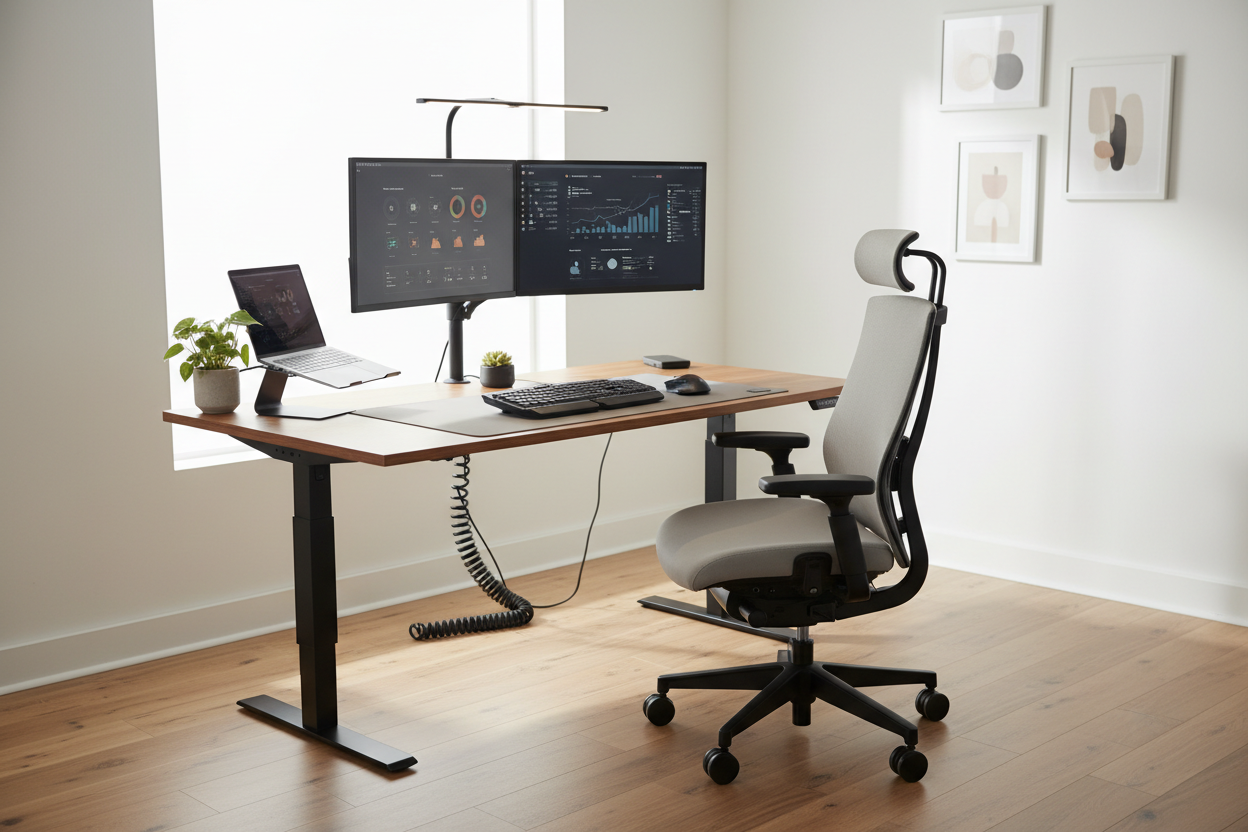
Por qué la ergonomía es más importante que nunca para los trabajadores remotos
Trabajar desde casa se ha convertido en la nueva normalidad para millones de estadounidenses, pero muchos teletrabajadores están pagando las consecuencias con dolor de espalda crónico, tensión cervical y disminución de la productividad. Según la Asociación Americana de Quiropráctica, el dolor de espalda es una de las causas más comunes de ausencias laborales, con un coste para los estadounidenses de al menos 50 000 millones de dólares anuales en atención médica. ¿La buena noticia? La mayoría de estos problemas se pueden prevenir con una configuración ergonómica adecuada.
Esta guía completa lo guiará a través de todo lo que necesita para crear un espacio de trabajo ergonómico que proteja su salud, aumente su productividad y haga que trabajar desde casa sea realmente cómodo.
La base: Cómo elegir la silla de oficina ergonómica adecuada
Podría decirse que su silla de oficina es el equipo ergonómico más importante en el que invertirá. Pasará entre 6 y 8 horas al día en ella, por lo que elegir sabiamente es fundamental.
¿Qué hace que una silla sea verdaderamente ergonómica?
Una silla ergonómica debe adaptarse a la curvatura natural de la columna vertebral, permitir múltiples ajustes y brindar comodidad durante largos periodos sentados. Estas son las características esenciales que debe buscar:
- Soporte lumbar: La silla debe tener un soporte lumbar ajustable que se adapte a la curva de la columna. Esto evita que se encorve y reduce la presión sobre los discos lumbares.
- Altura ajustable: Los pies deben estar apoyados en el suelo con las rodillas en un ángulo de 90 grados. Una palanca de ajuste neumática facilita este ajuste.
- Profundidad y ancho del asiento: El asiento debe ser lo suficientemente ancho para sostener sus caderas cómodamente, con 2 a 4 pulgadas de espacio entre la parte posterior de sus rodillas y el borde del asiento.
- Apoyabrazos: Los apoyabrazos ajustables reducen la tensión en los hombros y el cuello al sostener los brazos mientras escribe.
- Función reclinable: La capacidad de reclinarse entre 110 y 130 grados ayuda a redistribuir la presión y proporciona alivio periódico a la columna.
Las mejores recomendaciones de sillas ergonómicas
Silla de oficina ergonómica giratoria y reclinable de 155° - $546.00

Esta silla premium cuenta con un impresionante ángulo de reclinación de 155 grados, ideal para esas siestas energéticas a la hora del almuerzo. El reposapiés integrado permanece oculto durante las horas de trabajo, pero se despliega fácilmente cuando necesitas descansar. Fabricada con cuero de tecnología duradera, transpirable e impermeable, esta silla combina comodidad y durabilidad.
Características principales:
- Reclinación máxima de 155° para una relajación máxima
- Reposapiés integrado oculto
- Cuero con tecnología duradera y transpirable.
- Espuma gruesa con paquete de resortes en forma de S para una comodidad duradera
- Función giratoria de 360 grados
Compre la silla ergonómica reclinable de 155° →
Silla de oficina ergonómica reclinable con masaje y reposapiés - $529.15

Lleva tu comodidad al siguiente nivel con la función de masaje integrada. Esta silla cuenta con 7 puntos de vibración estratégicamente ubicados que ayudan a aliviar la fatiga tras largas sesiones de trabajo. El diseño de respaldo alto con soporte lumbar libera la tensión de la espalda y las muñecas, mientras que el reposapiés extraíble transforma tu espacio de trabajo en una zona de relajación.
Características principales:
- Sistema de masaje vibratorio de 7 puntos
- Reclinable ajustable con reposapiés extraíble
- Capacidad de peso de 300 lb
- Cuero PU de primera calidad y malla transpirable.
- Base de metal resistente para una estabilidad superior
Escritorios de pie: un punto de inflexión para la salud en el trabajo remoto
Estar sentado todo el día no solo es incómodo, sino también peligroso. La Clínica Mayo informa que estar sentado durante períodos prolongados está relacionado con la obesidad, el aumento de la presión arterial, la hiperglucemia y los niveles elevados de colesterol. Los escritorios de pie ofrecen una solución, ya que permiten alternar entre estar sentado y de pie a lo largo del día.
La ciencia detrás de los escritorios de pie
Una investigación del American Journal of Public Health muestra que el uso de un escritorio de pie puede:
- Quema 50 calorías adicionales por hora en comparación con estar sentado
- Reduce el dolor de espalda hasta en un 32% después de varias semanas de uso
- Mejora el estado de ánimo y los niveles de energía en un 87%
- Aumentar la productividad en un 46% según un estudio del Centro de Ciencias de la Salud de Texas A&M
La clave no es estar de pie todo el día, sino alternar posiciones con regularidad. Los expertos recomiendan la regla 20-8-2: por cada 30 minutos, sentarse 20 minutos, estar de pie 8 minutos y moverse 2 minutos.
Escritorios de pie eléctricos o manuales: ¿cuál es el adecuado para usted?
Escritorio ergonómico eléctrico de altura ajustable de 40" x 24" - $599.99

Este escritorio eléctrico de pie representa la referencia en soluciones ergonómicas para espacios de trabajo. Su sistema de motor de alta gama proporciona un ajuste de altura suave y continuo, sin vibraciones ni paradas repentinas. Tres preajustes de memoria programables le permiten guardar sus alturas preferidas para sentarse y pararse, facilitando las transiciones con solo pulsar un botón.
Características principales:
- Motor eléctrico suave con ajuste de altura continuo.
- 3 preajustes de altura de memoria programables
- Capacidad de peso de 1766 lb para máxima estabilidad
- Orificios dobles para la gestión de cables para un espacio de trabajo organizado
- Funcionamiento silencioso por debajo de los 50 decibeles
- Ganchos laterales para un almacenamiento cómodo
Actualice a un escritorio eléctrico de pie →
Escritorio de altura ajustable manualmente - Escritorio compacto de pie de 27,5" - $229,00

Perfecto para apartamentos pequeños, dormitorios o despachos domésticos reducidos, este escritorio compacto de pie ofrece ventajas ergonómicas sin sacrificar el valioso espacio. El sistema de ajuste manual con manivela es fiable, no requiere electricidad y permite pasar de estar sentado (75 cm) a estar de pie (100 cm) en segundos.
Características principales:
- Tamaño compacto de 27,5" x 18,5"
- Rango de altura: 29,5" a 43,3"
- Ajuste manual de manivela (no necesita energía)
- Construcción robusta con marco de acero
- Acabado blanco limpio
- Perfecto para espacios pequeños
Ideal para: trabajadores remotos en apartamentos, estudiantes, trabajadores de vehículos recreativos o cualquier persona con espacio limitado.
Consigue el escritorio de pie compacto →
Posicionamiento del monitor: Cómo proteger el cuello y los ojos
La colocación incorrecta del monitor es uno de los errores ergonómicos más comunes que cometen los teletrabajadores. La posición de la pantalla afecta directamente la salud del cuello, los hombros y los ojos.
La configuración óptima del monitor
Según la Administración de Seguridad y Salud Ocupacional (OSHA), su monitor debe ser:
- 20 a 26 pulgadas de tus ojos (aproximadamente la longitud de un brazo)
- La parte superior de la pantalla debe estar a la altura de los ojos o ligeramente por debajo para evitar la tensión del cuello.
- Inclinado hacia atrás entre 10 y 20 grados para reducir el resplandor y mantener un ángulo de visión cómodo.
- Directamente frente a usted para evitar torcer el cuello
La solución: brazos de monitor ajustables

Este brazo para monitor de calidad profesional transforma su espacio de trabajo al ofrecer total flexibilidad en la colocación de la pantalla. El mecanismo de resorte de gas premium permite ajustar la altura, la inclinación, el giro y la rotación sin esfuerzo: su monitor se mantiene exactamente donde lo coloca, sin desviaciones ni hundimientos.
Características principales:
- Rango completo de movimiento: inclinación (+85°/-45°), giro de 360°, rotación completa
- Tecnología de resorte de gas de primera calidad para un ajuste suave y sin esfuerzo
- Compatible con VESA (75 x 75 mm, 100 x 100 mm)
- Admite monitores de 13 a 32" de hasta 17,6 libras
- Sistema integrado de gestión de cables
- Dos opciones de montaje: abrazadera en C o ojal
- Construcción de acero y aleación de aluminio de alta calidad.
Beneficios ergonómicos:
- Coloque la pantalla a la altura perfecta de los ojos para eliminar la tensión del cuello.
- Ajuste la distancia de visualización para minimizar la fatiga ocular
- Inclinación para eliminar el deslumbramiento y los reflejos.
- Cambie entre las posiciones sentada y de pie sin esfuerzo
Optimice la configuración de su monitor →
Creando el espacio de trabajo ergonómico completo
Más allá de los elementos más costosos, varios ajustes más pequeños pueden mejorar drásticamente su configuración ergonómica:
Posicionamiento del teclado y el ratón
El teclado y el ratón deben estar colocados de forma que los codos descansen en un ángulo de 90 grados con los hombros relajados. Tenga en cuenta estos consejos:
- Mantenga el teclado directamente frente a usted a la altura del codo.
- Coloque el ratón al mismo nivel que el teclado
- Utilice un reposamuñecas para mantener la posición neutra de la muñeca.
- Considere un teclado ergonómico con un diseño dividido para reducir la tensión en la muñeca.
Iluminación: El factor ergonómico que se pasa por alto
La mala iluminación provoca fatiga visual, dolores de cabeza y fatiga. La Asociación Americana de Optometría recomienda:
- Coloque su escritorio perpendicular a las ventanas para minimizar el resplandor.
- Utilice iluminación de tareas para iluminar su superficie de trabajo sin crear reflejos en la pantalla.
- Siga la regla 20-20-20: cada 20 minutos, mire algo a 20 pies de distancia durante 20 segundos.
- Ajuste el brillo de la pantalla para que coincida con la iluminación ambiental.
Reposapiés y alfombrillas antifatiga
Si no puede tocar el suelo cómodamente con los pies al sentarse, utilice un reposapiés para mantener una postura correcta. Al estar de pie, una colchoneta antifatiga reduce la presión en los pies, las piernas y la zona lumbar.
Lista de verificación de configuración ergonómica: cómo hacerlo bien
Utilice esta lista de verificación para evaluar y optimizar su espacio de trabajo:
Configuración de la silla:
- ✓ Pies apoyados en el suelo o reposapiés
- ✓ Rodillas en un ángulo de 90 grados
- ✓ El soporte lumbar se adapta a la curva de la espalda baja.
- ✓ Los apoyabrazos sostienen los codos a 90 grados
- ✓ 2-4 pulgadas entre el borde del asiento y la parte posterior de las rodillas
Configuración del escritorio:
- ✓ La altura del escritorio permite que los codos estén a 90 grados al escribir.
- ✓ Teclado y ratón al mismo nivel
- ✓ Muñecas en posición neutra (ni dobladas hacia arriba ni hacia abajo)
- ✓ Espacio adecuado para el movimiento del ratón
Configuración del monitor:
- ✓ La parte superior de la pantalla está a la altura de los ojos o ligeramente por debajo de ella
- ✓ 20-26 pulgadas de tus ojos
- ✓ Pantalla inclinada hacia atrás entre 10 y 20 grados
- ✓ Sin reflejos de ventanas o luces
- ✓ El brillo coincide con la iluminación ambiental
Errores ergonómicos comunes que cometen los trabajadores remotos
Error n.° 1: trabajar desde el sofá o la cama
Aunque sea tentador, trabajar con muebles mullidos perjudica la postura y provoca dolor crónico. La columna vertebral necesita un soporte adecuado que solo un espacio de trabajo específico puede proporcionar.
Error n.° 2: configuración solo para computadora portátil
Las pantallas de las laptops son demasiado bajas y los teclados obligan a las muñecas a adoptar posiciones incómodas. Si no puede evitar usar una laptop, invierta en un teclado externo, un mouse y un soporte para laptop para elevar la pantalla a la altura de los ojos.
Error n.° 3: Permanecer en una misma posición durante demasiado tiempo
Incluso la configuración ergonómica perfecta se vuelve problemática si nunca te mueves. Configura recordatorios para ponerte de pie, estirarte y caminar cada 30-60 minutos.
Error n.° 4: Ignorar las señales de alerta temprana
No espere a que el dolor se vuelva crónico. Si experimenta molestias, ajuste su configuración de inmediato. Pequeños ajustes ahora previenen problemas mayores en el futuro.
Error n.° 5: Escatimar en calidad
Los equipos ergonómicos baratos a menudo carecen de la capacidad de ajuste y la durabilidad adecuadas. Invertir en piezas de calidad ofrece beneficios en comodidad, salud y longevidad.
Construya su configuración ergonómica con un presupuesto limitado
Crear un espacio de trabajo ergonómico no requiere una inversión excesiva. Aquí te explicamos cómo priorizar tus inversiones:
Fase 1: Base esencial ($300-800)
- Silla ergonómica con soporte lumbar
- Brazo para monitor o soporte para portátil
- Teclado y ratón externos
Fase 2: Mejora para mayor comodidad ($500-1,000)
- Escritorio regulable en altura (manual o eléctrico)
- Iluminación de tareas
- Reposapiés o alfombrilla antifatiga
Fase 3: Optimización ($200-500)
- Segundo monitor para aumentar la productividad
- Soluciones de gestión de cables
- Accesorios ergonómicos (reposamuñecas, portadocumentos)
Recuerde: su salud es una inversión, no un gasto. El costo del equipo ergonómico es mínimo comparado con las facturas médicas, la pérdida de productividad y el dolor crónico.
Ejercicios ergonómicos y estiramientos para trabajadores remotos
Incluso con una ergonomía perfecta, tu cuerpo necesita movimiento. Incorpora estos ejercicios a lo largo de tu jornada laboral:
Estiramientos de cuello
- Incline lentamente la cabeza hacia cada hombro, manteniendo esta posición durante 15 segundos.
- Gire suavemente la cabeza en círculos, 5 veces en cada dirección.
- Realizar cada 2 horas para prevenir la rigidez del cuello.
Giros de hombros
- Ruede los hombros hacia atrás en círculos grandes, 10 repeticiones
- Apriete los omóplatos, manténgalos así durante 5 segundos y suéltelos.
- Repetir 3 veces cada hora
Ejercicios de muñeca
- Extiende el brazo hacia adelante y tira suavemente de los dedos hacia atrás con la otra mano.
- Cerrar los puños y soltar, 10 repeticiones
- Gire las muñecas en círculos, 10 veces en cada dirección.
- Realizar cada 30 minutos para prevenir el túnel carpiano.
Estiramientos para la espalda baja
- Torsión de columna sentado: gire el torso hacia cada lado, manteniendo esta posición durante 20 segundos.
- Estiramiento gato-vaca: alternando arquear y redondear la espalda.
- Flexión hacia adelante de pie: doblar las caderas, dejando los brazos colgando
- Haga estos ejercicios durante los descansos para aliviar la tensión de la espalda baja.
Preguntas frecuentes sobre la configuración ergonómica de la oficina en casa
1. ¿Cuánto debería gastar en una silla de oficina ergonómica?
Una silla ergonómica de calidad suele costar entre $300 y $800. Aunque parezca caro, considere que la usará más de 40 horas semanales durante años. Invertir en una silla de calidad como nuestra Silla de Oficina Ergonómica Reclinable de 155° ($546) le ofrece valor a largo plazo gracias a su comodidad superior, beneficios para la salud y durabilidad.
2. ¿Realmente vale la pena trabajar de pie en un escritorio?
Sí, si se usa correctamente. Los escritorios de pie no se basan en estar de pie todo el día, sino en el movimiento y la variación de la posición. Las investigaciones demuestran que alternar entre estar sentado y de pie reduce el dolor de espalda, aumenta la energía y mejora la productividad. Nuestro escritorio eléctrico de pie de 40" x 24" (US$599.99) facilita las transiciones gracias a sus ajustes de altura programables.
3. ¿Cuál es la altura ideal del monitor para prevenir el dolor de cuello?
La parte superior del monitor debe estar a la altura de los ojos o ligeramente por debajo cuando esté sentado en posición vertical. Esto suele significar que el centro de la pantalla está entre 15 y 20 grados por debajo de la altura horizontal de los ojos. Un brazo para monitor (139,99 $) ofrece un ajuste infinito, lo que le permite encontrar el ángulo de visión perfecto.
4. ¿Con qué frecuencia debo alternar entre estar sentado y de pie?
Los expertos recomiendan la regla 20-8-2: por cada 30 minutos, siéntate 20 minutos, permanece de pie 8 minutos y muévete 2 minutos. Este ritmo previene la fatiga en ambas posiciones y mantiene el cuerpo activo.
5. ¿Puedo crear una configuración ergonómica en un apartamento pequeño?
¡Por supuesto! Nuestro escritorio manual compacto de 27.5" ($229) está diseñado específicamente para espacios pequeños como apartamentos, dormitorios o casas rodantes. Combínalo con un brazo para monitor que ahorra espacio y aprovecha al máximo tus espacios limitados.
6. ¿Cuál es la diferencia entre los escritorios de pie eléctricos y manuales?
Los escritorios eléctricos de pie ofrecen ajuste de altura con botón pulsador y memorias programables, lo que facilita los cambios de posición. Los escritorios manuales utilizan un mecanismo de manivela y son más económicos, pero requieren esfuerzo físico para ajustarlos. Los escritorios eléctricos son ideales para cambios frecuentes de posición.
7. ¿Cómo sé si mi silla tiene el soporte lumbar adecuado?
Un soporte lumbar adecuado debe adaptarse a la curvatura natural de la zona lumbar. Al sentarse, debe sentir una suave presión que sostenga esta curvatura sin forzar la espalda a adoptar una posición antinatural. El soporte debe ser ajustable en altura y profundidad para adaptarse a la forma de su cuerpo.
8. ¿Los equipos ergonómicos realmente reducirán mi dolor de espalda?
Sí, siempre que se combine con una configuración adecuada y movimiento regular. Los estudios demuestran que las intervenciones ergonómicas reducen las molestias musculoesqueléticas entre un 60 y un 80 %. Sin embargo, el equipo por sí solo no es suficiente; también es necesario mantener una buena postura, tomar descansos regulares e incorporar estiramientos.
9. ¿Cuánto tiempo se tarda en adaptarse a un escritorio de pie?
La mayoría de las personas necesitan de 1 a 2 semanas para adaptarse a un escritorio de pie. Empiece con periodos cortos de pie (15-20 minutos) y aumente gradualmente la duración. Es posible que experimente fatiga inicial en las piernas y los pies; esto es normal a medida que sus músculos se adaptan.
10. ¿Cuál es la inversión ergonómica más importante para los trabajadores remotos?
Si bien cada componente es importante, una silla ergonómica es la base de su equipo. Pasará más tiempo en su silla que usando cualquier otro equipo, lo que la convierte en la inversión más importante para su salud y comodidad.
Tome acción: transforme su espacio de trabajo hoy
Crear una oficina en casa ergonómica no se trata solo de comodidad, sino también de proteger tu salud, mejorar tu productividad y construir un estilo de vida sostenible en el teletrabajo. La inversión que haces hoy previene costosos problemas de salud en el futuro.
¿Estás listo para actualizar tu espacio de trabajo?
Empecemos por lo esencial:
- Silla de oficina ergonómica reclinable a 155° - Comodidad premium con reposapiés integrado ($546)
- Escritorio eléctrico de pie de 40" - Alturas programables para transiciones sin esfuerzo ($599.99)
- Brazo de monitor de movimiento completo : posicionamiento perfecto de la pantalla en todo momento ($139,99)
¿Trabaja con espacio o presupuesto limitado?
- Escritorio manual compacto de pie : gran ergonomía en un espacio reducido (229 dólares)
- Sillón de oficina reclinable con masaje : comodidad y bienestar combinados ($529.15)
No dejes pasar ni un día más de incomodidad. Tu cuerpo se merece algo mejor y tu productividad te lo agradecerá.
