
The hotel room had a desk the size of a skateboard, a chair that belonged in a dentist's waiting room, and one outlet, hidden behind the nightstand and an arm's length from the floor.
You know this room. You have worked in it. The laptop sits at the edge of the tiny desk, so you hunch forward, chin out, shoulders up around your ears, and after three hours your neck is a knot you can feel from the inside. Dinner is a sad affair in the hotel bar, because you spent the whole day folded over a keyboard. And you have three more days of this.
Fall is the season for it. Conferences. Family visits. The annual pilgrimage to the office for a week of "collaboration." Remote work means your office is wherever your laptop lands, and too often that is a surface never meant for eight hours of typing.
This packing list is nine items that fix most of it. The first three will save your neck on every single trip. The rest are the difference between surviving a week and actually getting work done. None of it blows your carry-on budget, and the honest part is built in: I will tell you exactly what to skip.
Let us pack.
The Nine Essentials, in Order of How Much They'll Save You
1. A laptop stand that actually travels
The most important item on the list, and it is not close. The fundamental problem with every hotel desk, coffee shop table, and dining room table you will ever work from is that they are too low. Your laptop goes down, your head drops, your neck bends, and your posture collapses. A laptop stand fixes the screen height, which fixes the neck, which fixes most of the rest of the chain.
The stand you pack has to meet four criteria. It has to raise the screen to eye level. It has to be stable enough that typing does not make it sway. It has to fold flat enough to live in a carry-on. And it has to set up in seconds, not minutes. The Rackora Ergo Laptop Stand Elite Edition, $79.99, regularly $129.99, clears all four. It is adjustable, it folds flat, and it turns the worst hotel desk into a workstation in about ten seconds. If you want the full breakdown of fixed versus adjustable stands and what the differences cost you, our laptop stands explainer walks through the whole category.
Pack it at the top of your bag. You will use it before you use anything else on this list.
2. An external keyboard (and a mouse that isn't a trackpad)
Here is the thing nobody warns you about: the laptop stand creates a new problem. When your screen rises to eye level, the keyboard rises with it, and your hands now hover at chest height with your wrists bent at an angle that will make you miserable by lunch. The fix is a compact external keyboard that stays on the desk while the laptop floats above it.
This is the second most important item, it is the one people skip, and it is the one they regret skipping. A slim keyboard takes up almost no space, weighs next to nothing, and turns a raised laptop into a proper desk setup. Your forearms stay parallel to the floor, your shoulders stay down, and your wrists stop screaming.
The mouse question is simpler. A trackpad is fine for a day. For a week, bring a small mouse. It is the size of a bar of soap and it fits in any pocket of your bag. And if you do not want to pack a keyboard at all, the honest hack is to ask the hotel front desk. Half the time they have a spare keyboard and mouse from a conference room, and they will hand them over for free.
If you fall in love with real typing again, the Premium K80, $189.99, regularly $219.99, is the board we would point you to for the desk at home. It does not travel, and that is fine. Travel keyboards should be cheap to replace and easy to forget. The K80 is the opposite, which is exactly why it stays home.
3. A tablet stand (yes, it earns its space)
The tablet stand is the item you will be glad you packed about six times per trip. On the plane, it turns your tablet into a hands-free screen for a movie or a book. In the hotel, it becomes a second display for your laptop, the oldest trick in the remote work book: tablet next to laptop, a second-screen app running, and suddenly you have two monitors in a room the size of a closet. On calls, it becomes a stable camera stand so your coworkers are not staring at the ceiling.
The Rackora Pro Stand 100, $59.99, regularly $99.99, is the one that earns the spot in our bag: adjustable, stable, and happy with a tablet or a smaller laptop. If you are weighing tablet stand options, our best tablet stands roundup covers the landscape.
Honest caveat: if you do not own a tablet, skip this one. The stand is only as useful as the tablet sitting in it. But if you own a tablet and you have been leaving it home, this is the item that makes it earn its keep.
4. A travel monitor (the honest answer is probably no)
The travel monitor is the dream item. A second screen on the road, matching your home setup, total productivity. Here is the reality: it is an extra two or three pounds, an extra cable, an extra power source, and an extra thing to fish out of your bag at airport security, and for most trips you will use it twice and resent it the rest of the time.
So the honest recommendation is to skip it unless you fit a specific profile. Traveling for a week or more. Work that genuinely needs two screens, like design, data, or code. Presenting at a conference. Those are the cases where a portable monitor earns its space. Otherwise, the tablet-as-second-screen trick covers ninety percent of what people want a travel monitor for, at a fraction of the weight.
When you do take one, pack the smallest you can find, keep it with its cable in the same pouch, and be ready to defend it at security. When you do not, do not feel like you are missing out. The tablet trick is genuinely good.
5. A cable organizer
The least glamorous item on the list, and the one that will save you from the most small disasters. A cable organizer, a pouch, a packing cube, whatever you want to call it, is where every cable, charger, adapter, and power bank lives, so they are not a rat's nest in the bottom of your bag.
The security argument alone justifies it. Nothing slows down airport security like untying the knot of cables you shoved into a side pocket, and the people behind you in line will hate you for it. The hotel argument is stronger. It is nine at night, you are in a room you do not know, and the one cable you need is somewhere in the bag. With an organizer, it is always in the same place.
The contents are simple: one charger, one cable per device, a power bank, and the adapters you actually need. Pack one cable per device and no spares, and you are done. The organizer itself should be small enough to live near the top of your carry-on, because you will open it twice: once at security, once at the hotel.
6. A footrest (honestly, improvise first)
Hotel chairs are designed for looks, not bodies, which means your feet almost never land flat on the floor. Your knees end up at a strange angle, your hips tilt, and your lower back takes the punishment. A footrest fixes that. Here is the honest part: you do not need to pack one.
Every hotel room contains a footrest. The spare pillow. The folded towel. Your carry-on lying on its side, which is conveniently the exact right height. Your daypack. A phone book, if your hotel still has them. Anything stable at the right height works, because the goal is just flat feet and knees at a right angle.
Pack a footrest only for long stays, a week or more, when the improvised version gets old. And if you do pack one, get the kind that folds flat. The improvised approach is not a compromise. It is the same solution with a different label.
7. A lumbar cushion
Hotel chairs are flat slabs, and after day two your lower back files a formal complaint. A compact lumbar cushion flattens into a bag and fixes the problem everywhere at once: the hotel chair, the flight seat, the rental car, the coffee shop booth shaped like a question mark.
This is the item people mock. It is also the item people borrow by day three, because the person who mocked it is now sitting with a bed pillow wedged behind them, and the pillow is losing. A lumbar cushion is a small, cheap, boring piece of foam, and it will do more for your comfort on a five-day trip than any other item except the laptop stand.
Get the kind that is firm enough to hold its shape and small enough to pack flat, and do not overthink it. You will know it is working because your back will stop reminding you it exists.
8. A power strip (with USB ports)
Hotel rooms are allergic to outlets near the desk. The one outlet in the room is behind the nightstand, or behind the TV, or across the room in a spot that requires a yoga pose to reach. A slim power strip with USB ports solves this, and it is the cheapest insurance on the list.
The version you want is the small one, not the industrial strip with a six-foot cord. A compact strip with a short cord, two or three AC outlets, and a couple of USB ports weighs almost nothing, packs flat, and turns one inconvenient outlet into a charging station for your laptop, phone, watch, and camera all at once.
The rule of hotel power: check the outlet situation when you check in. If the only outlet is behind the nightstand, pull the nightstand out once, plug in the strip, push the nightstand back, and never think about it again. You will thank yourself at nine pm when everything is at twenty percent.
9. The bag that carries all of it
You probably already own the last item: the bag. The trick is not a new backpack. It is a system. Everything on this list goes into one packing cube or tech pouch, which goes into your carry-on near the top, so the whole kit comes out in one motion and goes back in the same way.
The system matters more than the gear. When the laptop stand, the keyboard, the cables, and the rest live in one place, you never search for them, and you never leave one behind. The bag opens twice on the trip: at security, and at the hotel. That is the whole job.
If you are traveling with just a personal item, the cube gets smaller but the principle holds: one pouch, everything tech, always the same spot. The kit is small enough to fit in a generous tote or a daypack, which is the entire point of packing portable.
What You Can Honestly Skip
You will notice items 4 and 6 came with caveats, and there is a broader principle underneath them. Most travel ergonomics advice tells you to bring everything. The honest version tells you to bring almost nothing and improvise the rest.
Skip the travel monitor unless the trip is long or the work demands two screens. Skip the dedicated footrest and steal a pillow from the bed. Skip the spare cables and the backup chargers; every city on earth sells a phone charger. Skip anything that needs its own case. Skip the second laptop stand "just in case," because the first one is in your bag. And absolutely skip the items that weigh more than the pain they prevent.
The test is brutal and simple: if you would not notice it missing until you unpacked at home, it does not come. That single rule keeps the kit light, and a light kit is a kit you will actually carry, which is the whole point. The best ergonomic gear in the world does nothing for you if it is sitting in a closet because it made your bag unbearable.
Packing Logic: Playing the Carry-On Weight Game
Every airline has its own weight rules, and the only universal truth is that you will find out yours at the counter. So the strategy is to make the kit light enough that the question never gets tense. The way to do that is to rank everything by a simple formula: how often you will use it, times how much pain it prevents.
By that formula, the laptop stand, the keyboard, and the cable pouch are automatic. Every trip. The tablet stand, the lumbar cushion, and the power strip are near-automatic. The monitor and the footrest are conditional, and the condition is trip length. That is why the list above is ordered the way it is. The top three are non-negotiables. Everything below earns its spot trip by trip.
A few hard rules keep the kit honest. Fold-flat beats rigid: if it does not lie flat, it does not come. One cable per device, no spares: if a cable dies on the road, you can replace it in any city on earth. Nothing gets its own case: if a device needs a hard case, it is too fragile to travel with. And the rule that ends all arguments: if it does not fit in the pouch, it does not come. The pouch is the budget, and the budget does not flex.
You will overpack the first time. Everyone does. You will take the monitor and the footrest and the extra charger, use half of it, and trim on the second trip. That is the process, and it is fine. The goal is not a perfect kit. It is a kit that is lighter next time.
Airport Lounges, Coffee Shops, and Rental Cars
The plane is a strange place to think about ergonomics, because you are strapped into a seat designed by someone who has never flown. The honest advice: the lumbar cushion comes out for the flight, the tablet stand comes out if you are watching something, and the most important thing is the walk in the terminal before you board. Airports are one of the few places where walking is built into the day, and the walk is the best thing your back will get.
The gate is where the pro move lives. Find the gate with the high-top counters, the ones built for standing with a laptop. Set up the Elite stand on the counter, raise the screen to eye level, and you have a standing desk in an airport. You land having already stood for a good chunk of your workday, and it costs nothing.

Coffee shops are the other half of the road. The table is too low, the chair is too tall, and the Wi-Fi is a hostage negotiation. The stand makes the table workable, the keyboard keeps your wrists happy, and the honest rule is that two hours is the ceiling. After two hours, stand up, walk around the block, and come back with fresh eyes. The barista does not care how long you stay.
In the rental car, the lumbar cushion is the star, along with the honest advice to stop every ninety minutes or so. Cars are the worst office ever designed, and they are also where you will spend a surprising amount of a fall road trip. Sit properly, keep the seat close enough that your arms are not reaching, and treat rest stops as meetings with your own spine.
The Hotel Room Hack: Ironing Board as Standing Desk
The best ergonomic hack in any hotel room costs nothing and is already there. It is the ironing board.
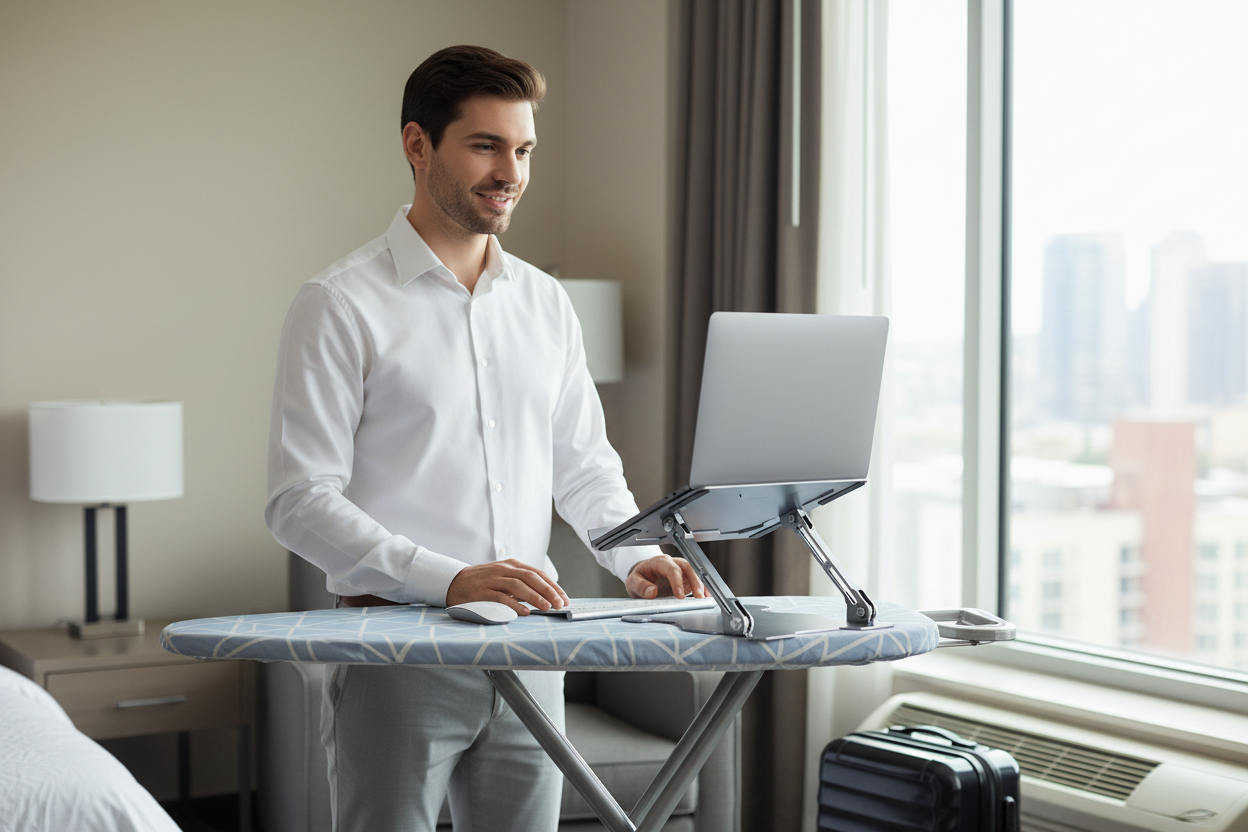
Here is the move. Most hotel rooms have one, and most ironing boards adjust through roughly the same range as a budget standing desk: low enough to work seated in a pinch, high enough to stand. Put the ironing board in front of the window, set it to standing height, put your laptop on the Elite stand on top, and you have a standing desk with a view, assembled in about ninety seconds.
The honest limits: it is narrow, it wobbles a little, and it is not the surface for a four-hour writing marathon. But for what you actually need it for, it is perfect. The morning calls. The email triage. The reading you would otherwise do hunched on the bed. Stand for the calls, sit for the deep work, and your back will be the only part of the trip that is not exhausted.
The mini-fridge is the supporting player in the same scene. It is counter height, it is solid, and it is in every room. Stack the Elite on top of the fridge and you have a second standing surface for a laptop, ideal when you are on a call and want to walk in place while you talk.
And if you are settling somewhere for a month instead of a weekend, the ironing board gets old fast, and that is when a real mobile desk earns its keep. Rackora's laptop computer cart, $158.46, is a proper standing desk on wheels: it rolls to the window for light, back to the wall for calls, and it goes up and down like a real desk because it is one. It does not fit in a carry-on, so it is a home-office tool rather than a travel one, but for extended stays it beats a wobbly ironing board by a mile.
What All of This Costs
Time for the honest math. The core of the kit, the laptop stand and the tablet stand, costs less than one night in the hotel room it saves you from. The Ergo Laptop Stand Elite Edition is $79.99, regularly $129.99. The Pro Stand 100 is $59.99, regularly $99.99. Together, that is $139.98 for the two items that will change every single trip you take from now on.
Add the rest of the kit, the cushion, the power strip, the cable pouch, the compact keyboard and mouse, and you are still well under what a single chiropractor visit runs, and that is the real comparison. None of these are luxury items. They are cheap, boring, and effective, and the whole kit lands in a range that most people spend on a nice dinner out.
What you should not do is go overboard. A travel monitor you use twice. A footrest that lives in your bag untouched. A second laptop stand "just in case." That is how a sensible kit becomes a heavy one. Start with the first three items, add the rest as the trips get longer, and let your own back do the prioritizing.
Everything on this list from Rackora ships free in the US and comes with a 30-day money-back guarantee, which is worth saying twice for the stands: if they do not change how your neck feels on the road, send them back. The guarantee is the part that makes trying the kit an easy yes.
FAQ
What's the single most important travel item?
The laptop stand, and it is not close. Hotel desks, coffee shop tables, and dining room tables are all too low, and a low screen is what destroys your neck over a week of work. A portable stand raises the screen to eye level and fixes the root of the problem. Everything else on this list is an upgrade. The stand is the fix.
Will the Elite stand fit in a carry-on?
Yes. It is built to travel: it folds flat, slips into a laptop compartment or a packing cube, and sets up in seconds. It is the kind of item you forget is in your bag until the moment you need it, which is exactly what a travel stand should be.
Do I need a travel keyboard?
If you are packing a laptop stand, yes. The stand raises the screen and the built-in keyboard with it, which puts your hands at an angle that hurts by lunch. A slim external keyboard keeps your wrists flat and your forearms parallel to the floor. If you are only traveling for a day or two and staying at sitting height, you can skip it.
Is a tablet stand worth packing?
Yes, if you own a tablet. It gives you a hands-free screen on the plane, a second display for your laptop in the hotel, and a stable camera for calls, all from an item that weighs almost nothing. If you do not own a tablet, skip it. The stand is only as good as the tablet sitting in it.
How do I make a hotel desk ergonomic?
Start with the laptop stand to raise the screen, then add the external keyboard so your wrists stay flat. Fix the chair with a lumbar cushion and a footrest improvised from a pillow or your carry-on. Move the desk away from the wall so you can sit properly, and find the outlet situation early so you are not hunched under the nightstand at nine pm.
Can I use an ironing board as a standing desk?
Yes, and it is the best free hack in any hotel room. Most ironing boards adjust through roughly the same range as a budget standing desk, so set it to standing height, put your laptop stand on top, and take your calls standing. It is narrow and a little wobbly, so save it for calls and email, not four-hour writing sessions.
What if I'm flying with a desktop setup?
Honestly, do not. A desktop tower in checked luggage is a gamble, and in a carry-on it is impossible. For a short trip, the laptop plus the stand plus a keyboard is the answer. For a longer stay or a move, ship the tower separately, keep the important drive in your carry-on, and set up fresh at the other end.
How much should travel ergonomics cost?
Less than you think. The core kit, the Ergo Laptop Stand Elite Edition at $79.99, regularly $129.99, and the Pro Stand 100 at $59.99, regularly $99.99, comes to $139.98, and that is the whole ballgame. Add the small stuff and you are still well under what one chiropractor visit runs. The expensive mistake is buying nothing and paying for it with your neck.
Every trip is a gamble on your posture, and most of us lose quietly, day by day, in hotel rooms we will never see again. It does not have to be that way. Nine items, most of them small enough to forget they are in your bag, turn any surface into a place you can actually work.
Start with the two that matter most: the Rackora Ergo Laptop Stand Elite Edition at $79.99, regularly $129.99, and the Pro Stand 100 at $59.99, regularly $99.99. Both ship free in the US, both come with a 30-day money-back guarantee, and together they are the difference between a trip that wrecks your neck and a trip that does not. Pack them at the top of the bag. Your back will know the difference by day two.
