National Workaholics Day: 9 Signs Your Desk Setup Is Working You Into the Ground
You told yourself you'd stop at 5:30. Then it was 6:15, then 7:40, and now it's 9:15 and you're still in the chair, neck stiff, eyes dry, one email left, which everyone knows means at least six. The laptop is warm enough to cook on. Your shoulders are somewhere up by your ears. And you can't remember the last time you actually leaned back in that chair, because there's always one more thing.
Here's the uncomfortable part: none of that is your fault. Not really. You can have all the willpower in the world, and if your setup fights you, the setup wins. A chair that won't recline, a monitor that's too low, a desk that's the wrong height, they all conspire to keep you locked in the same tense position for hours, and your body eventually files a complaint.
That's what this day on the calendar is really for. National Workaholics Day is a chance to look at the desk the way a stranger would, and ask the question we're all avoiding: is this setup helping me work, or is it working me into the ground?
Let's find out. Nine signs, honest ones, and what to do about each.
Signs 1-3: Your Body Keeps a Timesheet
Sign 1: The 6 p.m. neck. You don't notice anything during the day, because you're busy, and your body is polite about waiting its turn. But around the time you finally stand up, there it is: the ache at the base of your skull, the stiffness that makes you roll your head around like you're trying to loosen a rusty hinge. Here's what's actually happening. You've been staring down at a screen that's too low, or leaning forward to read something too far away, and your neck has been holding that position for six hours straight. The pain isn't the problem. The position is. No amount of stretching after the fact can compete with the damage of the position itself.
Sign 2: Weekends are for recovery. Real weekends are for stuff you like. If your Friday night involves collapsing on the couch "just to recover from the week," and Saturday is basically a horizontal recovery operation, your desk is doing something to you that a day off can't undo. The body is supposed to bounce back overnight. When it needs two full days to feel human again, the setup deserves a hard look, because the work will be there Monday either way, and the cycle starts over.
Sign 3: You're tired but wired at night. This is the sneaky one. You're exhausted, yet you can't wind down. You scroll, you snack, you reopen the work chat "just to check one thing," and then you're back in it. A long day in a static, tense position keeps your body in a low-level state of brace, and that brace doesn't clock out just because you did. When your evenings feel like this, it's not a personality flaw. It's the physical residue of six hours of hunching.
Signs 4-6: The Habits You've Normalized
Sign 4: Lunch happens at the keyboard. You eat with one hand and scroll with the other, and you've started calling it "multitasking" instead of what it is, which is not taking a break. There's a difference between eating at your desk and eating at your desk while your shoulders stay in work position. The fork goes in, the sandwich goes in, the posture never changes. You didn't take a lunch break, you took a lunch interval, and your neck can tell the difference.
Sign 5: Caffeine by 10 a.m., and again at 2. Look, we're not here to police your coffee intake. But there's a pattern worth noticing: the coffee isn't about enjoyment anymore, it's about propping yourself up for the next stretch of sitting. When your energy is a series of scheduled refills because your body is exhausted from the position it's been held in, the caffeine is treating a symptom. And the crash, when it comes, happens right in the chair, at the worst possible time of day.
Sign 6: Breaks are for other people. You know the feeling. You're "in flow," so you skip the walk, skip the water, skip the standing stretch. You tell yourself you'll take a break "when this is done," and this is never done. Here's the thing nobody says out loud: the people who take real breaks aren't lazy, they're the ones who make it to the end of the day without the 4 p.m. crash. The skipped breaks don't save you time. They just relocate the cost to your neck, your eyes, and your 6 p.m. self.
Signs 7-9: The Quiet Ones
Sign 7: Your shoulders live at your ears. Every now and then you catch yourself in a reflection or a video call and realize your shoulders are up around your jawline, like you're bracing for something. That's stress posture, and the chair is an accomplice. A backrest that doesn't support you, armrests at the wrong height, a seat that tilts you forward, they all push your shoulders toward your ears and hold them there. You can't unclench your way out of a position your furniture keeps recreating.
Sign 8: You never actually sit back. Look at your chair right now. When's the last time you sat all the way back in it, like a person on a couch, with your back against the rest? If the answer is "I don't know" or "my chair doesn't really do that," you have a chair that's a work appliance, not a place to rest. And here's the kicker: if your chair can't recline, every "break" you take still happens in work posture. You're leaning forward to rest, which isn't resting.
Sign 9: You measure your day in notifications, not breaks. The quietest sign of all: your sense of a "good day" is based on how many messages you cleared, how many tabs you closed, how long you stayed glued. Nobody ever described a good day as "I sat for nine hours without moving." If your day's success metric is time-in-chair, the setup has done its job a little too well. The work isn't the problem. The inability to leave it, even for five minutes, is.
Why the Setup, Not Willpower, Is Driving This
Here's the part that usually surprises people: you can't willpower your way out of a bad setup. You've tried. We've all tried. "Tomorrow I'll take breaks." "Tomorrow I'll sit up straight." And tomorrow looks exactly like today, because your body is not fighting your intentions, it's fighting your furniture, and your furniture doesn't care about your intentions.
Think about it mechanically. If your monitor is too low, your head comes forward and down, every minute of every day, no matter how often you remind yourself to sit up. If your chair won't recline, your back never gets a neutral, supported position, so your muscles stay braced from 9 to 5. If your desk is the wrong height, your shoulders compensate without you knowing. These aren't habit problems. They're geometry problems. And geometry doesn't respond to motivation, it responds to adjustment.
This is actually good news, because it means the fix isn't about becoming a more disciplined person. It's about changing the environment so your body doesn't have to fight it. The same hours, the same workload, the same you, in a setup that holds you properly, and suddenly you're not exhausted at 6 p.m. You're just done with work, which is how it's supposed to feel.
If you've been blaming yourself for the burnout, stop. Fix the setup, then see who's actually tired. If you want to dig into how a chair should fit your specific body, our guide on choosing an ergonomic chair by body type is the place to start, but first, let's do the five-minute reset that costs nothing.
The 5-Minute Desk Reset
Forget the fancy routines and the productivity apps for a second. Here's a five-minute reset you can do right now, in order, with nothing but your own hands. It won't fix a bad chair, but it will tell you exactly which parts of your setup are the problem, and it will give your body a genuine break today.
Minute one: stand up. Actually stand up, not the half-crouch you do to grab a snack. Walk somewhere, anywhere, even if it's just to the window and back. Drink some water while you're at it, because the desk brain forgets to hydrate and the dehydration makes the afternoon worse.

Minute two: fix the screen. The top of your monitor should be roughly at eye level, so you're looking slightly down, not craning down. If the monitor is too low, raise it. If you're on a laptop, the Rackora Laptop Stand Elite Edition, at $79.99 down from its regular $129.99, does this instantly, or a stack of books does it for free. If your screen is a separate monitor that needs real positioning, the Full-Motion Adjustable Single Monitor Arm at $139.99 (regularly $169.00) handles the job and frees your desk surface at the same time.
Minute three: reset the chair. Sit all the way back. Not the polite lean-forward work posture, all the way back, like you're on a couch. Your lower back should feel the backrest. If it doesn't, the chair isn't fitting you, and that's information.
Minute four: unclench. Jaw, shoulders, hands. Shake out your arms like you just typed a novel. Drop your shoulders away from your ears. Notice how long they've been up there without you knowing.
Minute five: look at something far away. Not the second monitor, not your phone. Out the window, or across the room. Just let your eyes relax for a full minute. It sounds silly, but your eyes have been at screen distance for hours, and they need the reset more than your posture does.
That's the whole reset. Five minutes, zero dollars, and now you know what your setup is doing to you. If you want to go further on the desk side of things, our standing desk buyer's guide covers the height and movement side of the equation, but the chair is next, because it's where breaks actually live.
The Chair That Makes a Break Possible: The 135° Recline
Let's talk about the moment a break stops being a break. It's the moment you realize you're still in work posture. You stopped typing, but your shoulders are still forward, your back is still braced, your feet are still planted like you're about to sprint to a meeting. You're "taking a break" in the exact position that wore you out. That's not a break. That's a pause.

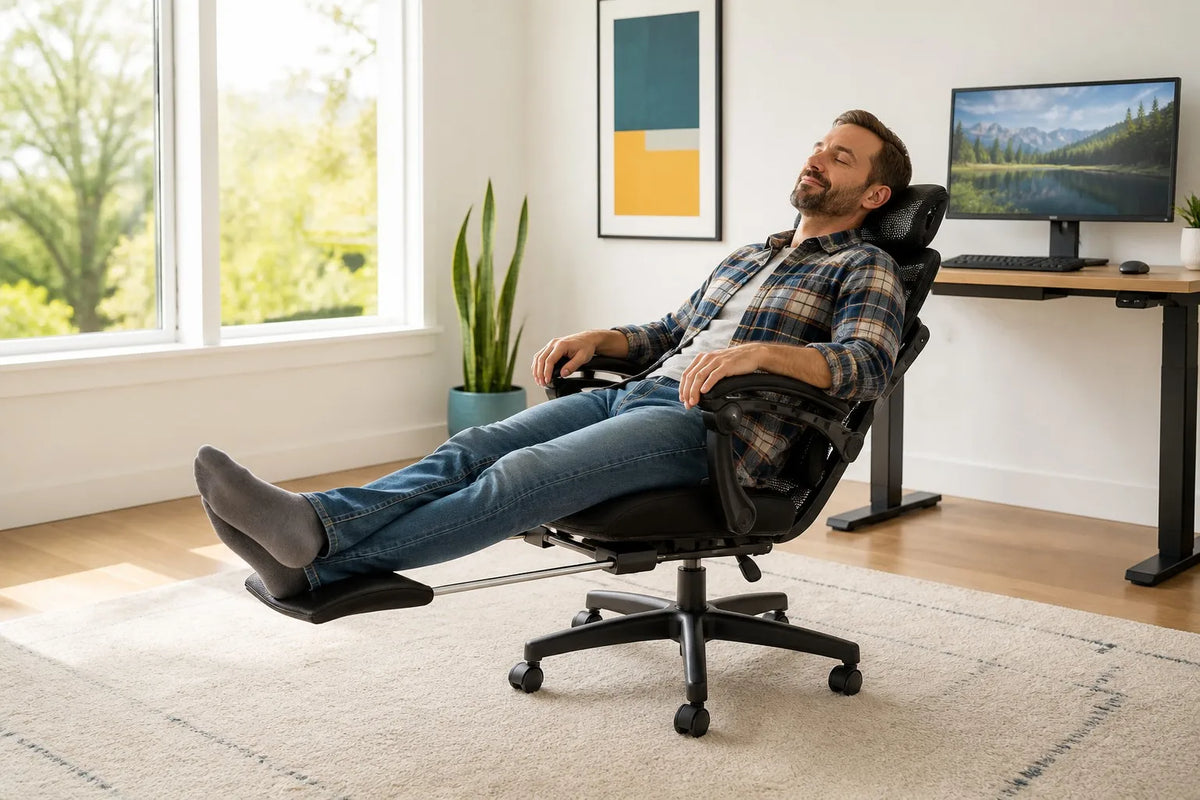
The chair is the difference between those two things, and most chairs are built for the pause, not the break. That's where the L2 Ergonomic Office Chair is different, and it's the reason we keep coming back to it. It reclines to 135 degrees, which is a genuinely different position, not a token tilt. And it has a built-in footrest, so when you lean back, your legs can come up and your back can change shape entirely.
Why does that matter for a workaholic specifically? Because you're not going to schedule "deep relaxation" in your calendar, let's be honest. You need a break you can take without leaving the desk, one that doesn't require you to stop being efficient. The 135-degree recline is exactly that: lean back, feet up, eyes closed for two minutes, and your back gets a completely different job than the one it's had all day. You're still at your desk, you're still "available," and your spine just got a real rest.
The L2 is $389.00 this weekend, down from its regular $449.00, and it carries a 4.9-star average from 418 reviews. It's a mesh chair, so it breathes, and it's built for exactly the kind of person reading this: someone who works long hours and needs the hardware to make those hours survivable. We'll say it plainly: if you only change one thing about your setup this month, change the thing you sit in.
What a Real Break Actually Looks Like
So what does a real break look like, once your chair actually lets you take one? It's smaller than you think. Two minutes of leaning back with your feet up, followed by a walk to the kitchen, is worth more than twenty minutes of sitting forward "resting." The point isn't the clock. The point is changing position completely, so your body isn't holding the same brace the whole day.
Try this rhythm. Every hour or so, do the recline break: lean the L2 all the way back to its 135 degrees, put your feet up on the built-in footrest, close your eyes or stare at the ceiling, and breathe for two minutes. Then stand up, walk around for a minute, get water. That's three minutes out of sixty, and it resets your neck, your eyes, and your mood in a way that "just keep typing" never will.
The funny thing is the math works in your favor. You'll actually get more done, because you're not fighting the 3 p.m. wall, and you're not spending your evenings recovering. The people who take real breaks aren't slacking. They've just figured out that the body is part of the workflow, and if you don't maintain it, it files its own complaints, usually at the worst possible time.
One more honest note: no chair, no desk, no routine is a substitute for actual rest, and if your body is telling you something loud, listen. Pain that's sharp, persistent, or radiating into your arms or legs is a reason to see a professional, not to buy a footrest. This article is about the setup, not the diagnosis.
The Cost of Ignoring the Signs
Let's talk about what happens if you do nothing, because "I'll deal with it later" is the most expensive plan in home office furniture. Not in dollars, at least not at first. The cost of ignoring these signs is paid in evenings, weekends, and energy, and it compounds quietly, the way interest does in the wrong direction.
Think about the last year. The 6 p.m. necks, the weekend recoveries, the skipped breaks, the shoulders at your ears. Each one individually is manageable, and that's exactly the problem, because individually they're manageable enough to ignore. Collectively, they're a second shift you're working without pay, in the same chair, in the same position, every single day. Nobody budgets for that, and it's the line item that never shows up on any statement.
Here's the honest part, and it's important: we sell chairs, and a chair is not a cure-all. If your workload is genuinely crushing, the answer isn't furniture, it's boundaries, support, and maybe a conversation with your manager. We're not going to pretend a footrest fixes a broken schedule. But most of the time, the exhaustion isn't one big thing, it's a hundred small postures, repeated daily, and those are fixable. The setup is the part of the problem that's actually in your control, which makes it the part worth starting with.
And the fix is cheaper than you think. The monitor arm that ends the 6 p.m. neck is the Full-Motion Adjustable Single Monitor Arm at $139.99, down from $169.00. The laptop stand that fixes the laptop crouch is the Rackora Laptop Stand Elite Edition at $79.99, down from $129.99. The chair that lets you actually recline is the L2 Ergonomic Office Chair at $389.00, down from $449.00. Compare that with what you're currently paying for the problem: the massage that helps for a day, the new mattress you're considering, the weekend you lose to recovery. The setup fix is the only version that pays you back on every single workday.
The other cost of ignoring is harder to see, and it's the habit itself. Every week you spend in a setup that fights you, you practice the posture, the bracing, the skipped breaks, and the practice makes it permanent. The body learns the position. That's why the fix matters sooner rather than later, because it's easier to change a setup than to unlearn a year of hunching.
We're not trying to guilt you into buying something today. We're trying to give you the honest math on doing nothing, because doing nothing is also a choice, and it's not a free one. It's just the choice whose bill arrives later, in the evenings, where you can't return it.
The Footrest Question
There's a small question hiding inside this article, and it's the one on every ergonomics checklist: do I need a footrest? The honest answer is: it depends on whether your feet can rest. If your feet sit flat on the floor with your thighs roughly parallel to it, you don't need a footrest, and anyone who sells you one is solving a problem you don't have. If your feet dangle, or you're perching on the front edge of the seat to reach the floor, or your legs angle up like a marionette, then yes, something has to change, and it's usually the chair height or the floor under your feet.
Why does it matter in an article about workaholism? Because the footrest is a work-life balance device, not a luxury. When your feet are supported, your legs relax, your lower back gets its natural curve back, and your body stops bracing to hold itself up. When your feet are dangling or stretched forward, the whole chain from ankles to shoulders is working overtime, adding tension to a body that's been tense since 9 a.m. The feet are the foundation of your posture, and a foundation that doesn't touch the ground is a foundation that's working a second job.
This is one of those unglamorous features that turns out to matter enormously, which is why we keep pointing at the L2 Ergonomic Office Chair. At $389.00, down from $449.00, it comes with a built-in footrest, and that does two things. First, the dangling-feet problem is solved without buying an extra gadget that lives under your desk and catches dust. Second, and more importantly for this article, the footrest is what makes the 135-degree recline break actually work, because you can't recline properly with your feet planted and your legs at a right angle. You lean back, the footrest comes up, and suddenly your whole body is in a rest position instead of a work position. The recline without the footrest is just a lean. The recline with the footrest is a break.
If you're not in the market for a new chair right now, the footrest lesson still applies today: get something under your feet. A stack of books, a sturdy box, an actual footrest, anything that lets your feet rest flat. It costs nothing or close to it, and it changes your posture from the ground up, literally.
And if you're tall, the same logic runs backward. If the seat is so low that your knees sit above your hips, the problem is chair height, not your legs. The goal is the same in both directions: feet supported, thighs roughly parallel to the floor, no part of your body fighting the furniture. Your body should adjust to the chair once, when you set it up, not every day, all day.
What to Do If You Can't Replace the Chair Today
Let's say you read all nine signs, nodded at most of them, and your budget says the new chair has to wait. Fine. There's a lot you can do today, for free or close to it, that moves the needle while you save up. The goal is to interrupt the pattern, not to perfect the setup, and interruption is cheaper than perfection.
First, the zero-dollar moves. Move your monitor up, even a stack of books works. Sit all the way back every time you remember, and let the chair hold you for ten seconds. Set one recurring reminder that says "stand up," and when it fires, actually stand up, walk to the other side of the room, and come back. Keep a glass of water at your desk, because fetching refills is a built-in break. None of these are cures, but they're all interruptions, and interruptions are how you break the auto-pilot that's been running your body since March.
Second, the cheap hardware moves, the ones that fix the two biggest offenders for less than a dinner out. If you work on a laptop, the Rackora Laptop Stand Elite Edition at $79.99 (regularly $129.99) ends the laptop crouch by lifting the screen to a usable height. If you're on a desktop, the Full-Motion Adjustable Single Monitor Arm at $139.99 (regularly $169.00) does the same job and clears your desk surface in the process. And the Pro Stand 100 at $59.99 (regularly $99.99) puts a tablet or secondary screen where you're not looking down at it. These aren't the glamorous purchases, but they're the ones that stop your neck from doing the heavy lifting all day.

Third, and this is the one that matters most: change the definition of a break. A break isn't a timer, it's a position change. When you stand up to get water, stretch your arms over your head. When you lean back in the chair, even a cheap one, find a way to get your legs up for thirty seconds. The body doesn't care about your schedule, it cares about posture variety, and every position change is a small reset. A day with ten tiny resets beats a day with one heroic attempt that never happens.
The point of this section isn't to talk you out of the real fix. It's to keep you from doing nothing while you wait for it, because doing nothing is the expensive option, and it's the one you've been choosing without noticing. Ten minutes of changes today is worth more than a perfect setup that never arrives.
FAQ
What are the first signs my desk setup is causing burnout?
Evening neck and shoulder pain, feeling like weekends exist only for recovery, and skipping breaks without noticing. If your body complains after work but not on vacation, the setup is part of the problem.
How do I take real breaks when I work from home?
Get out of the work position, not just off the clock. Stand up, walk a few steps, drink water, and look at something far away. If you stay in the same chair in the same posture, it is not a break.
Does a reclining chair with a footrest help?
Yes, because it lets you change position completely. The L2 Ergonomic Office Chair reclines to 135 degrees and has a built-in footrest, so a break can actually take your back out of the work position instead of keeping it locked in place.
How long should I sit without a break?
There is no magic number, but if you can't remember the last time you stood up, it's been too long. A couple of minutes of movement every hour or so is a practical goal, and any break is better than none.
What's the fastest fix for a sore neck at the end of the day?
Get the top of your monitor to roughly eye level and stop hunching forward to see it. A monitor arm or a stack of books does the job in five minutes. If the pain is persistent or severe, see a professional.
Can a chair really affect stress and burnout?
It can't fix your workload, but it can stop adding physical tension on top of it. When your chair forces your shoulders forward and won't let you lean back, your body stays braced all day, and that feeds the exhausted feeling.
What is the 135-degree recline break?
It's a two-to-five-minute break where you lean the chair all the way back, put your feet up on the built-in footrest, and let your back rest in a completely different position. It resets posture without leaving the desk.
When should I see a doctor about desk pain?
If pain is sharp, persistent, or radiating into your arms or legs, don't wait for a blog post. A setup change is worth trying, but real pain deserves a real professional opinion.
Here's the whole thing in one paragraph. Your desk setup has been working you into the ground, not because you're weak or undisciplined, but because the geometry is against you: a monitor that's too low, a chair that won't recline, a body braced for nine hours straight. The fix is the 5-minute reset today, and the L2 Ergonomic Office Chair for the long term. At $389.00, down from $449.00, with a 4.9-star average from 418 reviews, a 135-degree recline, and a built-in footrest, it's the difference between breaks that work and breaks that don't.
Orders ship free in the US, and there's a 30-day money-back guarantee, which matters for a chair more than any other purchase you'll make this year, because a chair is the one thing you can't judge until your body has lived in it. If it doesn't change how your evenings feel, send it back. We'll take it, no drama.
National Workaholics Day is one day a year, but your chair is every day. Give your back one real upgrade, and let the weekends go back to being weekends.
