Why Your Workspace Lighting Might Be Sabotaging Your Focus
You've probably been there. It's 2 PM, you're staring at your screen, and your brain feels like it's wading through mud. You grab another coffee, thinking caffeine will fix it. But here's something most people miss: the problem might not be your energy level. It could be your lighting.
I spent years working under harsh overhead fluorescents, wondering why I'd hit a wall every afternoon. Turns out, the wrong lighting doesn't just strain your eyes—it actively works against your ability to concentrate. The science is clear: lighting affects everything from your circadian rhythm to your cognitive performance.
Let's talk about how to fix it.
The Two Types of Lighting That Actually Matter for Focus
When people think about workspace lighting, they usually picture one lamp on their desk. Done. But that's like trying to cook with just a microwave—technically possible, but you're missing out on better results.
You need two layers:
Task Lighting: Your Focus Spotlight
This is direct light on whatever you're working on. If you're reading documents, writing notes, or doing detailed work, task lighting eliminates shadows and reduces eye strain. The key is positioning—you want light on your work surface, not bouncing off your screen creating glare.
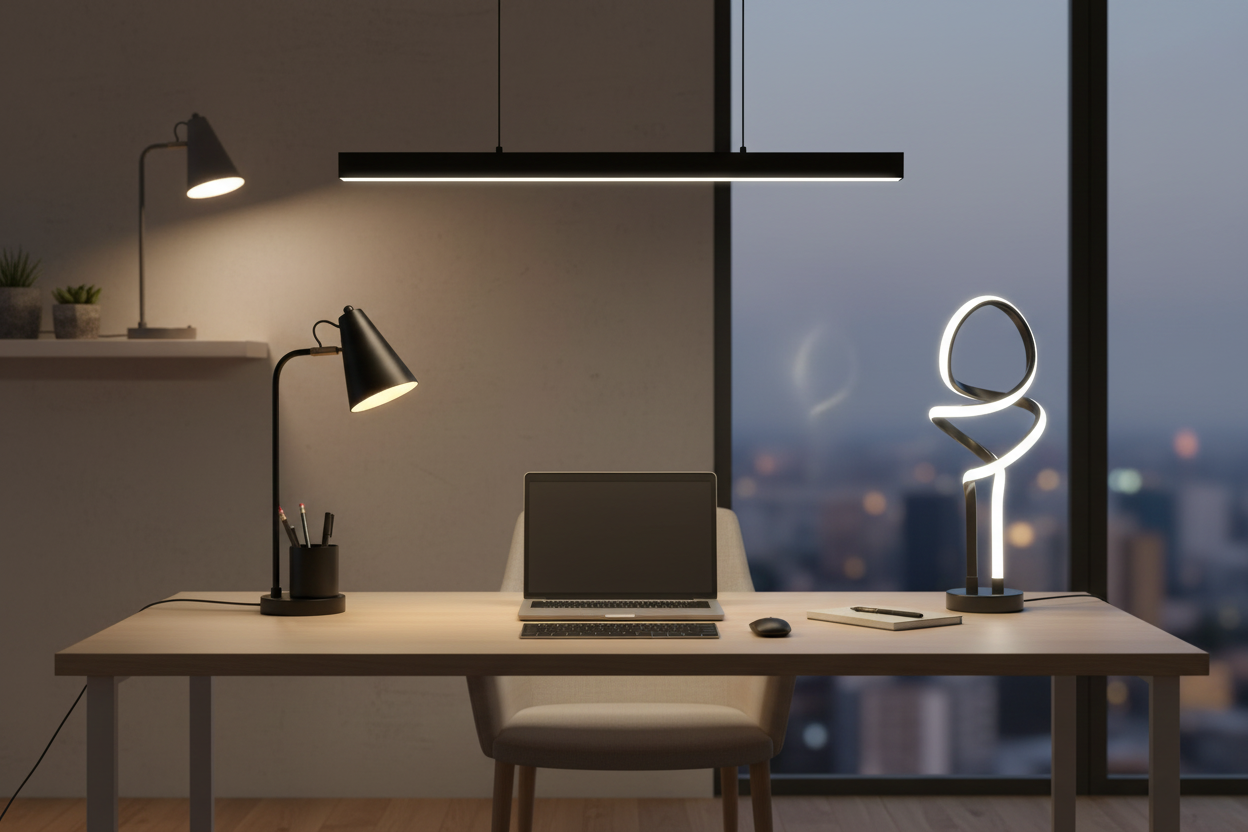
A solid task lamp makes a measurable difference. Take the 19.5" Student Black Metal Task Desk Lamp With Organizer ($67.66). It's not fancy, but it does exactly what you need: directional light where you're working, plus built-in storage for pens and small items. The adjustable head means you can angle it away from your monitor while still illuminating your keyboard and notebook.

What I like about this setup: the E26 socket takes standard bulbs up to 60W, so you control the brightness and color temperature. Start with a warm white (2700-3000K) for general work, or go daylight (5000K+) if you're doing color-critical tasks.
Ambient Lighting: The Background Player
Here's where most people get it wrong. They think ambient light is just "whatever's already in the room." But ambient lighting is what fills the space around your task area. It prevents the harsh contrast between your bright screen and a dark room—a contrast that fatigues your eyes faster than you realize.
The goal isn't to light up the entire room like a stadium. You want soft, indirect light that reduces shadows without creating glare. This is where ceiling fixtures or wall-mounted lights come in.
The 11.8 Inch LED Flush Mount Ceiling Light with Night Light ($85.00) handles this beautifully. It's a 20W LED fixture that provides even overhead lighting without the harshness of traditional fluorescents. The integrated night light is a nice touch for late-night work sessions when you don't need full brightness.

This fixture works for rooms up to 150 square feet, which covers most home offices. The 4000K color temperature sits right in the "neutral white" range—bright enough to keep you alert, but not so cool that it feels clinical.
The Monitor Light Situation: Do You Actually Need One?
Monitor lights—those bars that clip onto your screen—have become trendy in productivity circles. But do they actually help, or are they just another gadget?
The honest answer: it depends on your setup.
If you work primarily on a computer and your desk faces a wall (no natural window light), a monitor light can be genuinely useful. They illuminate your desk surface and keyboard without creating screen glare, because the light projects downward and forward, not back at you.
However, if you already have good task lighting positioned correctly, a monitor light might be redundant. I'd prioritize getting your ambient and task lighting right first. If you're still experiencing eye strain or your workspace feels unbalanced, then consider adding a monitor light.
Color Temperature: The Detail That Changes Everything
This is where lighting gets interesting. Color temperature, measured in Kelvin (K), dramatically affects how your brain responds to light.
Here's the breakdown:
- 2700-3000K (Warm White): Relaxing, cozy, similar to incandescent bulbs. Good for winding down, but can make you drowsy during work hours.
- 3500-4100K (Neutral White): Balanced and natural. Works well for general office tasks without being too stimulating or too relaxing.
- 5000-6500K (Daylight/Cool White): Crisp and energizing. Mimics midday sunlight. Great for detailed work and staying alert, but can feel harsh if overused.
For deep focus work, I recommend neutral to cool white (4000-5000K) during peak productivity hours. This range keeps you alert without the aggressive edge of pure daylight bulbs.
The 18"h Metal USB Table Lamp ($99.00) gives you flexibility here. Since it uses a standard bulb (not included), you can swap between color temperatures based on the time of day or task. The built-in USB port is practical for keeping your phone charged without hunting for outlets.

Dimming: Why Fixed Brightness Is Holding You Back
Your lighting needs change throughout the day. Morning light requirements differ from afternoon, which differ from evening. Fixed-brightness lights force you to work in conditions that might be too bright or too dim for the current time and task.
Dimmable lights let you adapt. When you're doing deep analytical work, you might want brighter light to maintain alertness. During creative brainstorming or reading, slightly dimmer light can feel less intense and more conducive to flow states.
The 3 Color Unique Bedside Dimmable LED Table Lamp ($109.00) offers stepless dimming, meaning you can fine-tune brightness to exactly what you need—not just "low, medium, high." The spiral design is modern without being distracting, and at 19 inches tall, it provides good coverage for a desk workspace.

The 50,000+ hour lifespan means you're looking at roughly 11 years of use if you run it 12 hours a day. That's the kind of longevity that justifies the investment.
Positioning: Where You Put Your Lights Matters More Than What You Buy
You can have the best lighting equipment in the world and still end up with glare, shadows, and eye strain if it's positioned poorly.
Task Lamp Placement
Position your task lamp to the side opposite your dominant hand. If you're right-handed, place it on your left. This prevents your hand from casting shadows on your work as you write or type.
Angle the light so it illuminates your desk surface, not your screen. If you notice reflections on your monitor, adjust the lamp angle or move it slightly back.
Ambient Light Placement
Overhead ambient lighting should be centered in the room or workspace, not directly above your monitor. You want even distribution that fills the space without creating hotspots.
If you're using wall-mounted lights or floor lamps for ambient fill, position them behind or to the side of your seating position. Light coming from behind your monitor creates glare; light from behind you creates shadows on your screen.
The 20-20-20 Rule Still Applies
Even with perfect lighting, your eyes need breaks. Every 20 minutes, look at something 20 feet away for 20 seconds. Good lighting reduces strain, but it doesn't eliminate the need for rest.
Natural Light: The Free Upgrade You Might Be Ignoring
If you have access to natural light, use it. Position your desk perpendicular to windows, not facing them or with your back to them. Facing a window creates glare on your screen; having the window behind you creates a backlit situation that strains your eyes.
Perpendicular placement gives you natural ambient light from the side, which is ideal. You get the circadian benefits of daylight exposure without the glare issues.
That said, natural light changes throughout the day. Morning light is cooler and more energizing; afternoon light is warmer and softer. Supplement with artificial lighting to maintain consistency, especially during early mornings, late afternoons, and overcast days.
The Evening Problem: Why Your Night Work Sessions Feel Harder
Working at night under the same bright, cool-white lighting you use during the day confuses your circadian system. Your brain interprets bright blue-spectrum light as "daytime," which suppresses melatonin production and can mess with your sleep later.
If you regularly work evenings, consider switching to warmer, dimmer lighting after sunset. This doesn't mean working in the dark—just reducing intensity and shifting toward warmer color temperatures (2700-3000K).
Fixtures with integrated night lights, like the 11.8 Inch 20W LED Flush Mount Ceiling Light ($89.85), give you options. Use the main 20W LED during the day, then switch to the 3W night light for evening work. It's enough to see what you're doing without blasting your circadian rhythm.

Energy Efficiency: The Long-Term Cost of Lighting
LED lighting costs more upfront but saves significantly over time. A quality LED uses about 80% less energy than an incandescent bulb producing the same light output.
Let's do the math on the 11.8 Inch LED Flush Mount Ceiling Light ($85.00). At 20W, running it 8 hours a day costs roughly $7 per year in electricity (at $0.12/kWh). An equivalent incandescent setup would cost around $35 per year. Over the 50,000+ hour lifespan (about 17 years at 8 hours/day), you save approximately $476 in energy costs.
The fixture pays for itself in energy savings alone, not counting replacement bulb costs you'd incur with traditional lighting.
Common Lighting Mistakes That Kill Productivity
Mistake #1: Only Using Overhead Lighting
Overhead-only lighting creates harsh shadows under your chin, nose, and brow. It's unflattering in video calls and creates uneven illumination on your work surface. Add task lighting to balance it out.
Mistake #2: Screen Brightness Doesn't Match Ambient Light
If your screen is significantly brighter than your surroundings, your pupils constantly adjust between the two, causing fatigue. Increase ambient lighting or decrease screen brightness to reduce the contrast.
Mistake #3: Ignoring Glare
Glare is light reflecting off your screen or work surface directly into your eyes. It's distracting and tiring. Reposition lights, adjust angles, or use matte screen protectors to minimize it.
Mistake #4: Using Inconsistent Color Temperatures
Mixing warm and cool white bulbs in the same space creates a disjointed feeling. Stick to one color temperature range for all lights in your workspace. If you want variety, change temperatures throughout the day, not within the same moment.
Mistake #5: Neglecting Maintenance
Dusty bulbs and fixtures reduce light output by up to 30%. Clean your lights every few months. It's a small thing that makes a noticeable difference.
Building Your Ideal Lighting Setup: A Practical Framework
Here's a straightforward approach to upgrading your workspace lighting:
Step 1: Assess Your Current Situation
Sit at your desk during your typical work hours. Notice where shadows fall, whether your screen has glare, and how your eyes feel after an hour of work. Take notes.
Step 2: Add Ambient Lighting First
If you don't have good overhead or background lighting, start there. A ceiling fixture like the LED Flush Mount Ceiling Light with Night Light ($85.00) establishes your baseline illumination.
Step 3: Layer in Task Lighting
Once your ambient light is set, add a task lamp. Position it according to the guidelines above—opposite your dominant hand, angled toward your work surface, not your screen.
Step 4: Fine-Tune Color Temperature and Brightness
Experiment with different bulbs or dimming levels. What feels right at 9 AM might feel too bright at 3 PM. Adjust until you find settings that keep you alert without causing strain.
Step 5: Evaluate After a Week
Give your new setup a full week before making additional changes. Your eyes need time to adjust. After a week, you'll have a clearer sense of what's working and what needs tweaking.
The Psychology of Lighting: Why It Affects Focus Beyond Biology
Good lighting doesn't just help your eyes and circadian rhythm—it affects your mental state. Bright, well-lit spaces feel more energizing and professional. Dim, poorly lit spaces feel sluggish and depressing.
This isn't just perception. Studies show that people working in well-lit environments report higher motivation, better mood, and improved concentration compared to those in dim or inconsistent lighting.
Your workspace lighting sets the tone for your work. Treat it as part of your productivity infrastructure, not an afterthought.
Special Considerations for Different Work Types
For Writers and Readers
Prioritize even, glare-free lighting. You'll be looking at text for extended periods, so reduce contrast and avoid harsh shadows. Neutral white (3500-4000K) works well for sustained reading without causing drowsiness.
For Designers and Visual Work
Color accuracy matters. Use daylight-balanced bulbs (5000-6500K) with high CRI (Color Rendering Index) ratings—95+ if possible. This ensures colors appear true to life, which is critical for design work.
For Programmers and Analysts
You're staring at screens most of the day. Focus on reducing screen glare and maintaining consistent ambient light. Consider slightly dimmer ambient lighting with targeted task lighting for reference materials.
For Video Calls and Content Creation
Front-facing light is essential. Position a lamp or light source in front of you, slightly above eye level, to eliminate shadows on your face. Avoid backlighting (windows or lights behind you), which turns you into a silhouette on camera.
Budget-Friendly Lighting Upgrades That Actually Work
You don't need to spend thousands to improve your lighting. Start with one quality piece and build from there.
The 19.5" Student Black Metal Task Desk Lamp ($67.66) is a solid entry point. It's affordable, functional, and includes storage—a practical choice that delivers immediate results.
Pair it with a ceiling fixture like the 11.8 Inch LED Flush Mount Ceiling Light ($89.85), and you've covered both task and ambient lighting for under $160. That's a complete lighting overhaul for less than most people spend on a single monitor.
If you want dimming control and a more refined aesthetic, the 3 Color Dimmable LED Table Lamp ($109.00) offers stepless adjustment and a modern design that doesn't look like standard office equipment.
Maintenance and Longevity: Making Your Investment Last
LED fixtures are rated for 25,000 to 50,000+ hours, but that assumes proper use and care.
Keep fixtures clean. Dust reduces light output and can cause overheating in enclosed fixtures. Wipe down bulbs and shades every month or two.
Avoid frequent on-off cycling. While LEDs handle switching better than incandescents, constantly flipping lights on and off still reduces lifespan. If you're leaving the room for just a few minutes, leave the light on.
Use compatible dimmers. Not all LEDs work with all dimmers. If you're adding dimming capability to an existing fixture, check compatibility to avoid flickering or buzzing.
Monitor for color shift. As LEDs age, they can shift slightly in color temperature. If you notice your "neutral white" bulb looking more yellow or blue over time, it might be nearing end of life.
The Bottom Line: Lighting Is Infrastructure, Not Decoration
Most people treat lighting as an afterthought—something that just needs to be "good enough." But your lighting setup is as fundamental to productivity as your desk, chair, or computer.
Poor lighting doesn't just cause eye strain. It degrades focus, increases fatigue, disrupts sleep, and makes work feel harder than it needs to be. Good lighting does the opposite: it supports concentration, reduces physical strain, and creates an environment where deep work feels natural.
You don't need a complicated setup. You need the right layers—ambient and task lighting—positioned correctly, with appropriate color temperature and brightness for your work style.
Start with one upgrade. Add a task lamp or replace an overhead fixture. Notice the difference. Then build from there.
Your eyes, your focus, and your future self will thank you.
Frequently Asked Questions
What's the best color temperature for focus and productivity?
For most people, 4000-5000K (neutral to cool white) works best during peak work hours. This range mimics natural daylight and promotes alertness without feeling harsh. If you work late, shift to warmer temperatures (2700-3000K) after sunset to avoid disrupting your sleep cycle.
How bright should my workspace lighting be?
General office work requires 300-500 lux of ambient lighting, with task lighting adding another 500-1000 lux on your work surface. In practical terms, this means a combination of overhead lighting and a desk lamp. If you're squinting or leaning forward to see clearly, you need more light. If you're experiencing glare or discomfort, you might have too much or poorly positioned light.
Do I really need both ambient and task lighting?
Yes, if you want to minimize eye strain and maintain focus for extended periods. Ambient lighting prevents harsh contrast between your screen and surroundings. Task lighting illuminates your immediate work area without creating glare. Using only one or the other forces your eyes to constantly adjust between bright and dark areas, which causes fatigue.
Can lighting actually improve my concentration, or is it just about comfort?
It's both. Proper lighting reduces physical strain (eye fatigue, headaches), which indirectly improves concentration by removing distractions. But lighting also has direct effects: blue-spectrum light (4000K+) increases alertness and cognitive performance during the day, while warm light (2700-3000K) promotes relaxation. Your brain responds to light cues, so optimizing your lighting setup genuinely affects mental performance.
How do I eliminate screen glare without making the room too dark?
Position lights to the side of your monitor, not directly in front or behind. Angle task lamps downward toward your desk surface, not at your screen. Increase ambient lighting to reduce the contrast between your screen and surroundings—this lets you lower screen brightness, which also reduces glare. If glare persists, consider a matte screen protector or repositioning your desk relative to windows and overhead lights.
Are expensive lighting fixtures worth it, or will budget options work fine?
It depends on what you're buying. For basic LED fixtures, mid-range options ($80-120) often provide the same light quality as premium models. You're paying for design, brand, and sometimes better build quality, but the actual lighting performance is comparable. However, avoid the cheapest options—poorly made LEDs can flicker, have inconsistent color temperature, or fail prematurely. The fixtures recommended in this article ($67-109) hit the sweet spot of quality and value.
How often should I replace LED bulbs or fixtures?
Quality LEDs last 25,000-50,000+ hours. At 8 hours per day, that's 8-17 years. You'll likely upgrade for aesthetic or functional reasons long before the LED fails. Replace bulbs when you notice significant dimming (usually 70% of original brightness), color shift, or flickering. For integrated LED fixtures (where the bulb isn't replaceable), the entire fixture is designed to last its rated lifespan.
What's the difference between lumens, watts, and lux?
Watts measure energy consumption. Lumens measure total light output from a bulb. Lux measures light intensity at a specific surface (lumens per square meter). For practical purposes: look at lumens when buying bulbs (higher = brighter), ignore watts (it's just energy use), and use lux when measuring whether your workspace has enough light. A typical desk needs 500-1000 lux for comfortable work.
Should I use warm or cool light for evening work sessions?
Use warmer light (2700-3000K) in the evening to minimize circadian disruption. Bright, cool-white light suppresses melatonin and can interfere with sleep quality. If you need to stay alert for evening work, use moderate brightness with neutral white (3500-4000K) rather than cool daylight. Dim the lights an hour before you plan to sleep to help your body transition.
Can I mix different color temperatures in the same workspace?
It's not recommended. Mixing warm and cool white lights in the same space creates visual inconsistency and can feel disorienting. Stick to one color temperature range for all lights in your workspace. If you want to change temperatures throughout the day (cooler in the morning, warmer in the evening), switch all lights together rather than running different temperatures simultaneously.
Ready to Upgrade Your Workspace Lighting?
The difference between struggling through your workday and maintaining deep focus often comes down to details most people overlook. Lighting is one of those details.
Start with the basics: a quality task lamp and proper ambient lighting. Position them correctly. Choose appropriate color temperatures. Then fine-tune based on how you feel after a week of use.
Check out the Student Black Metal Task Desk Lamp ($67.66) for focused task lighting, the LED Flush Mount Ceiling Light ($85.00) for ambient coverage, or the Dimmable LED Table Lamp ($109.00) if you want full control over brightness throughout the day.
Your workspace should support your best work, not fight against it. Better lighting is one of the simplest, most effective upgrades you can make.
