Every August, millions of students pack up their lives into a few boxes and move into a dorm room roughly the size of a walk-in closet. They bring laptops, mini fridges, string lights — and almost universally forget the one thing that will affect their health, focus, and GPA more than any other piece of furniture: a decent chair.
If you're a college student or a parent helping your kid get ready for fall semester, this guide is for you. We're going to talk honestly about what bad seating does to your body over a semester, how to find a chair that actually fits in a 12×10 dorm room, and why the Rackora High Back Mesh Chair with Lumbar Support & Footrest at $241 might be the best investment you make before move-in day.
The Hidden Dangers of Studying on a Bed (or a Cheap Plastic Chair)
Let's start with the uncomfortable truth: most college students study in positions that would make a physical therapist wince.
Studying on your bed sounds cozy. You're propped up on pillows, laptop balanced on your knees, maybe a snack within arm's reach. But here's what's actually happening to your spine: your lower back is rounded, your neck is craned forward, and your hip flexors are in a shortened position for hours at a time. Do that for a few weeks and you'll start noticing a dull ache in your lower back that doesn't go away after you stand up. Do it for a semester and you're looking at chronic postural dysfunction that can follow you into your 30s.
Cheap plastic chairs — the kind that come with dorm room desks or get grabbed from a discount store — aren't much better. They're flat, rigid, and designed for short-term use. They offer zero lumbar support, no height adjustment, and no way to shift your posture throughout a long study session. After two hours in one of those chairs, most students migrate back to the bed. And the cycle continues.

What Spinal Misalignment Actually Feels Like (and Costs)
Spinal misalignment from poor seating doesn't announce itself dramatically. It starts as mild stiffness in the morning. Then it becomes a persistent ache during long study sessions. Then it starts affecting your concentration — because it's genuinely hard to focus on organic chemistry when your lower back is screaming at you.
The downstream costs are real: chiropractic visits, physical therapy, over-the-counter pain medication, and lost study hours. A single chiropractic session in most US cities runs $60–$120. A semester of bad posture can easily cost you more in healthcare than a quality ergonomic chair would have.
Beyond the physical, there's a cognitive cost. Research consistently links physical discomfort to reduced working memory and attention span. When your body is uncomfortable, your brain allocates resources to managing that discomfort instead of processing information. For students trying to retain dense material during late-night study sessions, that's a meaningful academic disadvantage.
Space Optimization: Choosing a Chair That Fits a Dorm Room Without Sacrificing Features
Here's the challenge unique to college students: you need a chair that's genuinely ergonomic — with real lumbar support, adjustable armrests, and height flexibility — but it also has to fit in a room where the desk is three feet from the bed and the closet door swings into the chair's path.
Most ergonomic chairs are designed for corporate offices with generous floor plans. They're wide, they have large bases, and they assume you have room to roll around. Dorm rooms don't work that way.
What to Look for in a Dorm-Friendly Ergonomic Chair
Compact footprint with a full-size base. You want a chair with a 5-point caster base (for stability) but a relatively narrow seat width — ideally under 28 inches wide. This lets you tuck the chair fully under the desk when you're not using it, which matters a lot when your floor space is measured in square feet, not square yards.
Height adjustability. Dorm desks are notoriously non-adjustable. They're set at a fixed height that may or may not match your body. A chair with a wide pneumatic height range — say, 17 to 21 inches from floor to seat — lets you compensate for a desk that's too high or too low and maintain proper ergonomic alignment regardless.
3D or 4D armrests. This sounds like a luxury feature, but it's not. Fixed armrests that don't adjust to your body width will force your shoulders into an unnatural position. Over a semester of daily use, that translates to neck tension and upper back pain. Armrests that adjust in height, width, and angle let you position your arms so your shoulders stay relaxed — which is the whole point.
Dedicated lumbar support. Not a lumbar curve built into the backrest shape, but an actual adjustable lumbar support pillow or mechanism. Your lumbar spine has a natural inward curve, and a chair that supports that curve keeps your entire spine in alignment. Without it, you'll unconsciously slouch within 20 minutes of sitting down.
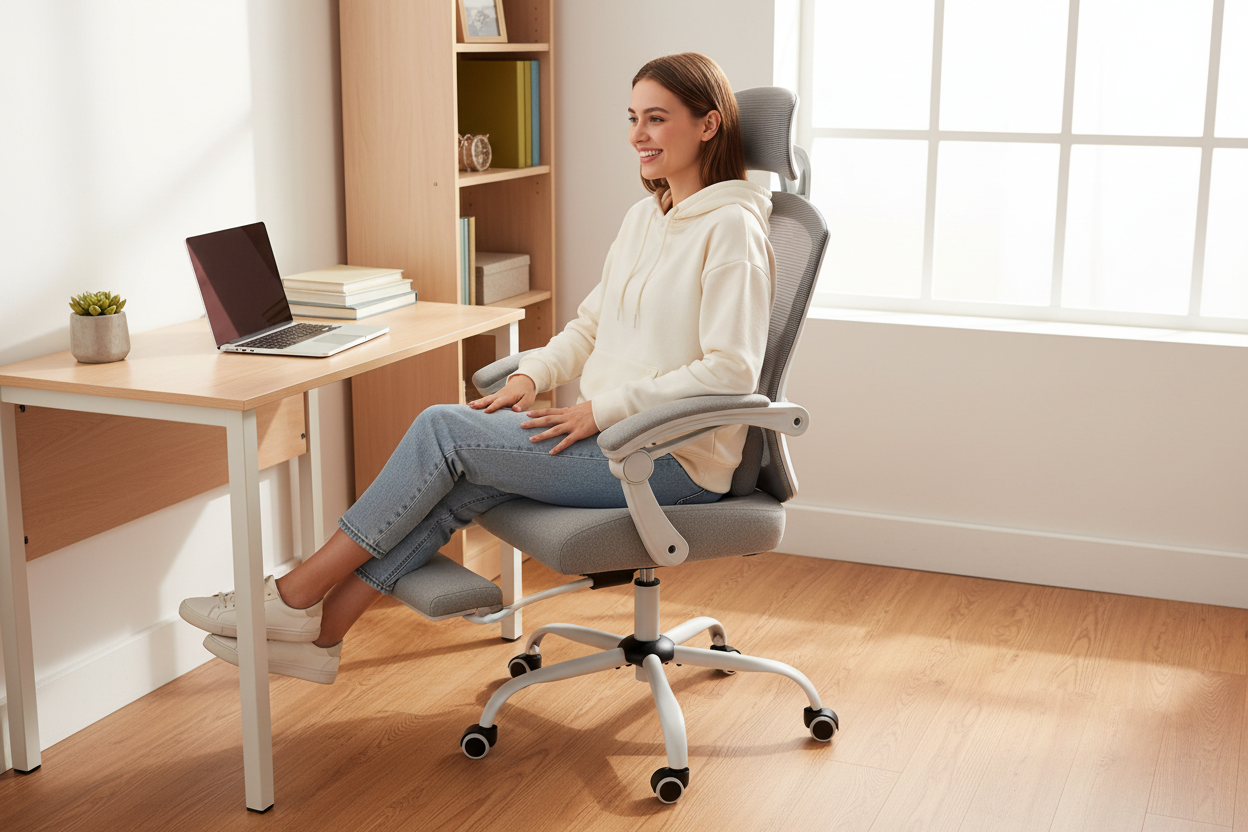
A retractable footrest. This is the feature most students don't think to look for until they've been studying for four hours and desperately want to recline without leaving their desk. A built-in footrest that tucks away when you don't need it is a genuine quality-of-life upgrade for long study sessions.
The Rackora High Back Mesh Chair: Built for Exactly This
The Rackora Ergonomic Office Chair with Lumbar Support & Footrest checks every one of those boxes — and at $241, it does it without requiring a second job.

At 27"L × 38"W × 52"H and 34 lbs, it's compact enough to tuck under a standard dorm desk. The nylon mesh backrest keeps you cool during late-night study sessions (mesh breathes; foam doesn't). The integrated lumbar support pillow cradles your lower spine. The headrest adjusts in height and angle. And the retractable footrest means you can recline to 135° and actually rest between study blocks without getting up.
The 360° swivel and pneumatic height adjustment handle the rest. It's a chair designed for all-day sitting — which is exactly what college students do, whether they're in class, at their desk, or on a video call.
Shop the Rackora Mesh Chair — $241 →

The Cross-Legged Sitting Problem (and What to Do About It)
Here's something that doesn't get talked about enough in ergonomics content: a lot of students — especially younger ones — don't sit in chairs the way chairs are designed to be used. They sit cross-legged. They tuck one foot under themselves. They perch on the edge of the seat. They shift positions constantly throughout a long study session.
This isn't laziness or bad habits. It's actually a natural response to the fact that most chairs don't accommodate the way human bodies want to move. When a chair is uncomfortable in a standard seated position, your body instinctively seeks alternative positions that redistribute pressure and change the muscle groups being loaded.
Why Position-Shifting Is Actually Good (When the Chair Supports It)
Static sitting — staying in one position for hours — is genuinely bad for you regardless of how good your posture is. Your body is designed to move. Muscles that stay contracted in one position for too long fatigue and develop trigger points. Circulation to your lower extremities decreases. Your intervertebral discs, which rely on movement to stay hydrated and healthy, get compressed without relief.
The solution isn't to force yourself to sit perfectly still in a perfect ergonomic position. It's to have a chair that makes it easy to shift positions — from upright focus mode to a slight recline for reading, from standard seated to a more relaxed position with the footrest extended — without having to get up and rearrange yourself.
A chair with a wide recline range (90° to 135°), a lockable tilt, and a retractable footrest essentially gives you multiple seating configurations in one piece of furniture. That's what makes it genuinely useful for students who study for 4–6 hours at a stretch.
For Students Who Need Even More Adjustability
If you're someone who really moves around a lot while studying — or if you're a parent buying a chair that needs to work for a student who's still growing — the Rackora High Back Mesh Chair with 4D Armrests at $340 is worth a look.

The 4D armrests on this chair lift up to 90°, which means you can flip them out of the way entirely when you want to sit cross-legged or in a non-standard position — and then bring them back when you're in focused work mode. The recline range is 90° to 120°, the mesh and fabric construction keeps airflow going, and the compact footprint (26.57"L × 24.80"W) fits neatly under most dorm desks.
It's a step up in price, but if adjustability is the priority, it's a legitimate option.
Budget vs. Investment: The Real Math on a $241 Ergonomic Chair
Let's talk money, because that's ultimately what drives most back-to-school purchasing decisions.
A cheap plastic chair from a big-box store runs $30–$60. A basic task chair with minimal adjustability might be $80–$120. The Rackora High Back Mesh Chair is $241. On the surface, that looks like a significant premium. But let's run the actual numbers.
The 3-Year Warranty Math
Most cheap chairs don't last three years of daily college use. The gas lift fails. The armrests crack. The seat foam compresses into a flat, unsupportive slab. You end up buying another chair — or going back to studying on the bed.
A chair backed by a 3-year warranty is a chair the manufacturer is confident will hold up. That confidence is built into the price. Spread $241 over three years of daily use and you're paying roughly $0.22 per day for a chair that actively supports your spine and keeps you comfortable during study sessions. That's less than a cup of coffee.
The Healthcare Cost Comparison
We mentioned this earlier, but it bears repeating with specifics. A single visit to a chiropractor for lower back pain: $60–$120. A course of physical therapy for postural dysfunction: $500–$2,000 depending on your insurance situation. Over-the-counter pain medication for chronic back pain: $15–$30/month. Lost study hours from discomfort-related distraction: priceless, but real.
The $241 chair starts looking like a bargain pretty quickly when you frame it against the alternative.
The Resale Value Angle
Quality ergonomic chairs hold their value. A well-maintained mesh chair from a reputable brand can sell for 50–70% of its original price on Facebook Marketplace or Craigslist after three or four years. A $30 plastic chair is worth nothing after a semester. The Rackora chair is an asset; the cheap chair is a consumable.
For Students Who Want the Premium Option
If budget isn't the primary constraint and you want a chair that's built to last well beyond college, the Rackora L2 Ergonomic Chair at $429 (on sale from $489) is the serious option.

The L2 is BIFMA X5.1-2017 certified — that's the gold standard for commercial office furniture safety and durability in North America. The Class 3 gas lift is rated for 120,000 cycles. The 3D armrests adjust in height, depth, and pivot. The seat depth slides 2 inches forward and back to fit different leg lengths. It's a chair designed for people who sit 6+ hours a day and need it to perform for years, not semesters.

For a student who's going to use this chair through college and into their first job, the L2 is the buy-once-cry-once option.
Shop the Rackora L2 — $429 (Sale from $489) →
How to Set Up Your Dorm Desk for Maximum Ergonomic Benefit
Even the best chair won't help you if the rest of your setup is working against it. Here's a quick checklist for getting your dorm desk ergonomics right from day one.
Chair height first. Adjust your chair so your feet are flat on the floor (or on the footrest) and your thighs are roughly parallel to the ground. Your knees should be at approximately 90°. This is your baseline.
Desk height relative to chair. Your elbows should be at roughly desk height when your arms are relaxed at your sides. If the desk is too high, raise your chair and use a footrest. If it's too low, you may need a desk riser — but most dorm desks are on the higher side, so raising the chair is the more common fix.
Monitor or laptop position. The top of your screen should be at or slightly below eye level. For laptop users, this almost always means using a laptop stand and an external keyboard. Typing directly on a laptop that's at desk height forces your neck into a downward angle for hours — which is exactly the kind of sustained forward head posture that causes neck pain and headaches.
Lumbar support position. The lumbar support on your chair should sit in the curve of your lower back — typically 2–4 inches above your belt line. Adjust it until you feel it gently pressing into the natural inward curve of your lumbar spine. You shouldn't have to actively push your back against it; it should just be there, supporting the curve that's already there.
Armrest height. Your armrests should support your forearms with your shoulders relaxed — not shrugged up toward your ears. If your armrests are too high, they'll push your shoulders up. If they're too low, you'll lean to one side to use them. Get them to the height where your shoulders drop naturally.
Take breaks. No chair, regardless of how good it is, eliminates the need to move. Set a timer for 45–50 minutes and stand up, walk around, and stretch for 5 minutes before your next study block. Your body will thank you, and your focus will actually improve — the Pomodoro technique exists for a reason.
Comparing Your Options: Which Rackora Chair Is Right for Your Dorm?
Here's a straightforward breakdown to help you decide:
Rackora High Back Mesh Chair with Lumbar Support & Footrest — $241
Best for: Students on a budget who want real ergonomic features without overspending. Compact footprint, breathable mesh, integrated lumbar pillow, retractable footrest, 90–135° recline. The sweet spot for most college students.
Rackora High Back Mesh Chair with 4D Armrests — $340
Best for: Students who shift positions frequently and want maximum armrest flexibility. The 4D armrests that lift to 90° are a genuine differentiator for non-standard sitting positions.
Rackora L2 Ergonomic Chair — $429 (Sale from $489)
Best for: Students (or parents) who want a chair that will last through college and beyond. BIFMA-certified, 3D armrests, adjustable seat depth, 300 lb capacity. The long-term investment option.
Get the Best Value Pick — $241 →
What Parents Should Know Before Buying
If you're a parent reading this while your student is busy ignoring your texts, here's the condensed version of what matters.
Your student will spend more time in their desk chair than in any other piece of furniture in their dorm room. More than the bed, arguably, once you account for classes, studying, video calls, and late-night gaming. The chair is not a luxury item — it's infrastructure.
The chairs that come with dorm rooms (when they come with anything at all) are not designed for extended use. They're designed to be cheap and durable in the sense that they won't break — not in the sense that they'll support a human spine for 6 hours a day.
A quality ergonomic chair is also one of the few back-to-school purchases that your student will actually use every single day, for all four years, and potentially take with them when they graduate. It's not a textbook that becomes obsolete. It's not a mini fridge that stays in the dorm. It's a piece of furniture that travels with them.
At $241 with a 3-year warranty, the Rackora High Back Mesh Chair is the kind of purchase that makes sense when you think about it that way. It's not the cheapest option. It's the smartest one.
Frequently Asked Questions
1. Will an ergonomic chair actually fit in a small dorm room?
Yes — if you choose the right one. The Rackora High Back Mesh Chair measures 27"L × 38"W × 52"H and weighs 34 lbs. It tucks fully under a standard dorm desk when not in use. The 5-point caster base is stable without being oversized. Most standard dorm rooms (typically 10×12 feet or larger) can accommodate it without any layout issues.
2. Is a mesh chair better than a foam chair for long study sessions?
For most students, yes. Mesh backrests allow airflow, which means you won't be sweating through your shirt after two hours of studying. Foam backrests retain heat. The tradeoff is that mesh can feel firmer initially — but most people adapt within a few days, and the breathability benefit is consistent throughout the session.
3. What's the difference between lumbar support built into the backrest shape vs. an adjustable lumbar pillow?
A lumbar curve built into the backrest shape is a fixed contour that may or may not align with your specific spine. An adjustable lumbar support pillow — like the one on the Rackora mesh chair — can be positioned to match your actual lumbar curve, regardless of your height or body proportions. For most people, the adjustable version provides meaningfully better support.
4. Can I use this chair for gaming as well as studying?
Absolutely. The recline range (90–135°), retractable footrest, and padded armrests make it comfortable for extended gaming sessions as well as studying. The breathable mesh keeps you cool during long sessions. The 360° swivel is smooth and quiet. It's a genuinely versatile chair.
5. How long does assembly take, and do I need tools?
Most users report assembly taking 20–30 minutes. All required tools are included. The instructions are straightforward. It's a reasonable solo assembly project — you don't need a second person, though having one makes it slightly easier when attaching the backrest.
6. Is $241 really worth it compared to a $60 chair from a discount store?
Run the math: a $60 chair that lasts one year costs $60/year. The Rackora chair at $241 with a 3-year warranty costs $80/year — and provides actual lumbar support, adjustable height, 3D armrests, and a retractable footrest that the $60 chair doesn't have. Factor in the healthcare costs of chronic back pain from poor seating and the $241 chair is the cheaper option over any multi-year horizon.
7. What if the chair doesn't work for my student's body type?
Rackora offers a return policy — check the product page for current terms. The chair accommodates a wide range of body types with its pneumatic height adjustment and adjustable lumbar support. If you're concerned about fit, the L2 model offers additional adjustability including seat depth adjustment, which is particularly useful for students with longer or shorter legs.
8. Does the footrest actually hold up under regular use?
Yes. The retractable footrest on the Rackora mesh chair is designed for regular use — it's not a flimsy add-on. It extends smoothly and locks in position. Students who use the recline function regularly report that the footrest is one of the features they use most during long study sessions and breaks.
9. How does this chair compare to gaming chairs marketed to students?
Gaming chairs are designed primarily for aesthetics and the appearance of ergonomics. Most have fixed lumbar pillows that don't adjust, bucket seat designs that restrict movement, and materials (faux leather) that don't breathe. Ergonomic office chairs like the Rackora mesh chair are designed around actual ergonomic principles — adjustable lumbar support, breathable mesh, flexible recline — and tend to perform better for long study sessions even if they're less visually dramatic.
10. Can this chair handle a student who sits cross-legged or in non-standard positions?
The Rackora mesh chair has a 19.5"+ wide seat with a padded cushion that accommodates cross-legged sitting reasonably well. The armrests adjust in height so they can be lowered out of the way when sitting in non-standard positions. For maximum armrest flexibility — including the ability to flip armrests up to 90° — the 4D Armrest model at $340 is the better choice for students who frequently sit cross-legged.
Your dorm room chair is going to shape your posture, your focus, and your physical health for the next four years. It's worth thinking about carefully — and spending on thoughtfully. The Rackora High Back Mesh Chair at $241 is the best balance of ergonomic features, compact size, and honest value we've found for college students. It's not the cheapest option. It's the right one.
