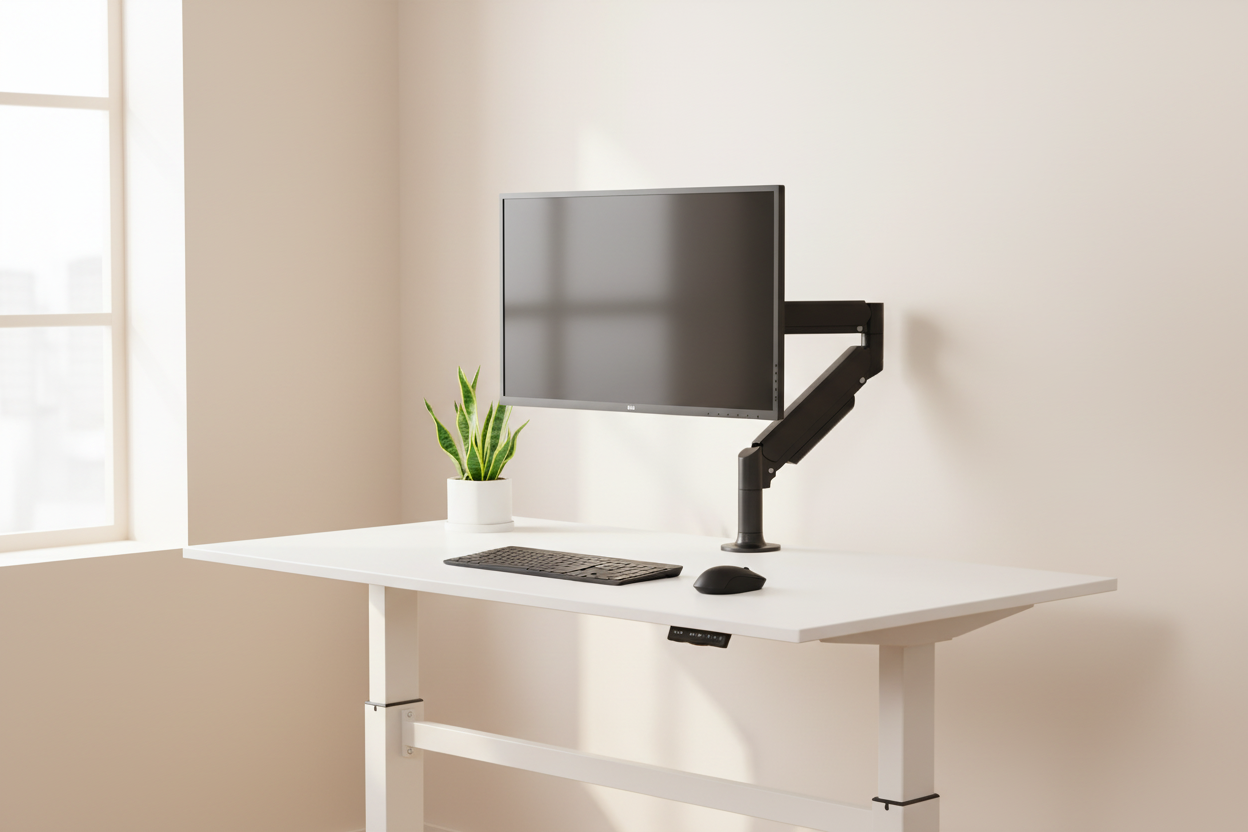
Let's be honest for a second. You've looked at your desk—really looked at it—and felt that little pang of something. Maybe it's the tangle of cables that's slowly becoming sentient. Maybe it's the mismatched collection of stuff that accumulated over the years like geological layers of bad decisions. Or maybe it's just the general vibe of "I gave up."
You're not alone. Research from Princeton Neuroscience Institute confirmed what we all suspected: visual clutter literally competes for your attention, reducing working memory and increasing cortisol levels. Translation? Your messy desk is stressing you out and making it harder to focus. Fun.
But here's the good news. The workspace aesthetic dominating 2026 isn't about spending thousands on designer furniture or living like a monk with nothing on your desk. It's about warm minimalism—a design philosophy that pairs natural materials with precision-engineered metal to create spaces that feel both human and intentional. And honestly? It's never been easier (or more affordable) to pull off.
Chapter 1: The Aesthetic Evolution—From RGB Chaos to Warm Minimalism
The Death of the "Battlestation"
Remember 2019–2022? Every desk setup on Reddit looked like the inside of a nightclub. LED strips behind every monitor. RGB keyboards cycling through the rainbow. Nanoleaf panels turning your wall into a rave. It was fun for a while. Then we all collectively got a headache.
The pandemic home office boom accelerated something interesting. When your workspace is also your living space—when your partner or roommate has to look at your desk during dinner—suddenly that aggressive gaming aesthetic feels less "cool" and more "why does our apartment look like a Best Buy display?"
What Changed
The shift didn't happen overnight, but by 2024, the signals were everywhere. Pinterest searches for "warm minimalist desk" climbed dramatically year-over-year. Posts on r/battlestations featuring wood and neutral tones consistently outperformed RGB setups. Major tech companies leaned hard into natural material aesthetics. And the "quiet luxury" movement from fashion started bleeding into interior design and workspace culture.
The 2026 Aesthetic DNA
So what does the 2026 minimalist desk actually look like? Here's the formula:
- Materials: Solid wood (walnut, oak, ash) + anodized aluminum or matte steel
- Colors: Warm neutrals—cream, sand, charcoal, matte black, natural wood tones
- Lighting: Warm white (2700–3000K), indirect, no visible bulbs
- Philosophy: Everything visible is intentional. Everything ugly is hidden.
The key word is warm. This isn't the cold, sterile minimalism of 2015 that made your space look like a hospital waiting room. It's minimalism with a pulse. Wood grain gives your eyes something organic to rest on. Metal provides structure and precision. Together, they create what designers are calling "engineered comfort."
Chapter 2: The Foundation—Your Desk Surface
Why Material Matters More Than Size
Here's a take that might surprise you: the size of your desk matters less than what it's made of. A 48-inch solid walnut desktop will feel more spacious and calming than a 72-inch particleboard slab covered in stuff. Quality materials create visual confidence. Your brain registers "this is intentional" and relaxes.
The Wood Options
Walnut is the king of desk woods for 2026. Rich brown tones, dramatic grain patterns, ages beautifully. Pairs perfectly with dark aluminum. White Oak offers a lighter, more Scandinavian feel—great if your space gets a lot of natural light. Ash is the underdog: similar to oak but with more pronounced grain, slightly more affordable, slightly more character. Bamboo is the sustainable choice—technically a grass, but pressed boards look great and are incredibly durable.
The Metal Frame Question
Standing desk frames have gotten remarkably good-looking. The best options for 2026: matte black steel (the safe choice—works with everything), anodized aluminum in silver or space gray (the premium choice), or white powder-coated steel for lighter wood tones. Avoid chrome, brushed nickel, or anything shiny. Reflective metals fight against the warm minimalist vibe.
🛒 The Standing Desk That Anchors the Whole Setup

Rackora 47-Inch Standing Desk with Height Adjustment
Price: $489.38
A standing desk is the foundation of any serious 2026 home office setup. This 47-inch model gives you enough surface area to spread out without overwhelming a typical home office room. The height adjustment means you can alternate between sitting and standing throughout the day—which isn't just an ergonomic win, it's a productivity win. Studies consistently show that alternating postures reduces afternoon energy crashes.
The clean white frame pairs beautifully with both light and dark wood desktop accessories, making it a versatile anchor for the warm minimalist aesthetic.
→ Shop the 47-Inch Standing Desk – $489.38
Chapter 3: The Centerpiece—Elevating Your Monitor
Here's where most desk setups fall apart. You've got a beautiful desk surface, and then a monitor sitting on its chunky plastic stand, hiding the wood grain, creating an awkward gap underneath that becomes a graveyard for sticky notes and dust.
The monitor arm is the single most impactful upgrade you can make to a minimalist desk setup. It does three things simultaneously: raises your screen to ergonomic height (reducing neck strain), frees up your entire desk surface, and becomes a design statement that ties your whole setup together.
What to Look For in a Monitor Arm
The ideal monitor arm for a 2026 minimalist setup should have a gas spring mechanism (smooth, effortless adjustment), integrated cable management channels, a clean profile with no visible hardware, and support for your monitor's weight without drooping over time.
🛒 For Single Monitor Setups

Rackora Full Motion Single Monitor Arm – Adjustable Gas Spring Desk Mount for 13–32" Screens
Price: ~~$169.00~~ $139.99
This is the arm that makes your monitor look like it's floating. The gas spring mechanism means you can reposition your screen with one finger—tilt, swivel, raise, lower—and it stays exactly where you put it. The cable management channel routes your monitor cables through the arm itself, so from the front, you see nothing but screen.
VESA compatible, supports screens from 13 to 32 inches, and the matte finish plays perfectly with the warm minimalist palette. Once you mount your monitor on an arm, you'll wonder how you ever worked any other way.
→ Shop the Single Monitor Arm – $139.99
🛒 For Dual Monitor Setups

Rackora Dual Monitor Gas Spring Monitor Mount – 13–32 Inch, 17.6 LBS Capacity
Price: $131.99
Once you go dual monitor, you never go back. But two monitors on their stock stands is a cable and clutter nightmare. This dual gas spring arm solves everything at once: both monitors float at the perfect height, cables route through the arm, and your entire desk surface opens up underneath.
The 17.6 LBS per arm capacity handles virtually any consumer monitor. The independent arm adjustment means you can angle each screen exactly where you need it—whether you prefer them flat side-by-side or angled inward for an immersive curve effect.
→ Shop the Dual Monitor Arm – $131.99
Chapter 4: Cable Invisibility—The Make-or-Break Detail
You can have the most beautiful desk in the world. Perfect monitor placement, curated accessories. And then one visible cable tangle ruins the entire thing. It's like wearing a tailored suit with untied shoes.
Cable management is the unsexy secret behind every "clean desk" photo you've ever admired. Here's how to actually achieve it.
The Cable Invisibility Framework
Level 1: Basic Containment (30 minutes)
Cable clips along the back edge of your desk. A simple cable tray mounted underneath. Velcro ties to bundle cables together. Visual improvement: ~60%.
Level 2: Thoughtful Routing (1–2 hours)
Monitor arm with integrated cable channels. Desk grommet for routing cables through the surface. Under-desk cable raceway. Power strip mounted under the desk, not on the floor. Visual improvement: ~85%.
Level 3: True Invisibility (2–4 hours)
Wireless peripherals (keyboard, mouse, charger). Single visible cable from monitor to laptop/PC—or zero with a USB-C monitor. All power and data cables routed through desk legs or wall channels. Cable sleeve from desk to wall outlet. Visual improvement: ~98%.
The Monitor Arm Cable Trick
Most monitor arms have a hollow channel running through the arm itself. You can route your monitor's power cable and video cable through this channel, so from the front, it looks like your monitor is floating with zero cables. The cable exits at the base of the arm, where you route it directly into an under-desk tray. From any normal viewing angle, you see nothing. This single trick is responsible for 90% of those "how is it so clean?" reactions.
The Wireless Peripheral Upgrade
Every cable you eliminate is a win. Priority order for going wireless:
- Mouse (easiest, biggest visual impact)
- Keyboard (slightly more expensive for quality, but worth it)
- Headphones (wireless headphones have gotten genuinely excellent)
- Charger (MagSafe or Qi pad eliminates the phone cable entirely)
The Compact Desk Solution for Tight Spaces

Rackora Manual Height Adjustable Desk – 27.5" Compact Standing Desk for Small Spaces
Price: $229.00
Not everyone has room for a full-size standing desk. If you're working in a bedroom, apartment, or dedicated corner of a shared space, this compact 27.5" desk is the answer. The manual height adjustment means you can switch between sitting and standing without the motor cost, and the smaller footprint actually makes cable management easier—fewer cables to route, less surface area to keep clean.
For a minimalist setup, smaller is often better. A compact desk forces intentionality: you simply don't have room for clutter.
→ Shop the Compact Standing Desk – $229.00
Chapter 5: Material Harmony—The Science of Why Wood + Metal Works
This isn't just about personal taste. There's actual perceptual psychology behind why the wood-and-metal combination feels so satisfying.
Contrast Theory
Our visual system is wired to find pleasure in controlled contrast. Too much uniformity reads as boring—our eyes have nothing to "discover." Too much variety reads as chaotic—our brain can't find a pattern. Wood + metal hits the sweet spot:
- Organic vs. geometric: Wood grain is irregular; metal edges are precise
- Warm vs. cool: Wood reads warm; aluminum reads cool
- Textured vs. smooth: Wood has tactile grain; anodized aluminum is glass-smooth
Two materials. Maximum contrast. Minimum complexity. That's the formula.
The "Quiet Luxury" Connection
If you've been paying attention to fashion, you've seen the "quiet luxury" trend—expensive-looking items that signal quality through materials and construction rather than logos and flash. Think understated, think considered, think built to last.
The same principle applies to your workspace. A quality monitor arm doesn't scream "LOOK AT ME." It just looks right. People notice it without knowing why. It signals that you care about your environment without trying too hard. That's the energy for 2026.
Color Temperature Matching
One detail most people overlook: the color temperature of your lighting should match your material palette. Warm wood tones look best under warm white light (2700–3000K). Cool aluminum looks best under neutral white (3500–4000K). Since you're mixing both materials, aim for 3000K—it flatters the wood without washing out the metal.
The Desk Accessory Hierarchy
Not all desk accessories are created equal for the minimalist aesthetic. Here's how to evaluate anything you're considering adding to your desk:
Tier 1 (Always welcome): Natural materials (wood, stone, leather, felt), matte finishes, neutral colors, items that serve a clear function
Tier 2 (Use sparingly): Brushed metal, glass, items with subtle branding, small plants
Tier 3 (Avoid): Shiny plastic, RGB anything, items with large logos, anything that doesn't have a clear purpose
Chapter 6: The Complete 2026 Minimalist Desk Setup—A Build Guide
Let's put it all together. Here's a step-by-step guide to building a complete minimalist desk setup from scratch—or transforming your current one.
Step 1: Clear Everything
Seriously. Take everything off your desk. Put it in a box. You're going to earn each item's place back on the desk surface. This sounds dramatic, but it's the only way to start with a clean slate rather than just rearranging the clutter.
Step 2: Assess Your Actual Needs
What do you actually use daily? Monitor(s). Keyboard and mouse. Maybe a notebook. Maybe a drink. That's probably it. Everything else can live in a drawer, on a shelf, or under the desk. Be ruthless here.
Step 3: Set Up Your Monitor Solution
Mount your monitor on an arm for maximum desk space. This is the single change that has the biggest visual impact. The Rackora gas spring arms are designed specifically for this—they hold your monitor at the perfect height, route cables internally, and free up your entire desk surface.
Step 4: Implement Cable Management
Follow the Cable Invisibility Framework from Chapter 4. Start with Level 2 at minimum. It takes an afternoon and the results are dramatic. The before-and-after difference will genuinely surprise you.
Step 5: Choose Your Peripherals Intentionally
For the 2026 aesthetic, your visible peripherals should follow the material palette. Keyboard: look for aluminum or wood accents, mechanical keyboards with walnut wrist rests are excellent. Mouse: matte finish, neutral color, no RGB. Mousepad: felt, leather, or cork—ditch the gaming pad with the logo. Headphone stand: wood or aluminum, or mount them under the desk.
Step 6: Add One Personal Touch
A small plant. A single framed photo. A meaningful object. One thing that makes the space yours without cluttering it. The rule of one prevents the slow accumulation that kills minimalist setups over time.
Step 7: Maintain the System
The hardest part isn't building a clean desk. It's keeping it clean. Two habits that help: the 2-minute reset (before you finish work each day, spend 2 minutes putting everything back in its place) and the monthly audit (once a month, look at your desk with fresh eyes and remove anything that's crept onto the surface without earning its place).
Chapter 7: Ergonomics—Because Beautiful Shouldn't Mean Painful
A desk setup can look incredible and still destroy your body if the ergonomics are wrong. The good news: proper ergonomics and the minimalist aesthetic are almost perfectly aligned. Clean setups tend to be ergonomic setups.
The Ergonomic Checklist
- Monitor height: Top of screen at or slightly below eye level. This is why monitor arms matter—stock stands almost never get this right.
- Monitor distance: Arm's length from your face (roughly 20–28 inches for most people)
- Keyboard position: Elbows at roughly 90 degrees, wrists neutral (not bent up or down)
- Chair height: Feet flat on floor, thighs roughly parallel to ground
- Standing desk height: Elbows at 90 degrees when standing, same as sitting
The Standing Desk Reality Check
Standing desks are genuinely beneficial—but not if you stand all day. The research is pretty clear: alternating between sitting and standing is the goal. A good rule of thumb is 20–30 minutes of standing for every hour of sitting. The Rackora standing desks make this easy because the adjustment is smooth and quick—you're not going to skip it because it's inconvenient.
The Monitor Arm Ergonomic Advantage
Here's something most people don't realize: monitor arms aren't just aesthetic. They're one of the most impactful ergonomic investments you can make. When your monitor is on a fixed stand, you adjust your posture to the monitor. When your monitor is on an arm, you adjust the monitor to your posture. That's a fundamental shift that reduces neck strain, shoulder tension, and eye fatigue over the course of a workday.
The Rackora gas spring arms let you reposition your monitor in seconds—which means you'll actually do it, rather than just tolerating a slightly wrong position for months.
Chapter 8: The Laptop User's Minimalist Setup
Not everyone uses a desktop. If you're a laptop user—and statistically, most home office workers are—you have a unique challenge: the laptop itself is a design element that needs to be integrated.
Option A: Laptop as Primary Display (Elevated)
If you use your laptop screen as your main display, you need it at eye level. A dedicated laptop stand solves the ergonomic problem while creating that "elevated, intentional" look. Pair it with an external keyboard and mouse, and suddenly your laptop setup looks as clean as any desktop.
Option B: Laptop Closed, External Monitor
Many people prefer to close their laptop and use an external monitor. In this case, you need a vertical laptop stand (to hold the closed laptop upright, saving desk space), an external monitor on an arm, and external keyboard and mouse. This is actually the cleanest possible setup because the laptop becomes almost invisible—just a thin vertical slab tucked to the side.
Option C: Laptop + External Monitor (Dual Screen)
The hybrid approach. Laptop open to one side, external monitor as primary. For this to look clean, the laptop needs to be elevated to roughly the same height as the external monitor. A laptop stand or riser achieves this while also improving airflow under the laptop.
The Tablet Stand Option
For those who use tablets as secondary displays or reference screens, a quality adjustable stand keeps the tablet at the right angle without adding visual clutter. The same material principles apply: look for aluminum or wood-accented stands that match your desk's palette.
Chapter 9: Lighting—The Detail That Changes Everything
Lighting is the most underrated element of a desk setup. Get it right and everything looks better. Get it wrong and even a beautiful setup looks flat and uninviting.
The Three-Layer Lighting Approach
Layer 1: Ambient light — The overall room lighting. For a home office, aim for 3000–4000K, bright enough to work comfortably but not harsh. Natural light is ideal; position your desk perpendicular to windows (not facing them, which causes glare, and not with your back to them, which causes screen glare).
Layer 2: Task light — A desk lamp or monitor light bar for focused work. Monitor light bars are particularly good for minimalist setups because they mount on the monitor itself, eliminating the need for a separate lamp on your desk surface.
Layer 3: Accent light — Optional, but a single warm light source (a small lamp on a shelf, or indirect LED strip behind your monitor at very low brightness) adds depth and makes the space feel more intentional. Keep it subtle—this is warm minimalism, not a photography studio.
The Color Temperature Rule
For the wood-and-metal aesthetic: 2700–3000K for evening work (warm, relaxing), 3500–4000K for daytime focus work (neutral, energizing). If you can only choose one, 3000K is the sweet spot that works for both.
Chapter 10: Maintaining the Minimalist Desk Long-Term
Here's the truth about minimalist desk setups that nobody talks about: they require active maintenance. Not a lot—but some. The natural entropy of a workspace is toward clutter. Things accumulate. Cables multiply. Objects appear on the desk surface without anyone consciously putting them there.
The Weekly Reset
Once a week, spend 10 minutes doing a full desk reset. Clear everything off the surface, wipe it down, and put back only what belongs. This sounds like a lot, but it's actually faster than the alternative—letting clutter build until it requires a major overhaul.
The "One In, One Out" Rule
Every time you add something to your desk setup, something else has to go. This prevents the slow accumulation that kills minimalist setups. It also forces you to be intentional about additions—if you're not willing to remove something to make room, maybe you don't actually need the new thing.
Seasonal Refreshes
Every few months, take a fresh look at your setup. Does everything still serve a purpose? Has your workflow changed in ways that should change your setup? The best minimalist setups evolve with their users rather than staying frozen in time.
Building Your 2026 Minimalist Desk: The Complete Shopping List
Here's everything you need to build the complete 2026 minimalist desk setup, with Rackora's lineup covering the key pieces:
The Foundation
Option 1: Full Standing Desk Setup
Rackora 47-Inch Standing Desk with Height Adjustment – $489.38 — The full-size foundation for a serious home office.
Option 2: Compact Setup
Rackora Compact Manual Height Adjustable Desk – $229.00 — For smaller spaces where intentionality is everything.
The Monitor Solution
Single Monitor:
Rackora Full Motion Single Monitor Arm – $139.99 (was $169.00) — Gas spring, cable management, VESA compatible.
Dual Monitor:
Rackora Dual Monitor Gas Spring Mount – $131.99 — Independent arm adjustment, 17.6 LBS capacity per arm.
Total Investment
A complete minimalist desk setup using Rackora's lineup:
- Standing desk: $229–$489
- Monitor arm(s): $132–$140
- Wireless peripherals: $50–$200 (third-party)
- Cable management: $20–$50 (third-party)
- Total: $431–$879 for a complete, professional-grade minimalist setup
That's a fraction of what a professional interior designer would charge to achieve the same result—and you'll understand every element of your setup because you built it yourself.
Frequently Asked Questions
Q: What's the most important single upgrade for a minimalist desk setup?
A: A monitor arm, without question. It frees up your desk surface, improves ergonomics, enables cable management through the arm itself, and immediately makes your setup look more intentional. If you can only do one thing, do this.
Q: Do I need a standing desk for the 2026 minimalist aesthetic?
A: No, but it helps. A standing desk gives you flexibility in how you work, and the clean frame lines of a quality standing desk contribute to the aesthetic. That said, a beautiful fixed-height desk with great accessories will look better than an ugly standing desk with no thought put into the rest of the setup.
Q: How do I manage cables with a standing desk that moves up and down?
A: The key is a cable management spine or sleeve that runs along the desk leg. As the desk moves, the cables move with it inside the sleeve. You'll also want to leave enough slack in your cables to accommodate the full range of height adjustment—measure the difference between your lowest and highest positions and add that length to your cable routing.
Q: What's the difference between a gas spring monitor arm and a spring-assisted arm?
A: A gas spring arm uses compressed gas to counterbalance your monitor's weight, making adjustment effortless—you can move the monitor with one finger. A spring-assisted arm uses a mechanical spring, which requires more force to adjust and can feel "springy" or unstable. For a minimalist setup where you want smooth, precise positioning, gas spring is worth the investment.
Q: Can I achieve the wood-and-metal aesthetic on a budget?
A: Yes. Start with a bamboo or pine desktop (much cheaper than walnut), add a quality monitor arm (the biggest visual impact per dollar), and use matte black cable management accessories. The material combination works at any price point—it's the pairing that matters, not the price tag.
Q: How do I keep my minimalist desk clean over time?
A: Two habits: the 2-minute daily reset (put everything back in its place before you finish work) and the monthly audit (look at your desk with fresh eyes and remove anything that doesn't belong). The setup is easy to maintain once you've built the habit.
Q: What monitor size works best for a minimalist setup?
A: For single monitor setups, a 27–32 inch monitor hits the sweet spot—large enough to be productive, small enough to not dominate the space. For dual setups, two 24–27 inch monitors are ideal. Ultrawide monitors (34–38 inch) are increasingly popular for minimalist setups because they eliminate the center bezel gap of dual monitors.
Q: Is a dual monitor setup compatible with the minimalist aesthetic?
A: Absolutely, as long as the monitors are mounted on a quality arm (not on stock stands) and the cables are managed properly. A dual monitor arm actually looks cleaner than two separate single arms because there's only one desk clamp and one cable exit point.
Q: What plants work best for a minimalist desk setup?
A: Small, architectural plants that don't require much maintenance. Snake plants (Sansevieria) are ideal—they tolerate low light, need watering only every 2–3 weeks, and have a clean, upright form that doesn't sprawl. Succulents work well in small pots. Avoid anything that drops leaves or requires frequent attention.
Q: How do I choose between a monitor arm and a monitor riser/stand?
A: Monitor arms free up your entire desk surface and allow infinite positioning flexibility—they're the better ergonomic and aesthetic choice if your desk has a solid edge for clamping. Monitor risers/stands are better if your desk has a glass top (no clamping possible), if you need the storage space underneath, or if you prefer a more stable, fixed position for your monitor.
The Bottom Line
The 2026 minimalist desk aesthetic isn't a trend that's going to look dated in two years. It's a return to fundamentals: quality materials, intentional choices, and a workspace that supports how you actually work rather than fighting against it.
The wood-and-metal combination works because it's honest. Wood is warm and organic. Metal is precise and durable. Together, they create a workspace that feels both human and professional—which is exactly what a home office should be.
You don't need to do everything at once. Start with the monitor arm. Route your cables. Clear your desk surface. Each step compounds on the last, and within a few weeks, you'll have a setup that you actually look forward to sitting down at every morning.
That's worth more than any productivity hack.
Ready to build your 2026 minimalist desk setup?
→ Start with the Monitor Arm – $139.99 |
→ Shop Standing Desks |
→ Browse All Rackora Products
