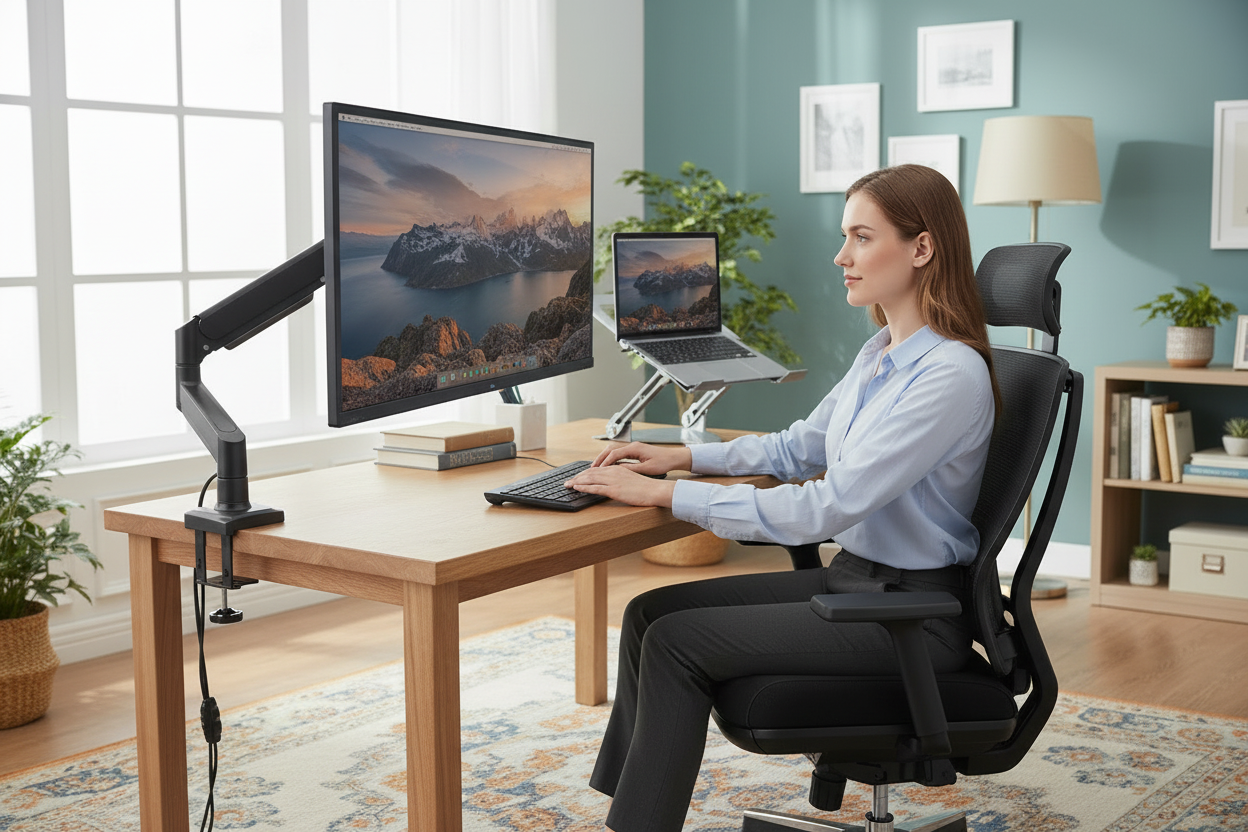
Returning to the Office? How to Rebuild Your Ergonomic Setup Without Buying Everything New
Monday morning, first day back at the office. You walk past the lobby, find your old desk, and sit down in the chair that felt perfectly fine in 2019. By ten o'clock your neck is talking to you. By two, your lower back has joined the conversation. The monitor is sitting on the desk like it's waiting for a taller person, the laptop is flat, and somewhere around three you catch yourself hunched over like a parenthesis. You text your partner: "my home setup spoiled me."
Here's the thing about returning to the office: your home setup didn't spoil you, it taught you. You spent the last few years dialing in a desk where the screen was at eye level, the chair actually supported you, and your wrists weren't bent at a forty-five-degree angle. The office is a time capsule from before any of that existed, and nobody is offering to pay for you to fix it.
Good news: you don't need to buy everything new. You need to buy maybe three things, reuse a few more, and skip the rest. This guide is the rebuild plan: what hurts, what fixes it, what's worth spending on, and what you should absolutely not spend on, in the order you should do it.
The Return-to-Office Reality: Your Home Setup Spoiled You
Let's be honest about what happened. At home, you built your setup around your body. The chair was adjusted to your height, the monitor was at your eye line, the laptop was raised, the lighting was yours. You didn't think about any of it because it all just worked.
Then you walked into the office, and it all un-worked at once. The office chair is a one-size-fits-most from a catalog. The monitor is on a stand that puts the top of the screen at your chin if you're five-foot-eight. The keyboard tray, if it exists, is at the wrong height. None of this is anyone's fault, exactly. It's just what happens when furniture is bought in bulk for a hundred people instead of chosen by one.
The trap is to respond by buying a whole new office setup: a $700 chair, a fancy monitor arm situation, a sit-stand desk for a cubicle you don't own. That's how people spend $1,500 in a weekend and still have a setup that doesn't work, because they bought everything and adjusted nothing.
The smarter move is a rebuild, not a purchase. Find the two or three things that are actually hurting you, fix those with a few specific purchases, and reuse everything you already own that's portable. You'll spend a fraction of the money and be more comfortable than the coworker who bought the whole catalog.
Let's also be honest about the emotional version of this, because it affects the spending. Nobody wants to buy a chair for a desk they didn't choose, in a building they didn't pick, for a schedule they didn't ask for. There's a part of you that wants to just suffer through it out of spite. Suffering through it is how people end up with chronic neck pain and a quiet feud with the facilities manager. Treat the office setup like a work problem, not a personal defeat. You solve work problems with tools, and a monitor arm is a tool.
There's a second layer to this, too, and it's worth naming. Returning to the office after years of home setups is a shock to your standards, not just your body. You got used to adjusting things until they felt right, and the office doesn't adjust. That's why the advice in this guide is the same advice that works at home, applied to a place you don't fully control: fix the things that touch your body, in the order your body complains about them, and don't buy anything else.
Your days-per-week number also changes the math in a way most advice ignores. If you're in the office twice a week, you're spending about 500 hours a year in that chair and at that desk. If you're in four days a week, it's closer to a thousand. The fix you're willing to pay for should scale with the hours, and the tiers at the end of this guide are built around exactly that split. One day a week? Buy the arm and stop there. Four days? Do the whole rebuild.
The Day-One Audit: What Actually Hurts?
Before you buy anything, spend one day at the office and take notes. Not the dramatic kind. Just notice where your body complains, because the complaint tells you exactly what to fix.
Neck pain means your screen is too low. This is the most common office setup problem and the easiest to fix. Your eyes should hit the top third of the screen when you're sitting naturally. If you're looking down at a monitor or a laptop that's sitting flat on the desk, your neck is holding your head at a forward angle for hours, and it lets you know.
Lower back pain usually means the chair. Either the lumbar support is a pillow that slid down behind you, or the seat is too deep, or the chair simply doesn't adjust the way you need it to. This is the one that takes the longest to surface and the longest to fix, which is why the chair conversation deserves its own section below.
Wrist and forearm pain means the keyboard and mouse are at the wrong height, or the laptop keyboard is doing work it shouldn't be doing. If your elbows aren't at about ninety degrees with your forearms level, your wrists are doing the compensating.
Hip and leg discomfort means either the seat is too high or too low, or your feet aren't flat on the floor, which is the footrest problem.
Here's the useful part: each of these has a specific, cheap fix, and they don't overlap much. Fix the screen height and your neck calms down even if the chair is still wrong. Fix the chair and your back stops complaining even if the screen is still low. You don't need everything at once. You need the thing that matches your actual complaint.
You can run this audit in one day, and you should, because the alternative is buying things on vibes. Vibes are how people end up with a $300 keyboard and still have neck pain. The audit costs a day and saves you that.
The audit also catches the sneaky ones. Wrist pain that shows up at 4pm but not 9am usually isn't the keyboard; it's the way you brace your arms while you're leaning toward a low screen. Shoulder tightness that only appears after lunch is often the mouse sitting too far away, which makes you reach all day without noticing. None of these need expensive gear. They need one correct adjustment, and the audit is how you find which one.
One more thing to look at on audit day: the second screen. If your office gives you a monitor plus your open laptop, you're now running two screens at two different heights, and your head is doing a slow tennis match between them all day. That's not a posture problem you can solve with willpower. It's a geometry problem, and geometry problems get solved with a stand and an arm, not with good intentions.
The $139.99 Fix: A Monitor Arm Gets Your Eyes Where They Belong
If the audit said "neck," this is your answer. The full-motion adjustable single monitor arm is $139.99, it mounts to your desk, and it does one thing that matters more than anything else in this entire guide: it puts the monitor at your eye level, and keeps it there.
Think about what happens in the first thirty minutes of your workday. You sit down, the screen is six inches too low, so you hunch. You hunch for a while, then you straighten up, then you hunch again when you're actually reading. That cycle, repeated for eight hours, is the entire source of the neck pain you felt on day one. The monitor arm ends the cycle because it removes the reason to hunch in the first place.
A few honest notes on the arm. It's full motion, which means it moves the way you move: pull it closer when you're reading, push it back when you're thinking, tilt it to kill the glare. It holds a single monitor, which is the setup most offices actually have, and it takes about ten minutes to install. No, you don't need the fancy dual-arm version. One monitor, one arm, one fixed problem.
Here's what the $139.99 buys you in practical terms: a workday without the neckache, which means a workday without the 3pm slump that's actually just pain fatigue. It's the cheapest real fix in this whole guide, and it's the one I'd buy first, before the chair, before the stand, before anything else.
To be fair to the arm: it fixes the screen height and nothing else. If your back is the problem, the arm won't help, and you shouldn't expect it to. That's the point of the audit. The arm is the neck fix. If your neck isn't the problem, spend the $139.99 somewhere else. But if it is, this is the most effective $139.99 in office supplies, full stop.
One detail worth mentioning: the arm also frees up desk space, which sounds like a side benefit until you realize the office desk is roughly the size of a tray table. The monitor stand that came with your screen is a slab of plastic that eats real estate. The arm takes that slab away and gives you the space back. It's not why you buy the arm, but it's a bonus you'll notice on day two.
The Chair Conversation: Office Chairs vs. the L2 Ergo Pro 633
Now the hard one. The chair.
Here's the honest truth about office chairs: some of them are fine, and some of them are torture devices wearing fabric. The way to tell the difference is the same audit you did on yourself. If the chair adjusts to your height, if your feet sit flat, if the lumbar hits your back instead of your shoulder blades, you might be fine with what's there. Ask facilities for a better chair if yours is broken or ancient; that costs nothing and occasionally works.
But if the office chair is the problem, and you're going to be in it for years of hybrid days, buying your own chair is not an overreaction. It's a purchase you'll amortize over a thousand-plus hours a year of sitting.

The L2 Ergo Pro 633 is the chair for this situation, and I'll tell you why it beats both the office chair and most of its own competition. It's $379.00 right now, regularly $449.00. The regular price matters here, because it means the chair is a real purchase, not an impulse buy, and the sale price means now is the time.
Two features matter for the office specifically. The built-in footrest matters because office desks are built for the mythical six-foot-tall man, which means if you're shorter, your feet dangle, and your legs quietly suffer for eight hours. The ergonomic adjustment matters because the office is where you sit the way you actually sit, which is not the way the catalog photo sits. And if you're trying to figure out whether the L2 fits your body type specifically, the chair selection guide is worth ten minutes.
One more thing about the chair math that people skip. A chair is the rare office purchase that follows you, because most people end up working hybrid for years. The L2 isn't a desk you leave behind when you change jobs. It's a chair you'll use at home on your remote days and at the office on your in-person days, and $379 across that kind of lifespan is a different number than $379 as a one-week impulse. Buy it for the long game and the price looks very different.
And one more honest note: bringing your own chair to the office is normal now. Nobody looks twice at the person rolling in with a better chair. It's a sign you're done with the catalog special.
If you're on the fence about whether your body type needs a particular chair feature, don't guess. The chair selection guide walks through the body-type questions, and the 30-day return window means you can test the L2 at the office for a week and send it back if it's not the answer. The risk is a week of shipping, which is the whole point of the guarantee.
There's also the question of what "ergonomic office chair" actually means when facilities says it. Sometimes it's a real chair with real adjustments. Sometimes it's the word "ergonomic" printed on a chair that's a decade old with a broken gas cylinder. Look at the chair you're sitting in and ask whether it can do the basics: seat height, back angle, armrests, lumbar. If it can't do all four, it's not an ergonomic chair, whatever the sticker says, and the L2 is not a luxury purchase. It's the fix.
The Laptop-and-Dock Setup
Most office setups these days are a laptop, a dock, and a monitor. The monitor is on the arm now, which leaves the laptop itself, and this is where people make the second most common mistake.
If you dock your laptop and close the lid, the laptop is just a computer, and you're using the external monitor and keyboard. Fine. But if you keep the lid open as a second screen, the laptop keyboard is now at desk level, which means your wrists are bent, and the laptop screen is at desk level, which means your neck is doing the thing we just fixed with the arm. You've spent $139.99 on the monitor arm and then recreated the problem with the laptop.
The fix is a laptop stand that raises the laptop to match the monitor. The Ergo Elite laptop stand is $79.99, regularly $129.99, and it's the one I'd pick because it's adjustable and it's built for exactly this dual-screen setup. Pair it with an external keyboard and mouse, which you should be using anyway, and both screens are now at eye level and both hands are at the right height.

There's a whole breakdown of how stands differ if you need it: fixed, adjustable, cooling, which one does what. The laptop stands guide covers it. The short version is: for a docked laptop that's doubling as a second screen, you want adjustable, and you want it to hold the laptop at eye level, not at "slightly better than the desk."
There's a version of this setup where you close the laptop lid, dock it, and use only the external monitor. That's clean, and if your office gives you a real keyboard and mouse, it's the best option. The stand conversation is for people running two screens, and it's the difference between a setup that works and a setup that almost works. Almost works is still a neckache by Wednesday.
And yes, before you ask: if your office lets you work standing sometimes, and the desk is adjustable, great. If it isn't, the standing desk conversation is separate, and the standing desk buyers guide has the full argument for and against. The short version: a standing desk at the office is only worth it if you'll actually use the standing position, and only if the desk is yours to control.
The dock itself is worth one sentence, because people overthink it. The dock's only job is to turn one connection into many ports, and if your office provided one, it's fine. The setup problems are never the dock. They're the screen heights and the keyboard heights, which is why this section keeps coming back to the same two fixes. Solve the heights and the dock takes care of itself.
What to Reuse from Home (and What to Leave)
Here's the part that saves you real money: a shocking amount of your home setup is portable, and you should take it with you.
Bring: laptop stands, external keyboards, mice, wrist rests, cables, the good lamp, the footrest. These are all small, all cheap to transport, and all the kind of thing that costs $30 to $80 to rebuy and nothing to carry in a tote bag. If you own the Ergo Elite laptop stand at home and the office is the problem, the stand goes to the office on Monday. Same with a good keyboard: your wrists will thank you, and your coworkers will be too busy to care.
Leave: the big stuff. Your expensive chair stays at home if the office has anything workable, because dragging a chair through a parking garage on a Monday morning is how you start your week, and because the chair conversation above is about buying the right chair, not transporting the wrong one. Your giant monitor stays at home. Your standing desk, obviously, stays at home.
The rule of thumb: bring the things that move with you easily and make the biggest difference, buy the things that stay in one place and get used every day, and skip the things that are cheap to rebuy or embarrassing to transport. The goal is a setup that works on day one at the office, not a moving van.
A note on the keyboard specifically, since it's the most common thing people leave at home and then regret. If your home keyboard is a decent mechanical or ergonomic model and the office keyboard is a membrane slab with a numpad you never use, the keyboard is the single most worthwhile thing to carry in. It's light, it's small, and it's the piece of your setup your hands touch every single minute of typing. The mouse too, if it's your mouse.
One practical note on the "bring" list: label your stuff. Office supplies are communists when it comes to ownership, and the $80 keyboard you brought in is suddenly "the team's keyboard" by Tuesday. A piece of tape with your name on it saves friendships.
One exception to the leave-it rule: if you own a footrest and the office desk is the standard fixed height, bring the footrest. It's small, it's light, and it fixes the dangling-feet problem while you figure out the bigger chair question. A footrest from home beats buying one in a panic on Wednesday.
Budget Rebuild Tiers: Minimal, Comfortable, Spoiled
You don't have to decide how much to spend before you know what tier you're in. Here are the three realistic rebuilds, from cheapest to most complete.
Minimal: $139.99. The monitor arm, and nothing else. This fixes the neck, which is the most common complaint, for the price of a nice dinner. It's the tier for people who are in the office one or two days a week, or who aren't sure yet whether the office is a long-term thing. It's also the tier that proves the point: you don't need to buy everything to stop hurting.
Comfortable: about $519. The monitor arm at $139.99 plus the L2 Ergo Pro 633 at $379.00. Now the neck and the back are both handled, which covers the two complaints that actually drive people to buy stuff. This is the tier for anyone who's in the office three or more days a week. It's the sweet spot of this entire guide, and it's the one I'd pick.
Spoiled: about $1,179. The arm, the L2, the Ergo Elite laptop stand at $79.99, and if your office situation allows it, the 40×24 electric standing desk at $599.99, regularly $879.99. This is the tier for people who are in the office full time and want the same standard of setup they built at home. It's real money, but it's also the difference between tolerating the office and actually liking being there.
Notice what's missing from all three tiers: the $700 chair, the dual monitor arm, the sit-stand desk for a desk you don't own, the cable organizer kit. None of it. The rebuild works because it's targeted, and the tiers work because they match your actual schedule.
The tiers are also a good argument for going in order. Start with the arm, live with it for a week, and see what's still complaining. If it's your back, the chair is next. If nothing's complaining, congratulations, you spent $139.99 and skipped the $1,000. That's the whole philosophy, and it's the reason this guide is called a rebuild and not a shopping list.
One more tier consideration: what happens if you split time between home and office? Most people in hybrid roles end up buying the arm for the office and leaving the home setup alone, because the home setup already works. That's the correct instinct. Rebuild where it hurts, not where it's fine. The tiers assume the office is the broken place, and if it isn't, you already know what to do.
The numbers also have a hidden advantage worth naming: they're all small enough to be decisions, not projects. Under $150 for the arm, under $400 for the chair. That's the range where a bad week at the office stops being a reason to keep suffering. The tiers are priced to be decided in an afternoon, which is exactly when you should decide them, before the pain becomes a habit.
FAQ
Do I need a monitor arm for one monitor?
If the monitor is at the wrong height, yes, and the single monitor arm at $139.99 is exactly the right tool for it. If your monitor happens to be at eye level already, you don't need one. Most office monitors aren't.
Will my home laptop stand work at the office?
Yes, and it should come with you. A laptop stand is small, portable, and makes the same difference at the office desk it made at home. If you don't own one, the Ergo Elite at $79.99 is the one to get.
Should I buy a new chair or ask for a better office chair?
Ask first, because it's free and it occasionally works. If facilities can't help and the chair is genuinely wrong for your body, buy your own. The L2 Ergo Pro 633 at $379.00, regularly $449.00, is the chair for that situation, and bringing your own chair to the office is completely normal now.
What's the cheapest real fix?
The monitor arm at $139.99. If your neck hurts because the screen is too low, the arm is the single cheapest thing that actually solves a real problem, and it's the first thing to buy.
Is a standing desk worth it at the office?
Only if the desk is yours to control and you'll actually use the standing position. The 40×24 desk at $599.99, regularly $879.99, is a genuine upgrade if you're in the office full time and your employer lets you bring one. If you're there one day a week, spend the money on the chair instead.
How do I know what's hurting?
Spend one day and take notes. Neck pain is the screen height, back pain is the chair, wrist pain is the keyboard and mouse height, and leg discomfort is the seat and foot position. The complaint tells you exactly which fix you need.
Can I take my home setup to the office?
The portable parts, yes: stands, keyboards, mice, and cables. The big parts, no: chairs, desks, and monitors. Bring what moves easily and makes a difference, and buy what stays in one place.
What's the fastest fix for day-one neck pain?
Raise the screen, today. A monitor arm at $139.99 is the permanent version, but even stacking your laptop on a box gets your neck out of the forward bend while the arm ships. Eye level is the goal; anything beats desk level.
Here's the whole rebuild in two sentences. Buy the full-motion single monitor arm at $139.99 to fix your neck, and if the office chair is wrong for your body, buy the L2 Ergo Pro 633 at $379.00, regularly $449.00, to fix your back. Reuse your laptop stand, your keyboard, and your mouse from home, and skip everything else.
Both pieces ship free across the US and come with a 30-day money-back guarantee, so the risk is a week of shipping, not your money. If you're heading back to the office this fall, don't buy a whole new setup and don't tough it out in a chair that hurts. Fix the two things that actually hurt, take the portable stuff with you, and give your body a week to forgive you. It will.
