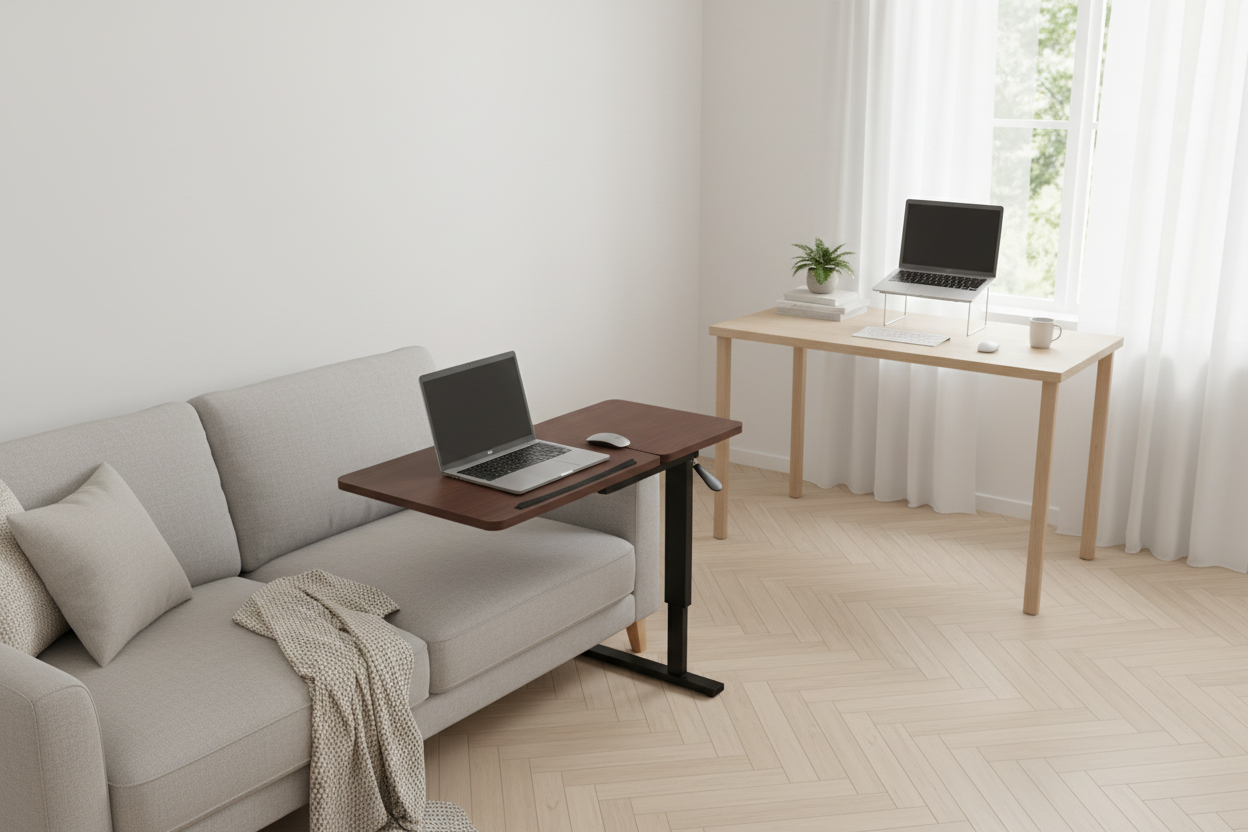
Creating a Multi-Zonal Workspace in a Small Apartment
Quick Answer: Mobile laptop carts let you shift your workspace from bedroom to living room — or anywhere in between — without sacrificing ergonomics or focus. The Rackora Mobile Overbed Rolling Laptop Desk ($178.44) is purpose-built for exactly this: height-adjustable, smooth-rolling, and stable enough for a full workday. If you're serious about a flexible, multi-zonal setup in a small apartment, a mobile cart paired with a quality ergonomic stand is the smartest investment you'll make.
Why Is a Multi-Zonal Workspace So Hard to Pull Off in a Small Apartment?
You know the feeling. You wake up, open your laptop on the bed, and tell yourself it's just for a quick email check. Two hours later, your neck is stiff, your back is complaining, and you've somehow migrated to the couch — where the WiFi is weaker and the lighting is worse. By noon, you're hunched over the kitchen counter because the table is covered in last night's dishes.
Small apartment living is a constant negotiation between space, function, and sanity. The average American studio or one-bedroom apartment clocks in at under 700 square feet. There's no dedicated home office. There's no spare room. There's just your space — and it has to do everything: sleep, eat, relax, and now, work.
The traditional answer — buy a desk, put it in the corner — doesn't cut it anymore. A fixed desk eats square footage, locks you into one posture, and turns your bedroom into a permanent office. That's bad for sleep, bad for focus, and honestly, bad for your mood.
The smarter answer? Design your apartment in zones — and make those zones fluid.
What Exactly Is a Multi-Zonal Workspace?
A multi-zonal workspace isn't about having multiple rooms. It's about intentionally designing different areas of your apartment for different types of work — and equipping each zone with the right gear so you can actually be productive there.
Think of it like this:
- Zone 1 – The Focus Zone: Your primary work area. Could be a corner of the living room or a dedicated desk nook. This is where deep work happens — writing, coding, video calls.
- Zone 2 – The Flex Zone: The couch, the bed, or a reading chair. Ideal for lighter tasks — reviewing documents, casual browsing, video calls in a relaxed setting.
- Zone 3 – The Recharge Zone: The kitchen table or a balcony. A change of scenery for brainstorming, journaling, or taking a break that doesn't feel like a break.
The key to making this work isn't willpower — it's the right mobile gear. When your workspace can move with you, zoning becomes effortless.
How Do Mobile Laptop Carts Transform a Small Apartment?
Picture this: It's 7 AM on a Tuesday. You don't have a meeting until 10, so you want to ease into the morning — coffee in hand, still in pajamas, working from the couch. But your laptop is on the fixed desk across the room, and dragging it to the couch means balancing it on a throw pillow (terrible for airflow, terrible for your posture).
Now picture the same morning with a Rackora Mobile Overbed Rolling Laptop Desk. You roll it from its overnight spot beside your bed to the couch in about four seconds. You adjust the height so the screen is at eye level. You tilt the surface to your preferred angle. You open your laptop, and you're working — comfortably, ergonomically, without a single compromise.

The Rackora Mobile Overbed Table with Wheels ($178.44) is built around a few principles that matter enormously in a small apartment:
- Height-adjustable design: Works whether you're sitting on the couch, lying in bed, or standing at the kitchen counter. No fixed height means no fixed posture.
- Smooth-rolling hidden wheels: Glide across hardwood, tile, or carpet without scratching floors or making noise. The H-shaped base keeps it stable even on uneven surfaces.
- Tilting desktop surface: Angle the work surface toward you for reading or writing — reduces neck strain significantly compared to a flat surface.
- Premium walnut finish: MDF desktop with a walnut wood grain top and black metal base. It looks like furniture, not office equipment. That matters when your apartment is also your living space.
- Safety-first rounded corners: No sharp edges catching on fabric or skin as you move it around.
At $178.44, it's the kind of purchase that pays for itself in chiropractor visits avoided.
Which Ergonomic Laptop Stand Is Best for a Fixed Focus Zone?
Your mobile cart handles the flex zones. But your primary Focus Zone — wherever that is — deserves a more permanent ergonomic solution. This is where a quality laptop stand earns its keep.
Here's the problem most people don't think about: when you use a laptop directly on a desk, your screen is too low. You tilt your head down. Over hours, that forward head posture puts enormous strain on your cervical spine — up to 60 lbs of force at a 60-degree tilt, according to spinal research. That's not a minor inconvenience. That's a long-term injury waiting to happen.
A laptop stand raises your screen to eye level, which straightens your neck, opens your chest, and lets your shoulders drop naturally. It's one of the highest-ROI ergonomic upgrades you can make.

The Rackora Ergo Laptop Stand Elite Edition ($79.99) is designed for exactly this role. It's the anchor of your Focus Zone — stable, adjustable, and built to last. Pair it with a wireless keyboard and mouse, and your laptop becomes a proper desktop workstation without taking up any more space than the laptop itself.
For gamers or power users who run hot sessions, the Rackora Gaming Laptop Stand Elite Edition ($79.99) adds active cooling to the equation — keeping your machine running at peak performance even during extended sessions.

What If You Need the Ultimate All-in-One Workspace Solution?
Some people want more than a stand. They want a command center — something that handles multiple devices, multiple angles, and multiple use cases without requiring a dedicated room.
That's where the Rackora 360° Rotating Laptop Stand with Cooling Fan ($129.99) comes in.

The 360° rotation is a game-changer for small apartments. Presenting to a client on a video call? Rotate the screen toward them. Switching from typing to reading? Rotate to your preferred angle. Sharing your screen with a roommate? Spin it around without moving the whole setup. The integrated cooling fan keeps thermals in check during long work sessions — no more throttling, no more fan noise from your laptop struggling to breathe.
And if you're running a more complex multi-device setup — tablet, laptop, and phone all in play simultaneously — the Rackora Premium K80 Multipurpose Ergonomic Stand ($189.99) is the professional-grade solution. It's the stand for people who mean business.

How Do You Actually Set Up Three Zones in a Small Apartment?
Let's get practical. Here's a room-by-room blueprint for a typical one-bedroom or studio apartment.
Zone 1: The Living Room Focus Zone
Your living room is probably your largest open space. Use it. Push your couch slightly away from the wall and create a small work nook in the corner — a compact surface (even a floating shelf at desk height works), your Rackora Ergo Laptop Stand, a wireless keyboard, and a small desk lamp. When work is done, the stand folds flat, the keyboard slides into a drawer, and the space reverts to living room in under two minutes.
The 360° Rotating Stand is particularly useful here — you can spin the screen away when you're done working, so the space doesn't feel like an office 24/7.
Zone 2: The Bedroom Flex Zone
The bedroom flex zone is where the Rackora Mobile Rolling Laptop Desk truly shines. Park it beside your bed at night. In the morning, roll it to wherever you're starting your day — bed, couch, kitchen. The height-adjustable design means it works whether you're sitting up in bed, perched on the edge of the mattress, or standing at the kitchen counter with your morning coffee.
The walnut finish means it doesn't look out of place in a bedroom — it looks like a thoughtful piece of furniture, not a piece of office equipment that wandered in from a corporate break room.
Zone 3: The Kitchen / Balcony Recharge Zone
This zone is about changing your environment to reset your brain. Neuroscience backs this up — even a minor change in physical environment can break mental fatigue and restore focus. Your kitchen table or balcony becomes a legitimate workspace when you bring your mobile cart or a compact stand with you.

For this zone, the Rackora Ergo Laptop Stand Elite Edition is ideal — lightweight enough to carry from room to room, stable enough to use on any flat surface, and adjustable enough to work at kitchen table height or balcony railing height.
Multi-Zonal Workspace Setup: Comparing Your Options
Here's a quick comparison to help you figure out which Rackora products belong in which zone of your apartment:
| Product | Price | Best Zone | Key Advantage | Mobility |
|---|---|---|---|---|
| Mobile Overbed Rolling Laptop Desk | $178.44 | Flex Zone (Bedroom / Couch) | Full height adjustment + rolling wheels | ⭐⭐⭐⭐⭐ Maximum |
| 360° Rotating Stand with Cooling Fan | $129.99 | Focus Zone (Living Room) | 360° rotation + active cooling | ⭐⭐⭐⭐ High |
| K80 Multipurpose Ergonomic Stand | $189.99 | Focus Zone (Primary Desk) | Multi-device, professional-grade | ⭐⭐⭐ Medium |
| Ergo Laptop Stand Elite Edition | $79.99 | Recharge Zone (Kitchen / Balcony) | Lightweight, foldable, universal | ⭐⭐⭐⭐⭐ Maximum |
| Gaming Laptop Stand Elite Edition | $79.99 | Focus Zone (Gaming / Power Use) | Active cooling for sustained performance | ⭐⭐⭐⭐ High |
How Do You Maintain Work-Life Separation Without a Separate Room?
This is the question nobody talks about enough. When your apartment is your office, the psychological boundary between "work mode" and "off mode" gets blurry fast. You check Slack at midnight. You feel guilty relaxing on the couch because your laptop is right there, staring at you.
The multi-zonal approach actually helps with this — but only if you're intentional about it. A few principles that work:
- Zone activation rituals: When you move to your Focus Zone, do a small ritual — make coffee, put on headphones, open a specific playlist. Your brain learns to associate the zone with work mode.
- Physical pack-up: At the end of the workday, physically move your mobile cart to a corner or closet. Out of sight, out of mind. The Rackora Rolling Desk is perfect for this — roll it away, and your bedroom is a bedroom again.
- Zone-specific tasks: Reserve your Flex Zone (couch/bed) for lighter tasks only — reading, reviewing, casual calls. Never do deep work there. Your brain will start to associate the couch with relaxation, not stress.
What Are the Most Common Mistakes When Setting Up a Small Apartment Workspace?
Mistake 1: Buying a Fixed Desk First
A fixed desk is the most intuitive purchase, but in a small apartment, it's often the wrong one. It commits you to one location, one posture, and one zone. If that zone doesn't work for you — wrong light, wrong noise level, wrong energy — you're stuck. Start with mobile gear and add fixed elements only once you know exactly where you want them.
Mistake 2: Ignoring Ergonomics in the Flex Zone
People invest in ergonomics for their "real" desk and then spend three hours hunched over a laptop on the couch. The flex zone is where most people spend the most time — and where most ergonomic damage happens. A mobile cart like the Rackora Rolling Desk brings proper ergonomics to every zone, not just the one with the fancy chair.
Mistake 3: Underestimating Cable Chaos
Mobile setups live and die by cable management. If your laptop is tethered to a power brick, a monitor, and a USB hub, it's not actually mobile. Invest in a good USB-C hub, a long braided cable, and a cable clip system. The goal is to be able to move your entire setup in under 60 seconds.
Mistake 4: Choosing Gear That Looks Like Office Equipment
In a small apartment, everything is on display. A clunky black plastic laptop stand on your coffee table looks like you gave up on interior design. Rackora's walnut-finish rolling desk and premium aluminum stands are designed to look at home in a living space — not just a corporate cubicle.
How Much Does a Complete Multi-Zonal Setup Cost?
Let's run the numbers on a complete Rackora multi-zonal setup:
| Zone | Product | Price |
|---|---|---|
| Focus Zone | 360° Rotating Stand with Cooling Fan | $129.99 |
| Flex Zone | Mobile Overbed Rolling Laptop Desk | $178.44 |
| Recharge Zone | Ergo Laptop Stand Elite Edition | $79.99 |
| Total | Complete 3-Zone Setup | $388.42 |
Compare that to the cost of a dedicated home office — rent for an extra room in a major US city runs $500–$1,500/month. A complete Rackora multi-zonal setup pays for itself in less than a week of avoided rent. And unlike a fixed desk setup, it moves with you when you move apartments.
Is a Mobile Laptop Cart Worth It for a Small Apartment?
Short answer: yes, unequivocally — if you work from home more than three days a week.
Here's the longer version. A mobile laptop cart solves three problems simultaneously:
- Ergonomics: It brings proper screen height and surface angle to wherever you're working, not just your designated desk.
- Flexibility: It lets you change your environment throughout the day — which research consistently shows improves focus, creativity, and mood.
- Space efficiency: It takes up no more floor space than a side table, and it rolls out of the way when you're done.
The Rackora Mobile Overbed Rolling Laptop Desk at $178.44 hits a sweet spot: premium enough to last years, practical enough to use every day, and good-looking enough to leave out in your living space without embarrassment.
Frequently Asked Questions
What is a multi-zonal workspace in a small apartment?
A multi-zonal workspace is a setup where different areas of your apartment are intentionally designed for different types of work — deep focus, flexible tasks, and recharging. Instead of one fixed desk, you use mobile and adaptable gear to create productive zones throughout your home.
Can I really work ergonomically from my couch or bed?
Yes — with the right gear. A height-adjustable rolling desk like the Rackora Mobile Overbed Table brings proper ergonomics to any surface. The key is getting your screen to eye level and your wrists in a neutral position, regardless of where you're sitting.
What is the best mobile laptop cart for a small apartment?
The Rackora Mobile Overbed Rolling Laptop Desk ($178.44) is our top pick. It's height-adjustable, has smooth-rolling hidden wheels, a tilting desktop surface, and a premium walnut finish that looks at home in any living space.
How do I separate work and personal life in a small apartment?
Use zone-specific rituals (a specific playlist or coffee routine when entering work mode), physically move your mobile cart out of sight at the end of the workday, and reserve your flex zones (couch, bed) for lighter tasks only. The physical act of rolling your desk away is surprisingly effective at signaling "work is done" to your brain.
Do I need a laptop stand if I already have a rolling desk?
They serve different purposes. A rolling desk gives you mobility and a stable surface. A laptop stand raises your screen to eye level, which is critical for neck health during long sessions. For a complete ergonomic setup, use both — the rolling desk for mobility and a stand like the Rackora Ergo Laptop Stand Elite Edition ($79.99) for proper screen positioning.
What laptop stand is best for a living room setup?
The Rackora 360° Rotating Laptop Stand with Cooling Fan ($129.99) is ideal for living room use. The 360° rotation lets you share your screen easily, and the integrated cooling fan keeps your laptop running cool during long sessions.
Is the Rackora K80 stand worth it for a home office?
If you're running a multi-device setup — laptop, tablet, and phone simultaneously — the Rackora K80 Multipurpose Ergonomic Stand ($189.99) is absolutely worth it. It's professional-grade, built for sustained daily use, and handles multiple devices without compromise.
How do I set up three workspace zones in a studio apartment?
Focus Zone: a corner of the living room with a laptop stand and wireless peripherals. Flex Zone: your bedroom or couch area with a mobile rolling desk. Recharge Zone: your kitchen table or balcony with a lightweight portable stand. The key is making each zone easy to activate and easy to pack away.
Does Rackora offer free returns?
Yes. Rackora offers a 30-day no-hassle return policy on all products. If it doesn't work for your space, send it back.
How fast does Rackora ship in the US?
Rackora ships from US warehouses with delivery in 3–7 business days for most orders. No waiting weeks for overseas shipping.
Work Anywhere: Buy Mobile Laptop Carts from Rackora
Your apartment is small. Your ambitions aren't. A multi-zonal workspace setup means you're never stuck in one spot, never compromising on ergonomics, and never letting your living space feel like a prison sentence.
Rackora's mobile workspace gear is built for exactly this — premium materials, thoughtful design, and the kind of flexibility that makes small-space living feel expansive rather than cramped.
- 🛒 Shop the Rackora Mobile Overbed Rolling Laptop Desk — $178.44
- 🛒 Shop the 360° Rotating Laptop Stand with Cooling Fan — $129.99
- 🛒 Shop the Ergo Laptop Stand Elite Edition — $79.99
New to Rackora? Subscribe to our email list and get 15% off your first order. Already a fan? Use code DE30 for an extra 30% off during our Holiday Sale. All orders ship from US warehouses in 3–7 days, and every product comes with our 30-day no-hassle return guarantee.
Your workspace should work as hard as you do — and move as freely as you do. Let's build it.
