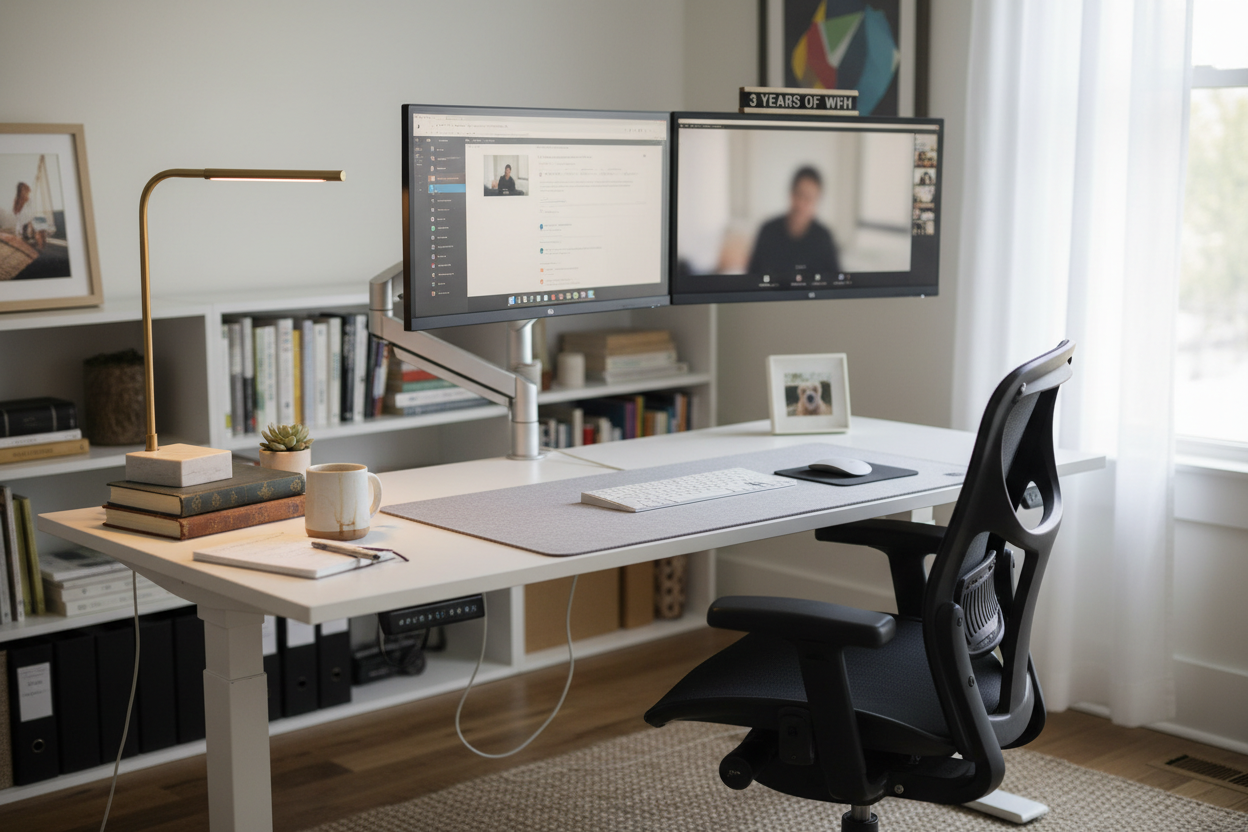
Three years into working from home, and I've learned something that goes against everything the tech world tells us: your workspace setup matters way more than your computer specs.
I used to think dropping $3,000 on a gaming PC would solve all my productivity problems. Turns out, the real game-changer was investing in furniture that didn't leave me feeling like I'd been hit by a truck every afternoon.
The $3,000 PC That Didn't Fix My Back Pain
Let me paint you a picture. Early 2023, I'm sitting at my kitchen table on a wooden chair that came with my apartment. My laptop's propped up on a stack of books. I'm hunched over like Gollum, squinting at a 13-inch screen, convincing myself that once I upgrade to that beast of a desktop with the latest high-end graphics card, everything will click into place.
So I did it. Built the dream machine. Dual monitors, mechanical keyboard, the works. And you know what changed? Absolutely nothing about how my body felt at the end of the day.
My neck still ached. My lower back was staging a full rebellion by 2 PM. My wrists felt like they were filled with broken glass after eight hours of typing. The fancy computer just meant I could render videos faster while destroying my posture.
That's when it hit me: I'd been optimizing the wrong thing.
The Real Productivity Killer Nobody Talks About
Here's what three years of remote work taught me that no productivity guru will tell you: physical discomfort is the silent assassin of deep work.

You can have all the focus apps, the Pomodoro timers, the noise-canceling headphones in the world. But if your chair feels like sitting on a medieval torture device, or your desk forces you into positions that would make a chiropractor weep, you're fighting a losing battle.
I started tracking this. On days when my back hurt, my actual productive hours dropped to maybe 4-5. The rest was just me shifting positions, standing up to stretch, walking around, basically anything to escape the discomfort. I was present for 8 hours, but only half-present.
Compare that to days when I felt physically comfortable: 7-8 hours of solid focus. Same brain, same computer, different chair. The math isn't complicated.
What Actually Changed Everything
The turning point came when I stopped thinking like a gamer and started thinking like someone who actually works for a living. I needed a workspace, not a battle station.
First investment: a proper standing desk. Not because standing all day is some miracle cure, but because the ability to change positions throughout the day is everything. Some tasks I do better standing. Some sitting. Having the choice means I'm not locked into one position until my body gives up.

I went with the 40'' x 24" Ergonomic Electric Height Adjustable Standing Desk ($599.99), and honestly, it's the piece of equipment I use most. Electric adjustment means I actually change positions, unlike those manual crank desks that are such a pain you just leave them in one spot forever.
The 40-inch width gives me enough space for my monitors without feeling cramped, and the electric motor is smooth enough that I can adjust it while on a call without sounding like I'm operating heavy machinery.
The Chair Situation: Where I Went Wrong Twice
Let me save you some money and regret. I bought two chairs before I got it right.
Chair #1 was a $150 "ergonomic" thing from Amazon that looked good in photos. It felt okay for about two weeks, then the foam compressed into something resembling cardboard. The lumbar support was a joke, just a curved piece of plastic that dug into my spine.
Chair #2 was the opposite mistake: a $900 designer chair knockoff that was supposedly "just as good" as the premium brands. It wasn't. The mesh started sagging after three months, and the armrests broke within six.
Chair #3, the one I should've bought first: a proper ergonomic office chair with actual adjustability. Not the fake kind where everything's "adjustable" but nothing actually moves smoothly.

The Ergonomic Office Chair with Lumbar Support ($459.00) has been my daily driver for over a year now. The 3D armrests actually adjust in ways that matter, the lumbar support is adjustable and doesn't feel like a torture device, and the mesh back means I'm not sweating through my shirt by noon.
The reclining function is clutch for those moments when you need to lean back and think, or take a call where you're mostly listening. And the 300lbs capacity means it's built solid, not like those flimsy chairs that feel like they're going to collapse if you lean back too hard.
Monitor Arms: The Upgrade Nobody Thinks About
This one surprised me. I thought monitor arms were just for people who wanted their setup to look cool on social media. Turns out, they're actually functional.
Having your monitors at exactly the right height and distance makes a massive difference. No more hunching forward to read text. No more tilting your head up or down. Just straight-ahead, neutral spine, the way your neck was designed to work.

I use the Full Motion Single Monitor Arm ($139.99) for my main display. The gas spring adjustment means I can move it with one finger, and it stays exactly where I put it. No drooping, no drifting down throughout the day.
The VESA compatibility means it works with pretty much any monitor, and the cable management clips keep everything looking clean instead of like a rat's nest of wires.
Lighting: The Thing You Don't Notice Until You Fix It
I worked for two years under a single overhead light that made everything look like a police interrogation room. Harsh shadows, eye strain, the works. I just thought that's how home offices looked.
Then I added a proper desk lamp, and it was like putting on glasses for the first time. Suddenly I could see what I was doing without squinting. The eye strain headaches that I thought were just part of screen work? Gone.

The 19.5" Black Metal Task Desk Lamp ($67.66) sits on the corner of my desk and provides focused light exactly where I need it. The organizer base is actually useful for keeping pens and small stuff from cluttering up my workspace.
It's not some fancy smart lamp with 16 million colors. It's just good, functional task lighting that makes it easier to see what you're working on. Sometimes that's all you need.
The Total Investment: Less Than You Think
Let's do the math on a proper workspace setup:
Standing desk: $599.99
Ergonomic chair: $459.00
Monitor arm: $139.99
Desk lamp: $67.66
Total: $1,266.64
That's less than half what I spent on that gaming PC. And the impact on my actual work? Not even close. The workspace setup probably doubled my productive hours. The fancy computer just made me better at procrastinating in 4K.
What About the Cheaper Options?
Look, I get it. Dropping over a thousand dollars on furniture isn't nothing. I tried the budget route first, and here's what I learned:
Cheap standing desks wobble. Not a little bit, like "oh that's slightly annoying." I mean wobble enough that typing feels like working during an earthquake. The manual crank ones are such a pain that you never actually adjust them, which defeats the entire point.
Budget ergonomic chairs are ergonomic in name only. They'll have all the adjustment levers and knobs, but nothing actually adjusts smoothly or stays in place. The foam compresses fast, the mesh sags, the armrests break. You end up buying twice.
I'm not saying you need to buy the most expensive stuff. But there's a minimum threshold of quality below which you're just wasting money. A $200 standing desk isn't a deal if you have to replace it in six months.
The Stuff That Didn't Matter As Much As I Thought
In the interest of saving you some money, here's what I thought would be game-changers but turned out to be nice-to-haves at best:
Footrests: Bought one, used it for a week, now it's under my desk collecting dust. If your chair and desk are at the right height, you don't need it.
Keyboard trays: These made sense when desks were all the same height. With an adjustable desk, you can just set it to the right height for typing. One less thing to install and adjust.
Cable management systems: I bought a whole kit of cable raceways and clips. Used maybe 10% of it. A few velcro ties and some basic routing is all you really need.
Desk pads: They look cool, but they don't actually do anything. Your mouse works fine on the desk. Your keyboard doesn't slide around. It's just aesthetic.
The Routine That Makes It All Work

Having the right equipment is half the battle. The other half is actually using it properly. Here's what works for me:
Morning: Start standing. I begin the day at standing height while I go through emails and plan out my tasks. Gets the blood flowing, wakes me up better than coffee.
Deep work: Sit down. When I need to focus on something complex, I lower the desk and settle into the chair. The ergonomic setup means I can stay focused for 2-3 hour blocks without discomfort breaking my concentration.
Afternoon: Back to standing. After lunch, I raise the desk again. Helps fight off that post-lunch energy dip and keeps me from slouching into the afternoon.
End of day: Sit for wrap-up. Last hour or so, I sit down to finish up loose ends and plan tomorrow. Gives my legs a break before I'm done for the day.
The key is changing positions throughout the day. Standing all day is just as bad as sitting all day. Your body wants variety.
What This Actually Feels Like Day-to-Day
The difference isn't dramatic in any single moment. It's not like you sit in a good chair and suddenly feel enlightened. It's more subtle than that.
What I notice is what's missing. The nagging lower back pain that used to start around 11 AM? Gone. The neck tension that would build up until I had to stop and stretch? Not there anymore. The wrist pain from bad keyboard positioning? Disappeared.
I get to the end of the day and I'm mentally tired from work, which is normal. But I'm not physically exhausted from fighting my furniture. That's the difference.
I can work a full day and then actually do stuff in the evening. Go for a run, cook dinner, hang out with friends. I'm not just collapsing on the couch because my body feels like it went through a meat grinder.
The Productivity Gains Nobody Measures
Here's what's hard to quantify but absolutely real: when you're physically comfortable, you procrastinate less.
Think about it. How much of your procrastination is actually just avoiding discomfort? You get up to get water, check your phone, walk around, anything to escape the physical discomfort of your setup.
When sitting at your desk doesn't hurt, you don't have that subconscious motivation to avoid it. You just work. The resistance disappears.
I'm not saying I never procrastinate now. I'm human. But the baseline resistance to just sitting down and working is gone. That's huge.
For People Who Think They Can't Afford It

I hear this a lot: "That's great for you, but I can't drop $1,200 on furniture right now."
Fair enough. But consider this: what's the cost of not doing it?
If bad ergonomics is costing you even one productive hour per day, that's 260 hours per year. If your time is worth $50/hour (and if you're working from home in a professional capacity, it probably is), that's $13,000 in lost productivity annually.
Suddenly $1,200 doesn't seem so expensive. It pays for itself in about three weeks.
And that's not even counting the long-term health costs. Chronic back pain, neck problems, carpal tunnel, these things don't just hurt, they're expensive to treat. An ounce of prevention, etc.
If you absolutely can't swing the full setup right now, prioritize the chair. You can make do with a regular desk for a while, but you can't make do with a bad chair. That's where most of the damage happens.
The Stuff I'm Still Experimenting With
Three years in, I don't have it all figured out. Here's what I'm still tweaking:
Standing desk converters vs. full desks: I went with a full electric desk, but I'm curious about the converters that sit on top of a regular desk. Might be a good option for people who can't replace their whole desk.
Anti-fatigue mats: I've tried a few for standing periods. Some help, some are just squishy and annoying. Still haven't found the perfect one.
Monitor positioning: I keep adjusting the height and distance of my monitors. There's definitely a sweet spot, but it seems to change based on what I'm working on.
Lighting temperature: I've been playing with warmer vs. cooler light temperatures throughout the day. Warmer in the evening seems to help with sleep, but I'm not 100% sure yet.
What I'd Tell My Past Self
If I could go back to early 2023 and give myself advice, here's what I'd say:
Stop obsessing over computer specs. Your laptop is fine. What's not fine is the kitchen chair you're sitting on for 8 hours a day.
Invest in your workspace first, toys second. The standing desk and ergonomic chair will change your life. The RGB lighting and mechanical keyboard are just fun.
Don't cheap out on the chair. This is the one thing you interact with for 40+ hours per week. It's worth spending money on.
Actually use the standing feature. Don't just buy a standing desk and leave it in sitting position forever. Set reminders if you have to.
Your body is part of your productivity system. Treat it like it matters, because it does.
The Bottom Line
Three years of working from home has taught me that productivity isn't just about optimizing your workflow or using the right apps or having the fastest computer. It's about creating an environment where you can actually do your best work without your body staging a revolt.
A professional workspace isn't a luxury. It's infrastructure. It's the foundation that everything else is built on. You can have the best computer, the best software, the best skills in the world, but if you're working in physical discomfort, you're handicapping yourself.
The standing desk, the ergonomic chair, the monitor arm, these aren't just furniture. They're tools that let you work at your full capacity instead of at whatever percentage your body can tolerate before it gives up.
Is it worth $1,200? Absolutely. Would I rather have that money back and go back to my kitchen table setup? Not a chance. Some investments pay dividends every single day. This is one of them.
Ready to Upgrade Your Workspace?
If you're tired of fighting your furniture and ready to actually enjoy working from home, here's where to start:
Get the foundation right with a quality electric standing desk ($599.99) that you'll actually use every day.
Pair it with an ergonomic chair ($459.00) that supports your body instead of destroying it.
Add a monitor arm ($139.99) to get your screen at the perfect height.
Your back will thank you. Your productivity will thank you. And three years from now, you'll wonder why you waited so long.
Frequently Asked Questions
Is a standing desk really worth it, or is it just a trend?
Standing desks are worth it, but not for the reason most people think. The benefit isn't standing vs. sitting, it's having the ability to change positions throughout the day. Your body wasn't designed to stay in one position for 8 hours straight, whether that's sitting or standing. A good electric standing desk lets you switch it up based on what you're doing and how you're feeling. I use mine in both positions every single day.
How much should I spend on an office chair?
The sweet spot seems to be $400-600 for a chair that will actually last and provide real ergonomic support. Below $300, you're mostly getting chairs that look ergonomic but don't actually adjust properly or hold up over time. Above $800, you're paying for brand names and features you probably don't need. The $459 chair I use hits that sweet spot: real adjustability, solid build quality, and a price that doesn't require a second mortgage.
Can't I just use my laptop on the couch or in bed?
You can, and I did for the first few months of working from home. But your future self will hate you for it. Working from a couch or bed destroys your posture, kills your productivity, and blurs the line between work and rest. Your brain needs spatial separation between work and relaxation. Plus, the ergonomics are terrible. You'll end up with neck and back problems that take months to recover from.
Do I really need a monitor arm, or can I just stack books under my monitor?
Books work as a temporary solution, but a monitor arm is better for several reasons. First, it's adjustable, so you can fine-tune the height and distance throughout the day. Second, it frees up desk space since the monitor isn't sitting on a stand. Third, it lets you easily switch between landscape and portrait orientation if you need to. And fourth, it just looks cleaner and more professional. For $140, it's worth doing it right.
What's the ideal desk height for working?
There's no one-size-fits-all answer because everyone's body is different. When sitting, your elbows should be at about 90 degrees when your hands are on the keyboard, and your eyes should be level with the top third of your monitor. When standing, same principle applies. This is why electric standing desks are so valuable, you can dial in the exact height that works for your body, not just accept whatever standard desk height is.
How often should I switch between sitting and standing?
I aim for switching every 1-2 hours, but it's not a strict rule. Some tasks I prefer doing while standing (emails, calls, quick tasks), others I prefer sitting (deep focus work, writing, detailed analysis). Listen to your body. If you're feeling stiff or uncomfortable, that's your cue to change positions. The goal is variety, not forcing yourself to stand for some arbitrary amount of time.
Will an ergonomic setup actually make me more productive?
Yes, but not in the way you might think. It won't make you type faster or think harder. What it does is remove the physical discomfort that constantly interrupts your focus. When you're not dealing with back pain, neck strain, or wrist discomfort, you can actually concentrate on your work instead of constantly shifting positions and taking breaks to stretch. I went from 4-5 productive hours per day to 7-8, just by eliminating physical distractions.
What if I don't have space for a full standing desk?
If space is tight, consider a standing desk converter that sits on top of your existing desk. They're not as smooth as a full electric desk, but they're better than nothing. Alternatively, prioritize the chair. A great ergonomic chair on a regular desk is better than a mediocre chair on a standing desk. You can always upgrade the desk later when you have more space.
How long does it take to get used to a standing desk?
Give it about two weeks. The first few days, your legs will get tired faster than you expect. Start with just 20-30 minutes of standing at a time, then gradually increase. Don't try to stand all day right away, you'll just end up sore and discouraged. By week two, you'll naturally find your rhythm of when to sit and when to stand. By week four, you won't even think about it anymore.
Are expensive ergonomic chairs really better than gaming chairs?
Yes, and it's not even close. Gaming chairs are designed to look cool and keep you in one position during gaming sessions. Ergonomic office chairs are designed to support your body during long work days with proper lumbar support, adjustable everything, and breathable materials. I've owned both. The gaming chair looked great in photos and destroyed my back. The ergonomic chair looks boring and lets me work all day without pain. Choose accordingly.
