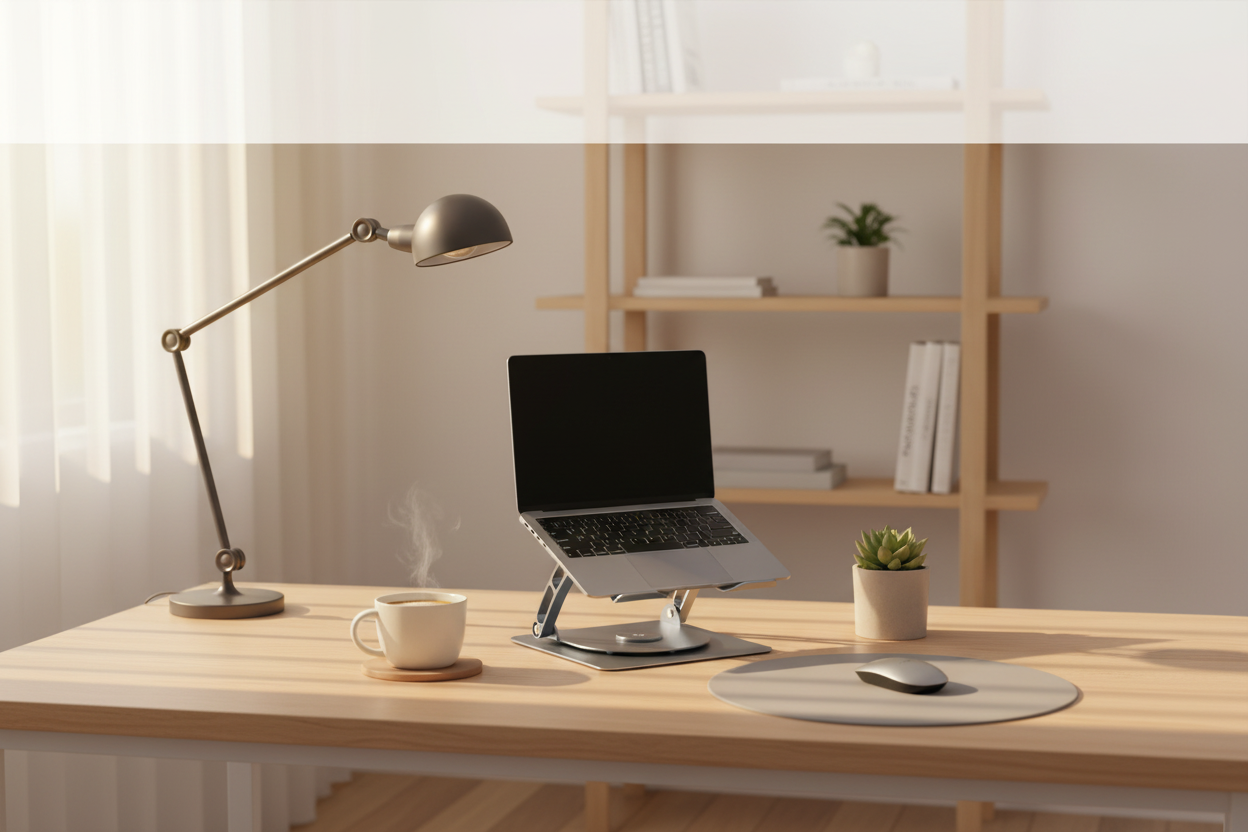
The Ultimate Cozy Home Office Makeover for Under $200
Quick Answer: The fastest way to make your home office cozier and more productive without breaking the bank? Start with a premium ergonomic laptop stand to fix your posture, add a cooling fan stand if your machine runs hot, and layer in soft, adjustable lighting. Rackora's lineup of aerospace-grade aluminum stands and 360° rotating cooling stands gives you lab-tested performance starting at $49.99 — all well within a $200 total budget.
Why Does Your Home Office Feel So… Blah?
Picture this: It's 9 AM on a Tuesday. You've got your coffee, your to-do list is ready, and you sit down at your desk — only to be greeted by a tangle of cables, a laptop screen angled straight at your chin, and a chair that's slowly turning your lower back into a question mark. Within an hour, your neck aches, your laptop fan is screaming like a jet engine, and your motivation has quietly left the building.

Sound familiar? You're not alone. According to ergonomics researchers, the average remote worker spends 6–8 hours a day at a desk that was never designed for full-time use. The result? Chronic neck strain, reduced focus, and a workspace that feels more like a punishment than a sanctuary.
Here's the good news: you don't need a $5,000 renovation or a Pinterest-perfect studio apartment to fix this. A targeted investment of under $200 in the right functional accessories can completely transform how your desk looks, feels, and performs. And that's exactly what this guide is about.
Let's build your dream cozy home office — one smart upgrade at a time.
What Makes a Home Office Feel "Cozy" AND Productive?
"Cozy" doesn't mean cluttered with throw pillows and scented candles (though we're not judging). In the context of a home office, coziness is the intersection of comfort, control, and calm. It's a space where everything is within reach, nothing is straining your body, and the environment supports deep focus rather than fighting against it.

The three pillars of a cozy productive workspace are:
- Ergonomic alignment — Your screen at eye level, your wrists neutral, your back supported.
- Thermal comfort — No overheating devices radiating heat onto your hands and lap.
- Visual calm — A clean, organized surface with intentional lighting.
The great news? All three are achievable for under $200 with the right accessories. Let's break it down.
How Can a Laptop Stand Really Change Your Work-From-Home Experience?
Here's a scenario you might recognize: You've been on back-to-back Zoom calls for three hours. Your laptop is flat on the desk, so you've been hunching forward, craning your neck down at a 30-degree angle. By 2 PM, you have a tension headache that no amount of ibuprofen seems to touch.
A quality laptop stand is the single highest-ROI upgrade you can make to your home office. By elevating your screen to eye level, it immediately corrects your cervical spine alignment — reducing neck and shoulder strain by up to 50% according to occupational health studies. It also frees up desk space underneath for a keyboard and mouse, turning your laptop into a proper desktop workstation.
But not all laptop stands are created equal. Here's what separates a premium stand from a $15 plastic shelf:
What Should You Look for in a Premium Ergonomic Laptop Stand?
- Material: Aerospace-grade aluminum dissipates heat and won't flex under load. Avoid hollow plastic.
- Adjustability: Multiple height and angle settings let you dial in your exact ergonomic sweet spot.
- Stability: Anti-slip silicone pads on both the feet and the laptop cradle prevent any wobble during typing.
- Portability: If you move between rooms or travel, a foldable design is essential.
The Rackora Ergo Laptop Stand Elite Edition — Your Posture's New Best Friend

The Rackora Ergo Laptop Stand Elite Edition ($79.99) is the workhorse of the Rackora lineup. Machined from solid aerospace-grade aluminum, it features a multi-angle adjustment system that lets you set your screen height precisely where your eyes naturally rest — no more hunching, no more craning.
The anti-slip silicone pads grip your laptop firmly without scratching the finish, and the open-frame design allows passive airflow underneath your device, keeping temperatures lower even during intensive tasks. At $79.99, it's the kind of investment that pays for itself in reduced chiropractor visits within the first month.
Best for: Daily work-from-home users who want a permanent, premium desk setup.
Price: $79.99
→ Shop the Ergo Laptop Stand Elite Edition
Is Your Laptop Overheating Ruining Your Productivity? Here's the Fix.
It's a Friday afternoon. You're deep in a creative flow — editing a video, running a complex spreadsheet, or gaming during your lunch break — when suddenly your laptop fan kicks into overdrive. The bottom of your machine is hot enough to fry an egg. Performance tanks. Your fingers are uncomfortably warm. The whole experience becomes miserable.
Laptop thermal throttling is real, and it's silently killing your productivity. When a laptop's CPU gets too hot, it automatically reduces its clock speed to prevent damage — meaning the machine you paid $1,200 for is now performing like a $400 budget model. Studies show that sustained temperatures above 90°C can reduce CPU performance by 20–40%.
The solution isn't a new laptop. It's better airflow management.
How Does the Rackora 360° Rotating Laptop Stand with Cooling Fan Solve Overheating?

The Rackora 360° Rotating Laptop Stand with Cooling Fan ($129.99) is the engineering marvel of the lineup. It combines full ergonomic height adjustment with a built-in dual-turbine cooling system — delivering active airflow directly to your laptop's underside where heat accumulates most.
The 360° rotation feature is a genuine game-changer for collaborative work: spin your screen to face a colleague in a meeting, then rotate it back to your optimal viewing angle in seconds. The silent motor ensures the fan noise won't disrupt your calls or concentration.
For gamers, video editors, or anyone who pushes their machine hard, this stand is the difference between a smooth session and a frustrating, laggy one.
Best for: Power users, gamers, and anyone whose laptop runs hot.
Price: $129.99
→ Shop the 360° Cooling Stand
What's the Best Budget-Friendly Laptop Stand for a Cozy Home Office?
Not everyone needs the full-featured cooling stand. Maybe you work primarily on documents and calls, your laptop runs cool, and you just want a clean, elevated setup that looks great on your desk. In that case, the Rackora Pro Stand 100 ($59.99) is your answer.

The Pro Stand 100 delivers premium adjustability and a minimalist aesthetic at a price that leaves plenty of room in your $200 budget for other upgrades. Its clean lines and neutral finish complement any desk aesthetic — whether you're going for Scandinavian minimalism or a moody dark-mode setup.
Best for: Light to moderate users who prioritize aesthetics and ergonomics on a budget.
Price: $59.99
→ Shop the Pro Stand 100
How Do You Build a Complete Cozy Home Office for Under $200? (The Budget Breakdown)
Let's get practical. Here are three curated budget builds using real Rackora products, each totaling under $200:
The "Clean & Calm" Build — $139.98
| Product | Price | What It Does |
|---|---|---|
| Rackora Pro Stand 100 | $59.99 | Elevates screen to eye level, improves posture |
| Rackora Adjustable Tablet Stand | $49.99 | Secondary screen or reference device holder |
| Rackora Magnetic Phone Stand | $23.99 | Keeps phone visible without cluttering desk |
| Total | $133.97 | Clean, organized, ergonomic desk |
The "Power User" Build — $179.98
| Product | Price | What It Does |
|---|---|---|
| Rackora Ergo Laptop Stand Elite | $79.99 | Premium ergonomic elevation, heat dissipation |
| Rackora Adjustable Tablet Stand | $49.99 | iPad or secondary device at perfect angle |
| Rackora Magnetic Phone Stand | $23.99 | MagSafe-compatible phone dock |
| Total | $153.97 | Full ergonomic workstation under budget |
The "Thermal Beast" Build — $199.98
| Product | Price | What It Does |
|---|---|---|
| Rackora 360° Cooling Stand | $129.99 | Active cooling + 360° rotation + ergonomics |
| Rackora Magnetic Phone Stand | $23.99 | Phone dock with bottle opener bonus |
| Total | $153.98 | Maximum thermal performance, room to spare |
All three builds come in under $200 — leaving you budget for a good desk plant, a quality mouse pad, or that fancy coffee you deserve.
Do You Really Need a Separate Tablet Stand for Your Home Office?
You might be thinking: "I already have a laptop stand — why would I need a tablet stand too?" Here's the scenario that changes minds: You're on a video call on your laptop while trying to reference a PDF, a recipe, or a design brief on your iPad. Without a stand, your tablet is flat on the desk, forcing you to look down and break your posture every few minutes. With a dedicated tablet stand, your iPad becomes a true second screen — at eye level, at the perfect angle, always visible.

The Rackora Adjustable Tablet Stand for Home Office ($49.99) is built for exactly this use case. Its universal compatibility means it works with iPads, Android tablets, e-readers, and even small laptops. The adjustable angle lets you set it for reading, drawing, or video calls — and the anti-slip base keeps it rock-solid even during touch interactions.
At $49.99, it's one of the most versatile additions to any desk setup.
How Does a Magnetic Phone Stand Make Your Desk Feel More Organized?
Here's a small but mighty upgrade that most people overlook: your phone. Right now, it's probably lying flat on your desk, lighting up every few minutes and pulling your attention away from your work. Or it's propped against your coffee mug at a precarious angle. Neither is ideal.

The Rackora Magnetic Phone Stand with Bottle Opener ($23.99) solves this with elegant simplicity. The strong magnetic grip (MagSafe-compatible) holds your phone at the perfect viewing angle, keeping notifications visible without demanding your full attention. The built-in bottle opener is a genuinely fun bonus — because sometimes the best home office perk is a cold drink at 5 PM.
At under $24, this is the easiest "yes" in your entire $200 budget.
Ergonomic Stand vs. No Stand: Is the Upgrade Really Worth It?
Let's put the numbers side by side so you can see exactly what you're getting:
| Factor | No Stand (Laptop Flat) | With Rackora Stand |
|---|---|---|
| Screen height | 15–20° below eye level | At or near eye level |
| Neck angle | 30–45° forward flexion | Neutral (0–5°) |
| Laptop temperature | No airflow underneath | Passive or active cooling |
| Desk space | Laptop occupies full footprint | Space freed for keyboard/mouse |
| Posture fatigue (8hr day) | High — neck/shoulder strain | Low — aligned spine |
| CPU performance (hot laptop) | Throttled up to 40% | Maintained at full speed |
| Cost | $0 | From $59.99 |
The math is pretty clear. For less than the cost of a single chiropractor visit, you get a setup that actively protects your body and your machine's performance every single day.
What Are the Best Cozy Home Office Accessories for Under $50?
Not every upgrade needs to be a centerpiece. Sometimes the coziest improvements are the small ones — the accessories that quietly make everything feel more intentional and put-together.
Here are the Rackora picks that deliver maximum coziness per dollar:
- Rackora Adjustable Tablet Stand Holder — Grey ($49.99): A sleek, neutral-toned stand that works with virtually any tablet or small device. The grey finish pairs beautifully with both light wood and dark desk surfaces.
- Rackora Magnetic Phone Stand ($23.99): Keeps your phone upright and accessible without cluttering your desk.
- Rackora Multi-Function Tablet Case Stand with Pencil Holder ($39.99): If you use an iPad for notes, sketching, or reference, this case-stand combo keeps your Apple Pencil always within reach.
How Do You Make a Small Home Office Feel Bigger and Cozier at the Same Time?
Small spaces have a secret weapon: verticality. When you lift your devices off the desk surface — laptop on a stand, tablet on a holder, phone on a magnetic dock — you instantly create visual breathing room. Your desk looks cleaner, feels larger, and becomes a space you actually want to spend time in.
Pair this with a few non-Rackora cozy touches that cost almost nothing:
- A small plant (pothos or succulents are nearly indestructible)
- A warm-toned desk lamp (2700K–3000K color temperature for that golden-hour glow)
- A quality mouse pad that covers most of your desk surface (doubles as a wrist rest)
- Cable management clips to tame the wire chaos
With your Rackora stands handling the ergonomic and thermal heavy lifting, these small touches complete the transformation from "functional desk" to "cozy sanctuary."
Is the Rackora K80 Stand Worth It for a Home Office?
If you're willing to stretch your budget slightly — or if you're looking for one premium piece that does it all — the Rackora Premium K80 Multipurpose Ergonomic Stand ($189.99) deserves serious consideration.

The K80 is Rackora's flagship multipurpose stand — engineered for users who want a single, beautifully designed piece of hardware that handles laptops, tablets, and documents with equal grace. At $189.99, it sits right at the edge of our $200 budget, making it a one-product makeover for minimalists who prefer a single statement piece over multiple accessories.
The K80's build quality is immediately apparent: the weight, the precision of the adjustment mechanism, the way it holds its position without any drift. This is the kind of desk accessory that makes visitors ask "where did you get that?"
Best for: Minimalists who want one premium piece that does everything.
Price: $189.99
→ Shop the K80 Multipurpose Stand
Upgrade Your Desk on a Budget — Here's Your Action Plan
You've made it to the end, which means you're serious about making your home office a place you actually love. Here's the simple truth: a cozy, productive home office isn't about spending a fortune. It's about spending smartly on the accessories that have the highest daily impact on your comfort, health, and performance.
Rackora's lineup is built for exactly this. Every product is engineered to solve a real problem — not just to look good on a shelf. From the $23.99 magnetic phone stand that quietly declutters your desk to the $129.99 360° cooling stand that keeps your machine running at full power, every dollar you spend with Rackora is a dollar invested in your daily quality of life.
Ready to transform your workspace?
- 🛒 Shop the Ergo Laptop Stand Elite Edition — $79.99
- 🛒 Shop the 360° Cooling Stand — $129.99
- 🛒 Shop the K80 Multipurpose Stand — $189.99
✅ Free shipping on orders over $50 | 📦 US warehouse — ships in 3–7 business days | 🔄 30-day hassle-free returns
💌 Subscribe to the Rackora newsletter and get 15% off your first order — plus early access to new launches and exclusive member deals.
Frequently Asked Questions
Can I really makeover my home office for under $200?
Absolutely. The key is focusing on high-impact functional accessories rather than decorative items. A quality laptop stand ($59.99–$129.99) combined with a tablet holder and phone stand can completely transform your ergonomics, desk organization, and device performance — all within a $200 budget. Check the three budget builds in this article for exact product combinations.
What is the most important home office accessory to buy first?
A laptop stand, without question. It's the single upgrade that affects your posture, your device's thermal performance, and your desk organization all at once. Start with the Rackora Pro Stand 100 ($59.99) if you're on a tight budget, or the Ergo Laptop Stand Elite Edition ($79.99) for a premium experience.
Does a laptop stand really help with neck pain?
Yes — and the research backs this up. When your laptop is flat on a desk, you're looking down at a 30–45° angle for hours at a time. This puts enormous strain on the cervical spine and the muscles of the neck and upper back. Elevating your screen to eye level with a stand reduces this forward flexion to near zero, dramatically reducing cumulative strain over a workday.
Is the Rackora 360° Cooling Stand worth the extra cost over a regular stand?
If your laptop runs hot during intensive tasks — video editing, gaming, large spreadsheets, extended video calls — then yes, absolutely. Thermal throttling can reduce your CPU performance by 20–40%, meaning you're not getting the full value from your machine. The active cooling in the 360° Cooling Stand ($129.99) addresses this directly. If your laptop runs cool, the Ergo Elite or Pro Stand 100 are excellent choices.
What laptop sizes are compatible with Rackora stands?
Rackora stands are designed for universal compatibility, accommodating most laptops from 11" to 17". This includes MacBooks (Air and Pro), Dell XPS, HP Spectre, Lenovo ThinkPad, ASUS, and gaming laptops. Check individual product pages for specific size ranges.
How long does Rackora take to ship to the US?
Rackora ships from US-based warehouses, with standard delivery taking 3–7 business days. Most orders placed before 2 PM EST ship the same day.
Does Rackora offer a return policy?
Yes. Rackora offers a 30-day hassle-free return policy on all products. If you're not completely satisfied with your purchase, you can return it within 30 days for a full refund or exchange.
Can I use a Rackora laptop stand with an external monitor setup?
Yes. Many users use a Rackora laptop stand as part of a dual-screen setup — the laptop elevated on the stand serves as a secondary screen while an external monitor is the primary display. This is an excellent ergonomic configuration that maximizes screen real estate without requiring a dedicated monitor arm.
What's the difference between the Rackora Pro Stand 100 and the Ergo Laptop Stand Elite Edition?
Both are premium aluminum stands with adjustable height and anti-slip pads. The Ergo Laptop Stand Elite Edition ($79.99) offers more advanced ergonomic adjustment options and a more refined build quality, making it the better choice for full-time home office users. The Pro Stand 100 ($59.99) is an excellent value pick for lighter users or those who prioritize minimalist aesthetics.
Is the Rackora K80 Stand compatible with both laptops and tablets?
Yes. The Rackora Premium K80 Multipurpose Ergonomic Stand ($189.99) is designed for multipurpose use — it accommodates laptops, tablets, and documents with equal ease. It's the ideal choice for users who want a single, premium stand that handles everything on their desk.
