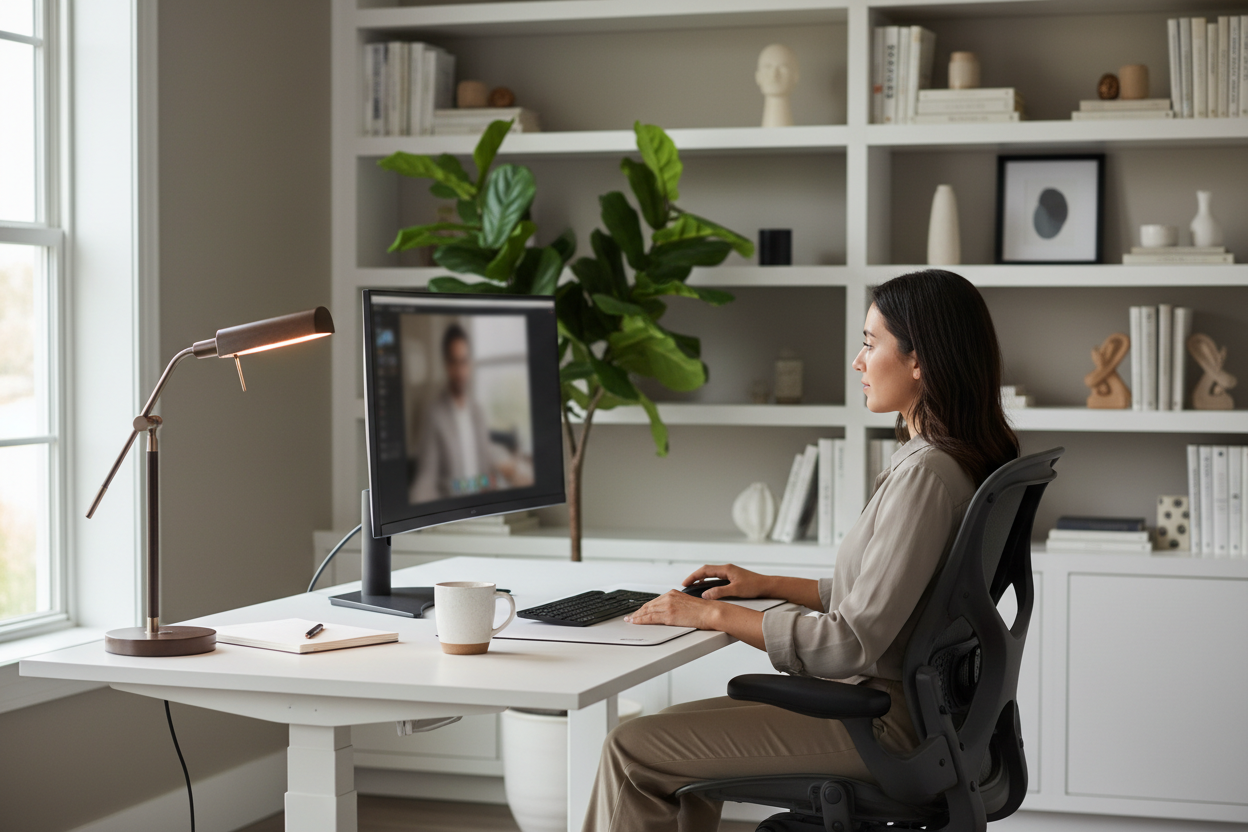
Remember when "working from home" meant answering emails in your pajamas? Those days are long gone. Today's remote work reality means your home office isn't just where you work—it's your professional stage, your meeting room, and increasingly, the first impression you make on clients, colleagues, and potential employers.
Your video call backdrop speaks volumes before you say a single word. A cluttered background screams disorganization. A blank wall suggests you haven't quite settled in. But a thoughtfully designed backdrop? That tells people you're serious, professional, and you've got your act together.
Let's talk about how to create a video call backdrop that actually works for you.
Why Your Video Background Actually Matters More Than You Think
Here's the thing nobody tells you about video calls: people are absolutely judging your background. Not in a mean way, but it's human nature. While you're presenting that quarterly report, half the people on the call are wondering about that stack of boxes behind you or trying to read the titles on your bookshelf.
A Stanford study found that environmental cues in video calls significantly impact how viewers perceive professionalism and credibility. Your backdrop isn't just decoration—it's part of your professional brand now.
Think about it this way: you wouldn't show up to an in-person meeting wearing a wrinkled shirt. Your video backdrop is the remote work equivalent of your professional attire. It sets the tone, establishes credibility, and creates an environment where people can focus on what you're saying rather than what's happening behind you.
The Foundation: Getting Your Desk Setup Right
Everything starts with your desk. Not just any desk, but one that positions you correctly in the frame and gives you the flexibility to adjust throughout the day.
Height matters more than most people realize. When your desk is too low, you're hunching over, creating unflattering camera angles. Too high, and you're straining your neck and shoulders. The sweet spot? Your eyes should be level with the camera, which means your desk needs to adapt to you, not the other way around.

The 47-Inch Standing Desk with Height Adjustment ($489.38) gives you the workspace you need for a professional setup. The clean white finish looks crisp on camera and reflects light beautifully, helping to brighten your overall appearance. At 47 inches wide, you have plenty of room for your monitor, keyboard, and those carefully chosen backdrop accessories we'll discuss later.
What makes this particularly effective for video calls is the generous surface area. You can position your camera at the optimal distance while still having workspace on either side. The height adjustment means you can find that perfect eye-level position for your camera, whether you prefer sitting or standing during calls.
Seating That Looks Good and Feels Better
Here's an uncomfortable truth: you can have the perfect backdrop, but if you're squirming in an uncomfortable chair, it shows. People notice when you're constantly shifting position or leaning forward to relieve back pressure.
Your chair needs to do two things simultaneously—support you through long video sessions and look professional on camera. That's a taller order than it sounds.

The Reclining Office Chair with Footrest ($429.00) brings executive-level comfort to your video setup. The inflatable lumbar support is a game-changer—you can adjust it throughout the day as your posture needs change. During long video marathons, that customizable support keeps you sitting upright and engaged rather than slouching.
The footrest might seem like a luxury, but it's actually strategic for video calls. It helps you maintain proper posture by supporting your legs, which keeps your spine aligned and your shoulders back. On camera, this translates to looking confident and professional rather than tired or uncomfortable. The 300lbs capacity means this chair is built to last, maintaining its support and appearance through years of daily video calls.
Monitor Positioning: The Secret to Natural Eye Contact
Ever notice how some people seem to be looking slightly down or off to the side during video calls? That's a monitor positioning problem, and it's more common than you'd think.
Your camera needs to be at eye level, which means your monitor needs to be at eye level. But most desk setups have monitors sitting directly on the desk surface, forcing you to look down. This creates an unflattering angle and makes it seem like you're not making eye contact.

The Dual Monitor Gas Spring Mount ($131.99) is perfect if you're running a multi-screen setup. Many professionals use one monitor for their video call and another for notes, presentations, or reference materials. This mount handles both screens (13-32 inches) with smooth gas spring adjustment, so you can position each monitor exactly where you need it.
For video calls, this setup is brilliant. Position your primary monitor with the camera at true eye level, then angle your secondary monitor slightly to the side for your working documents. The gas spring mechanism means you can make micro-adjustments even during calls—no tools, no fuss. And because both monitors are elevated off your desk, you gain valuable surface space for those backdrop-enhancing elements.
Lighting: The Make-or-Break Element Nobody Gets Right
You can have the most beautifully styled backdrop in the world, but bad lighting will make you look like you're calling in from a cave. Good lighting isn't about brightness—it's about direction, quality, and consistency.
The biggest mistake people make? Relying solely on overhead lighting. Ceiling lights cast shadows downward, creating dark circles under your eyes and generally unflattering shadows across your face. You need light coming from in front of you, slightly above eye level.
Natural light is beautiful but unreliable. Morning calls look great, afternoon calls turn you into a silhouette if you're facing a window, and evening calls require artificial light anyway. You need a consistent solution.

The 19.5" Black Metal Task Desk Lamp ($67.66) works surprisingly well as a key light for video calls. Position it about 45 degrees to one side of your camera, angled down slightly. The adjustable arm lets you fine-tune the angle, and the metal construction means it stays put once you've found the sweet spot. The built-in organizer is a bonus—it keeps small items tidy and out of your video frame.
Pro tip: use a daylight-balanced LED bulb (5000-6500K) to match natural light. This keeps your skin tones looking natural on camera and matches the ambient light in most home offices. The black metal finish looks professional and intentional on camera, unlike plastic lamps that can look cheap in the background.
Creating Depth: The Three-Layer Backdrop Strategy
Flat backgrounds look flat on camera. That's not a profound observation, but it's one most people ignore. The secret to a professional-looking backdrop is creating visual depth through three distinct layers.
Layer One: Your Immediate Background (2-3 feet behind you)
This is what fills most of your frame. It should be clean but not sterile. A solid-colored wall works, but it's more interesting with subtle texture—think a painted accent wall, wood paneling, or even high-quality wallpaper.
Avoid busy patterns or bright colors that compete for attention. Soft neutrals work best: warm grays, soft blues, sage greens, or warm whites. These colors are flattering on camera and don't create color casts on your skin.
Layer Two: Mid-Ground Elements (3-5 feet behind you)
This is where you add personality and professionalism. A bookshelf slightly out of focus, a credenza with a few carefully chosen objects, or a tall plant that adds organic texture.
The key word is "slightly out of focus." You want these elements visible but not demanding attention. They should suggest depth and thoughtfulness without being distracting.
Books are classic for a reason—they suggest knowledge and professionalism. But arrange them thoughtfully. Mix vertical and horizontal stacks, vary the heights, and maybe add a small object or two to break up the lines. Nobody's reading the titles, but everyone notices if they look haphazardly thrown together.
Layer Three: Background Depth (5+ feet behind you)
If your space allows it, having something visible in the far background adds a sense of space and prevents that "backed into a corner" look. This could be a doorway, a window with sheer curtains, or even just the suggestion of the room continuing beyond the frame.
This layer should be quite out of focus—just shapes and light that add dimension without detail.
The Color Psychology of Your Backdrop
Colors communicate, whether we're conscious of it or not. Your backdrop color choices send subtle messages about your professional brand.
Blue tones suggest trustworthiness, calm, and competence. There's a reason so many corporate offices use blue—it's universally professional without being cold. Navy, slate blue, or soft powder blue all work well on camera.
Gray tones are sophisticated and neutral, letting you be the focus. Warm grays (with slight brown undertones) feel more approachable than cool grays. Avoid pure gray, which can look institutional.
Green tones bring in nature and growth. Sage green or soft olive can make your space feel calm and grounded. Avoid bright greens, which can create unflattering color casts on your skin.
Warm neutrals (beiges, taupes, warm whites) create an approachable, comfortable feeling. They're particularly good if your industry values creativity or personal connection over corporate formality.
What to avoid: bright reds (too aggressive), pure white (creates exposure problems), black (too dramatic for most contexts), and busy patterns (distracting and can create weird visual effects on camera).
Strategic Object Placement: What to Include and What to Skip
The objects in your backdrop should tell a story about who you are professionally, but subtly. Think of them as supporting actors, not the main show.
Good backdrop elements:
Plants add life and organic texture. A tall floor plant in the corner or a medium-sized plant on a shelf creates visual interest without being distracting. Stick to real plants if possible—fake ones often look obviously fake on camera.
Books and professional materials suggest expertise and continuous learning. But keep them organized. Messy bookshelves suggest a messy mind, fair or not.
Subtle personal touches—a small piece of art, a professional award, or a tasteful decorative object—add personality without oversharing. One or two items maximum.
Architectural elements like crown molding, wainscoting, or interesting wall textures add sophistication without requiring any styling.
Backdrop elements to avoid:
Family photos are tricky. They're personal, which can be good, but they also invite questions and can be distracting. If you include them, keep them small and to the side.
Posters and wall art with text are problematic—people will try to read them instead of listening to you. If you include art, make it visual rather than text-based.
Anything that moves—ceiling fans, curtains near open windows, or doors that might open mid-call. Movement in the background is incredibly distracting.
Clutter of any kind. This seems obvious, but it's worth stating: visible mess undermines professionalism faster than almost anything else.
Religious or political items, unless they're directly relevant to your work. You want your backdrop to be professionally neutral.
The Technical Setup: Camera Position and Framing
You've styled the perfect backdrop, but if your camera isn't positioned correctly, nobody will see it the way you intended.
Camera height: Eye level, always. This creates natural-looking eye contact and flattering angles. If you're using a laptop camera, this probably means elevating your laptop on a stand.
Distance from camera: Aim for about arm's length. Too close feels invasive, too far makes you seem disconnected. You want your head and shoulders to fill roughly the middle third of the frame, with your backdrop visible but not dominating.
Framing: Leave a little space above your head (about a fist's width) and frame yourself from mid-chest up. This is the most natural, conversational framing for video calls.
Background in frame: Your backdrop should be visible but not overwhelming. If people are seeing more background than you, you're sitting too far from the camera or your backdrop is too busy.
Dealing with Common Backdrop Challenges
Challenge: Small spaces with no room for depth
Solution: Use a single well-chosen backdrop element like a piece of textured wall art or a narrow floating shelf with a few objects. Even in tight spaces, you can create the illusion of depth with lighting—a small lamp creating a pool of light on the wall behind you adds dimension.
Challenge: Shared spaces where you can't control the background
Solution: Position yourself facing a corner or wall section you can control. Use a room divider or bookshelf to create a defined backdrop area. In a pinch, a well-chosen virtual background is better than a chaotic real one, but use it sparingly—they still look artificial.
Challenge: Windows behind you creating backlight issues
Solution: Never sit with a window directly behind you—you'll be a silhouette. Instead, position windows to your side for natural fill light, and use curtains or blinds to control the intensity. If you must have a window in frame, make sure you have strong enough front lighting to balance it.
Challenge: Inconsistent lighting throughout the day
Solution: Invest in dedicated lighting that you can control. Natural light is beautiful but unreliable. Having consistent artificial lighting means you look the same whether it's 9 AM or 9 PM.
Industry-Specific Backdrop Considerations
Your ideal backdrop varies depending on your field. What works for a creative professional might not work for a financial advisor.
Corporate/Finance: Clean, minimal, professional. Think solid colors, subtle textures, maybe a bookshelf with business books. Avoid anything too personal or creative.
Creative Fields: You have more freedom to show personality. Interesting art, creative objects, or even a well-styled workspace visible in the background can reinforce your creative credentials.
Education/Coaching: Warm and approachable works best. Bookshelves, plants, and warm colors create an environment that feels conducive to learning.
Healthcare/Therapy: Calm, neutral, and private. Avoid anything too personal or distracting. Soft colors and minimal styling create a professional therapeutic environment.
Sales/Client-Facing: Professional but approachable. You want to seem successful without being intimidating. Clean, well-organized, with subtle touches that suggest competence.
Maintaining Your Backdrop: The Weekly Checklist
A great backdrop isn't set-it-and-forget-it. It requires regular maintenance to stay camera-ready.
Before every important call:
- Do a quick camera check to see what's actually in frame
- Remove any clutter that's crept into view
- Adjust lighting if needed (time of day affects natural light)
- Check that nothing's moved or fallen over
Weekly maintenance:
- Dust visible surfaces (dust shows up surprisingly well on camera)
- Water plants and remove any dead leaves
- Straighten books and objects
- Check that your backdrop still looks good on camera—sometimes things shift gradually
Monthly review:
- Evaluate whether your backdrop still serves your professional goals
- Consider seasonal updates (lighter colors in summer, warmer tones in winter)
- Replace any elements that look worn or dated
- Test your setup with different lighting conditions
Budget-Friendly Backdrop Improvements
Creating a professional backdrop doesn't require a complete home office overhaul. Small, strategic improvements make a big difference.
Under $75:
- Paint an accent wall in a camera-friendly color
- Add a large plant (real or high-quality fake)
- Install a floating shelf and style it with a few objects
- Upgrade your lighting with a quality desk lamp ($67.66)
Under $200:
- Add a small bookshelf and fill it thoughtfully
- Invest in a dual monitor mount for better camera positioning ($131.99)
- Get proper task lighting for consistent illumination
- Add textured wall elements like wood panels or wallpaper
Under $500:
- Upgrade to a height-adjustable desk for optimal positioning ($489.38)
- Invest in a quality ergonomic chair that looks good on camera ($429.00)
- Create a complete lighting setup with multiple sources
- Add architectural elements or built-in shelving
Advanced Tips: Taking Your Backdrop to the Next Level
Once you've mastered the basics, these advanced techniques can elevate your video presence.
Depth of field manipulation: If you're using a DSLR or mirrorless camera instead of a webcam, you can use a wider aperture to create a shallow depth of field. This keeps you in sharp focus while softly blurring the background, creating a professional, polished look.
Accent lighting: A small LED strip or accent light behind a plant or object creates visual interest and depth. This works particularly well in the evening when ambient light is low.
Seasonal rotation: Subtle seasonal changes keep your backdrop fresh. This doesn't mean holiday decorations—think seasonal colors, different plants, or rotating art.
Multiple setups: If you have the space, consider creating two different backdrop options—one more formal for client calls, one more casual for team meetings. This gives you flexibility based on context.
Texture layering: Combine different textures in your backdrop—smooth walls with rough wood, matte surfaces with subtle shine. This creates visual interest without being busy.
The Psychology of Presence: Beyond the Visual
Your backdrop is important, but it's just one element of your video presence. The most perfectly styled backdrop won't compensate for poor audio, bad posture, or distracted energy.
Audio quality matters as much as video. Invest in a decent microphone or headset. People will tolerate mediocre video quality, but bad audio is a meeting-ender.
Your energy and engagement matter more than your backdrop. Make eye contact with the camera, not your own image. Sit up straight. Gesture naturally. Be present in the conversation.
Consistency builds trust. Using the same backdrop for regular meetings creates familiarity. People come to associate that environment with you, which builds professional recognition.
Authenticity trumps perfection. Your backdrop should feel like a natural extension of your professional self, not a stage set. A slightly imperfect but authentic backdrop is better than a perfectly styled but sterile one.
Future-Proofing Your Setup
Remote work isn't going anywhere. Your video call backdrop is a long-term investment in your professional presence.
Choose elements that won't date quickly. Trendy colors and styles might look great now but feel dated in a year. Classic, neutral choices have staying power.
Invest in quality over quantity. One great chair is better than three mediocre ones. A well-made desk will serve you for years. Quality lighting pays dividends in every single video call.
Build flexibility into your setup. Adjustable elements—height-adjustable desks, movable lighting, modular shelving—let you adapt as your needs change.
Plan for technology evolution. Leave space and power outlets for future upgrades. That webcam you're using now might be replaced by something better in a year.
Putting It All Together: Your Action Plan
Creating a professional video call backdrop doesn't happen overnight, but you can make meaningful improvements quickly.
Week 1: Foundation
- Evaluate your current setup on camera
- Identify the biggest issues (lighting, positioning, clutter)
- Clear and clean your backdrop area
- Optimize your desk and chair positioning
Week 2: Core Improvements
- Address lighting issues with better positioning or new fixtures
- Adjust camera height and framing
- Add or remove backdrop elements as needed
- Test your setup with a friend or colleague
Week 3: Refinement
- Fine-tune object placement and styling
- Experiment with different lighting angles
- Create depth with layered elements
- Document your optimal setup for consistency
Week 4: Optimization
- Test your backdrop in different lighting conditions
- Get feedback from colleagues
- Make final adjustments
- Establish a maintenance routine
Ready to Transform Your Video Presence?
Your video call backdrop is more than just what's behind you—it's part of your professional brand in the remote work era. The right setup communicates competence, attention to detail, and professionalism before you say a word.
Start with the foundation: a 47-inch height-adjustable desk ($489.38) that positions you perfectly in frame, a supportive ergonomic chair with footrest ($429.00) that keeps you comfortable and looking professional, and proper lighting with a quality task lamp ($67.66). Add a dual monitor mount ($131.99) to get your camera at the perfect height, and you've got the core of a professional setup.
The investment in your video presence pays dividends in every client call, team meeting, and virtual presentation. In the new remote normal, your backdrop isn't just background—it's part of how you show up professionally every single day.
Frequently Asked Questions
What's the ideal distance between me and my backdrop?
Aim for 3-5 feet between you and your main backdrop elements. This creates enough depth to prevent a flat look while keeping backdrop elements visible but not distracting. If you're too close to the wall, you'll look cramped. Too far, and your backdrop becomes irrelevant to the frame.
Should I use a virtual background or a real one?
Real backgrounds almost always look better and more professional. Virtual backgrounds can be glitchy, especially around hair and when you move. They also require more processing power, which can affect video quality. Use virtual backgrounds only when your real background is truly problematic and you can't fix it.
How do I prevent glare on my glasses during video calls?
Position your light source slightly above and to the side of your face rather than directly in front. Tilt your glasses slightly downward if possible. If you're still getting glare, try moving your light source farther away and using a larger, more diffused light rather than a small, bright one.
What color should I paint my backdrop wall?
Soft, muted colors work best. Warm gray, soft blue, sage green, or warm white are all excellent choices. Avoid pure white (creates exposure issues), bright colors (distracting and can create color casts), and very dark colors (can make the space feel small and create contrast issues).
How much should I invest in my video call setup?
Start with the basics and build from there. A minimum viable setup (good lighting, clean background, proper camera positioning) can be achieved for under $200. A professional-grade setup with quality furniture and equipment runs $800-1200. The key is prioritizing: lighting and camera position matter more than expensive furniture.
Can I have windows in my video call backdrop?
Yes, but never directly behind you—you'll be backlit and appear as a silhouette. Windows to the side can provide beautiful natural fill light. If a window must be in frame behind you, use sheer curtains to diffuse the light and ensure you have strong enough front lighting to balance it.
How often should I change my backdrop setup?
Your core setup should be consistent—people come to recognize your professional environment. But small seasonal updates (different plants, rotating art, seasonal colors) keep things fresh without being disruptive. Major changes should be infrequent, maybe once or twice a year at most.
What's the biggest mistake people make with video call backdrops?
Clutter. Hands down. A messy, disorganized background undermines professionalism faster than anything else. The second biggest mistake is poor lighting—specifically, relying only on overhead lights that create unflattering shadows. Fix these two issues and you're ahead of 80% of people on video calls.
Do I need different backdrop setups for different types of calls?
Not necessarily. A well-designed neutral backdrop works for most professional contexts. However, if you regularly switch between very different professional roles (say, creative work and corporate consulting), having two setups or easily swappable elements can be useful.
How do I make a small space work for video calls?
Focus on one well-styled corner rather than trying to make the whole room camera-ready. Use a corner setup to create natural depth. Choose a single focal point (a piece of art, a plant, a small shelf) rather than multiple elements. Good lighting is even more critical in small spaces—it creates the illusion of more room.
