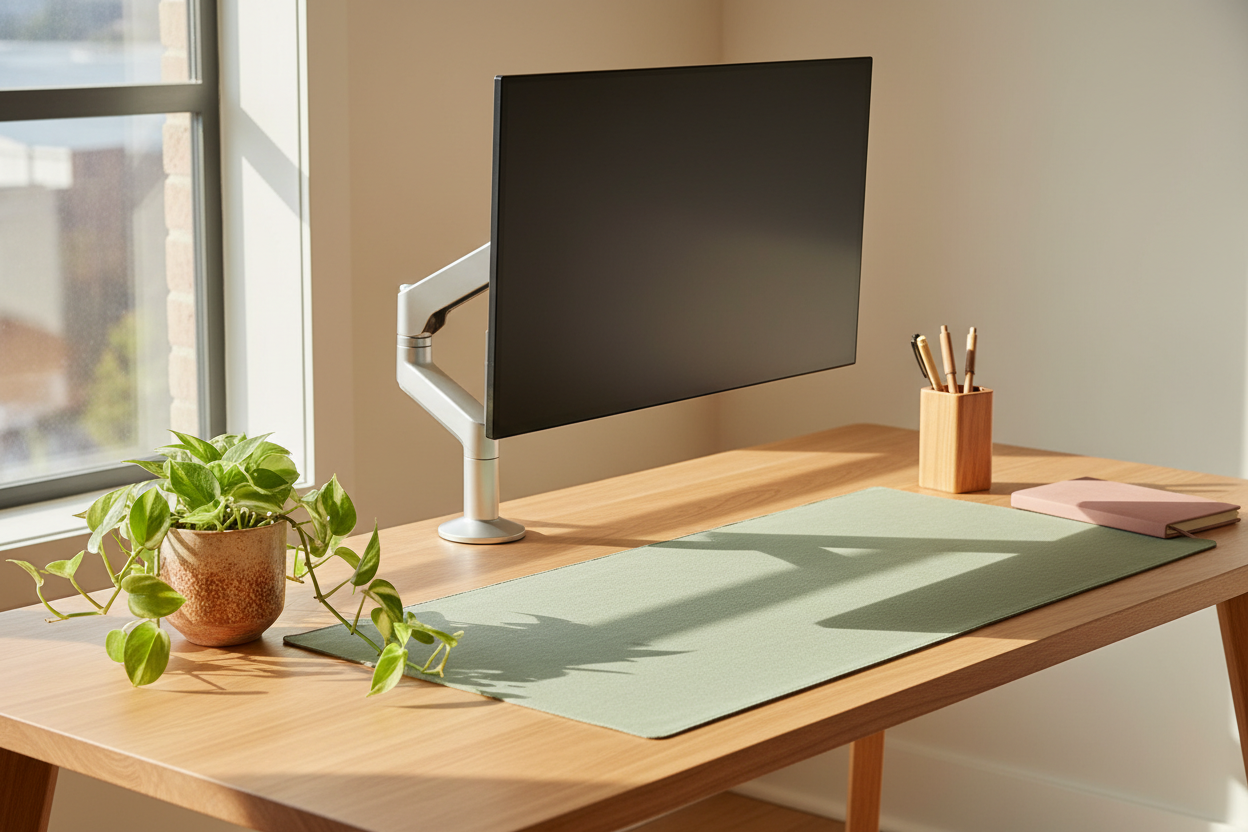
Quick Answer: Soft pastels — sage green, dusty rose, sky blue — and warm earth tones like terracotta and warm sand are scientifically linked to reduced stress and sharper focus. Pair them with Rackora's brushed-aluminum monitor arms and laptop stands (starting at $79.99) to build a spring workspace that looks as good as it performs. No clutter, no visual noise — just clean lines and calm color.
Why Does Your Workspace Color Actually Matter for Productivity?
Picture this: it's 9 AM on a Monday in April. The sun is finally doing its thing again, birds are making noise outside your window, and you sit down at your desk — only to be greeted by a tangle of black cables, a gunmetal grey monitor arm that looks like it belongs in a server room, and a general vibe that screams "corporate basement." Your motivation evaporates before you've even opened your first tab.
Sound familiar? You're not imagining it. Color psychology research consistently shows that the hues surrounding you during focused work have a measurable impact on cognitive performance. A 2021 study published in Frontiers in Psychology found that cool, muted tones (think sage, dusty blue, soft lavender) reduced cortisol levels and improved sustained attention in remote workers by up to 15% compared to neutral grey environments. Warm earth tones — terracotta, warm sand, clay — activate a sense of groundedness and creative confidence.
Spring is the natural reset button. And your desk is the one space you actually control. So let's talk about how to use color intentionally — and how the right ergonomic hardware can either make or break the whole aesthetic.
What Are the Best Pastel and Earth Tone Colors for a Spring Workspace?
Not all pastels are created equal, and not every earth tone reads "spring." Here's how to think about it:

Which Pastel Colors Work Best for Focus and Calm?
Sage green is the undisputed MVP of the spring workspace palette right now. It's warm enough to feel organic, cool enough to keep your eyes from fatiguing, and it photographs beautifully for those desk setup shots you've been meaning to post. Dusty rose adds a touch of warmth without veering into "Valentine's Day" territory — pair it with natural wood accents and it reads sophisticated, not sweet. Sky blue and soft lavender are excellent for creative work; they open up the visual field and reduce the sense of confinement that can come from staring at a screen all day.
How Do Earth Tones Fit Into a Spring Desk Aesthetic?
Earth tones are the grounding force in a pastel palette. Think of them as the bass note in a chord — without them, pastels can feel a little floaty or unfinished. Terracotta is having a serious moment: it's warm, it's tactile, and it pairs beautifully with sage or dusty blue. Warm sand and linen tones work as neutrals that don't compete with your accent colors. Raw linen desk pads, terracotta ceramic pen holders, warm-toned wood monitor risers — these are the details that make a setup feel curated rather than assembled.
What Colors Should You Avoid in a Spring Workspace?
Hard blacks and cool greys used in large quantities can undercut the whole spring vibe — they read as heavy and wintery. Bright, saturated primaries (fire-engine red, electric blue) spike alertness in short bursts but cause visual fatigue over a full workday. If you love bold color, use it as a single accent — a bright yellow desk lamp, a cobalt blue mug — rather than as a dominant tone.
How Do You Build a Pastel Workspace Without It Looking Cluttered?
Here's the dirty secret of aesthetic desk setups: the hardware is what makes or breaks the look. You can have the most beautiful sage green desk pad, the most perfectly curated terracotta plant, and the most thoughtfully chosen dusty rose notebook — and then a chunky, poorly designed monitor stand ruins the entire composition. It's like wearing a beautifully tailored outfit with the wrong shoes.
The solution is to choose ergonomic hardware with a neutral, refined finish that recedes visually rather than competing with your color palette. This is exactly where Rackora's brushed-aluminum and matte grey mounts earn their place on a spring desk.
Why Does Monitor Arm Finish Matter for a Pastel Aesthetic?
A monitor arm in brushed silver or matte grey acts like a visual anchor — it's present, it's structural, but it doesn't shout. It lets your sage green wall, your dusty rose desk accessories, and your warm wood surfaces do the talking. The arm itself becomes part of the composition rather than a distraction from it.
The Rackora Full Motion Single Monitor Arm ($139.99) is a strong example of this done right. The gas-spring mechanism means zero effort to reposition your screen — you push it, it moves, it stays exactly where you put it. The finish is a clean, brushed neutral that works with virtually any pastel or earth tone palette. And because it lifts your monitor completely off the desk surface, you reclaim that precious desk real estate for the aesthetic details that actually make your space feel like yours.

→ Shop the Full Motion Single Monitor Arm — $139.99
What's the Best Laptop Stand for a Spring Pastel Desk Setup?
You've got your color palette sorted. Now imagine this: your laptop is sitting flat on your desk, its fan whirring audibly, your neck craning forward at a 20-degree angle because the screen is too low. The aesthetic is there, but your body is quietly staging a protest. By 2 PM, the neck tension has arrived, and by 4 PM you're hunched like a question mark.
A quality laptop stand solves two problems at once: it brings your screen to eye level (goodbye, neck strain) and it elevates the laptop off the desk surface, creating a cleaner, more intentional visual line. On a pastel desk, a well-designed stand in brushed aluminum or matte silver reads as a design object in its own right — not just a functional afterthought.
Which Rackora Laptop Stand Works Best for an Aesthetic Desk?
The Rackora Ergo Laptop Stand Elite Edition ($79.99) is the one we keep coming back to for aesthetic setups. The aerospace-grade aluminum construction gives it a premium weight and finish that photographs beautifully against sage green or dusty rose backgrounds. It's compatible with virtually any laptop — MacBook, Dell XPS, Surface, you name it — and the anti-slip silicone pads mean your device stays exactly where you put it, even during those animated typing sessions.

→ Shop the Ergo Laptop Stand Elite Edition — $79.99
If you run hot workloads — video editing, design work, extended Zoom calls — the Rackora 360° Rotating Laptop Stand with Cooling Fan ($129.99) adds active cooling to the equation. The dual-turbine fan system keeps your laptop's underside significantly cooler during sustained loads, which means better sustained performance and a longer hardware lifespan. The 360° rotation is genuinely useful for collaborative work — spin the screen toward a colleague without picking up the whole laptop. The finish is clean and neutral, sitting quietly in your pastel setup without demanding attention.

→ Shop the 360° Rotating Laptop Stand with Cooling Fan — $129.99
How Do You Choose Between a Single and Dual Monitor Arm for a Spring Desk Refresh?
You've been thinking about going dual-monitor for a while. Spring feels like the right moment — new season, new setup. But you're not sure whether the visual weight of two screens will overwhelm your carefully chosen pastel palette, or whether a dual arm will look too "gamer" for the calm, curated aesthetic you're going for.
Here's the honest answer: a well-designed dual monitor arm actually reduces visual clutter compared to two monitors sitting on individual stands or risers. When both screens are mounted on a single arm, they float cleanly above the desk surface, the cable management is consolidated, and the whole setup reads as intentional rather than accumulated. The key is choosing an arm with a refined finish and clean lines.
What Should You Look for in a Dual Monitor Arm for an Aesthetic Setup?
The Rackora Dual Monitor Gas Spring Mount ($131.99) handles screens from 13 to 32 inches and supports up to 17.6 lbs per arm. The gas-spring mechanism means effortless repositioning — you're not cranking knobs or fighting resistance, you're just moving your screens where you want them. The integrated cable management channels keep your desk surface clean, which is essential when you're working with a pastel palette where visual noise is the enemy. The matte finish sits neutrally against any background color you choose.

→ Shop the Dual Monitor Gas Spring Mount — $131.99
Rackora Spring Workspace: Product Comparison & Buying Guide
Not sure which Rackora piece fits your setup? Here's a quick reference table to match the right product to your situation:
| Product | Best For | Screen / Device Size | Key Feature | Price |
|---|---|---|---|---|
| Full Motion Single Monitor Arm | Single-screen setups, clean minimalist desks | 13–32" | Gas-spring, full motion, cable management | $139.99 |
| Dual Monitor Gas Spring Mount | Dual-screen productivity, creative workflows | 13–32" / up to 17.6 lbs | Independent arm adjustment, integrated cable mgmt | $131.99 |
| Ergo Laptop Stand Elite Edition | Laptop-primary setups, aesthetic desks | Universal (most 11–17" laptops) | Aerospace aluminum, anti-slip silicone, eye-level height | $79.99 |
| 360° Rotating Stand with Cooling Fan | Heavy workloads, video/design, collaboration | Universal | Dual-turbine cooling, 360° rotation, height-adjustable | $129.99 |
| Premium K80 Multipurpose Ergonomic Stand | Versatile multi-device setups | Universal | Multi-surface compatibility, premium build | $189.99 |
How Do You Style Rackora Hardware Into a Pastel Spring Desk Setup?
Let's get practical. You've chosen your palette — say, sage green as your dominant tone, warm sand as your neutral, and a touch of terracotta as your accent. Here's how to layer Rackora hardware into that composition without it feeling like an afterthought:
What Desk Accessories Complement a Pastel and Earth Tone Palette?
Start with your largest surface first. A linen or warm sand desk pad anchors the whole setup and gives you a neutral base that works with any pastel accent. From there, your Rackora monitor arm or laptop stand in brushed aluminum becomes the structural centerpiece — it's the piece that holds everything together visually.
Add organic texture in your accent pieces. A small terracotta planter with a trailing pothos, a ceramic pen cup in dusty rose, a warm-toned wood coaster for your coffee — these are the details that make a setup feel lived-in and personal rather than staged. The key is keeping the count low: three to five accent objects maximum. More than that and you're back in clutter territory.
Think about your cable situation. Nothing destroys a pastel aesthetic faster than a nest of black cables snaking across a sage green desk pad. Rackora's monitor arms include integrated cable management channels that route your display cables cleanly along the arm. For the remaining cables — power, USB hub, keyboard — a simple cable management box in a neutral tone keeps things tidy without adding visual weight.
Consider your lighting. Spring light is golden and directional in the morning, diffuse and soft in the afternoon. A warm-toned LED desk lamp (2700–3000K color temperature) will make your earth tones glow and keep your pastels from looking washed out under cool overhead lighting. Position it to the side of your monitor rather than behind it to eliminate screen glare.
How Do You Make a Small Desk Look Bigger with Color and Hardware?
If you're working with a compact desk — a 48" or smaller surface — color and hardware choices become even more critical. Light pastels (sky blue, soft mint, pale lavender) visually expand a small space; dark tones contract it. A monitor arm that lifts your screen completely off the desk surface is one of the highest-impact changes you can make to a small setup: suddenly you have a full desk surface to work with instead of a monitor footprint eating up a third of it.
The Rackora Full Motion Single Monitor Arm ($139.99) is particularly effective here. Mount it to the back edge of your desk, route the cables through the arm's integrated channels, and your desk surface opens up completely. Pair it with a light sage or sky blue desk pad and the whole setup reads as significantly larger than it actually is.
Is a Standing Desk Worth It for a Spring Workspace Refresh?
You've been sitting for eight hours a day, five days a week, for longer than you'd like to admit. Your lower back has opinions about this. Spring — with its energy of renewal and movement — is genuinely the best time to make the switch to a height-adjustable setup, because the seasonal motivation is real and it's the kind of change that compounds over time.
The Rackora Adjustable Mobile Desk JST6600 ($180.00) offers height adjustment from 24.2" to 32.7", which covers the ergonomic sweet spot for most users whether sitting or standing. The mobile base means you can reposition it in your space as the light changes throughout the day — follow the morning sun to your east-facing window, move back to your main position for afternoon calls. It's a genuinely flexible piece of furniture for a genuinely flexible way of working.

Spring Workspace Color Palette: A Practical Styling Guide
Here's a quick reference for building three distinct spring palettes, each with a suggested Rackora hardware pairing:
| Palette Name | Dominant Color | Neutral | Accent | Best Rackora Pairing |
|---|---|---|---|---|
| Garden Studio | Sage Green | Warm Sand / Linen | Terracotta | Single Monitor Arm + Ergo Laptop Stand |
| Soft Bloom | Dusty Rose | Cream / Off-White | Warm Gold (accessories) | Ergo Laptop Stand Elite + K80 Stand |
| Sky Desk | Sky Blue / Soft Lavender | White / Light Grey | Natural Wood | Dual Monitor Gas Spring Mount |
| Desert Calm | Warm Sand / Clay | Off-White | Sage Green (plants) | 360° Rotating Stand with Cooling Fan |
Frequently Asked Questions: Pastel and Earth Tone Workspace for Spring
Do pastel colors actually improve productivity, or is it just aesthetic?
There's real research behind it. Muted, cool-toned pastels (sage, sky blue, soft lavender) are associated with reduced cortisol and improved sustained attention. Warm earth tones promote a sense of groundedness and creative confidence. Neither effect is dramatic on its own, but combined with good ergonomics and reduced visual clutter, the cumulative impact on your workday is meaningful.
Will a silver or grey monitor arm clash with a pastel desk setup?
No — and this is actually the ideal pairing. Brushed silver and matte grey are the most versatile hardware finishes for pastel and earth tone palettes because they read as neutral rather than competing with your accent colors. Think of them the way you'd think of stainless steel appliances in a kitchen: they work with virtually any color scheme.
What's the easiest way to refresh a workspace for spring without spending a lot?
Start with a new desk pad in a pastel or earth tone — it's the single highest-impact, lowest-cost change you can make. Add one or two small plants (pothos and snake plants are nearly indestructible). Then, if your monitor is sitting on a riser or directly on the desk, upgrading to a monitor arm like the Rackora Single Monitor Arm ($139.99) frees up your entire desk surface and transforms the visual composition of your setup.
How do I keep a pastel desk setup looking clean and not cluttered?
The rule of three to five: limit your visible desk objects to no more than five items total (monitor/laptop, one plant, one or two accessories, your keyboard and mouse). Everything else goes in a drawer or off the desk entirely. Integrated cable management — like what's built into Rackora's monitor arms — is essential. Visible cables are the number one enemy of a clean aesthetic setup.
Is a gas-spring monitor arm worth the extra cost over a basic arm?
Yes, for daily use. A gas-spring arm lets you reposition your monitor with one hand and zero effort — push it up, it stays up; pull it down, it stays down. A basic friction arm requires you to loosen and tighten knobs every time you adjust, which means most people stop adjusting and just leave it in one position. The ergonomic benefit of a monitor arm comes from actually using the adjustability, and gas-spring makes that effortless.
Can I use a laptop stand and a monitor arm together on the same desk?
Absolutely — this is actually one of the most ergonomically effective setups you can build. Mount your external monitor on the Rackora Single Monitor Arm, position your laptop on the Ergo Laptop Stand to the side as a secondary screen, connect a wireless keyboard and mouse, and you have a full dual-screen ergonomic workstation with a completely clear desk surface. Both pieces in brushed aluminum will look cohesive together.
What monitor arm works best for ultrawide monitors?
For ultrawide screens (34" and above), you'll want to check the specific weight rating of the arm. The Rackora Dual Monitor Gas Spring Mount supports up to 17.6 lbs per arm, which covers most 32" monitors. For very large ultrawides, check the product specifications or reach out to Rackora's support team to confirm compatibility before purchasing.
How long does Rackora take to ship to the US?
Rackora ships from US-based warehouses, so standard delivery is 3–7 business days to most US addresses. No waiting weeks for international freight — your spring desk refresh arrives when spring is actually still happening.
Does Rackora offer returns if the product doesn't work for my setup?
Yes. Rackora offers a 30-day no-questions-asked return policy. If the arm doesn't fit your desk, the stand doesn't work with your laptop, or you just change your mind, you can return it within 30 days for a full refund.
How do I get a discount on my first Rackora order?
Subscribe to the Rackora email list and you'll receive 15% off your first order automatically. It's the easiest way to try a monitor arm or laptop stand at a lower entry price — and you'll get early access to seasonal sales and new product launches.
Refresh Your Desk Color Palette This Spring
Spring doesn't ask permission — it just shows up and makes everything feel possible again. Your workspace should do the same thing. A sage green desk pad, a terracotta plant, a dusty rose notebook — these are small moves, but they compound. And when you anchor them with hardware that's built to last and designed to disappear into your aesthetic rather than fight it, the whole setup starts to feel like a place you actually want to spend time.
Rackora's monitor arms, laptop stands, and desk mounts are designed with exactly this in mind: brushed-aluminum finishes that work with any palette, gas-spring mechanisms that make ergonomic adjustment effortless, and build quality that means you're not replacing anything next spring. Starting at $79.99, with free US shipping, 30-day returns, and 3–7 day delivery from US warehouses, there's no reason to keep putting it off.
Subscribe to the Rackora newsletter and get 15% off your first order. Then come back and tell us which palette you went with.
→ Shop the Full Motion Single Monitor Arm — $139.99
→ Shop the Ergo Laptop Stand Elite Edition — $79.99
→ Shop the Dual Monitor Gas Spring Mount — $131.99
