
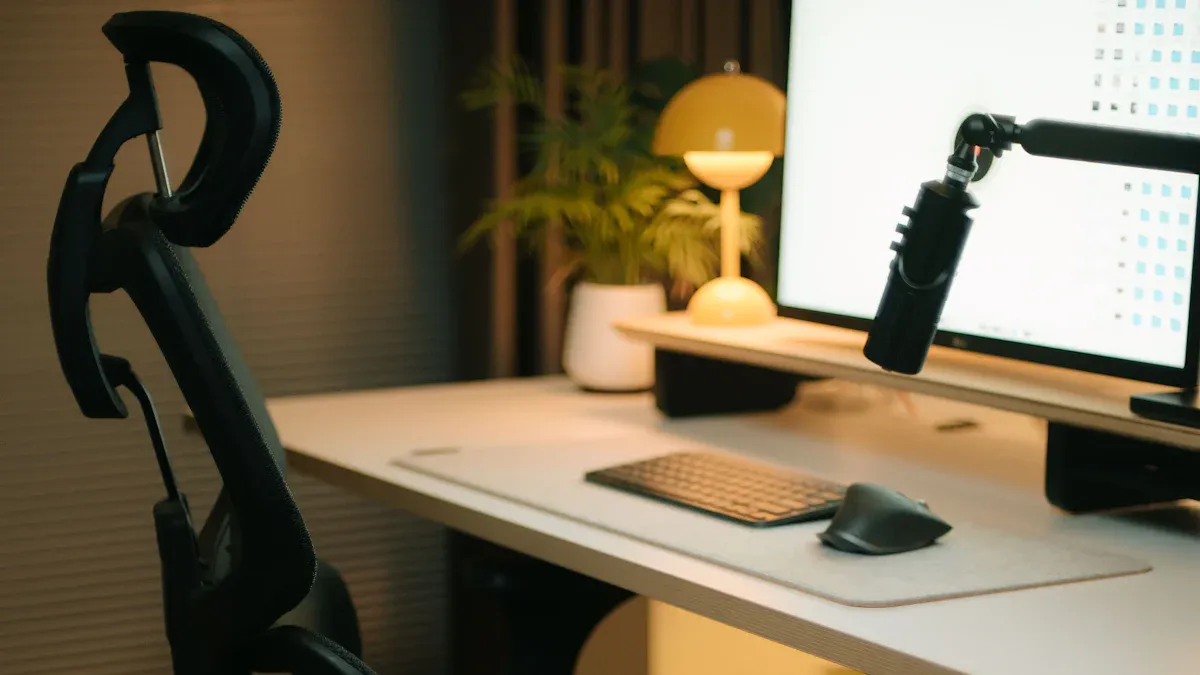
You deserve the best office gear to make your work easier, more productive, and a lot more comfortable. Imagine a setup with a sleek standing desk, an ergonomic chair, and a high-tech laptop stand—these essentials can transform your home office vibe instantly. Rackora brings together technology and aesthetics, so you get gear that looks sharp and works even better. If you want your workspace to boost your mood and efficiency, now's the perfect time to upgrade.
Key Takeaways
- Upgrade your workspace with essential gear like a standing desk, ergonomic chair, and monitor arm to boost comfort and productivity.
- A standing desk allows you to switch between sitting and standing, reducing back pain and increasing energy levels during work.
- Choose an ergonomic office chair that supports your spine and promotes good posture to minimize discomfort during long hours.
- Use a monitor arm to free up desk space and adjust your screen for optimal viewing angles, enhancing your work efficiency.
- Invest in a laptop stand to elevate your screen to eye level, which helps prevent neck strain and improves typing posture.
- Noise-canceling headphones can significantly reduce distractions, allowing you to focus better and feel less mentally fatigued.
- Incorporate smart lighting solutions to reduce eye strain and maintain alertness, adjusting brightness based on your tasks.
- Keep your workspace organized with cable management systems and desk accessories to enhance productivity and create a professional look.
Best Office Gear for Work
If you want to create the best office gear setup this year, you need to start with the essentials. Let’s break down the top picks from Rackora that can transform your workspace and help you feel your best every day.
Rackora Standing Desk
A standing desk is more than just a trend. It’s a game-changer for anyone who spends hours at a keyboard and mouse. Rackora’s electric height adjustable desk stands out in the world of office furniture. You get a modern design, sturdy build, and features that make your work routine smoother.

Height Adjustment Benefits
You can switch between sitting and standing with just a touch. The desk’s motor system lets you adjust the height smoothly, so you don’t have to deal with sudden stops or noise. This flexibility helps you stay active and avoid the aches that come from sitting too long. Research shows that ergonomic desks like this one can boost productivity and reduce physical complaints. You’ll notice less back pain and more energy during your workday.
Here’s a quick look at what users love about the Rackora standing desk:
|
Feature |
Description |
|---|---|
|
Adjustable Height |
Change the height to fit your needs and stay comfortable. |
|
Ease of Mobility |
Move the desk easily to switch up your workspace. |
|
Modern Design |
The sleek finish adds style to your home office. |
|
Lockable Wheels |
Keep the desk steady when you need it. |
|
Quick Assembly |
Set up in about 15 minutes and get started fast. |
|
Sturdy Design |
Solid construction for long-lasting use. |
|
Smooth Height Adjustment |
Adjust the desk quietly and without hassle. |
|
Cable Management |
Keep your workspace tidy and organized. |
|
Quiet Operation |
The motor runs quietly, so you can focus on your tasks. |
Users often mention how easy it is to move the desk and how it encourages a more active work style. The sturdy design and modern look get a lot of praise, too.
Cable Management Features
A messy desk can slow you down. Rackora’s desk comes with built-in cable management, so you can keep your keyboard, mouse, and wireless keyboard cords out of sight. The rear wiring holes and side hooks help you organize everything, making your workspace look clean and professional. You’ll spend less time untangling cables and more time getting things done.
Tip: Use the desk’s hooks for headphones or bags to keep your gear within reach but off your desktop.
Rackora Office Chair
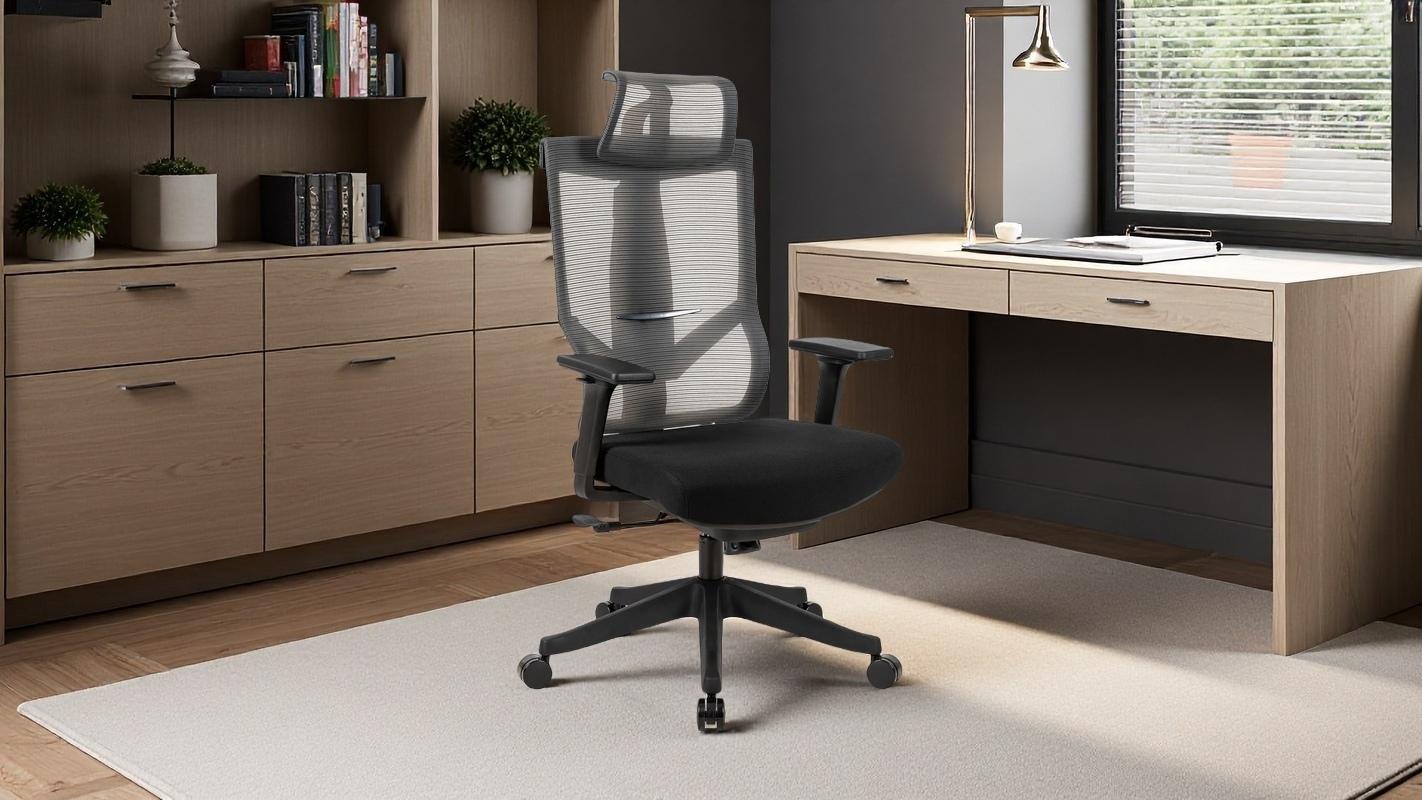
No setup is complete without the best office chair. Rackora’s ergonomic office chair is designed for comfort and support, especially if you spend long hours at your desk. You get a high back, breathable fabric, and elastic cushioning that adapts to your body.
Ergonomic Support
The chair’s design supports your spine and helps you maintain good posture. Studies show that ergonomic chairs can reduce pain in your back, neck, and shoulders. You’ll feel less discomfort and more focused during work. Users report less back pain and higher energy levels after switching to this chair.
|
Feature |
Rackora Office Chair |
Standard Office Chairs |
|---|---|---|
|
Adjustable Headrest |
Yes |
No |
|
2D Armrests |
Yes |
Limited/Fixed |
|
High Back Design |
Yes |
Often No |
|
Weight Capacity |
300 lbs |
Varies |
|
Material Quality |
High-quality mesh |
Varies |
Many people say this is the best office chair for long days at the desk. The high comfort ratings and adjustable features make it a favorite for home office setups.
Adjustable Armrests
You can adjust the armrests up and down to find the perfect spot for your arms while typing on your keyboard or using your mouse. The 2D armrests help you avoid strain and keep your shoulders relaxed. This feature is especially useful if you switch between tasks or share your workspace with others.
Note: Adjustable armrests make it easier to use a wireless keyboard and ergonomic mouse, giving you more flexibility in your work routine.
Monitor Arm Setup
A monitor arm is one of the best office gear upgrades you can make. Rackora’s Full Motion Adjustable Single Monitors Arm lets you position your screen exactly where you want it. You’ll get more desk space and better ergonomics.
Rackora Full Motion Arm
This monitor arm supports screens from 13 to 34 inches and up to 26.4 pounds. You can tilt, swivel, and rotate your monitor for the best viewing angle. The gas spring tension adjustment makes it easy to raise or lower your screen. The sleek design fits any office or home office setup.
Here’s how Rackora’s monitor arm compares to others:
|
Feature |
Rackora's Products |
Competitors' Products |
|---|---|---|
|
Build Material |
Anodized aluminum alloy, silicone |
Often plastic |
|
Adjustability |
Dual-axis tilt, swivel, rotate |
Limited adjustability |
|
Portability |
Foldable, lightweight |
Often bulky |
|
Stability |
Anti-skid silicone base |
May not be stable |
|
Warranty |
1-year warranty |
Often no warranty |
|
Design |
Modern, sleek finish |
Less stylish |
You’ll notice the difference in stability and style right away. The anti-skid base keeps your monitor steady, even when you adjust it.
Workspace Flexibility
With the monitor arm, you can free up desk space for your keyboard, mouse, and other gear. You can switch between landscape and portrait modes, making it easier to work on documents or code. The dual-axis adjustability helps you maintain good posture and reduce neck strain. You’ll find it easier to stay organized and productive.
- Dual-axis adjustability helps you keep a healthy posture.
- Elevated platform improves airflow, keeping your devices cool.
- Anti-skid features make sure your monitor stays put.
If you want the best office gear for your workspace, Rackora’s standing desk, office chair, and monitor arm are must-haves. These products combine style, comfort, and smart design to help you work better and feel better every day.
Office Tech Essentials
You want your office setup to work as hard as you do. The right tech essentials can make a huge difference in your daily routine. Let’s look at the gear that helps you stay comfortable, organized, and focused.
Laptop Stand for Work
A laptop stand is a must if you spend hours typing on your keyboard and clicking your mouse. The best laptop stands help you keep your screen at eye level, which means less neck pain and better posture. Rackora’s 360° Rotating Stand takes things up a notch.

Rackora 360° Rotating Stand
Rackora’s laptop stand gives you full rotation, adjustable height, and a sturdy build. You can easily switch angles while working or presenting. The stand folds up for easy storage, so you can take it anywhere. Here’s how Rackora’s stand compares to other popular options:
|
Laptop Stand |
Features |
Comparison |
|---|---|---|
|
360° rotation, cooling fan, adjustable height |
Portable, ergonomic, easy to adjust |
|
|
Roost |
Tricky unfolding, good for travel |
Good option for height |
|
Nexstand |
Sturdy, compact |
Better for thick laptops |
|
Rain Design mStand |
Good for heat dissipation |
Affordable, stylish |
You get a stand that’s easy to use and keeps your laptop cool. The adjustable height lets you set up your workspace just how you like it.
Cooling Fan Advantages
If your laptop gets hot during long work sessions, the built-in fan on Rackora’s stand helps keep things cool. This means your device runs better and lasts longer. You’ll notice less lag and fewer interruptions. The fan has three speeds, so you can pick what works best for you.
Studies show that using an adjustable laptop stand reduces discomfort and improves typing accuracy. Without a stand, you might end up with awkward wrist angles and neck strain. Ergonomic gear like this can boost your productivity and help you avoid pain.
Noise-Canceling Headphones
Distractions can ruin your focus. Noise-canceling headphones block out background sounds, so you can concentrate on your work. You’ll hear your keyboard and mouse clicks, but not the chatter around you.
Productivity Boost
When you use noise-canceling headphones, your mental load drops. You don’t have to fight to stay focused. Here’s what happens in different conditions:
|
Condition |
Mental Load Level |
Description |
|---|---|---|
|
No Noise |
Mid-level |
You can focus on tasks without distractions. |
|
Noise |
High |
More effort needed to maintain focus due to ambient sounds. |
|
Noise-Canceling |
Lower than Noise |
Easier to concentrate, less mental fatigue. |
You get more done and feel less tired at the end of the day.
Top Brands
Some top brands for noise-canceling headphones include Sony, Bose, and Apple. These offer great sound quality and comfort. Pick a pair that fits your style and budget.
Smart Lighting Setup
Lighting matters more than you think. A good desk lamp helps you see your keyboard and mouse clearly, reduces eye strain, and keeps you alert.
Desk Lamp Features
Modern desk lamps, like those from Rackora, use integrated LED lights. These are energy-efficient and last a long time. You can adjust the brightness to fit your needs. Here’s a quick look at the tech advancements:
|
Product Type |
Advancements |
|---|---|
|
Laptop Stands |
Ergonomic designs, cooling features, adjustable heights |
|
Desk Lamps |
Integrated LED lights |
You get a lamp that looks good and works even better.
Lighting for Focus
Smart lighting helps you stay focused. Bright, cool light keeps you awake and sharp. Softer light is great for relaxing after a long day. You can switch modes depending on your task.
Tip: Place your lamp so it lights up your keyboard and mouse without causing glare on your screen.
With these office tech essentials, you can create a setup that supports your productivity and comfort. The right laptop stand, headphones, and lighting make your workspace work for you.
Organization & Desk Accessories
Keeping your workspace organized can make a huge difference in how you feel and work every day. When you have the right desk accessories and organizers, you spend less time searching for things and more time getting things done. Let’s look at some smart ways to keep your desk tidy and your mind focused.
Cable Management for Office
Desk Pad and Clips
Cables from your keyboard, mouse, and other devices can quickly turn your desk into a tangled mess. A simple desk pad gives your workspace a clean look and protects your surface from scratches. Add a few cable clips, and you can guide cords exactly where you want them. This keeps your accessories in place and your desk clutter-free.
Tip: Use color-coded clips to quickly spot which cable belongs to which device.
Rackora Desk Features
Rackora desks come with built-in cable management systems that help you keep everything organized. You get rear wiring holes and side hooks, so you can tuck away cords and hang your headphones or bags. This design not only looks sleek but also boosts your productivity by keeping distractions out of sight. Many users say these features match what you’d find in top brands like Herman Miller or Steelcase. The ergonomic design lets you switch between sitting and standing, which helps reduce strain and keeps you comfortable.
- Rackora desks feature integrated cable management systems that help maintain an organized workspace, enhancing productivity.
- Ergonomic designs allow users to alternate between sitting and standing, similar to offerings from leading brands like Herman Miller and Steelcase.
- The ergonomic features of these desks are essential for reducing physical strain and improving posture, which is a common focus among top brands.
Desk Organizers
Minimalist Storage
A good organizer can change your whole desk setup. Choose minimalist storage options that hold your pens, notebook, and other office supplies without taking up too much space. Drawer organizers, trays, and stackable bins keep everything in its place. You’ll find it easier to focus when your accessories are neatly stored.
Workspace Aesthetics
The right desk accessories do more than just organize—they add style to your workspace. Pick organizers that match your desk’s color or your personal taste. A matching set of organizers, a sleek stand for your phone, and a stylish notebook can make your desk feel inviting and professional.
|
Category |
Description |
|---|---|
|
Ergonomic tools |
Adjustable chairs and desks that reduce physical strain and fatigue. |
|
Organizational products |
Filing systems and desk organizers that keep workspaces orderly and efficient. |
|
Technology accessories |
High-quality headsets and monitor stands that streamline digital work. |
|
Comfort-enhancing items |
Supportive footrests and anti-fatigue mats for better comfort. |
Whiteboards & Notepads
Brainstorming Tools
Sometimes you need to jot down ideas fast. A small whiteboard or a stack of sticky notes on your desk makes it easy to capture thoughts before they slip away. These accessories help you brainstorm, plan your day, or track important tasks.
Digital vs. Paper
You might love the feel of a paper notebook, or maybe you prefer a digital notepad on your tablet. Both have their place in a modern office. Paper notebooks are great for quick sketches or lists, while digital options let you organize and search your notes easily. Try keeping both on your desk so you can switch between them as needed.
Note: Many people find that writing in a notebook helps them remember ideas better than typing.
With the right desk accessories and organizers, you can create a workspace that feels calm, looks great, and helps you stay on top of your game. A little organization goes a long way!
Wellness & Comfort in Office
You spend a lot of time at your desk, so comfort and ergonomics matter more than you think. When you set up your home office, you want to feel good and stay healthy. Let’s look at some wellness accessories that can make your workspace better.
Footrests & Cushions
Ergonomic Benefits
If you sit for long hours, a footrest can help you maintain good posture. You place your feet on the footrest, which encourages movement and reduces pressure on your lower back. Ergonomics experts often recommend products like the Kensington SoleMate Comfort Footrest and the Humanscale FR300 Foot Rocker. These options let you adjust the height and angle, so you find the best position for your feet. You can also try a comfort mat if you use a standing desk. The Topo Comfort Mat by Ergodriven has a contoured surface that keeps your legs active while you stand.
Top Picks
When you want the best ergonomic seat cushions, look for ones that support your hips and spine. Memory foam cushions adapt to your body and help you avoid soreness. Here are some popular picks:
- Kensington SoleMate Comfort Footrest
- Humanscale FR300 Foot Rocker
- Topo Comfort Mat by Ergodriven
Tip: Place your footrest under your desk and adjust it until your knees form a 90-degree angle. This setup helps you stay comfortable during sitting work styles.
Blue Light Glasses
Eye Protection
Staring at your monitor, keyboard, and mouse all day can strain your eyes. Blue light glasses filter out harsh light from screens. You notice less eye fatigue and fewer headaches. Many office workers say these glasses help them focus longer and feel less tired.
Office Use
You can wear blue light glasses during work or while browsing at home. They fit easily into your routine. Choose a pair with a lightweight frame for all-day comfort. You’ll see the difference after just a few days.
|
Benefit |
Description |
|---|---|
|
Less Eye Strain |
Reduces discomfort from screens |
|
Fewer Headaches |
Helps prevent tension headaches |
|
Better Sleep |
Limits blue light exposure at night |
Desk Plants
Health Benefits
Adding a plant to your desk brings life to your workspace. Plants improve air quality and boost your mood. Studies show that greenery can lower stress and increase productivity. You feel more relaxed and focused when you see a touch of nature next to your monitor.
Low-Maintenance Options
You don’t need a green thumb to enjoy desk plants. Try succulents, snake plants, or pothos. These options need little water and thrive in low light. Place one near your keyboard or mouse for a fresh look.
- Succulents: Need water once a week.
- Snake Plant: Survives with minimal care.
- Pothos: Grows well in any light.
Note: Desk plants make your home office feel more inviting and help you stay energized during long work hours.
When you combine these wellness accessories with Rackora’s ergonomic products, you create a workspace that supports your health and comfort. You work better and feel better every day.
Remote Work Must-Haves
Remote work gives you freedom, but you need the right gear to stay productive wherever you go. Let’s explore the essentials that make remote work smoother and more comfortable.
Portable Desk Solutions
Rackora Laptop Cart
You want flexibility in your workspace. The Rackora Laptop Cart delivers just that. You can adjust the height from sitting to standing in seconds. The cart’s sturdy steel frame and compact design fit perfectly in small spaces. You get a workspace that moves with you, whether you’re working in your living room or a hotel room.

Mobility Features
Mobility matters when you work remotely. The Rackora Laptop Cart rolls on wheels that rotate 360°, so you can glide around furniture and tight corners. You can lock two wheels to keep your desk steady while you type on your keyboard or use your mouse. Height adjustability lets you switch positions, which helps you avoid slouching and keeps your posture in check. Users say portable desks like this improve mood, boost productivity, and even help with back pain. You also get better overall health, including blood pressure and blood sugar levels.
Here’s what makes portable desk solutions a smart choice:
- You can move your workspace anywhere.
- Height adjustability supports sitting and standing.
- Compact storage saves space.
- Promotes proper standing position and engages core muscles.
- Prevents slouching and reduces back pain.
Webcam & Microphone Upgrades
Video Call Quality
Clear video and audio make a big difference in remote meetings. You want your team to see and hear you without distractions. External webcams offer autofocus, automatic brightness, and color correction. High-quality microphones capture your voice clearly, so you sound professional.
|
Feature |
Description |
|---|---|
|
Video Quality |
Autofocus, brightness, and color correction for sharp video. |
|
Microphone Clarity |
Captures voice warmth and clarity. |
|
Built-in Lighting |
Some webcams, like the Razer Kiyo, include a ring light for better lighting. |
|
Noise-Cancelling Headset |
Blocks background noise for clear communication. |
Recommended Devices
You can try the Logitech C920 webcam for crisp video. The Blue Yeti microphone gives you studio-quality sound. The Razer Kiyo webcam adds built-in lighting, which helps in dim rooms. A noise-cancelling headset, like the Sony WH-1000XM5, keeps your calls distraction-free.
Travel-Friendly Gear
Compact Accessories
Traveling for work? You need gear that fits in your bag and sets up fast. A survey found that 66% of business travelers feel more productive with travel-friendly office gear. Compact chargers, foldable keyboards, and portable stands help you work anywhere.
- IceCore 65W GaN Charger keeps your cables organized and powers your devices.
- MagicEase Ultra-Slim Magnetic Backlit Keyboard turns your tablet into a laptop.
- Cube Pocket Foldable Bluetooth Keyboard lets you type quickly on the go.
On-the-Go Setup
You can set up your workspace in minutes. Use a portable desk, plug in your charger, and connect your keyboard and mouse. You stay productive whether you’re in a coffee shop or an airport lounge.
Tip: Keep your travel gear organized in a small pouch. You’ll always have what you need for remote work.
Remote work feels easier when you have the right gear. Portable desks, upgraded webcams, and compact accessories help you stay comfortable and productive wherever you go.
You’ve seen how the right office gear can change your workday. Rackora’s standing desk, ergonomic chair, and monitor arm help you stay comfortable and productive. Pick gear that matches your style and needs. Investing in a quality desk makes your workspace more efficient and enjoyable. Here’s a quick checklist to upgrade your setup:
- Standing desk
- Ergonomic chair
- Monitor arm
- Laptop stand
- Desk organizer
Ready to boost your workspace? Make this year your most productive yet!
FAQ
What makes the best office gear important for productivity?
You get more done when you use gear designed for comfort and ergonomics. The right setup helps you focus, reduces pain, and keeps your workspace organized. You feel better and work smarter every day.
How do I choose the best office chair for my home office?
Pick a chair with adjustable features, good lumbar support, and breathable fabric. Ergonomics matter. Try chairs with 2D armrests and a high back. You want comfort for long hours and a chair that fits your desk and sitting work styles.
Why should I use a laptop stand in my office setup?
A laptop stand lifts your screen to eye level. You avoid neck strain and improve posture. The best laptop stands also help with cooling and organization. You can pair them with a wireless keyboard and ergonomic mouse for extra comfort.
What desk accessories help with organization?
Desk accessories like organizers, cable clips, and trays keep your office supplies tidy. You find your notebook, mouse, and keyboard faster. A clean setup boosts productivity and makes your workspace look professional.
How do ergonomic mouse and keyboard improve comfort and ergonomics?
You reduce wrist pain and fatigue when you use an ergonomic mouse and keyboard. These accessories support natural hand positions. You work longer without discomfort and keep your hands healthy.
Are best ergonomic seat cushions worth it for office furniture?
Yes! Best ergonomic seat cushions support your hips and spine. You feel less soreness and stay comfortable during long sitting work styles. They work well with any office chair or furniture.
Can I use a monitor arm with any desk?
Most monitor arms fit standard desks. Check your desk thickness and monitor size before buying. A monitor arm frees up space, improves ergonomics, and lets you adjust your screen for the best view.
Tip: Always check the weight limit of your monitor arm before setting up your gear.
