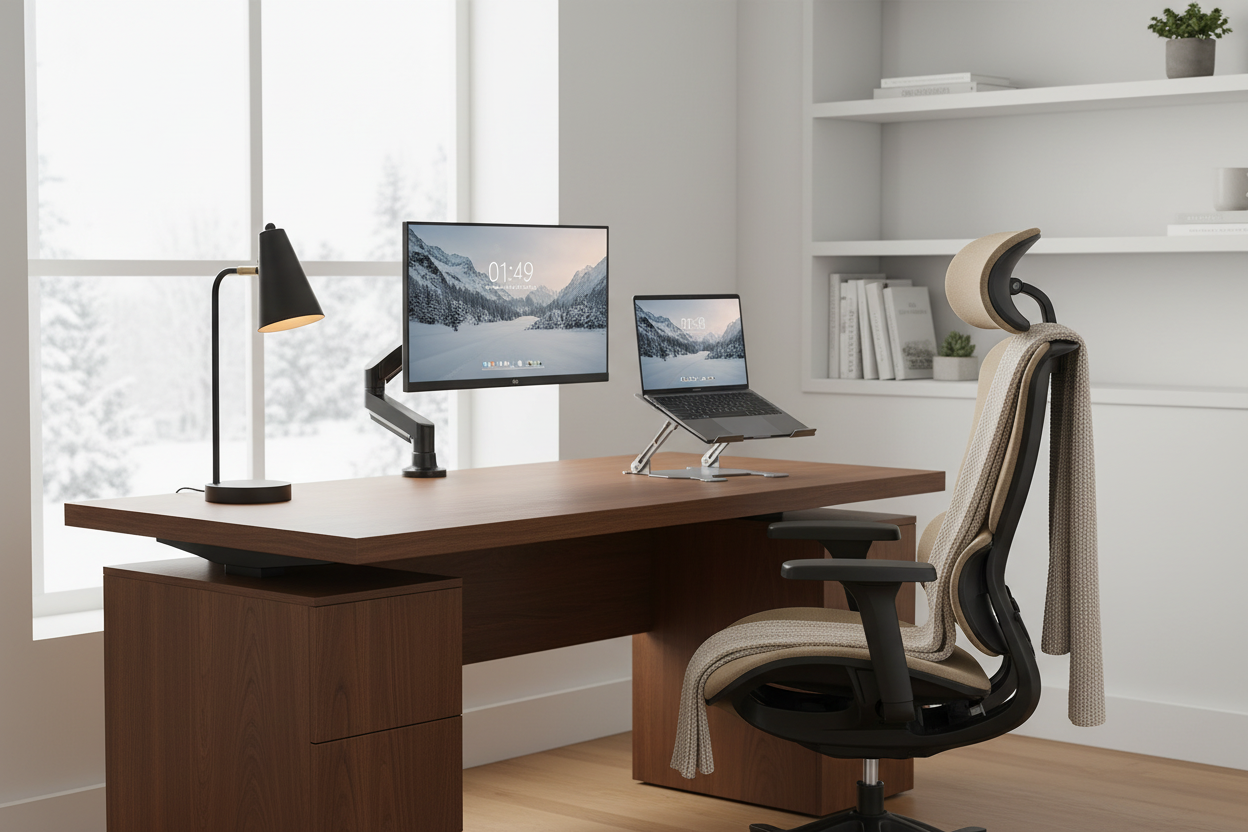
Winter's here, and if you're anything like most remote workers, you're probably spending way more time indoors than you'd like. The days are shorter, the weather's colder, and that couch is looking mighty tempting as a makeshift office. But here's the thing—your workspace shouldn't feel like a compromise. It should be a place where you actually want to spend time, where productivity flows naturally, and where your body doesn't hate you by 3 PM.
Creating the right indoor workspace isn't just about throwing together a desk and chair. It's about building an environment that supports your work, protects your health, and honestly, makes those long winter days a little more bearable. Let's talk about what actually matters when you're setting up a workspace that works for you.
Why Your Winter Workspace Setup Actually Matters
Look, we've all been there. You start the day at the kitchen table, move to the couch after lunch, maybe end up back in bed with your laptop balanced on your knees. It feels flexible, but your neck, back, and productivity are paying the price.
Winter makes this worse. When it's dark and cold outside, you're spending even more hours in whatever space you've carved out for work. That temporary setup? It's not cutting it anymore. Your body needs proper support, your eyes need the right lighting, and your mind needs a space that says "this is where work happens" so you can actually disconnect when the day's done.
The good news is that creating a proper workspace doesn't mean spending thousands or turning a whole room into an office. It means being smart about the essentials—the pieces that make the biggest difference in how you feel and perform during those long indoor days.
Start with the Foundation: Your Desk Setup
Your desk is where everything happens, so getting this right matters more than you might think. The key isn't finding the biggest or fanciest desk—it's finding one that fits your space and supports how you actually work.
If you're dealing with a smaller room or apartment, the Full Motion Single Monitor Arm ($139.99) is going to change your life. Instead of your monitor eating up half your desk space, you can mount it on an arm that adjusts exactly where you need it. This frees up room for notebooks, your coffee, or whatever else you need within reach. The gas spring mechanism means you can adjust the height and angle throughout the day without fighting with stiff joints or screws.

For the desk itself, think about whether you're sitting all day or if you'd benefit from the option to stand. The 40'' x 24" Ergonomic Electric Height Adjustable Standing Desk ($599.99) gives you both options with the push of a button. No cranks, no manual adjustments—just smooth electric height changes that let you switch positions when your body needs it. The 40-inch width gives you enough space for a monitor, keyboard, and some breathing room without overwhelming a smaller space.

What makes this desk work for long winter days is the three-position height memory. Set your preferred sitting height, your standing height, and maybe a middle position for different tasks. Switch between them instantly without measuring or adjusting. The motor runs quietly—under 50 decibels—so you're not disrupting calls or your concentration when you change positions. Side hooks give you spots to hang your bag or headphones, and the rear cable management holes keep your cords organized without adding bulk.
Standing desks aren't just a trend—they're a response to what sitting for 8+ hours does to your body. The ability to stand for part of your day improves circulation, reduces back strain, and honestly just helps you feel more alert. You don't need to stand all day. Even switching positions for 20-30 minutes every few hours makes a difference.
The Laptop User's Secret Weapon
If you're working primarily on a laptop, you're probably hunched over more than you realize. Laptop screens sit way too low for proper ergonomics, which means you're constantly looking down, straining your neck and upper back.
The fix is simple: get your laptop screen up to eye level. The Rackora Ergo Laptop Stand Elite Edition ($79.99) does exactly this. It's adjustable, stable, and designed to work with any laptop size. Pair it with an external keyboard and mouse, and suddenly you've got a setup that rivals any desktop configuration.

This is one of those changes that you feel immediately. Your shoulders drop, your neck relaxes, and you can actually see your screen without tilting your head down. For less than $80, it's one of the best investments you can make in your workspace comfort.
Seating: Where Comfort Meets Function
Let's be real—your dining chair isn't designed for 8-hour work sessions. Neither is that "office chair" you picked up for $50 five years ago. If you're serious about creating a workspace that supports you through long winter days, your chair needs to be more than just somewhere to sit.
The High Back Mesh Office Chair with Adjustable Armrests ($340.00) is built for people who actually spend time in their chairs. The mesh back keeps air flowing so you're not sweating by midday. The adjustable armrests mean you can position them exactly where your arms naturally rest, reducing shoulder tension. And the high back provides support all the way up your spine, not just the lower portion.

Yes, $340 is an investment. But consider this: you're sitting in this chair for 40+ hours a week. That's more time than you spend in your bed. The cost per hour of use is actually incredibly low, and the difference in how your body feels at the end of the day is worth every penny.
Look for chairs with adjustable lumbar support, seat depth adjustment, and armrests that move in multiple directions. Your body isn't static, and your chair shouldn't be either.
Lighting: The Element You're Probably Overlooking
Here's something most people don't think about until they have a headache at 2 PM: lighting matters. A lot. Winter means less natural light, which means you're relying more on artificial sources. Overhead lighting alone creates shadows on your workspace and can cause eye strain. You need task lighting that illuminates what you're actually working on.
The 19.5" Student Black Metal Task E26 Desk Lamp With Organizer ($67.66) is more than just a light—it's a workspace organizer too. The adjustable arm lets you direct light exactly where you need it, whether you're reading documents, writing notes, or just need better visibility for video calls. The built-in organizer keeps pens, clips, and small items within reach without cluttering your desk.

Position your task light to the side of your dominant hand (left side if you're right-handed, right side if you're left-handed) to minimize shadows while you work. And if you can, try to set up your desk near a window to take advantage of whatever natural light you can get during winter days.
The Multi-Monitor Setup for Serious Productivity
If you're constantly switching between applications, documents, or communication tools, a single monitor might be holding you back. Having two screens lets you keep reference material visible while you work, monitor communications without constant tab-switching, or simply spread out your workspace.
The Rackora Dual Monitor Desk Mount 17-32 Inch (starting at $99.00) supports two monitors while keeping your desk surface clear. Each arm adjusts independently, so you can position your screens at the perfect height and angle for your setup. The VESA compatibility means it works with most monitors, and the sturdy construction keeps everything stable even when you're adjusting positions.
Dual monitors aren't just for programmers or designers. Anyone who works with multiple documents, spreadsheets, or communication tools will see immediate productivity gains. Plus, getting your monitors at the right height reduces neck strain—you should be looking slightly down at your screens, not up or straight ahead.
Creating Zones in Your Workspace
Even in a small space, you can create distinct zones that help your brain shift between different types of work. Your primary monitor is for focused work. A secondary screen or tablet can handle communications or reference materials. A small area of your desk can be for handwritten notes or sketching ideas.
This zoning isn't just about organization—it's about creating visual cues that help you focus. When you're in your "deep work" zone, you're not distracted by chat notifications in your peripheral vision. When you're in communication mode, everything you need is right there.
Use your monitor arms and desk layout to create these zones intentionally. Position your primary screen directly in front of you. Angle a secondary monitor slightly to the side. Keep your task light focused on your writing area. These small adjustments add up to a workspace that supports different types of work throughout your day.
Managing Cables and Clutter
Nothing kills the vibe of a nice workspace faster than a tangle of cables and random clutter. Winter means you're looking at this space all day, every day, so keeping it clean matters for your mental state as much as your productivity.
Start with cable management. Use velcro ties or cable clips to bundle cords together and route them along the back edge of your desk. The standing desk has rear cable management holes that make this easier—thread your power cables, monitor cables, and USB cords through these openings to keep them off your work surface. The side hooks are perfect for hanging headphones or your bag when you're not using them.
For daily clutter, the organizer built into the desk lamp helps, but you might also want a small drawer unit or desktop organizer for items you use regularly. The key is having a designated spot for everything so your desk can be clear when you need it to be.
Temperature and Air Quality Considerations
Winter indoor air is dry. Heating systems make it worse. If you're spending 8+ hours in your workspace, you're going to notice. Dry air causes dry skin, irritated eyes, and can even affect your respiratory system.
Consider adding a small humidifier to your workspace. It doesn't need to be huge—even a desktop model can make a difference in how comfortable you feel throughout the day. Position it away from your electronics, and clean it regularly to prevent mold or bacteria buildup.
Temperature is another factor. If your workspace is in a corner or near a window, it might be colder than the rest of your home. A small space heater can help, but make sure it's positioned safely away from papers, cables, and anything flammable. Some people prefer a heated foot pad under their desk—it keeps your feet warm without heating the whole room.
Personalizing Your Space Without Overdoing It
Your workspace should feel like yours, but there's a balance between personal and cluttered. A few meaningful items—a plant, a photo, something that makes you smile—can make your space feel more inviting without becoming distracting.
Plants are particularly good for indoor workspaces. They improve air quality, add visual interest, and give you something living to care for during long work days. Low-maintenance options like pothos, snake plants, or succulents work well in office environments and don't require constant attention.
Avoid covering every surface with decorations or keeping too many personal items visible. The goal is a space that feels personal but still allows you to focus on work when you need to.
Sound Management for Focus
Winter means windows are closed, which means you're more aware of every sound in your space. If you're dealing with noisy neighbors, street traffic, or household sounds, you need a strategy for managing audio distractions.
Noise-canceling headphones are the obvious solution, but they're not always comfortable for all-day wear. Consider a white noise machine or app that provides consistent background sound to mask irregular noises. Some people work better with instrumental music or nature sounds—experiment to find what helps you focus.
If you take a lot of video calls, think about your audio setup from the other side too. A decent USB microphone picks up your voice more clearly than laptop mics and often includes noise cancellation features that filter out background sounds. Your colleagues will appreciate not hearing your dog barking or your neighbor's music during meetings.
Building in Movement and Breaks
Even with a perfect ergonomic setup, sitting (or standing) in one position for hours isn't great for your body. Build movement into your day intentionally. Set a timer to remind yourself to stand up, stretch, or walk around every hour.
If you have a standing desk, alternate between sitting and standing throughout the day. Start with 20-30 minutes of standing per hour and adjust based on how your body feels. Some people prefer standing for specific tasks—phone calls, reading, or brainstorming—and sitting for others. The three height memory presets make switching effortless, so you can change positions as often as you need without disrupting your workflow.
Keep a water bottle at your desk. Staying hydrated is important, and it has the added benefit of forcing you to get up for bathroom breaks, which means you're moving regularly whether you remember to or not.
The Psychology of a Dedicated Workspace
One of the hardest parts of working from home, especially during winter when you're indoors all the time, is separating work from life. Having a dedicated workspace—even if it's just a specific corner of a room—helps your brain make that distinction.
When you sit down at your workspace, you're in work mode. When you leave it, you're off the clock. This boundary is crucial for preventing burnout and maintaining some semblance of work-life balance when your home and office are the same place.
If you don't have a separate room for an office, use visual cues to create this boundary. A room divider, a specific chair that's only for work, or even just a ritual of setting up and putting away your workspace each day can help establish this mental separation.
Investing in Quality Over Quantity
When you're setting up a workspace, it's tempting to buy everything at once or go for the cheapest options to save money. Resist this urge. It's better to invest in a few high-quality pieces that will last and actually support your work than to fill your space with cheap items that need replacing in a year.
Start with the essentials: a good chair, proper desk height (whether that's a standing desk or a regular desk at the right height for you), and appropriate lighting. Add other pieces as you identify specific needs. Maybe you realize you need better monitor positioning, so you invest in a monitor arm. Maybe your laptop setup is causing neck pain, so you get a laptop stand.
Quality pieces from brands like Rackora are designed with real-world use in mind. They're tested, adjustable, and built to last through years of daily use. That initial investment pays off in durability, comfort, and performance.
Maintaining Your Workspace Through Winter
Once you've set up your ideal workspace, maintaining it is key. Dust builds up faster in winter when windows are closed and heating systems are running. Wipe down your desk, keyboard, and monitors weekly. Clean your chair's mesh or fabric according to the manufacturer's instructions.
Check your equipment periodically. Are your monitor arms still tight, or have they loosened with use? Is your chair's gas lift still providing proper support? Are your cables still organized, or have they started to tangle again? Small maintenance tasks prevent bigger problems down the line.
Reassess your setup as your needs change. Maybe you've started doing more video calls and need better lighting. Maybe you've added a second monitor and need to rethink your desk layout. Your workspace should evolve with your work, not stay static just because you set it up a certain way initially.
The ROI of a Proper Workspace
Let's talk numbers for a second. If you work from home full-time, you're spending roughly 2,000 hours a year in your workspace. That's 2,000 hours where your environment is either supporting you or working against you.
A $600 standing desk over 5 years is $120 per year, or about $0.06 per hour of use. A $340 chair is $68 per year, or $0.03 per hour. These aren't expenses—they're investments in your health, productivity, and honestly, your quality of life during those long winter months when you're indoors most of the time.
Compare that to the cost of back pain, neck strain, eye fatigue, or the productivity loss from working in an uncomfortable environment. The math makes sense pretty quickly.
Common Mistakes to Avoid
Don't position your desk facing a wall if you can avoid it. Having some visual depth—even if it's just looking across a room—reduces eye strain and makes your space feel less claustrophobic.
Don't skip the ergonomic basics just because you're working from home. Your body doesn't care whether you're in a corporate office or your spare bedroom—it still needs proper support.
Don't use your bed or couch as a workspace, even occasionally. It blurs the line between rest and work, and neither your sleep nor your productivity will benefit from the confusion.
Don't ignore lighting. It affects everything from your mood to your eye health to how you look on video calls. Get it right.
Don't buy everything at once without testing your workflow first. Set up the basics, work for a week or two, then add pieces based on what you actually need rather than what you think you might need.
Making It Work in Small Spaces
Not everyone has a spare room to convert into an office. If you're working with limited space, focus on pieces that serve multiple purposes or can be easily stored when not in use.
A laptop stand takes up minimal space but provides major ergonomic benefits. A monitor arm frees up desk surface area. A compact standing desk can fit in a corner or against a wall without dominating a room.
Consider furniture that can transition between work and personal use. A clean, simple desk can double as a console table when you're not working. A good office chair can be your desk chair during the day and your reading chair in the evening.
Use vertical space. Wall-mounted shelves keep supplies accessible without eating up floor or desk space. Cable management that routes cords up walls and along baseboards keeps your limited floor space clear.
The Winter Workspace Checklist
Here's what a well-equipped winter workspace should include:
✓ Desk at the right height for your body (or adjustable standing desk)
✓ Ergonomic chair with proper lumbar support and adjustability
✓ Monitor(s) at eye level, about an arm's length away
✓ Task lighting that illuminates your work without glare
✓ Cable management to keep cords organized and out of the way
✓ Adequate storage for supplies and materials you use regularly
✓ Temperature control (space heater, fan, or both)
✓ Humidity management if your indoor air is dry
✓ Personal touches that make the space feel like yours
✓ Clear boundaries between workspace and living space
Ready to Transform Your Winter Workspace?
You don't need to overhaul everything at once. Start with the piece that will make the biggest difference for you. If you're dealing with neck pain, that might be a laptop stand or monitor arm. If you're tired of sitting all day, a standing desk could be the game-changer. If your back is killing you by mid-afternoon, invest in a proper ergonomic chair.
Winter's going to be here for a while. You might as well be comfortable while you work through it. Your body will thank you, your productivity will improve, and honestly, those long indoor days will feel a lot more manageable when you're working in a space that actually supports you.
The Rackora collection is designed for people who take their workspace seriously—not because they're obsessed with gear, but because they understand that the right tools make everything easier. Quality construction, thoughtful design, and real-world testing mean these pieces work the way you need them to, day after day, through winter and beyond.
Check out the full range of monitor arms, standing desks, ergonomic seating, and laptop stands to find what works for your space and your work style. Your winter workspace is waiting.
