So You're Trying to Work From Every Corner of Your House
Let's be honest — working from home sounds great until your roommate decides 10 AM is the perfect time to blast music in the living room, or the afternoon sun turns your bedroom into a greenhouse. If you've ever picked up your laptop and migrated to three different rooms before noon, you already know the problem a fixed desk can't solve.
That's the real conversation we need to have about mobile laptop carts versus fixed desks. Not specs on a comparison chart — but the actual, day-to-day reality of working in a shared house, a small apartment, or any space that isn't exclusively yours.
This guide is for people who need flexibility without sacrificing a real workspace. We'll cover what rolling carts actually do well, where fixed desks still win, and how to build a hybrid setup that handles both.
The Hybrid Reality: Why "Just Pick One" Doesn't Work Anymore
The traditional home office advice — get a good desk, a good chair, set it up in a dedicated room — assumes you have a dedicated room. A lot of people don't. And even those who do often find themselves wanting to work from the couch in the morning, the kitchen table at lunch, and back to the desk in the afternoon.
This isn't laziness. It's actually smart. Research on productivity consistently shows that changing your environment can reset focus and reduce mental fatigue. Moving from a dim bedroom to a bright living room window isn't procrastination — it's a legitimate cognitive reset.
The problem is that most furniture is designed for one scenario. A fixed standing desk is excellent if you have a dedicated office corner. A rolling laptop cart is excellent if you need to move. But what if you need both?
That's the hybrid setup: a primary fixed workspace for deep work, and a mobile cart for the times when you need to relocate. It sounds simple, but getting the balance right — especially in terms of budget and space — takes some thought.
The Roommate Problem
If you share a house or apartment, you're dealing with noise, competing schedules, and limited private space. A fixed desk in a shared bedroom means you're always working in the same acoustic environment. A rolling cart means you can move to wherever it's quiet — the hallway, a spare room, even a covered patio.
The key is having a cart that's actually stable enough to work on, not just something that wobbles every time you type. More on that in a minute.
Chasing Natural Light for Video Calls
Anyone who's been on a Zoom call with a window behind them knows the problem: you look like a silhouette. Natural light needs to be in front of you, and in most homes, that means one or two specific spots at specific times of day.
A mobile cart lets you position yourself relative to the light, not relative to where your desk happens to be bolted to the floor. For video calls especially, this matters more than most people realize until they've had a client comment on their lighting.
What a Rolling Laptop Cart Actually Does Well
Let's give mobile carts their due. When people think "rolling cart," they sometimes picture a flimsy TV tray on wheels. That's not what we're talking about. A well-built laptop cart is a legitimate workspace tool with specific strengths.
Portability Without Packing Up
The biggest advantage is obvious: you can move your entire workspace in about five seconds. No unplugging, no carrying, no reassembling. Lock the casters, roll, unlock. That's it.
For people who move between rooms multiple times a day, this is genuinely life-changing compared to the alternative of carrying a laptop, charger, mouse, and notebook separately every time.
Height Adjustability
Most quality rolling carts are height-adjustable, which means you can use them sitting or standing. This is a bigger deal than it sounds. Being able to stand for 20-30 minutes during a long call, then sit back down, is one of the most effective ways to manage energy levels throughout the day.
Fixed desks can be height-adjustable too (electric standing desks), but they're anchored to one spot. A rolling cart gives you height flexibility and location flexibility simultaneously.
Small Footprint
Rolling carts take up significantly less floor space than a full desk. When you're not using it, you can roll it into a corner, a closet, or against a wall. For small apartments or shared spaces where every square foot matters, this is a real advantage.
The Stability Question: What Rolling Carts Can and Can't Handle
Here's where we have to be honest, because this is where a lot of people get disappointed after buying a cart that looked great in photos.
Weight Capacity and Surface Size
Rolling carts are designed for laptops — typically 11" to 15.6" machines — plus maybe a small external monitor or a few accessories. They're not designed to hold a 27" monitor, a full desktop tower, and a mechanical keyboard. If that's your setup, a cart isn't your answer.
For a laptop-centric workflow — laptop, maybe a USB hub, a notebook, a coffee mug — a quality cart handles it fine. The surface area is smaller than a desk, which forces a cleaner, more minimal setup. Some people find this actually helps focus.
Typing Stability
This is the real test. A cheap cart will wobble when you type, which is annoying at best and genuinely fatiguing over a full workday. A well-built cart with a solid frame and quality locking casters should feel stable enough that you forget it's on wheels.
The locking casters are non-negotiable. If the cart can roll while you're working on it, it's not a workspace — it's a hazard. Always check that the casters lock properly before buying.
Surface Texture and Grip
A smooth, hard surface is fine for a laptop with rubber feet. If you're using a mouse, you'll want a mouse pad. Some carts have a slight lip or edge to prevent items from sliding off, which is worth looking for if you tend to work with a lot of items on the surface.
Featured Product: Rackora Small Mobile Rolling Standing Desk

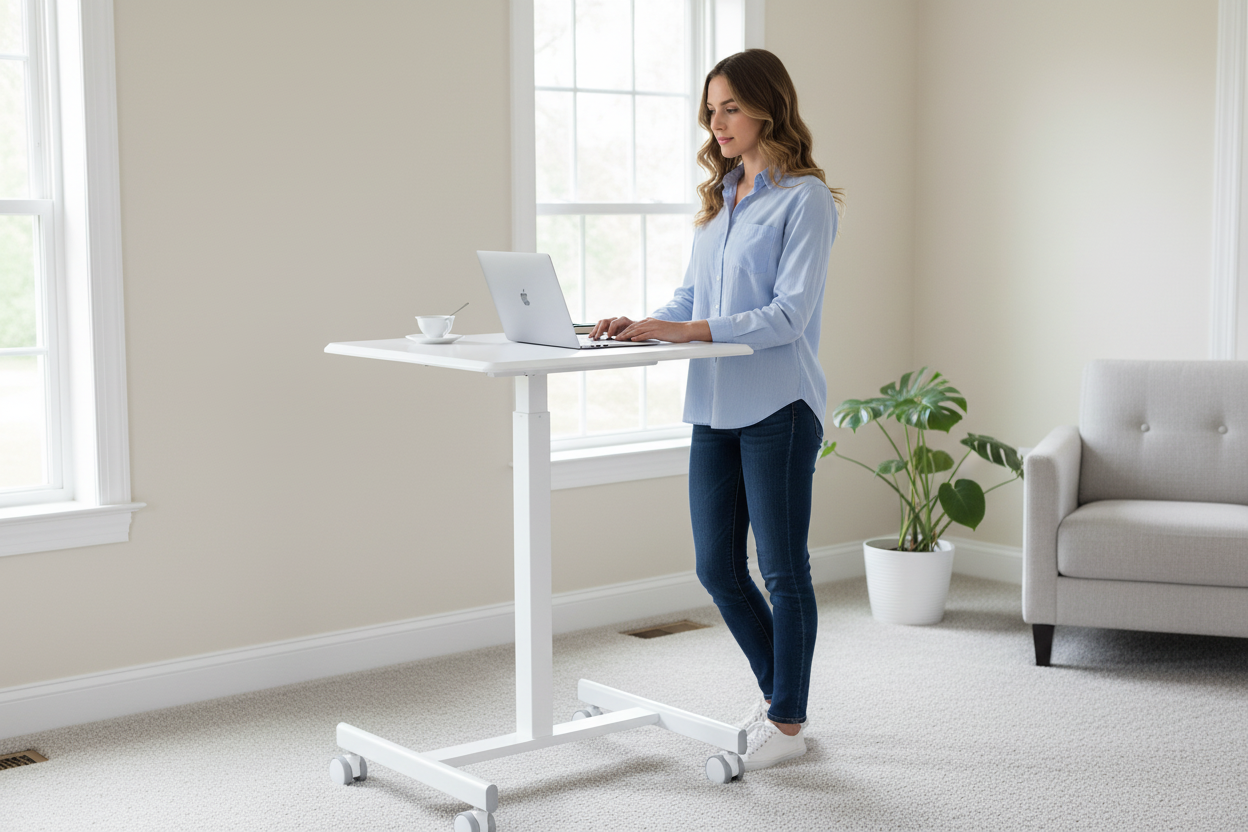
The Rackora Small Mobile Rolling Standing Desk at $158.07 is the cart we'd recommend for most people in a shared-home situation. Here's why it works:
- Locking casters — four wheels, all lockable, so the cart stays put when you're working and rolls smoothly when you need to move
- Height adjustable — works for sitting and standing use, so you're not locked into one posture all day
- Universal compatibility — designed to work with 11" to 15.6" laptops across brands
- Compact footprint — small enough to tuck into a corner when not in use, large enough to be a real workspace
- Solid build quality — the frame is built to minimize wobble during typing, which is the thing that kills productivity on cheaper carts
At $158.07, it's priced in the range where you're getting real build quality without paying for features you don't need. This isn't a cart that's going to feel like a compromise — it's a cart that's going to feel like a deliberate choice.
→ Shop the Rackora Rolling Desk — $158.07
What Fixed Desks Still Do Better
Rolling carts are great, but they're not the answer for everything. Here's where a fixed desk — especially a height-adjustable standing desk — still wins.
Dual Monitor Setups
If you run two monitors, a fixed desk is almost certainly what you need. The surface area, the stability, and the ability to mount monitor arms all favor a fixed setup. Rolling carts aren't designed for this kind of load.
Deep Work Sessions
For long, focused work sessions — coding, writing, design — a fixed desk with a proper ergonomic setup (monitor at eye level, keyboard at elbow height, good chair) is hard to beat. The stability and the permanence of the setup means you can optimize it once and not think about it again.
Peripherals and Cable Management
If you have a lot of peripherals — external keyboard, mouse, drawing tablet, audio interface — a fixed desk lets you set them up properly and manage cables so they're not a tangle every time you sit down. Rolling carts don't have the surface area or the cable management options for complex setups.
Ergonomic Optimization
A fixed standing desk, especially an electric height-adjustable one, lets you dial in your ergonomics precisely. You can set the exact height for sitting and standing, add a monitor arm, position everything perfectly. That level of optimization is harder to achieve on a rolling cart.
More Rolling Desk Options Worth Considering
Rackora Adjustable Laptop Computer Cart (28.5"–42.5")

The Rackora Adjustable Laptop Computer Cart at $158.46 offers a wider height range — from 28.5" to 42.5" — making it a strong choice if you're taller or if you want more flexibility between sitting and standing positions. The extended range means it works well as a standing-only cart for people who prefer to stand for most of their workday.
→ Shop the Adjustable Cart — $158.46
Rackora Adjustable Mobile Desk JST6600

The Rackora JST6600 Mobile Desk at $180.00 sits in a slightly different height range — 24.2" to 32.7" — which makes it particularly well-suited for seated use at standard chair heights. If your primary use case is working from a chair (not standing), this range gives you more precise adjustment in the seated zone. It's also a solid option for use next to a couch or in a living room setup.
Mobile Overbed Table with Wheels (Walnut)

The Mobile Overbed Table at $178.44 is a different kind of mobile workspace — designed to roll over a bed or sofa so you can work from a fully reclined or semi-reclined position. If you have a chronic back issue, or if you just want the option to work from bed without hunching over a laptop on your lap, this is worth a look. The walnut finish also makes it look considerably more intentional than a typical hospital-style overbed table.
The Fixed Desk Side: When You Need a Permanent Anchor
Compact Manual Height Adjustable Desk — 27.5"

If you want a fixed desk that doesn't dominate a small room, the 27.5" Compact Manual Height Adjustable Desk at $229.00 is worth serious consideration. At 27.5" wide, it fits in spaces where a standard 48" or 60" desk simply won't. The manual height adjustment means you can switch between sitting and standing without an electric motor — which also means no power cord running to the desk frame.
For a hybrid setup, this works well as the "home base" — the fixed desk you return to for deep work — while a rolling cart handles the mobile side of your workflow.
→ Shop the Compact Standing Desk — $229.00
Building the Hybrid Setup: A Practical Framework
Here's how to think about combining a fixed desk and a rolling cart without overcomplicating it or overspending.
Step 1: Define Your Primary Workflow
What does most of your work actually look like? If you're primarily on video calls and writing, a rolling cart can handle 80% of your day. If you're doing design work with multiple monitors, a fixed desk handles 80% and the cart is supplemental.
Start with the 80% case and build from there.
Step 2: Identify Your Pain Points
What's actually making your current setup frustrating? Is it noise from roommates? Bad lighting for calls? Back pain from sitting too long? Each of these has a different solution:
- Noise: Mobile cart so you can relocate
- Lighting: Mobile cart so you can position relative to windows
- Back pain: Height-adjustable desk (fixed or rolling) so you can alternate sitting and standing
- Space constraints: Compact fixed desk + rolling cart that stores away
Step 3: Set a Realistic Budget
A solid hybrid setup doesn't have to be expensive. The Rackora Small Mobile Rolling Desk at $158.07 plus the Compact Standing Desk at $229.00 gives you a complete hybrid setup for under $400. That's less than most single electric standing desks, and you get more flexibility.
Step 4: Think About Storage
Where does the rolling cart live when you're not using it? In a small apartment, this matters. Most rolling carts can be stored in a closet, against a wall, or in a corner. Measure your space before buying and make sure you have a plan for where it goes when it's not in use.
Step 5: Don't Over-Accessorize the Cart
It's tempting to try to replicate your full desk setup on a rolling cart. Resist this. The cart is for mobility — keep it minimal. Laptop, charger, maybe a small notebook. The more you load onto it, the less convenient it becomes to move.
Common Mistakes People Make When Buying a Rolling Cart
Buying Based on Price Alone
The $40 rolling carts on Amazon look fine in photos. In practice, they wobble, the height adjustment is imprecise, and the casters don't lock properly. If you're going to use a cart as a real workspace, spend enough to get one that actually works. The $150-$180 range is where build quality becomes reliable.
Ignoring the Height Range
Check the minimum and maximum height before buying. If you're 6'2" and want to stand at the cart, make sure the maximum height is actually tall enough. If you're 5'3" and want to use it seated, make sure the minimum height works with your chair.
Forgetting About the Casters
Not all casters are equal. Look for casters that: (1) roll smoothly on both hard floors and carpet, (2) lock securely, and (3) won't scratch hardwood floors. If you have hardwood or tile, check whether the casters are floor-safe before buying.
Expecting a Cart to Replace a Desk
A rolling cart is a supplement, not a replacement, for most people. If you're trying to do eight hours of focused work on a rolling cart every day, you'll probably find the smaller surface area and the lack of ergonomic optimization frustrating over time. Use it for what it's good at — mobility and flexibility — and have a fixed workspace for the heavy lifting.
Who Should Buy a Rolling Cart (and Who Shouldn't)
Buy a Rolling Cart If:
- You share a house or apartment and need to relocate to find quiet or good lighting
- Your primary device is a laptop (11"–15.6")
- You want to alternate between sitting and standing without committing to a fixed standing desk
- You have limited space and need furniture that can be stored away
- You work from multiple locations within your home regularly
- You want a secondary workspace to complement a fixed desk
Stick With a Fixed Desk If:
- You run a dual-monitor setup
- You have a dedicated office room that's exclusively yours
- Your work requires a lot of peripherals (drawing tablet, audio gear, etc.)
- You do long, uninterrupted deep work sessions that benefit from a fully optimized ergonomic setup
- You never need to relocate during the workday
Get Both If:
- You have a dedicated workspace but also need flexibility for calls or creative work
- You work from home full-time and want to avoid the fatigue of being in one spot all day
- You share a space and need a mobile option for when your primary workspace isn't available
Ergonomics on a Rolling Cart: Making It Work for Your Body
One concern people have about rolling carts is ergonomics. Can you actually work on one without wrecking your neck and back? Yes — with a few adjustments.

Screen Height
The biggest ergonomic issue with laptop use is screen height. Your laptop screen is almost always too low, which means you're looking down and straining your neck. On a rolling cart, you have a few options:
- Use a laptop stand to raise the screen, paired with a Bluetooth keyboard and mouse
- Adjust the cart height so the screen is closer to eye level (this works better for standing use)
- Accept that the cart is for shorter sessions and save the ergonomically optimized setup for your fixed desk
Posture
Standing at a rolling cart is actually better for posture than sitting at a low table. If you're using the cart for video calls, try standing — it tends to make you more alert and engaged, and it puts the camera at a better angle.
Session Length
Rolling carts are best for sessions of 1-3 hours. For longer sessions, the ergonomic limitations start to add up. Use the cart for calls, creative sessions, and focused sprints — then return to your fixed desk for the long haul.
The Real Cost Comparison
Let's put some numbers on this.
Option A: Fixed Standing Desk Only
A quality electric standing desk: $400–$800+
You get: one workspace, one location, full ergonomic optimization
You don't get: flexibility to relocate
Option B: Rolling Cart Only
Rackora Small Mobile Rolling Desk: $158.07
You get: full mobility, height adjustability, compact footprint
You don't get: the surface area or stability for a full multi-monitor setup
Option C: Hybrid Setup
Rackora Small Mobile Rolling Desk ($158.07) + Compact Standing Desk ($229.00) = $387.07
You get: a fixed workspace for deep work AND a mobile workspace for flexibility
This is often less than a single premium electric standing desk, and you get more versatility
For most people in shared living situations, Option C is the best value. You're not compromising on either use case.
Frequently Asked Questions
Q: Can I use a rolling laptop cart as my only desk?
A: For a laptop-only setup with minimal peripherals, yes — many people do this successfully. The limitations are surface area (smaller than a traditional desk) and ergonomics for very long sessions. If you're doing 4-6 hour focused work sessions daily, you'll probably want a fixed desk as your primary workspace and use the cart as a supplement.
Q: What's the weight limit on a rolling laptop cart?
A: This varies by model, but most quality rolling carts are designed for laptops (up to about 15.6") plus light accessories — a total surface load of roughly 20-30 lbs. They're not designed for heavy desktop monitors or multiple large displays. Check the specific weight capacity listed for any cart you're considering.
Q: Will a rolling cart scratch my hardwood floors?
A: Quality casters on well-built carts are typically floor-safe, but it's worth checking the product specs. Look for casters described as "floor-safe" or "non-marking." If you're concerned, you can also place a small rug or mat under the cart's parking spot.
Q: How do I keep the cart from rolling while I'm working?
A: Locking casters. This is non-negotiable — any cart you use as a real workspace needs casters that lock securely. The Rackora rolling desks all have locking casters. Engage them before you start working and the cart stays put.
Q: Is a rolling cart good for video calls?
A: Yes — this is actually one of the best use cases. You can position the cart (and yourself) relative to natural light sources, which dramatically improves how you look on camera. Standing at the cart during calls also tends to make you more engaged and energetic.
Q: What's the difference between a rolling cart and a mobile standing desk?
A: The terms are often used interchangeably. "Mobile standing desk" typically implies height adjustability that allows for standing use, while "rolling cart" is a broader term. For home office use, look for a cart that's explicitly height-adjustable if you want the option to stand.
Q: Can I use a rolling cart on carpet?
A: Most rolling carts work on carpet, but rolling resistance is higher than on hard floors. Check that the casters are rated for carpet use if that's your primary surface. On thick carpet, some carts can be harder to roll smoothly.
Q: How do I choose between the different Rackora rolling desk models?
A: The main differences are height range and price. The Small Mobile Rolling Desk ($158.07) is the most compact and best for most people. The Adjustable Cart ($158.46) offers a taller maximum height (42.5") for taller users or standing-focused use. The JST6600 ($180.00) has a lower minimum height (24.2") for seated use at standard chair heights. Choose based on your height and whether you primarily want to sit or stand.
Q: Is a hybrid setup (rolling cart + fixed desk) worth the extra cost?
A: For people who work from home full-time in a shared space, yes — the flexibility is genuinely valuable. The Rackora rolling desk at $158.07 plus a compact fixed desk at $229.00 comes to under $400, which is less than many single electric standing desks. You get more versatility for a similar or lower total cost.
Q: How long does it take to set up a rolling cart?
A: Most rolling carts arrive partially assembled and take 15-30 minutes to fully set up. Once assembled, there's no daily setup — you just roll it where you need it and lock the casters.
If you're working from home in a shared space, the question isn't really "rolling cart or fixed desk" — it's "how do I build a setup that handles both the focused work and the flexible work?"
A rolling laptop cart solves the problems that a fixed desk can't: noise from roommates, bad lighting for calls, the need to change your environment to reset your focus. A fixed desk solves the problems that a rolling cart can't: multi-monitor setups, long ergonomically optimized work sessions, complex peripheral arrangements.
The hybrid approach — a compact fixed desk as your home base, a quality rolling cart for mobility — gives you both without requiring a dedicated office room or a massive budget.
The Rackora Small Mobile Rolling Desk at $158.07 is the cart we'd start with. It's built well enough to be a real workspace, compact enough to store when you don't need it, and priced fairly for what you get. Pair it with the 27.5" Compact Standing Desk at $229.00 and you have a complete hybrid setup for under $400.
That's a setup that actually works for how people live and work today — not how they lived and worked when the traditional home office was designed.
