Summer Break Is Here — And Your Back Is Already Paying for It
Let's be honest. The moment summer break hits, the gaming sessions get longer. What starts as a casual afternoon turns into a 10-hour grind, and before you know it, you're hunched over your desk at 2 AM with a stiff neck, numb wrists, and a PC that sounds like it's about to take off. Sound familiar?
Here's the thing most gamers don't talk about: your desk setup is either working for you or against you. And for the majority of players still rocking a fixed-height desk with a monitor sitting flat on the surface, it's definitely working against you.
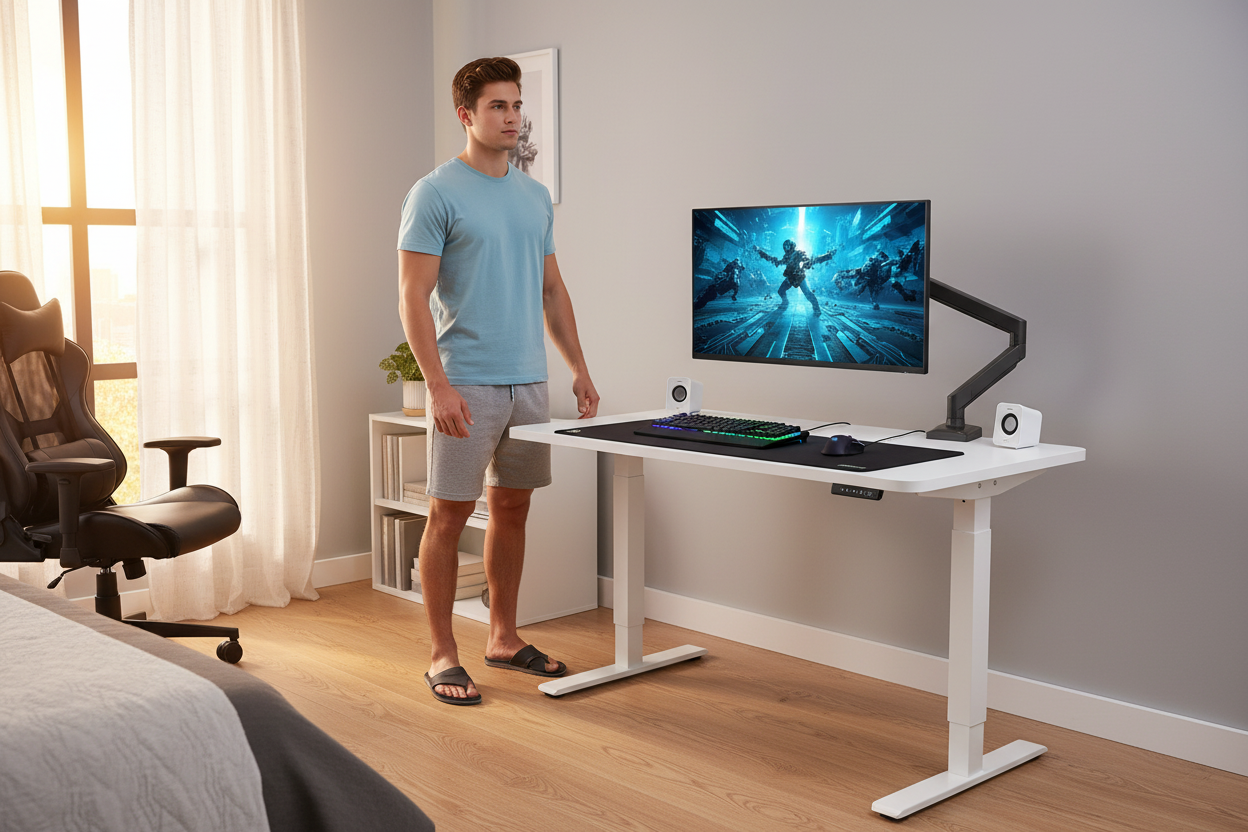
In 2026, the serious gaming community has quietly made a shift. The battlestations that are getting the most attention — the ones that look clean, perform better, and don't leave you feeling wrecked after a long session — all have two things in common: a height-adjustable standing desk and a full-motion monitor arm.
This guide breaks down exactly why that combination works, what to look for, and how the Rackora 8x24 Inches Height Adjustable Ergo Standing Desk paired with the Rackora Full Motion Single Monitor Arm has become the go-to setup for gamers who take their health and their performance seriously.
🎮 Shop the Rackora Gaming Desk — $479.99
The Real Problem: "Gamer Posture" Is Not a Myth
You've probably heard the term thrown around, but gamer posture is a genuine physical issue that develops over time from extended sessions at a poorly configured desk. It's not just about slouching — it's a cascade of problems that compound on each other.

Forward Head Posture
When your monitor is too low or too far away, your head naturally drifts forward to compensate. For every inch your head moves forward from its neutral position, the effective weight your neck muscles have to support increases dramatically. Over a summer of long gaming sessions, this creates chronic tension in the neck and upper back that doesn't just go away when you log off.
Rounded Shoulders
Fixed-height desks are almost never at the right height for your body. If the desk is too high, you shrug your shoulders to reach the keyboard. Too low, and you hunch forward. Either way, your shoulder muscles are working overtime, and over weeks and months, that leads to rounded shoulders and the kind of upper-body tightness that makes even casual movement uncomfortable.
Severe Neck Strain
The combination of forward head posture and rounded shoulders puts enormous strain on the cervical spine. Gamers who spend 6-10 hours a day at a fixed desk often report persistent neck pain, headaches, and even tingling in the arms — all symptoms of a setup that's biomechanically wrong for their body.
The fix isn't complicated. It's about getting your monitor at eye level and your desk at the right height for your arms. That's exactly what a height-adjustable desk and a monitor arm do together.

How a Standing Desk Fixes This
The Rackora Ergo Standing Desk adjusts from 28" to 47" in height. That range covers virtually every body type — whether you're 5'2" or 6'4", you can dial in the exact height where your elbows sit at 90 degrees and your wrists float naturally over the keyboard. No more compromising. No more "good enough."
And when you pair that with the Full Motion Monitor Arm, your screen moves independently of the desk surface. You can position it at exact eye level, push it back when you need desk space, pull it close for detail work, or tilt it to eliminate glare from a window. The monitor works around you — not the other way around.

Weight Capacity: Why This Matters More Than You Think for Gaming
Here's something that doesn't get talked about enough in gaming desk reviews: weight capacity. Most budget desks are rated for 50-60 lbs. That sounds like plenty until you actually add up what's sitting on a serious battlestation.
The Weight of a Real Gaming Setup
Think about what's actually on your desk:
- A full-tower PC case: 20-35 lbs
- A 27-32" gaming monitor: 10-18 lbs
- A mechanical keyboard: 2-4 lbs
- Speakers, headphone stand, controller dock: 5-10 lbs
- Capture cards, external drives, USB hubs: 3-6 lbs
- Desk mat, accessories, drinks: 3-5 lbs
Add that up and you're easily looking at 45-75 lbs on the desk surface before you've even thought about monitor arms or clamp mounts. A desk rated for 50 lbs is already at its limit — and that's before the structural stress of an electric motor raising and lowering the surface repeatedly.
The Rackora Desk's Heavy-Duty Build
The Rackora 8x24 Standing Desk is built with this reality in mind. The frame is constructed from durable materials designed for long-lasting heavy-duty performance — not the flimsy particleboard-and-thin-steel construction you find on cheaper alternatives. At 80 lbs assembled weight, the desk itself has the structural mass to stay stable even when loaded with a full gaming rig.
That stability matters when you're in the middle of an intense session. A wobbly desk translates directly to a wobbly monitor, which is distracting at best and genuinely disorienting during fast-paced gameplay.

Monitor Arm Weight Capacity for Gaming Monitors
The same logic applies to the monitor arm. Gaming monitors — especially ultrawide and high-refresh-rate panels — are heavier than standard office displays. The Rackora Full Motion Monitor Arm supports screens up to 17.6 lbs and is compatible with monitors from 13" to 32". The gas spring mechanism means the arm holds its position without drift — you set it, and it stays there, even during the kind of desk-pounding moments that happen in competitive gaming.
The arm mounts via C-clamp or grommet, both of which are included. The C-clamp attaches to the desk edge without drilling, while the grommet mount goes through an existing hole in the desk surface for a cleaner, more permanent installation.

🖥️ Shop the Rackora Monitor Arm — $139.99
Cable Management: The Difference Between a Battlestation and a Bird's Nest
Walk into any serious gamer's room and you'll notice something immediately: the setups that look the best have almost no visible cables. That's not an accident — it's the result of intentional cable management, and a standing desk with built-in cable routing makes it dramatically easier to achieve.

Why Gaming Setups Have So Many Cables
A typical gaming battlestation involves:
- Power cables for the PC, monitor, speakers, and desk lamp
- DisplayPort or HDMI cables from PC to monitor
- USB cables for keyboard, mouse, headset, and peripherals
- Audio cables for speakers or DAC/amp setups
- Ethernet cable for wired gaming connections
- Charging cables for controllers, phones, and wireless devices
That's easily 10-15 cables running across and under a typical desk. Without a system to manage them, they tangle, they get in the way, and they make the whole setup look chaotic — which is fine if you don't care, but most gamers who invest in quality hardware want their setup to look as good as it performs.
How the Rackora Desk Handles This
The Rackora Standing Desk is designed with cable management in mind. The 48" x 24" surface gives you enough real estate to route cables along the back edge and down the legs without them crossing the work area. The desk's design accommodates cable trays and clips (standard accessories that attach to the underside of the surface), keeping power strips and cable bundles hidden from view.
The monitor arm adds another layer of cable management. The Rackora Monitor Arm includes integrated cable management clips along the arm itself, so your DisplayPort and USB cables run cleanly through the arm rather than dangling freely. The result is a monitor that looks like it's floating — no cable mess, no visual clutter.

"Living Room Ready" — The New Standard for Gaming Setups
There's a growing trend in the gaming community toward setups that look good enough to be in a living room — not just a dedicated gaming cave. Clean cable management is the foundation of that aesthetic. When your desk is tidy, the rest of the room feels more intentional. It's the kind of setup you're not embarrassed to have on camera during a stream or a video call.
A standing desk with proper cable routing, combined with a monitor arm that hides its own cables, gets you 80% of the way there without any additional effort.
Acoustic and Thermal Benefits: The Overlooked Advantages of Lifting Your PC
This is the one that surprises most people. Moving your PC tower off the floor — or off the desk surface — has real, measurable benefits for both noise levels and thermal performance. And during a hot summer gaming marathon, those benefits become very noticeable.
The Problem with PCs on Carpeted Floors
Most gaming PCs sit on the floor next to the desk. On hardwood or tile, that's fine. On carpet, it's a problem. Here's why:
- Restricted airflow: PC cases draw air in from the bottom and sides. Carpet fibers block those intake vents, reducing airflow and forcing the fans to work harder to maintain safe temperatures.
- Dust accumulation: Carpet is a dust magnet, and a PC sitting on carpet will pull significantly more dust into its filters and components than one elevated off the floor. More dust means more cleaning, more thermal throttling, and shorter component lifespan.
- Acoustic dampening gone wrong: Carpet absorbs some fan noise, but it also traps heat around the base of the case. The net result is often a louder PC running hotter than it needs to.
Summer Makes This Worse
During summer, ambient room temperatures are higher. Your PC's cooling system is already working against a warmer baseline. If you're gaming for 6-8 hours straight on a hot day, a PC sitting on carpet in a warm room is going to thermal throttle — meaning the CPU and GPU will automatically reduce their performance to avoid overheating. You'll notice it as stuttering, frame drops, and inconsistent performance during the sessions when you want to be at your best.
The Standing Desk Solution
The Rackora 8x24 Standing Desk has a 48" x 24" surface — large enough to place your PC tower on the desk itself, elevated off the floor entirely. With the tower on the desk surface, it draws clean air from all sides, exhausts heat freely, and sits in a position where you can actually see the RGB lighting (if that matters to you).
Alternatively, many gamers use the standing desk's height adjustment to position the desk at a height where the PC tower sits on a dedicated shelf or stand at desk level, keeping the floor clear and the airflow unobstructed.

Acoustic Benefits
When your PC is elevated and has proper airflow, the fans don't have to spin as fast to maintain safe temperatures. Slower fans mean quieter operation. During a summer gaming session, the difference between a PC struggling with restricted airflow and one breathing freely can be 5-10°C in CPU/GPU temperatures — and that translates directly to fan speed and noise level.
For streamers and content creators who game with a microphone open, this is particularly relevant. A quieter PC means cleaner audio without constant fan noise in the background.
The Complete 2026 Gaming Battlestation: What the Setup Actually Looks Like
Let's put this all together. Here's what a Rackora-powered gaming battlestation looks like in practice:
The Desk: Rackora 8x24 Inches Height Adjustable Ergo Standing Desk

- Surface: 48" x 24" — enough room for a full keyboard, mouse pad, speakers, and accessories without feeling cramped
- Height range: 28" to 47" — covers sitting and standing positions for virtually any height
- Assembly: 15 minutes — no tools required beyond what's included
- Build: Heavy-duty frame with durable materials rated for serious loads
- Price: $479.99
The desk is the foundation. Get this right and everything else falls into place.
🛒 Get the Rackora Standing Desk — $479.99
The Monitor Arm: Rackora Full Motion Single Monitor Arm

- Compatibility: 13-32" monitors, VESA 75x75mm and 100x100mm, up to 17.6 lbs
- Motion: Full tilt, swivel, rotate, and extend — positions your screen exactly where you need it
- Mechanism: Premium gas spring — smooth, effortless adjustment, holds position without drift
- Cable management: Integrated clips along the arm
- Mount options: C-clamp and grommet (both included)
- Build: Aluminum alloy and steel construction
- Price: $139.99
🛒 Get the Rackora Monitor Arm — $139.99
The Combined Setup
Together, the desk and monitor arm run $619.98. For a setup that will last years, eliminate posture problems, improve your PC's thermal performance, and make your battlestation look genuinely impressive — that's a straightforward investment in both your health and your gaming experience.
Who This Setup Is For (And Who It Isn't)
This setup is ideal if you:
- Game for 4+ hours per day, especially during summer break
- Have noticed neck, shoulder, or back discomfort after long sessions
- Run a mid-to-high-end PC with a 27"+ monitor
- Care about how your setup looks — for streaming, content creation, or just personal satisfaction
- Want a desk that can transition between gaming and work or study without reconfiguring everything
- Have a carpeted gaming room and want to improve PC airflow
This setup might be overkill if you:
- Game casually for 1-2 hours a few times a week
- Use a laptop exclusively
- Already have a well-configured ergonomic setup that's working for you
For everyone else — especially students using summer break to grind ranked, build their streaming channel, or just enjoy the games they've been waiting all year to play — this is the upgrade that makes every session better.
Setting Up Your Rackora Gaming Desk: What to Expect
Desk Assembly
The Rackora Standing Desk is designed for a 15-minute assembly. The frame comes pre-assembled in sections, and the desktop attaches with included hardware. You don't need any special tools or technical knowledge — if you can follow illustrated instructions, you can build this desk. Most users report being fully set up and gaming within 30 minutes of opening the box.
Monitor Arm Installation
The monitor arm installs in under 10 minutes. Choose your mount type (C-clamp for no-drill installation, grommet for a cleaner permanent mount), attach the base, connect the arm, and mount your monitor using the included VESA plate. The gas spring is pre-tensioned for monitors in the mid-weight range and can be adjusted with a simple Allen key if your monitor is particularly light or heavy.
Dialing In Your Ergonomics
Once everything is assembled, here's how to set your ergonomic position:
- Stand or sit in your normal gaming position
- Adjust the desk height until your elbows are at approximately 90 degrees with your hands on the keyboard
- Adjust the monitor arm until the top of the screen is at or slightly below eye level
- Position the monitor at arm's length (roughly 20-30 inches from your face)
- Tilt the screen back 10-20 degrees to reduce neck strain
That's it. You've just set up a more ergonomically correct gaming position than 90% of gamers are using right now.

The Long Game: Why This Investment Pays Off
It's easy to think of a standing desk as a luxury. But consider the alternative: years of poor posture leading to chronic pain, physical therapy, or worse. The gamers who are making this switch in 2026 aren't doing it because it's trendy — they're doing it because they want to keep gaming at a high level for years to come, and they've realized that their body is the most important piece of hardware in their setup.
A $479.99 desk and a $139.99 monitor arm is a one-time purchase. The posture problems that develop from years of gaming at a poorly configured setup are not a one-time problem — they compound, they worsen, and they eventually affect your quality of life well beyond gaming.
The math is simple. The choice is yours.
🎮 Build Your Battlestation — Shop the Rackora Desk
Frequently Asked Questions
1. Is a standing desk actually worth it for gaming, or is it just a work thing?
Standing desks are absolutely worth it for gaming — arguably more so than for office work. Gamers tend to spend longer uninterrupted periods at their desks than most office workers, which means the ergonomic benefits (and the consequences of ignoring ergonomics) are amplified. The ability to switch between sitting and standing during long sessions also helps with focus and energy levels, which directly affects gameplay.
2. What's the height range of the Rackora Standing Desk, and will it work for my height?
The Rackora 8x24 Standing Desk adjusts from 28" to 47" in height. This range accommodates most adults in both sitting and standing positions. As a general guideline, the correct sitting desk height puts your elbows at 90 degrees with your hands on the keyboard — for most people, that falls between 28" and 32". Standing height is typically 6-12" higher than sitting height.
3. Can the monitor arm hold my ultrawide gaming monitor?
The Rackora Full Motion Monitor Arm supports monitors from 13" to 32" and up to 17.6 lbs. Most standard and curved gaming monitors in the 27-32" range fall within these specs. However, ultrawide monitors (34"+ or 49" super-ultrawide) typically exceed the arm's size and weight rating and would require a dedicated ultrawide monitor arm.
4. How stable is the desk when it's at standing height with a full gaming setup on it?
The Rackora desk is built with a heavy-duty frame and weighs 80 lbs assembled, which gives it significant structural mass and stability. At standing height, there is some inherent flex in any electric standing desk — this is normal. The Rackora's construction minimizes this to a level that doesn't affect gaming. The monitor arm's gas spring mechanism also helps by keeping the monitor stable independently of minor desk movement.
5. Does the monitor arm work with both C-clamp and grommet mounting?
Yes. The Rackora Monitor Arm includes both a C-clamp base and a grommet mount base in the box. The C-clamp attaches to the edge of the desk without drilling and works on desktops up to approximately 3.5" thick. The grommet mount goes through an existing hole in the desk surface (typically 1.5-3.5" diameter) for a cleaner, more permanent installation.
6. How long does it take to assemble the standing desk?
Rackora rates the desk at 15 minutes for assembly. In practice, most users complete it in 15-30 minutes. The frame comes in pre-assembled sections, and the desktop attaches with included hardware. No special tools are required beyond what's in the box.
7. Can I put my PC tower on the desk surface instead of the floor?
Yes, and for gamers with carpeted floors, this is actually recommended. The 48" x 24" surface is large enough to accommodate a full-tower PC case alongside your peripherals. Elevating the PC off carpet improves airflow, reduces dust intake, and can meaningfully lower operating temperatures during long summer gaming sessions.
8. Is the monitor arm compatible with VESA mounts?
Yes. The Rackora Monitor Arm is compatible with VESA 75x75mm and 100x100mm mounting patterns, which covers the vast majority of gaming monitors on the market. The VESA mounting plate is included in the box.
9. Will switching between sitting and standing actually help with gaming performance?
Indirectly, yes. Standing periodically during long sessions improves circulation, which helps maintain focus and reaction time. Many competitive gamers report feeling more alert and less fatigued during sessions where they alternate between sitting and standing compared to sessions where they sit for hours without moving. It won't make you a better aimer overnight, but it does help sustain performance over a long session.
10. What's the total cost of the Rackora desk and monitor arm together?
The Rackora 8x24 Height Adjustable Standing Desk is $479.99 and the Rackora Full Motion Single Monitor Arm is $139.99, for a combined total of $619.98. Both products are available individually, so you can start with the desk and add the monitor arm when you're ready.
Ready to Upgrade Your Battlestation?
Summer break is the perfect time to make the switch. You've got the time to set it up properly, the sessions ahead to appreciate the difference, and the motivation that comes from finally building the setup you've been thinking about.
The Rackora 8x24 Standing Desk and Full Motion Monitor Arm are in stock and ready to ship. Don't spend another summer hunched over a desk that's working against you.
🎮 Shop the Standing Desk — $479.99 🖥️ Shop the Monitor Arm — $139.99
