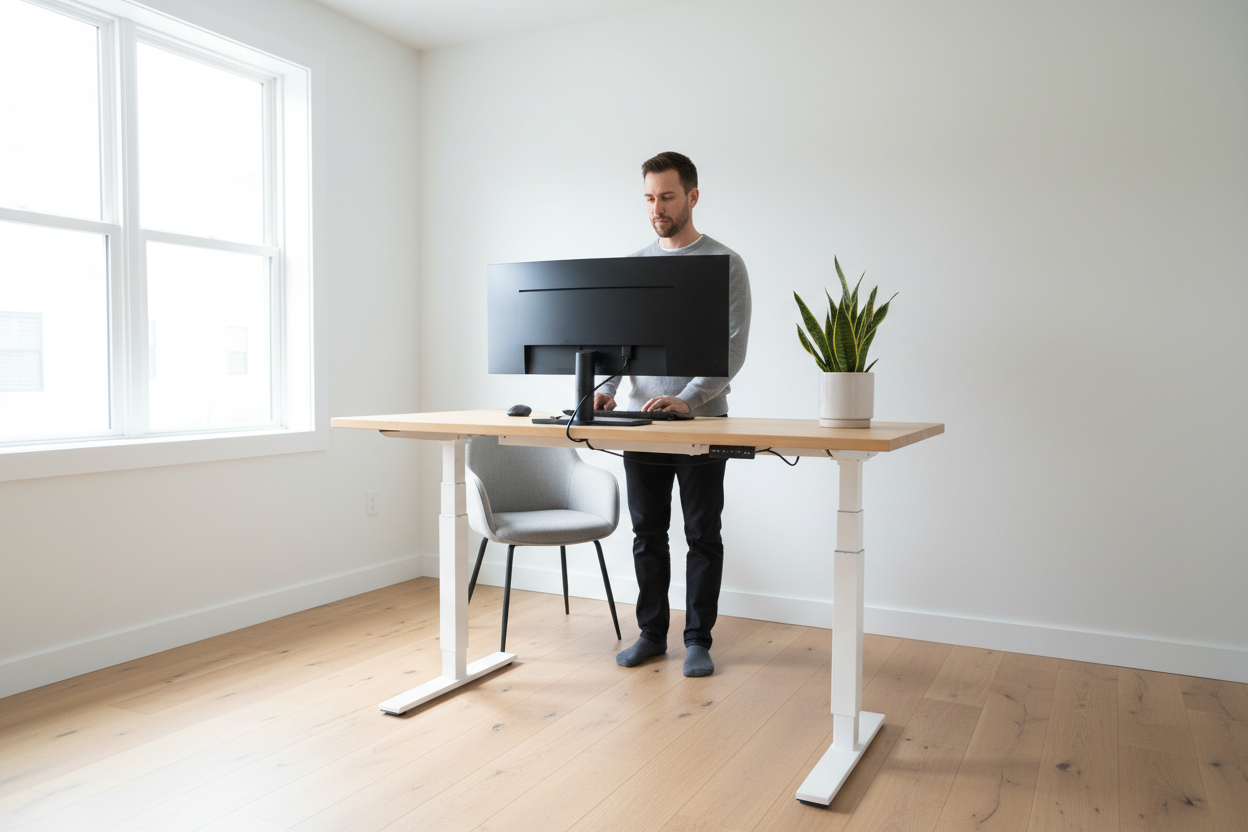
Quick Answer: The sit-stand sweet spot for lower back pain relief is 30 minutes of standing for every 60 minutes of sitting. That 1:2 ratio keeps your spine decompressed, your hip flexors loose, and your energy steady — without the fatigue that comes from standing all day. An electric height-adjustable standing desk makes hitting that ratio effortless, letting you switch postures in under three seconds with a single button press.
You know that dull, grinding ache that creeps into your lower back around 2 p.m.? The one that starts as a mild annoyance and ends with you shifting in your chair every five minutes, unable to focus on anything except how uncomfortable you are? That's not a sign you need a better chair. It's a sign your body is screaming for a posture change — and it's been screaming for a while.
The good news: you don't need a standing ovation from your physical therapist or a $3,000 ergonomic overhaul to fix it. You need a smarter sit-stand rhythm and the right desk to make it automatic. Let's break it all down.
Why Does Sitting All Day Wreck Your Lower Back?
Picture this: it's Monday morning. You sit down at your desk with a fresh cup of coffee, open your laptop, and dive into your inbox. Three hours later, you haven't moved. Your hips are locked at 90 degrees, your lumbar spine is slowly rounding forward, and the muscles along your lower back — the erector spinae, the quadratus lumborum — are working overtime just to keep you upright.
Here's what's actually happening inside your body during prolonged sitting:
- Intradiscal pressure spikes. Sitting increases pressure on your lumbar discs by up to 40% compared to standing. Over hours, that sustained compression can irritate the disc and surrounding nerves.
- Hip flexors shorten and tighten. When your hip flexors (the psoas, in particular) stay in a shortened position for hours, they pull your pelvis into an anterior tilt — which exaggerates the lumbar curve and strains the lower back muscles.
- Glutes switch off. Sitting literally turns off your glutes. And since your glutes are the primary stabilizers of your pelvis and lower spine, a dormant backside means your lower back muscles have to pick up the slack.
- Blood flow slows. Reduced circulation means less oxygen and fewer nutrients reaching the muscles and discs of your lower back — accelerating fatigue and discomfort.
The solution isn't to stand all day, either. Standing for hours on end creates its own problems: varicose veins, foot pain, and a different kind of lower back fatigue from sustained static loading. The answer is movement — specifically, a structured alternation between sitting and standing.
What Exactly Is the "Sit-Stand Sweet Spot"?
The sit-stand sweet spot is the optimal ratio of sitting to standing time that minimizes musculoskeletal strain while keeping you productive and energized. After reviewing research from occupational health studies and ergonomics guidelines from institutions like Cornell University's Human Factors and Ergonomics Research Group, the consensus lands on a clear target:
Stand for 30 minutes for every 60 minutes of sitting. That's a 1:2 ratio — or roughly 20–33% of your workday on your feet.
Some ergonomists push for a 1:1 ratio (30 minutes sitting, 30 minutes standing) for people with existing lower back conditions. But for most healthy adults working a standard 8-hour day, the 30/60 split is the sweet spot: enough standing to decompress the spine and re-engage the glutes, not so much that your legs and feet fatigue.
The key word here is scheduled. Waiting until your back hurts to stand up means you're already in a pain cycle. The goal is to change postures before discomfort sets in — which is exactly why an electric desk with programmable height memory is such a game-changer.
How Do You Actually Schedule Posture Changes Throughout the Day?
Let's get practical. Here's a sample posture schedule built around the 30/60 sit-stand sweet spot for a standard 8-hour workday. Use this as your starting template and adjust based on your meetings, focus blocks, and energy levels.
| Time Block | Posture | Duration | Activity Suggestion |
|---|---|---|---|
| 8:00 – 9:00 AM | Sitting | 60 min | Email triage, planning, deep focus work |
| 9:00 – 9:30 AM | Standing | 30 min | Video calls, light reading, brainstorming |
| 9:30 – 10:30 AM | Sitting | 60 min | Writing, coding, spreadsheet work |
| 10:30 – 11:00 AM | Standing | 30 min | Slack/Teams messages, phone calls |
| 11:00 AM – 12:00 PM | Sitting | 60 min | Deep focus, project work |
| 12:00 – 1:00 PM | Lunch break | 60 min | Walk, stretch, step away from the desk |
| 1:00 – 2:00 PM | Sitting | 60 min | Post-lunch focus block |
| 2:00 – 2:30 PM | Standing | 30 min | Review documents, light admin tasks |
| 2:30 – 3:30 PM | Sitting | 60 min | Meetings, collaborative work |
| 3:30 – 4:00 PM | Standing | 30 min | End-of-day wrap-up, email replies |
| 4:00 – 5:00 PM | Sitting | 60 min | Final focus block, planning tomorrow |
Notice how the standing blocks align naturally with lower-intensity tasks — calls, messages, light reviews. That's intentional. Standing is great for communication and light cognitive work; sitting tends to support deeper focus. Work with your natural workflow, not against it.
Pro tip: Set a recurring timer on your phone or use a free app like Stretchly or Time Out to remind you when to switch. After two weeks, the rhythm becomes automatic.
Does the Type of Desk You Use Actually Matter?
Short answer: absolutely. And here's why.
Imagine you're deep in a flow state — you've been sitting for 55 minutes, you're almost done with a complex report, and your timer goes off. If switching to standing requires you to manually crank a handle, unplug cables, and readjust your monitor, you're going to skip it. Every time. The friction is too high.
An electric height-adjustable desk removes that friction entirely. You press a button — or tap a saved memory preset — and the desk rises smoothly and quietly to your standing height in about three seconds. You don't break your train of thought. You don't disrupt your workflow. You just stand up and keep working.
That's the difference between a sit-stand desk you actually use and one that stays at the same height for six months.
Which Rackora Standing Desk Is Right for Your Space and Budget?
Rackora's standing desk lineup covers everything from compact apartment setups to full-size home office workstations. Here's a quick comparison to help you find your match:
| Model | Surface Size | Height Range | Drive Type | Best For | Price |
|---|---|---|---|---|---|
| Manual Compact Desk (27.5") | 27.5" x 18.5" | 29.5" – 43.3" | Manual crank | Small spaces, dorms, RVs | $229.00 |
| Mobile Rolling Laptop Cart | Compact laptop surface | Adjustable | Manual | Flexibility, room-to-room mobility | $158.07 |
| 48" x 24" Electric Desk | 48" x 24" | 28" – 47" | Electric motor | Full home office, dual monitors | $479.99 |
| 47" White Electric Desk | 47" x 23.4" | Adjustable | Electric motor | Modern aesthetic, mid-size setups | $489.38 |
| 40" x 24" Electric Desk (Brown) | 40" x 24" | 28" – 47" | Silent electric motor (<50dB) | Quiet offices, 3 memory presets | $599.99 |
All electric models ship from Rackora's US warehouse and arrive in 3–7 business days. Every desk comes with a 30-day return window — so you can try it in your actual space with zero risk.
The Rackora 40" Electric Standing Desk: Built for the Sit-Stand Sweet Spot

If you're serious about hitting the 30/60 sit-stand ratio consistently, the Rackora 40" x 24" Ergonomic Electric Height Adjustable Standing Desk ($599.99) is the desk that makes it effortless.
Here's what sets it apart for lower back pain relief specifically:
- Three programmable height memory presets. Set your exact sitting height, your standing height, and a mid-height for perching on a stool. One button press, and the desk moves there automatically — no guessing, no readjusting.
- Silent motor under 50 decibels. That's quieter than a normal conversation. You can switch postures mid-meeting without anyone on your video call noticing a thing.
- Smooth, stepless lifting. No jerks, no sudden stops. The desk rises and lowers in one fluid motion, which matters when you have a monitor, laptop, and coffee mug on the surface.
- Solid wood desktop in warm brown. The composite wood surface is built to handle daily use — and it looks like it belongs in a premium home office, not a corporate cubicle farm.

Switch Postures Easily — Shop the 40" Electric Desk →
What If You Have a Smaller Space? The 48" Electric Desk and Compact Options

Not everyone has room for a 40-inch desk — and that's completely fine. The Rackora 48" x 24" Electric Standing Desk ($479.99) gives you a generous 48-inch work surface with the same electric height adjustment (28" to 47" range), at a slightly lower price point. It's wide enough for a dual-monitor setup with a monitor arm, and the 24-inch depth keeps your screen at a healthy distance from your eyes.
If you're working from a studio apartment, a dorm room, or a corner of your bedroom, the Manual Compact Standing Desk ($229.00) is worth a serious look. At just 27.5" x 18.5", it fits where full-size desks simply can't — and the manual crank adjustment is smooth and reliable. No electricity required, no motor to maintain. Just a solid powder-coated steel frame and a durable composite wood top that handles daily use without complaint.

Shop the Compact Desk for Small Spaces →
How Do You Set Your Standing Desk to the Right Height?
Getting the height right is just as important as switching postures. A desk that's too high forces your shoulders up into a shrug; too low and you're hunching forward — which defeats the entire purpose.
Here's the quick formula for both positions:
Sitting height: Adjust the desk so your elbows are at roughly 90 degrees when your forearms rest on the surface. Your wrists should be neutral (not bent up or down), and your monitor top should be at or just below eye level.
Standing height: Same rule — elbows at 90 degrees, wrists neutral. Most people find their standing desk height is 3–5 inches higher than their sitting height. For reference, if you're 5'10", your standing desk height will typically land around 44–46 inches.
Once you've dialed in both heights, save them as memory presets on your electric desk. From that point on, switching postures is literally a one-button operation.
What Else Can You Do to Maximize Lower Back Relief While Using a Standing Desk?
The sit-stand ratio is the foundation, but a few supporting habits will amplify your results significantly:
Use an anti-fatigue mat when standing. A cushioned mat reduces the compressive load on your feet, knees, and lower back during standing intervals. Look for one that's at least 3/4 inch thick with beveled edges.
Keep one foot slightly elevated. Placing one foot on a small footrest or the bottom rung of a stool while standing shifts your pelvis slightly and reduces lumbar strain. Alternate feet every 10–15 minutes.
Move during your standing intervals. Standing still is better than sitting, but gentle movement is better than standing still. Shift your weight, do a few calf raises, or take a short walk to the kitchen and back. The goal is circulation, not just posture.
Check your monitor position. Whether sitting or standing, your monitor should be at arm's length and the top of the screen should be at or just below eye level. A monitor arm makes this adjustment seamless as your desk height changes.
Stretch your hip flexors daily. Even with a perfect sit-stand schedule, your hip flexors will benefit from a daily stretch. A simple kneeling hip flexor stretch — 30 seconds per side, twice a day — can make a noticeable difference in lower back comfort within a week.
Is a Standing Desk Worth It for Lower Back Pain? Here's the Honest Answer
A standing desk is not a cure for lower back pain. If you have a herniated disc, spinal stenosis, or a structural issue, you need to work with a physical therapist or physician — no desk will fix that on its own.
But for the vast majority of people whose lower back pain is driven by prolonged static sitting — which is most desk workers — a height-adjustable desk combined with a structured sit-stand schedule is one of the most effective, evidence-backed interventions available. It addresses the root cause (sustained compressive loading and hip flexor shortening) rather than just masking the symptom.
The research backs this up. A 2011 study published in Occupational and Environmental Medicine found that sit-stand workstations significantly reduced musculoskeletal discomfort in office workers over a 12-week period. A 2018 Cochrane review confirmed that alternating sitting and standing reduces lower back and neck pain compared to sitting-only work.
The investment pays off — not just in comfort, but in focus, energy, and long-term spinal health.
The 47" White Standing Desk: For the Home Office That Has to Look Good

If your home office doubles as a guest room, a creative studio, or a space you actually care about aesthetically, the Rackora 47" White Standing Desk ($489.38) is worth a look. The clean white finish pairs with virtually any interior — Scandinavian minimalism, modern farmhouse, contemporary — and the 47-inch surface gives you room for a 27-inch monitor, keyboard, mouse, and a few desk accessories without feeling cramped.
It ships from the US warehouse and arrives ready to assemble with all hardware included. The white surface wipes clean with a damp cloth, which matters more than you'd think after a few months of daily use.

Switch Postures Easily — Shop Standing Desks →
Frequently Asked Questions
What is the ideal sit-stand ratio for lower back pain?
The most widely recommended ratio is 30 minutes of standing for every 60 minutes of sitting (a 1:2 ratio). For people with existing lower back conditions, some ergonomists recommend moving toward a 1:1 ratio. The key is consistency — switching postures on a schedule, before discomfort sets in, rather than reactively.
How long should I stand at my standing desk at a time?
Most ergonomics research suggests standing intervals of 20–30 minutes are optimal. Standing for longer than 45–60 minutes continuously can cause its own issues — foot fatigue, varicose vein risk, and lower back fatigue from sustained static loading. The goal is movement and alternation, not marathon standing sessions.
Can a standing desk actually fix lower back pain?
For lower back pain caused by prolonged sitting — which is the most common type in desk workers — a height-adjustable desk combined with a structured sit-stand schedule is one of the most effective non-medical interventions available. It won't fix structural issues like herniated discs, but it directly addresses the root cause of posture-related lower back pain.
What height should my standing desk be set to?
Your standing desk height should allow your elbows to rest at approximately 90 degrees when your forearms are on the surface, with your wrists in a neutral position. For most people, this is roughly elbow height when standing. A common reference: if you're 5'10", your standing desk height will typically be around 44–46 inches.
Is a manual or electric standing desk better for switching postures frequently?
Electric is significantly better for frequent posture switching. The friction of manually cranking a desk height is enough to discourage most people from switching as often as they should. An electric desk with programmable memory presets lets you switch in under 3 seconds — which means you'll actually do it. If budget is a constraint, a manual desk is still far better than a fixed-height desk.
Do I need an anti-fatigue mat with a standing desk?
It's highly recommended. Standing on a hard floor for 30-minute intervals puts compressive load on your feet, knees, and lower back. A quality anti-fatigue mat (at least 3/4 inch thick) significantly reduces that load and makes standing intervals more comfortable — which means you'll stand more consistently.
How long does it take to see results from using a sit-stand desk?
Most people notice a reduction in afternoon lower back discomfort within 1–2 weeks of consistently following a sit-stand schedule. Significant improvements in chronic lower back pain typically take 4–8 weeks of consistent use. The key word is consistent — sporadic standing won't move the needle.
Can I use a standing desk if I already have lower back pain?
Yes, in most cases — but start gradually. Begin with 15-minute standing intervals and work up to 30 minutes over 2–3 weeks. If you have a diagnosed spinal condition, consult your physical therapist or physician before making significant changes to your workstation setup.
What's the best standing desk for a small apartment or home office?
The Rackora Manual Compact Standing Desk (27.5" x 18.5", $229.00) is purpose-built for small spaces — apartments, dorms, RVs, and compact home offices. If you need mobility, the Rackora Mobile Rolling Laptop Cart ($158.07) lets you move your workstation from room to room with locking casters for stability when you're ready to work.
Does Rackora offer free returns on standing desks?
Yes. All Rackora standing desks come with a 30-day return window. Every desk ships from the US warehouse and arrives in 3–7 business days. New subscribers can also get 15% off their first order by signing up for the Rackora email list.
Ready to Find Your Sit-Stand Sweet Spot?
Lower back pain from sitting isn't inevitable. It's a posture problem — and posture problems have posture solutions. The 30/60 sit-stand ratio is your target. A structured daily schedule is your system. And the right electric standing desk is what makes the whole thing automatic.
Rackora's standing desk lineup is built for real home offices, real budgets, and real people who want to work better without sacrificing their health. Every desk ships from the US in 3–7 days, comes with a 30-day return guarantee, and is backed by a team that actually cares about ergonomics — not just aesthetics.
New to Rackora? Subscribe to our email list and get 15% off your first order. Already ready to upgrade? Use code DE30 for an extra 30% off during our current sale.
Switch Postures Easily: Shop Standing Desks → Shop Compact Desks for Small Spaces →
