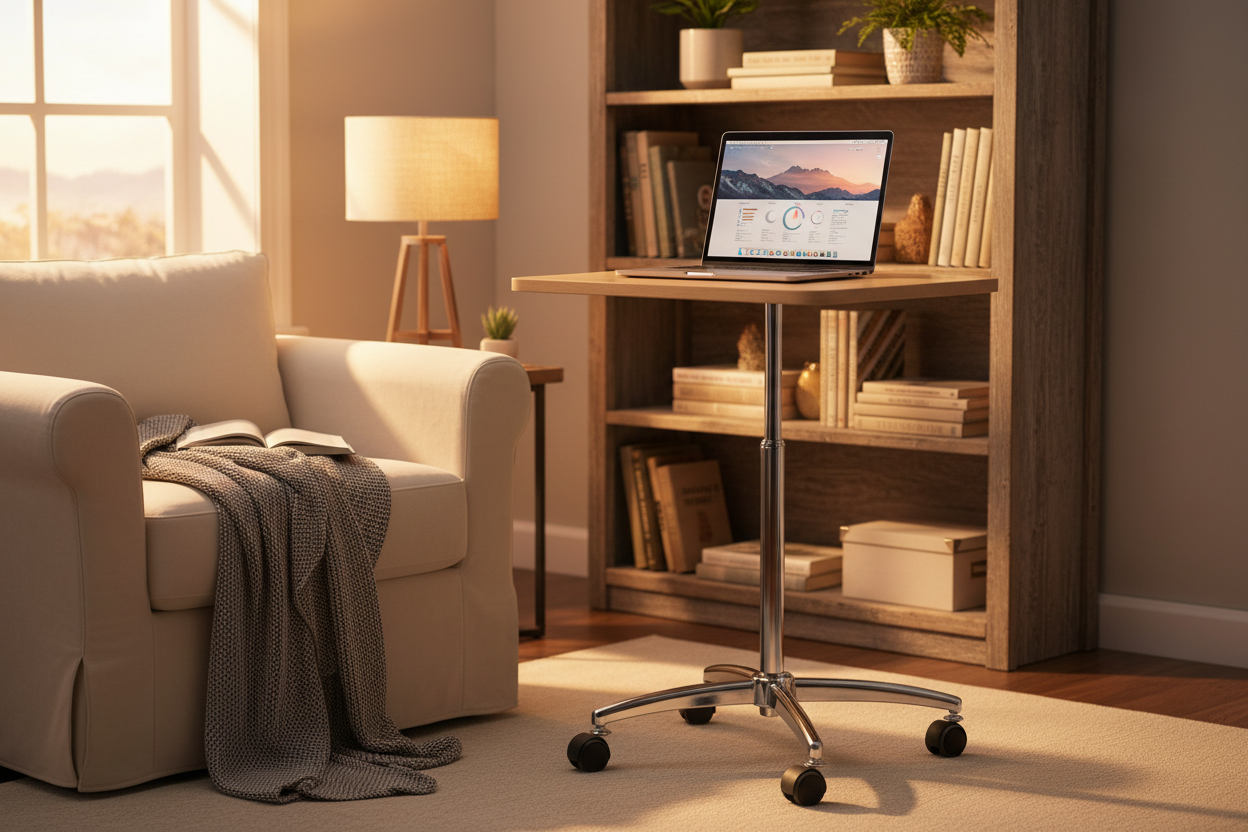
You want every classroom to run smoothly. With a laptop computer cart, you keep each laptop organized, charged, and ready for action. Adjustable and mobile carts give you flexibility, letting students collaborate and stay productive. Recent studies show these carts help students maintain proper posture and boost social skills.
|
Benefit |
Description |
|---|---|
|
Flexible Workstations |
Promote interactive learning, leading to increased productivity, focus, and collaboration. |
|
Improved Social Skills |
Mobility allows students to easily collaborate and solve problems together. |
|
Encouragement of Proper Posture |
Carts help students maintain ergonomic positions, reducing fatigue and back pain over time. |
Key Takeaways
- Laptop computer carts keep devices organized, charged, and ready for use, enhancing classroom efficiency.
- Mobility and flexibility of carts promote collaboration among students, boosting social skills and teamwork.
- Proper organization reduces clutter, helping students focus better and minimizing distractions during lessons.
- Security features like locking systems protect valuable technology from theft and unauthorized access.
- Charging multiple devices at once saves time and ensures that all laptops are ready for class without delays.
- Adjustable height and smooth-rolling casters make it easy to adapt the classroom layout for different activities.
- Involving students in routines for device check-in and maintenance fosters responsibility and respect for technology.
- Choosing the right cart with adequate capacity and compatibility prepares classrooms for future growth and technology needs.
Benefits of a Laptop Computer Cart
Organization and Storage
Device Arrangement
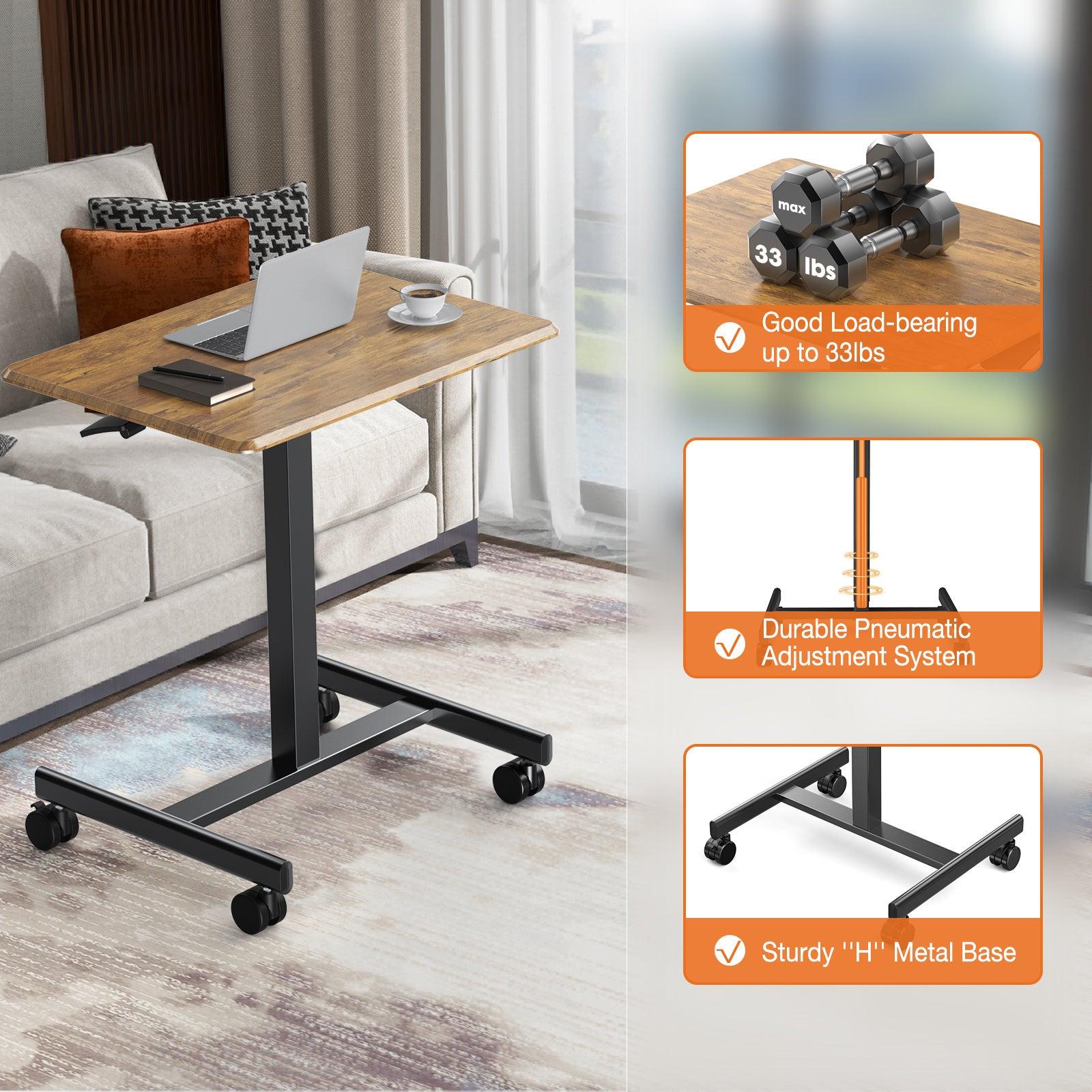
You want every device in your classroom to be easy to find and ready to use. A laptop computer cart gives you a dedicated space for each laptop, tablet, or portable monitor. You can assign slots for each student, making distribution fast and simple. The Rackora Adjustable Laptop Computer Cart supports a wide range of devices, so you never worry about compatibility. You keep your classroom running smoothly when every laptop and tablet has its place.
Reducing Clutter
Clutter slows down learning and creates distractions. A laptop storage cart helps you keep cables, chargers, and devices organized. You avoid tangled cords and misplaced equipment. With a charging station built into your cart, you eliminate the mess of multiple charging solutions scattered around the room. You create a clean, focused environment where students can concentrate on learning. The Rackora cart’s spacious desktop and universal compatibility make it easy to store laptops, tablets, and accessories together.
Security Features
Locking Systems
You protect valuable technology with secure locking systems. The Rackora Adjustable Laptop Computer Cart features locking wheels and a sturdy steel frame, keeping devices safe when not in use. You prevent unauthorized access and ensure that laptops stay where they belong. Locking mechanisms give you peace of mind, especially in busy classrooms.
Theft Prevention
You want to keep every laptop and tablet secure. Effective laptop charging carts use multiple security features to prevent theft and loss. Here’s how top solutions compare:
|
Security Feature |
Description |
|---|---|
|
Tracking and Locking Software |
Solutions that track device locations, remotely lock devices, and wipe data to prevent unauthorized access. |
|
Asset Tagging |
Labeling devices with unique identifiers for better tracking and organization, optimizing inventory management. |
|
Protective Cases |
Providing cases to minimize damage and loss, along with training on proper device handling. |
You can combine these features with a laptop and tablet storage carts to maximize protection. You keep your classroom technology safe and ready for learning.
Charging Convenience
Multiple Device Charging
You need every device charged and ready for class. Laptop charging carts let you power up multiple laptops and tablets at once. You save time and avoid the hassle of charging devices individually. The Rackora Adjustable Laptop Computer Cart offers universal compatibility, so you can charge Apple, Dell, HP, Lenovo, Asus, and more. You keep your classroom running efficiently.
If you connect half of the Chromebooks in your cart, those typically reach full charge in 3-4 hours. Then you can connect the other half. This method ensures every device gets the power it needs without overloading your charging cart.
Avoiding Power Issues
You prevent classroom disruptions by keeping devices charged and organized. Laptop charging carts help you avoid technical problems that waste valuable teaching time. Here’s how you benefit:
- Laptop carts ensure devices are securely stored and fully charged, reducing the likelihood of uncharged devices disrupting lessons.
- The streamlined distribution process saves valuable class time, allowing teachers to focus on instruction rather than troubleshooting.
- Having devices charged and ready means students can start lessons without delays, enhancing the overall classroom experience.
- The convenience of accessing devices easily for charging minimizes the risk of technical issues during class.
- Teachers experience reduced administrative burdens, allowing them to concentrate on teaching rather than managing device issues.
You keep your classroom productive and focused. With a reliable charging cart, you never miss out on learning opportunities.
Mobility and Flexibility
Easy Movement
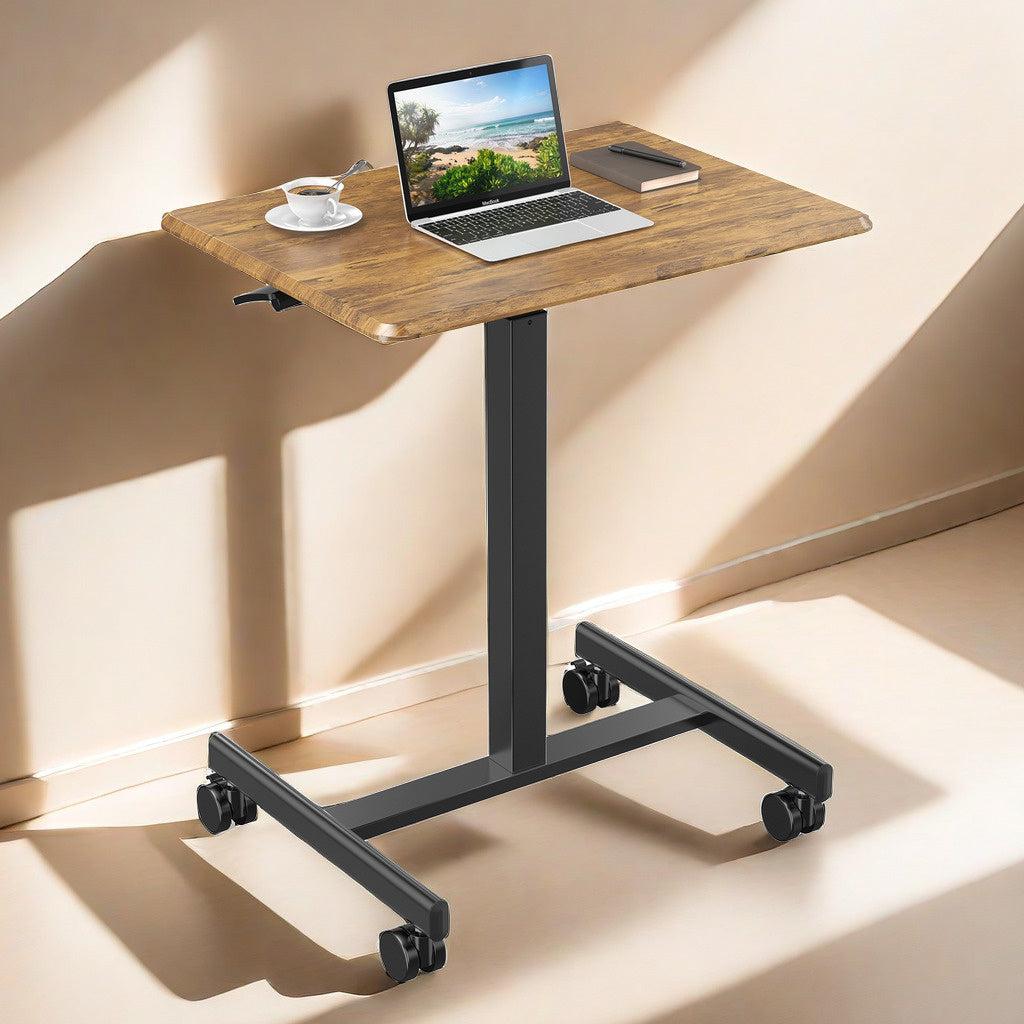
You want your classroom to adapt quickly to any situation. A laptop computer cart gives you the freedom to move technology wherever you need it. The Rackora Adjustable Laptop Computer Cart features smooth-rolling casters and a lightweight steel frame. You glide the cart from one side of the room to another without effort. Locking wheels keep the cart stable when you stop, so your devices stay secure.
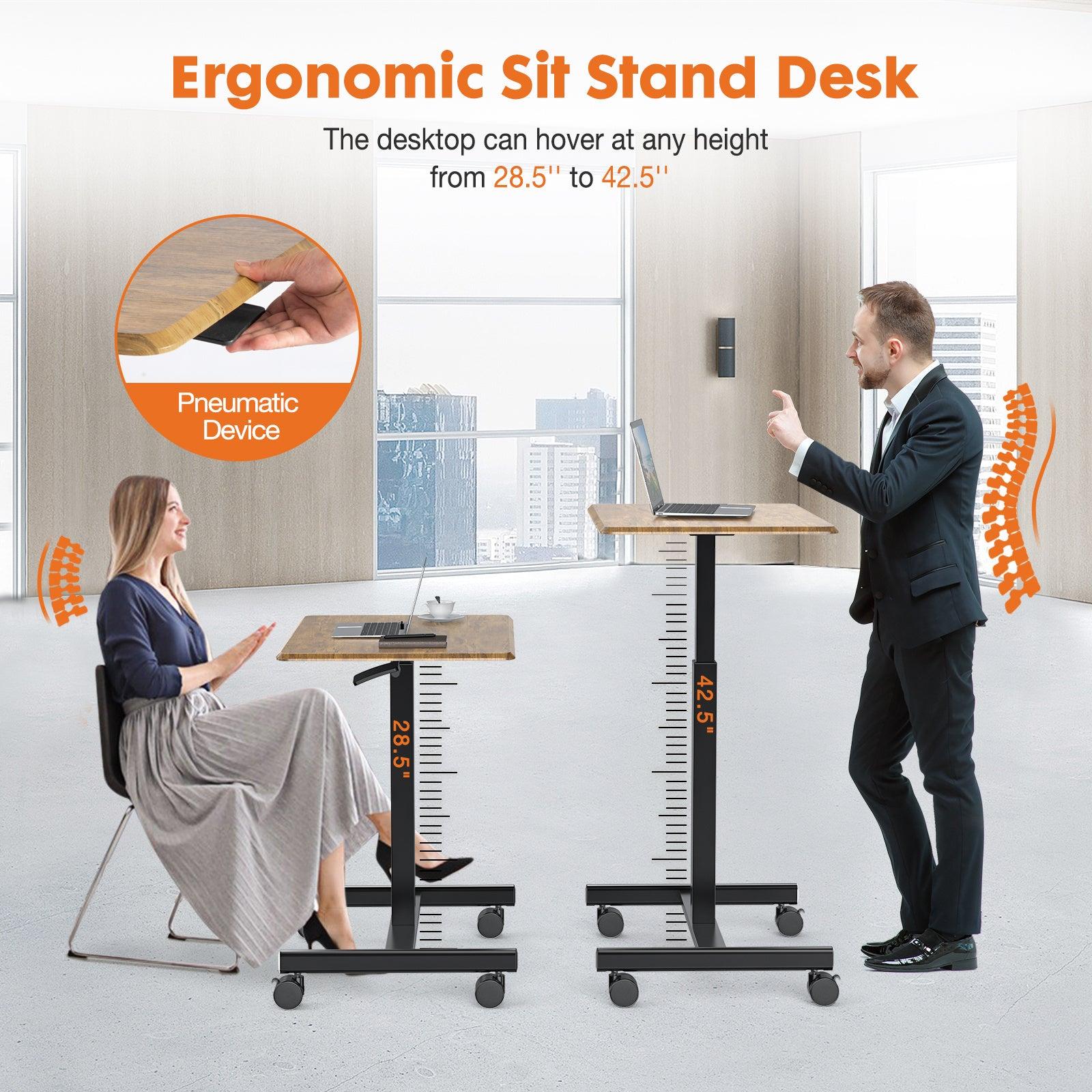
Tip: You can adjust the cart’s height to fit any workspace, making it perfect for both sitting and standing activities.
You save time when you move devices between classrooms or learning stations. You avoid the hassle of carrying laptops by hand or searching for outlets. The cart’s universal compatibility means you transport any device—laptops, tablets, or portable monitors—with ease.
- Quickly reconfigure your classroom for group work or presentations.
- Move technology to quiet corners for focused study.
- Adapt to health guidelines by spacing out devices as needed.
You create a flexible learning environment that responds to your needs.
Supporting Collaboration
You encourage teamwork when you make technology mobile. Students gather around the cart, share ideas, and work together on projects. The Rackora cart’s mobility lets you set up huddle spaces or move devices to different groups in seconds.
- Mobile carts help students collaborate in real time, boosting cooperative learning.
- You support small group activities by bringing devices directly to students.
- Flexible arrangements maximize learning potential and keep students engaged.
You foster a classroom where students interact, solve problems, and learn from each other. The adjustable height feature lets everyone participate comfortably, whether sitting or standing. You empower students to take charge of their learning and work together toward success.
A laptop computer cart transforms your classroom into a dynamic space. You never miss out on opportunities for collaboration and creativity.
Choosing Laptop Charging Carts
Capacity and Size
Classroom Needs
You want a laptop charging cart that matches your classroom needs. The right cart keeps every laptop and tablet organized, charged, and ready for use. When you choose a cart, you should consider how many devices you need to store and charge each day. A cart with enough slots for every student saves time and prevents confusion. You avoid delays and keep lessons on track.
|
Factor |
Description |
|---|---|
|
Device Compatibility |
Make sure the cart supports the charging ports of your laptops and tablets. |
|
Capacity |
Pick a cart that holds all devices for your classroom, with room for extras. |
|
Security |
Look for locking doors and indicator lights to protect your technology. |
|
Longevity |
Choose designs that promote battery health and include surge protectors. |
|
Footprint |
Assess the space the cart will occupy and select mobile or vertical solutions for tight areas. |
|
Cable Management |
Evaluate how the cart organizes cables to prevent clutter and ensure airflow. |
|
Thermal Management |
Ensure the cart has ventilation to prevent overheating during charging. |
|
Cost |
Review your budget and consider long-term savings from investing in quality features. |
A laptop and tablet storage cart with universal compatibility, like the Rackora Adjustable Laptop Computer Cart, supports a wide range of devices. You keep your classroom organized and efficient.
Future Growth
You plan for the future when you select a laptop charging cart. Schools often add new devices or expand classrooms. You need a cart that grows with your needs. Look for carts with extra capacity and flexible charging solutions. You avoid buying new equipment every year.
|
Factor |
Description |
|---|---|
|
Device Compatibility |
Make sure the cart works with laptops, tablets, and other devices. |
|
Capacity |
Assess how many devices the cart can charge at once, important for larger classrooms. |
|
Security Features |
Strong locking mechanisms prevent theft or tampering. |
|
Portability |
Wheels make it easy to move the cart between rooms. |
|
Charging Speed |
Smart charging features help charge devices quickly, crucial for busy classrooms. |
A tablet storage cart with adjustable slots and smart charging features prepares you for future growth. You stay ahead and never miss out on new technology.
Security Options
Lock Types
You protect your investment with strong security options. Laptop charging carts offer several lock types to keep devices safe. You choose carts with rugged builds and locking doors for extra protection. Electronic locks add another layer of security. Lockable compartments in charging stations prevent theft during recharging.
- Rugged build ensures durability.
- Locking doors provide additional security.
- Electronic locks add an extra layer of protection.
- Charging stations include lockable compartments for safety.
- Locking doors enhance security against theft.
You keep every laptop secure and ready for learning.
Tracking Features
You reduce device loss with tracking features. Modern laptop charging carts enable real-time monitoring of the cart’s location. You verify that all devices are accounted for and charged before moving the cart. This proactive monitoring lowers the risk of losing laptops and ensures every device is present and ready for use.
Charging Systems
Power Management
You want every device fully powered and ready for class. Efficient charging systems in laptop charging carts optimize power distribution. Smart charging features help you charge devices quickly, so teachers focus on teaching instead of technology issues. You save time and keep your classroom running smoothly.
Cable Organization
You extend device life with proper cable organization. Well-designed carts prevent overheating and battery degradation. You reduce physical wear on laptops and the cart itself. Organized cables minimize tripping hazards and keep your classroom safe.
- Proper cable management prevents overheating and battery degradation.
- Reduces physical wear on laptops and the charging cart.
- Minimizes tripping hazards, enhancing safety in classrooms.
- Tangled cables can lead to cable tension and damage.
- Constant bending or twisting of cables can degrade their protective coating, requiring frequent replacements.
You choose a laptop charging cart with smart cable management to protect your investment and keep your classroom organized.
Durability and Design
Build Quality
You want a laptop charging cart that stands up to daily use. Build quality matters. Heavy-gauge steel construction gives you the best durability and security. Steel resists dents and scratches, keeping your investment safe year after year. Tamper-resistant panels and secure locking mechanisms add another layer of protection. You avoid the risk of damage or theft, even in busy classrooms.
|
Material |
Benefits |
|---|---|
|
Steel |
Best durability and security; better ventilation compared to wood. |
|
Wood |
Retains heat, less effective for cooling devices. |
The Rackora Adjustable Laptop Computer Cart features a robust steel frame. You get a cart that lasts, even with frequent movement and heavy loads. You protect your devices and keep your classroom running smoothly.
Tip: Choose a cart with a sturdy frame and reliable locks. You gain peace of mind and reduce maintenance costs.
Aesthetics
You want your classroom to look modern and inviting. A sleek design encourages students to respect technology and take pride in their workspace. The Rackora cart’s stylish appearance fits any classroom or office. Smooth lines and a contemporary finish make it a standout addition. You create a professional environment that motivates students and teachers alike.
- Modern design signals innovation.
- Attractive carts blend with classroom décor.
- Sleek finishes make technology approachable.
Compact and lightweight designs suit classrooms with limited space. You maximize utility without sacrificing style.
Portability
Weight and Wheels
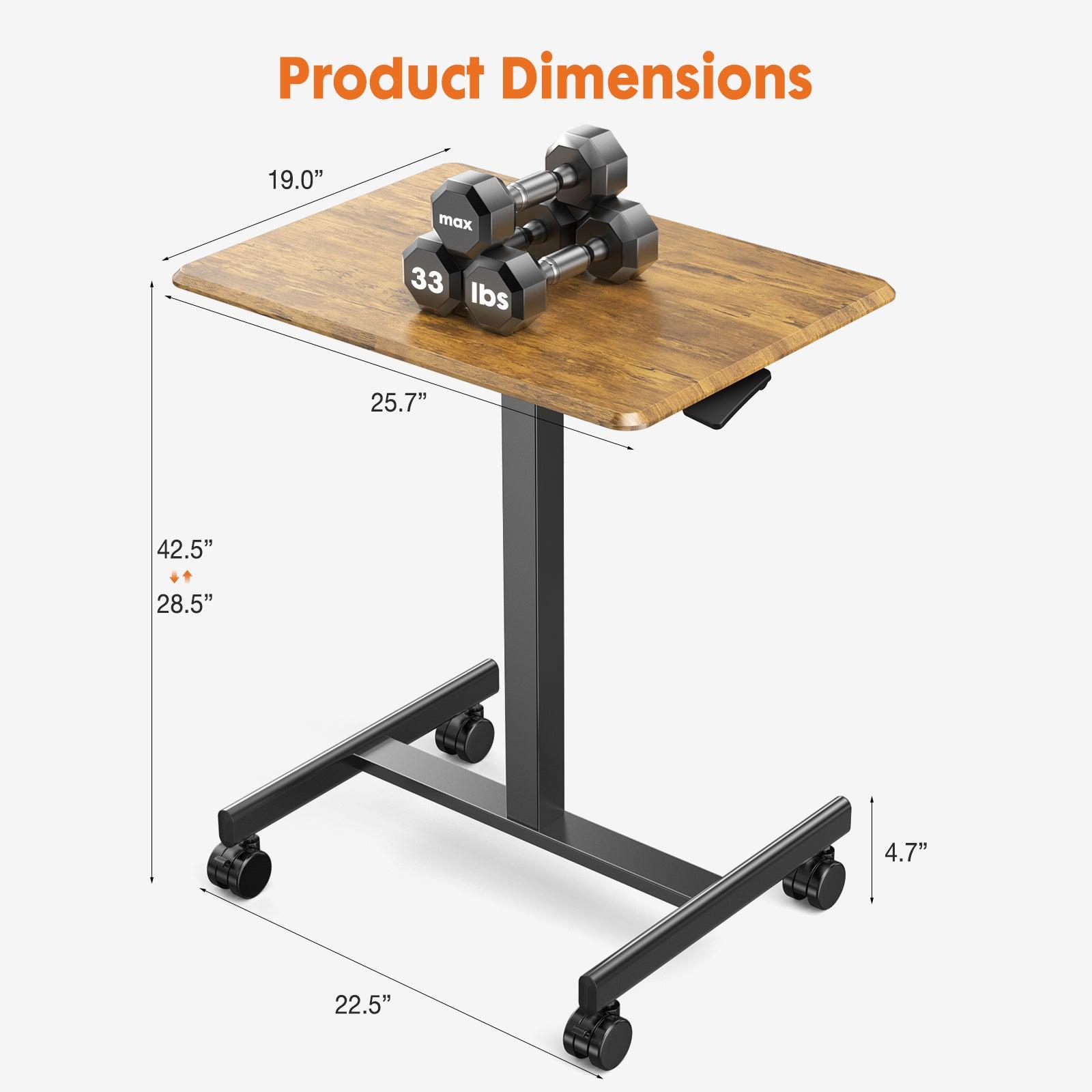
You need a cart that moves easily between classrooms. The weight of devices can add up quickly. Durable wheels or casters make all the difference. Large 4” casters help you transport the cart across multiple floors. Integrated handles let you push or pull with ease. Locking casters secure the cart in place, preventing accidents and keeping devices safe during use.
|
Feature |
Description |
|---|---|
|
Casters |
Large 4” casters enhance mobility, making it easier to transport the cart across multiple floors. |
|
Locking Casters |
Two casters can be locked to secure the cart in place, improving stability during use. |
|
Load Capacity |
Can handle loads of up to 30 devices, ensuring it is practical for school environments. |
|
Integrated Handles |
Full-length handles facilitate easy pushing or pulling, further enhancing usability. |
The Rackora Adjustable Laptop Computer Cart weighs just 25 lbs. You move it effortlessly, even when fully loaded. You avoid strain and save time during transitions.
Note: Investing in flexible casters extends the cart’s lifespan and reduces the risk of accidents.
Space Efficiency
You want to make the most of your classroom space. Compact carts fit into tight areas and leave room for students to move freely. Smart design allows you to store up to 30 devices without clutter. You keep walkways clear and maintain a safe environment. Space-efficient carts help you adapt to changing classroom layouts and maximize learning opportunities.
- Compact carts fit under desks or in corners.
- Vertical storage saves floor space.
- Efficient layouts support collaboration and group work.
Rackora’s cart combines lightweight design with a small footprint. You get powerful storage and charging in a space-saving package. You prepare your classroom for any challenge.
You can shop confidently with Rackora’s 30-day money-back guarantee. Take advantage of the holiday sale and save 30% with code DE30.
Using Laptop Computer Carts Effectively
Daily Routines
Check-In/Check-Out
You set the tone for technology use by establishing a clear check-in and check-out routine for your laptop cart. When students enter the classroom, you guide them to sign out their assigned device. This process builds accountability and keeps every laptop organized. You can create a simple sign-out sheet or use digital tracking for extra efficiency. Involving students in these routines increases their sense of responsibility and respect for classroom technology.
Tip: Start the year by working with students to develop these procedures. When students help create the rules, they follow them more closely.
Charging Schedules
You keep every device ready for learning by setting a consistent charging schedule. Assign tech-focused tasks during idle times, such as plugging in laptops before lunch or at the end of the day. You avoid last-minute scrambles for power and ensure every device is fully charged for the next lesson. The tablet storage cart makes it easy to charge multiple devices at once, saving you valuable time.
- Integrate short technology check-ins into daily routines, even for just five minutes.
- Use digital tools for quick tasks like bell ringers or exit tickets, maximizing device use.
Maintenance Tips
Cleaning
You maintain a healthy classroom by keeping your laptop cart clean. Wipe down surfaces regularly to remove dust and germs. Encourage students to clean their devices before returning them to the cart. This habit protects both the equipment and everyone’s well-being.
Security Checks
You protect your investment by performing regular security checks. Inspect locks and charging cables to ensure everything works properly. Remind students to report any issues right away. Communicate with your tech staff about repairs or concerns. These steps prevent problems before they disrupt learning.
Classroom Integration
Student Roles
You empower students by assigning them roles in managing the laptop cart. Establish a clear pick-up procedure so everyone knows how to access their device. Work with students to create an Acceptable Use Policy that outlines responsibilities. Rotate roles like “tech team” or “cart manager” to involve everyone in organization and care. Students learn valuable skills and help keep the classroom running smoothly.
- Set up a sign-out process for laptops.
- Collaborate on rules for device use.
- Teach students how to report issues.
- Rotate tech roles to build teamwork.
Group Projects
You boost collaboration by integrating the laptop cart into group projects. Flexible seating lets students choose their workspace, increasing engagement. Designate work zones for group or independent tasks. Use laptops to support research and digital teamwork. Move the cart easily to different areas, adapting to each project’s needs.
|
Strategy |
Description |
|---|---|
|
Flexible Seating |
Students select their workspace, promoting engagement and ownership of learning. |
|
Designated Work Zones |
Specific areas for collaboration or independent work enhance focus and teamwork. |
|
Technology Integration |
Laptops facilitate research and digital collaboration among students. |
|
Movable Furniture |
Easily rearrange the classroom to fit group activities and changing needs. |
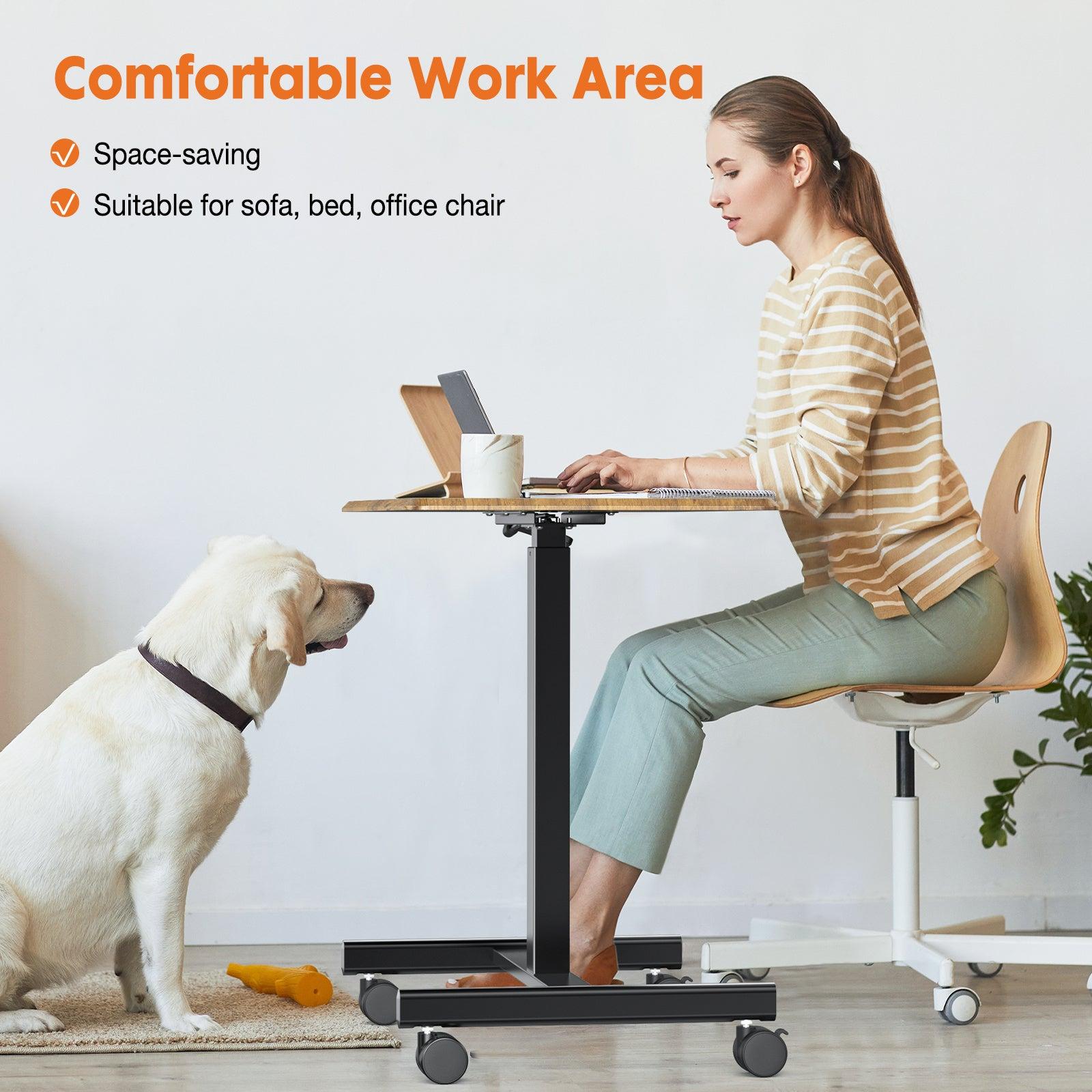
The adjustable height and mobility of your cart allow you to customize your teaching space. You can switch between standing and sitting activities, move technology where it’s needed, and create a dynamic classroom environment.
You transform your classroom into a flexible, organized, and engaging space. With the right routines and student involvement, your laptop cart becomes an essential tool for success.
Success Stories and Testimonials
Teacher Experiences
Classroom Management
You want your classroom to run smoothly, but you know that managing devices can present challenges. Teachers who use laptop computer carts often mention the need for careful planning. You can save time by setting up clear routines for device distribution and return. Some teachers have noticed that it takes about eight minutes to set up the cart each day. You can reduce this time by involving students in the process and using digital checklists.
- Teachers sometimes worry about losing instructional time during device setup.
- You may face questions about how students will access devices without disrupting the flow of your lesson.
- You can address these concerns by creating a routine and assigning roles to students.
One teacher shared that managing disruptive students became easier with a structured approach. You can use the cart as a tool to reinforce positive behavior. When you set expectations, you help every student stay focused.
Student Engagement
You want your students to feel excited about learning. Teachers report that laptop computer carts boost enthusiasm and participation. After you introduce dedicated devices, you notice students engage more with videos, live polls, and digital simulations. Surveys show that 76% of students believe technology makes learning more engaging. You see students participate more actively and show greater interest in lessons.
- Laptop programs lead to higher achievement and enthusiasm.
- Students interact with teachers in new ways, deepening their focus.
Student Perspectives
Access to Technology
You give your students the tools they need to succeed. When you provide easy access to laptops, you open doors to higher-level thinking and collaboration. Students in one-to-one programs often see better test scores in writing, math, and English. You notice that students feel more involved in the learning process.
|
Benefit Description |
Outcome |
|---|---|
|
More mobile computing |
Higher involvement in learning |
|
One-to-one programs |
Improved academic performance |
|
Gamified lessons |
Enhanced learning experiences |
|
Teacher feedback |
Positive impact on engagement |
Reduced Downtime
You want every minute in your classroom to count. Students appreciate how laptop computer carts reduce downtime. With devices charged and ready, you avoid delays and keep lessons moving. Students can start activities right away, which means more time for learning and less time waiting.
“I love that I can grab my laptop and get started right away. We don’t waste time looking for chargers or waiting for devices to turn on.” – High School Student
You see the difference when you use a reliable cart like the Rackora Adjustable Laptop Computer Cart. You keep your classroom organized, your students engaged, and your technology accessible.
Don't miss out on the opportunity to enhance your workstation with the Rackora Adjustable Laptop Computer Cart. Take advantage of the sale price of $158.46 and experience the difference that a well-designed laptop cart can make in your daily work routine.
You keep your classroom organized and your laptop secure with a laptop computer cart. You never worry about charging or missing out on learning. The Rackora adjustable cart gives you mobility and flexibility for every lesson. You prepare for back-to-school success and take advantage of the holiday sale and 30-day money-back guarantee. Make sure your students always have access to technology and learning opportunities.
FAQ
How does a laptop computer cart improve classroom learning?
You streamline device management and keep technology accessible. Students stay focused and engaged. You create a flexible environment that supports collaboration and boosts classroom learning.
Can I use the Rackora Adjustable Laptop Computer Cart with any laptop?
You enjoy universal compatibility. The cart supports most laptops, tablets, and portable monitors. You never worry about device size or brand.
Is the cart easy to move between classrooms?
You move the cart effortlessly. Smooth-rolling casters and a lightweight steel frame let you transport devices quickly. Locking wheels keep everything secure when you stop.
How do I keep devices charged and ready?
You set up a charging schedule. The cart allows you to charge multiple devices at once. You avoid power issues and keep every device ready for use.
What security features protect my devices?
You rely on a sturdy steel frame and locking wheels. The cart keeps devices safe from theft and unauthorized access. You gain peace of mind.
How do I maintain the cart for long-term use?
You clean surfaces regularly and check locks and cables. You encourage students to report issues. Routine care keeps your cart in top condition.
What if I am not satisfied with my purchase?
You shop with confidence. Rackora offers a 30-day money-back guarantee. You can return the cart if it does not meet your needs.
Tip: Take advantage of the current holiday sale and save 30% with code DE30!
