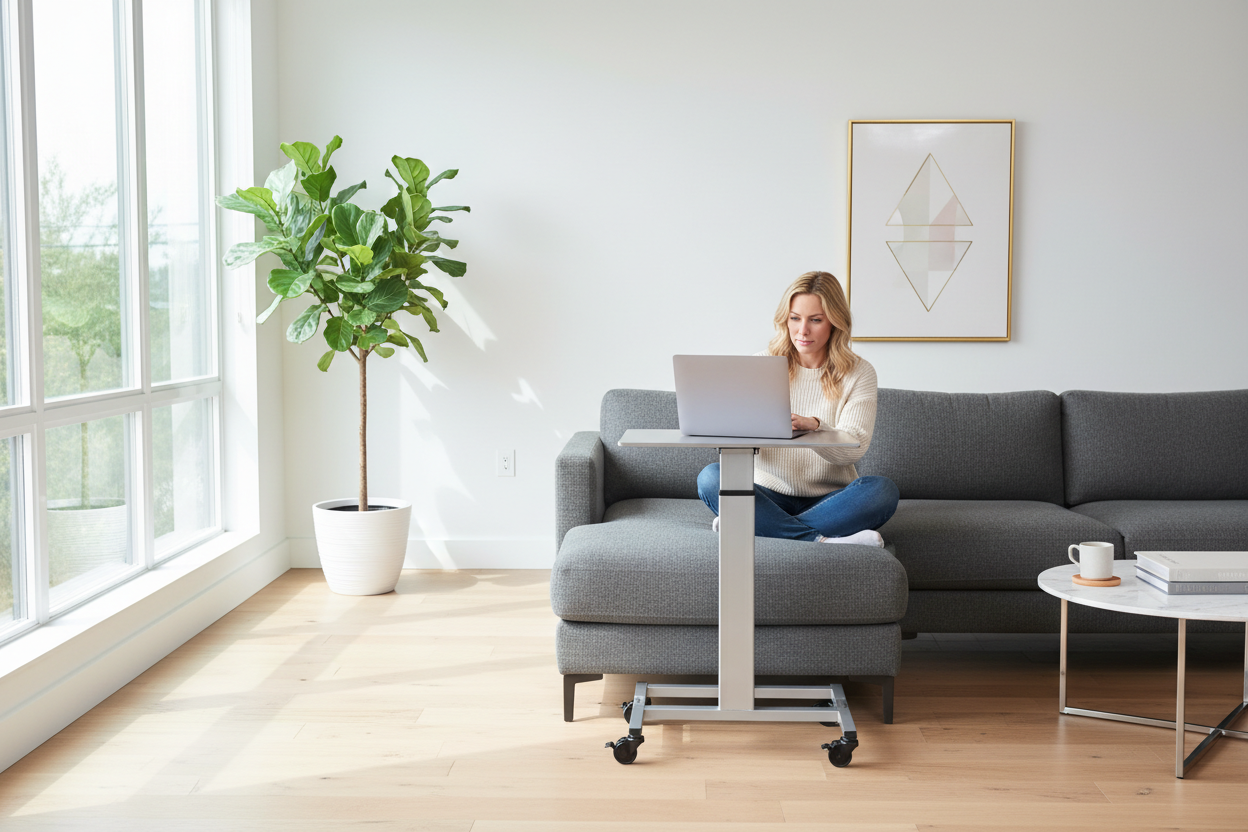
You Didn't Sign Up for a Cubicle at Home
Let's be honest — when remote work became the norm, most of us just grabbed a kitchen chair, propped a laptop on the dining table, and called it a "home office." It worked. Barely. But after a few months of stiff necks, sore backs, and the creeping dread of sitting in the same spot for eight hours straight, something had to give.
Here's the thing nobody tells you about working from home in a small apartment: the problem isn't the size of your space. It's the rigidity of it. A fixed desk in the corner of your bedroom doesn't just limit your movement — it limits your mindset. And if you've ever noticed that your best ideas come in the shower, on a walk, or literally anywhere except your desk, you're not imagining things.
That's where a mobile laptop cart changes everything. Not in a gimmicky, gadget-of-the-month way. In a genuinely practical, "why didn't I do this sooner" kind of way.
This guide is for anyone living in a small apartment who wants a smarter, more flexible way to work — without gutting their living room or spending thousands on a dedicated home office setup. We're going to dig into the psychology of workspace variety, the real ergonomics behind height-adjustable carts, what to look for in terms of stability, and a few creative ways to use these carts that go way beyond just "laptop stand."
And yes, we'll talk about the Rackora Adjustable Laptop Computer Cart — because it's the product anchor for this whole conversation, and it genuinely earns its place here.
Part 1: The Psychology of Changing Where You Work
Why Your Brain Hates Monotony (Even When You Don't Realize It)
There's a concept in cognitive psychology called "environmental cuing" — the idea that our brains associate specific physical spaces with specific mental states. Your bedroom cues sleep. Your kitchen cues hunger. And your desk? After months of grinding through emails, Zoom calls, and spreadsheets in the same spot, your desk starts to cue stress, fatigue, and a very specific kind of low-grade dread.
This isn't a personal failing. It's neuroscience. Our brains are pattern-recognition machines, and they're very good at linking environments to emotional states. The fix isn't to "push through" — it's to break the pattern.
Research from the University of Exeter found that workers who had control over their physical workspace reported significantly higher levels of wellbeing and productivity. And a study published in the Journal of Environmental Psychology showed that even minor changes in physical environment — different lighting, a new view, a change in seating position — can meaningfully boost creative thinking and reduce mental fatigue.
In a small apartment, you can't always change rooms. But you can change your micro-environment. Moving from your desk to the sofa, from the living room to the balcony, from sitting to standing — these small shifts are enough to reset your mental state and give your brain the novelty it craves.
The "Sofa Slump" Problem and How to Fix It
Of course, working from the sofa sounds great until you're hunched over a laptop balanced on a throw pillow, your neck at a 45-degree angle, wondering why your back hurts. The sofa isn't the problem. The lack of proper support is.
A mobile laptop cart solves this by bringing the work surface to you — at the right height, at the right angle — rather than forcing you to contort yourself around a fixed surface. You can sit upright on the sofa with the cart positioned at a comfortable height, keeping your screen at eye level and your wrists in a neutral position. It's the difference between "working from the sofa" and actually working from the sofa.
Preventing Burnout Through Micro-Environment Shifts
Burnout in remote workers is often less about workload and more about the relentless sameness of the environment. When every hour of every workday looks identical — same chair, same view, same four walls — the brain struggles to distinguish between "work time" and "rest time," leading to a kind of chronic low-level exhaustion.
Intentionally changing your work location throughout the day — even just moving from one end of the apartment to the other — creates natural mental breaks and helps your brain maintain clearer boundaries between focused work, creative thinking, and rest. A mobile cart makes this effortless. You're not rearranging furniture. You're just rolling your workspace to where you need it.

Shop the Rackora Adjustable Laptop Cart — $158.46 →
Part 2: The Real Ergonomics of Mobile Laptop Carts
Height Adjustability Isn't a Luxury — It's the Whole Point
When people think about ergonomics, they usually think about expensive office chairs or standing desk converters that cost as much as a month's rent. But the single most impactful ergonomic variable for laptop users is screen height — and that's exactly what a height-adjustable cart addresses.
The Rackora Adjustable Laptop Computer Cart adjusts from 28.5 to 42.5 inches in height. That range isn't arbitrary. Here's what it actually means in practice:
- 28.5 inches: Ideal for seated use on a standard sofa (seat height typically 17–19 inches). The cart surface sits at a comfortable working height without forcing you to hunch or reach up.
- 33–36 inches: Standard desk height range, perfect for seated use on a dining chair or office chair.
- 40–42.5 inches: Standing desk territory. For someone around 5'6"–6'0", this puts the laptop screen at roughly eye level when standing, which is exactly where it should be.
The ability to move fluidly between these positions throughout the day is what ergonomists call "postural variety" — and it's one of the most effective ways to reduce musculoskeletal strain during long work sessions. Sitting all day is bad. Standing all day is also bad. Alternating between the two, on your own schedule, is the sweet spot.
The Sofa-to-Standing Transition: How It Actually Works
Here's a realistic morning workflow using a mobile cart in a small apartment:
7:30 AM — Morning emails from the sofa. Cart at 29 inches. Coffee in hand, legs stretched out, inbox under control. No hunching, no laptop balanced on knees.
9:00 AM — Deep work session at the desk area. Roll the cart to your designated work corner. Raise it to 34 inches for seated desk height. Plug in your monitor if you have one.
11:00 AM — Standing sprint. Raise the cart to 42 inches. Stand for 45–60 minutes during a focused writing or coding session. Your back thanks you.
1:00 PM — Lunch break on the balcony. Roll the cart outside. Lower it back to sofa height for a relaxed post-lunch check-in with the team. Fresh air, change of scenery, same productive setup.
This kind of fluid, environment-shifting workday isn't possible with a fixed desk. It is completely possible — and surprisingly easy — with a mobile cart.
Wrist and Neck Positioning: The Details That Matter
Beyond height, there are two other ergonomic factors worth understanding:
Wrist angle: When your laptop surface is at the right height, your wrists naturally fall into a neutral position (flat or very slightly extended). Too low, and you're flexing your wrists upward. Too high, and you're extending them downward. Both lead to strain over time. The Rackora cart's smooth height adjustment mechanism lets you dial in the exact position that works for your body.
Neck angle: The top of your laptop screen should be at or slightly below eye level. For most people, this means the laptop surface needs to be higher than a standard desk — which is why the cart's upper range (up to 42.5 inches) is genuinely useful, not just a spec on a page.

Part 3: Stability and Security — Why This Matters More Than You Think
The "Wobble Factor" and Why It Kills Productivity
Here's something that doesn't get talked about enough in laptop cart reviews: stability. Specifically, the difference between a cart that feels solid and one that wobbles every time you type.
A wobbly cart isn't just annoying — it's a genuine productivity killer. Every micro-vibration is a micro-distraction. And if you're working on a balcony with uneven tiles, or on a thick living room carpet, a cart without proper stability features becomes actively frustrating to use.
The Rackora cart addresses this with heavy-duty locking caster wheels. When you're ready to work, you lock the wheels. The cart doesn't move. It doesn't wobble. It doesn't shift when you're typing aggressively or reaching across the surface. When you want to move, you unlock and roll.
Caster Wheels on Different Surfaces: What to Expect
One of the most common questions about rolling carts is how they perform on different floor types. Here's the honest breakdown:
- Hardwood and tile floors: Smooth rolling, easy to maneuver. Locking wheels hold firmly.
- Low-pile carpet: Rolls with slight resistance, which is actually helpful for control. Locks hold well.
- Thick carpet or area rugs: Requires a bit more effort to roll, but the cart remains stable when locked. The heavy-duty casters handle this better than cheaper alternatives.
- Outdoor patios (smooth concrete or composite decking): Works well. Avoid very rough or uneven surfaces where the cart could tip.
The key is the quality of the casters. Cheap casters on cheap carts tend to lock imperfectly, leaving a small amount of play that translates to wobble. The Rackora cart's casters are built to actually lock — not just slow down.
Weight Capacity and Structural Integrity
The Rackora cart weighs 25 lbs and is built with a steel frame. That weight is actually a feature, not a bug — it contributes to the low center of gravity that keeps the cart stable at full height extension. A lighter cart might be easier to carry, but it's also more prone to tipping when extended to 42 inches with a laptop on top.
The steel frame construction means this isn't a cart that's going to develop wobble over time as plastic joints loosen. It's built to maintain its structural integrity through daily use, daily height adjustments, and daily rolling across your apartment.

Get the Rackora Laptop Cart — $158.46 | Free Shipping →
Part 4: Beyond the Laptop — Multifunctional Uses You Probably Haven't Considered
The Rolling Presentation Podium
If you do any kind of in-person presenting — whether that's client meetings at home, teaching, or running workshops — a mobile laptop cart doubles as a surprisingly effective rolling podium. Raise it to standing height, position your laptop at eye level, and you have a professional-looking presentation setup that you can move around the room as needed.
This is particularly useful for home-based tutors, online educators who occasionally host in-person sessions, or anyone who does video calls and wants to stand while presenting without investing in a full standing desk setup.
The Bedside Medical and Reading Table
This is one of the most underrated uses of a height-adjustable cart. At its lowest setting (28.5 inches), the Rackora cart works beautifully as a bedside table for anyone who needs to keep a laptop, tablet, or medical device within easy reach while in bed.
This is genuinely useful for:
- People recovering from illness or surgery who need to work or stay connected from bed
- Anyone who uses a CPAP or other bedside medical device and needs a stable, adjustable surface
- Late-night readers who want a stable surface for a tablet or e-reader without disturbing a partner
- Parents who need to keep a baby monitor or feeding supplies within reach during nighttime feeds
The Kitchen Sous-Chef Station
Okay, this one's a bit unexpected, but hear us out. If you cook from recipes on your laptop or tablet, a mobile cart positioned at counter height in the kitchen is genuinely useful. You can follow along with a recipe video without craning your neck at a phone propped against the backsplash, and you can roll the cart out of the way when you need the counter space.
The Kids' Homework Station
For parents in small apartments, a mobile cart that adjusts to the right height for a child is a practical alternative to a dedicated kids' desk. As the child grows, the cart grows with them. And when homework time is over, the cart rolls out of the living room and back into storage.

Part 5: Choosing the Right Mobile Laptop Cart for Your Apartment
The Full-Size Option: Rackora Adjustable Laptop Computer Cart (28.5–42.5 inches)
If you want the full range of height adjustment — from sofa-height all the way to standing desk height — the Rackora Adjustable Laptop Computer Cart is the one to get. At $158.46, it's priced competitively for what it offers: a steel frame, heavy-duty locking casters, a spacious desktop surface, and a 14-inch height range that covers virtually every use case.
It supports laptops from 11" to 17", which covers the vast majority of laptops on the market — MacBooks, Dell XPS, HP Spectre, Lenovo ThinkPad, Surface Laptop, Chromebooks, and more.

The Compact Option: Rackora Small Mobile Rolling Standing Desk
If you're in a particularly tight space — a studio apartment, a dorm room, or a small bedroom — the Rackora Small Mobile Rolling Standing Desk at $158.07 offers a smaller footprint while maintaining the same core features: rolling casters with locks, height adjustability, and sturdy construction. It supports laptops up to 15.6", which covers most everyday laptops.

Which One Should You Get?
The honest answer: if you have a 17" laptop or plan to use the cart as a standing desk regularly, go with the full-size Adjustable Cart. If you're primarily using it for sofa work, bedside use, or in a very compact space, the Small Rolling Desk is a great fit.
Shop Full-Size Cart — $158.46 →Shop Compact Cart — $158.07 →
Part 6: Setting Up Your Mobile Workspace — Practical Tips
Tip 1: Designate "Work Zones" in Your Apartment
Even with a mobile cart, it helps to have 2–3 designated spots in your apartment where you regularly work. This preserves the environmental cuing benefit (your brain knows "this spot = work") while still giving you the variety of different locations. Think of it as having a small rotation of micro-offices rather than a single fixed desk.
Tip 2: Use a Wireless Keyboard and Mouse
A mobile cart is most useful when you're not tethered by cables. A wireless keyboard and mouse let you position the cart at the ideal height for your screen while keeping your input devices at the ideal height for your hands — which is often a different height. This is the setup that truly unlocks the ergonomic potential of a height-adjustable cart.
Tip 3: Keep a Power Strip on the Cart
One of the practical challenges of a mobile workspace is power. A small power strip zip-tied to the cart's lower shelf (if it has one) or placed on the desktop surface means you always have power available, regardless of where you roll the cart. Just make sure the cord is long enough to reach your nearest outlet from your farthest work zone.
Tip 4: Use the Cart for "Transition Rituals"
One of the challenges of working from home is the lack of clear transitions between work and non-work time. Use the act of rolling the cart to its "work position" and locking the wheels as a physical ritual that signals the start of the workday. Rolling it back to its storage spot signals the end. It sounds small, but physical rituals are surprisingly effective at helping the brain switch modes.
Tip 5: Outdoor Work — What to Know
Working from a balcony or patio is one of the genuine joys of having a mobile cart. A few things to keep in mind:
- Screen glare: Position yourself so the sun is behind you or to the side, not in front of you or behind the screen.
- Wind: On windy days, keep papers and lightweight accessories secured. The cart itself is stable, but loose items on the surface aren't.
- Temperature: Laptops don't love extreme heat. If it's over 90°F in direct sun, find a shaded spot or work indoors.
- Surface: Smooth concrete or composite decking works well. Avoid very rough or uneven surfaces.

Part 7: The Small Apartment Home Office — A Realistic Assessment
What a Mobile Cart Can and Can't Do
Let's be straight about this. A mobile laptop cart is not a replacement for a full home office setup if you're doing heavy-duty work that requires multiple monitors, a full-size keyboard, and a dedicated ergonomic chair. For that kind of setup, you need a fixed desk.
But for the majority of remote workers — people who primarily work on a single laptop, attend video calls, write, browse, and manage their work through a single screen — a mobile cart covers 90% of what a fixed desk does, with the added benefit of flexibility that a fixed desk can never offer.
In a small apartment where every square foot matters, that flexibility isn't just a nice-to-have. It's a genuine quality-of-life upgrade.
The Cost-Per-Square-Foot Argument
Here's a way to think about the value of a mobile cart in a small apartment: a dedicated desk takes up roughly 10–15 square feet of floor space permanently. In a city where apartment rents run $2,000–$4,000/month for a one-bedroom, that's $200–$600/month worth of floor space dedicated to a single piece of furniture that you use for 8 hours a day and ignore for the other 16.
A mobile cart, when not in use, can be rolled into a closet, tucked behind a sofa, or positioned against a wall where it takes up minimal visual and physical space. You're essentially getting a functional workspace that disappears when you don't need it. That's a genuinely different value proposition than a fixed desk.
Frequently Asked Questions
Q1: What laptop sizes fit on the Rackora Adjustable Laptop Computer Cart?
The Rackora cart accommodates laptops from 11" to 17", covering virtually all standard laptop sizes including MacBook Air, MacBook Pro, Dell XPS, HP Spectre, Lenovo ThinkPad, Surface Laptop, and most Chromebooks. The spacious desktop surface also has room for a mouse, notebook, or small accessories alongside your laptop.
Q2: How difficult is it to adjust the height?
The height adjustment mechanism is designed for quick, tool-free changes. Most users can adjust from one height setting to another in under 30 seconds. The mechanism is smooth enough that you can realistically adjust height multiple times throughout the day without it feeling like a chore.
Q3: Will the cart wobble when I'm typing?
When the locking casters are engaged, the cart is stable on hard floors, low-pile carpet, and most outdoor surfaces. The steel frame construction and the weight of the cart (25 lbs) contribute to its stability. Some very slight movement is possible on very thick carpet at maximum height extension, but it's not enough to disrupt normal typing or mouse use.
Q4: Can I use this cart as a standing desk replacement?
Yes, within the context of laptop use. At its maximum height of 42.5 inches, the cart puts a laptop screen at approximately eye level for someone 5'6"–6'0" tall when standing. It's not a replacement for a full standing desk with a monitor arm and external keyboard, but for laptop-only work, it functions very effectively as a standing desk.
Q5: Is the cart easy to assemble?
Assembly is straightforward and typically takes 20–30 minutes with basic tools. The cart ships partially assembled, and the remaining steps are clearly documented. No special skills or tools are required beyond a standard screwdriver.
Q6: Can I use this cart outdoors on a balcony or patio?
Yes, the cart works well on smooth outdoor surfaces like concrete or composite decking. The locking casters hold firmly on these surfaces. Avoid very rough or uneven outdoor surfaces where the cart could become unstable. Also be mindful of direct sunlight on your laptop screen and extreme heat conditions.
Q7: How does the Rackora cart compare to cheaper alternatives?
The main differences come down to frame material (steel vs. plastic), caster quality (true locking vs. partial locking), and height range. Cheaper carts often use plastic frames that develop wobble over time and casters that don't lock fully. The Rackora cart's steel construction and heavy-duty casters are built for daily use over the long term.
Q8: What's the difference between the full-size cart and the small rolling desk?
The full-size Rackora Adjustable Laptop Computer Cart ($158.46) supports laptops up to 17" and has a larger desktop surface. The Rackora Small Mobile Rolling Standing Desk ($158.07) has a smaller footprint and supports laptops up to 15.6". Choose the full-size if you have a larger laptop or want more desktop space; choose the compact version if space is at a premium.
Q9: Is this cart suitable for use in bed?
At its lowest height setting (28.5 inches), the cart can be positioned alongside a bed for bedside use — keeping a laptop, tablet, or other device within easy reach. It's not designed to straddle a bed like a traditional overbed table, but it works well as a bedside station positioned next to the bed.
Q10: Does the cart come with a warranty?
Please check the product page for current warranty information, as terms may be updated. Rackora stands behind the quality of its products and offers customer support for any issues that arise with your purchase.
The Bottom Line
If you're working from a small apartment and you're still anchored to a fixed desk in the corner, a mobile laptop cart is one of the most practical upgrades you can make. Not because it's a trendy gadget, but because it solves a real problem: the rigidity of a fixed workspace in a space that needs to serve multiple purposes throughout the day.
The Rackora Adjustable Laptop Computer Cart hits the right balance of height range (28.5–42.5 inches), stability (steel frame, locking casters), and versatility (sofa work, standing desk, bedside table, presentation podium). At $158.46, it's a meaningful investment — but one that pays off in daily quality of life, reduced physical strain, and the kind of workspace flexibility that a fixed desk simply can't offer.
Your apartment is small. Your workspace doesn't have to be rigid.
